What is the privacy complaint form template?
A privacy complaint is different from an access or deletion request. The person isn't only asking for something — they're telling you something went wrong: an unexpected email, information shared without their knowledge, a request ignored, a leak. How quickly and carefully you respond matters.
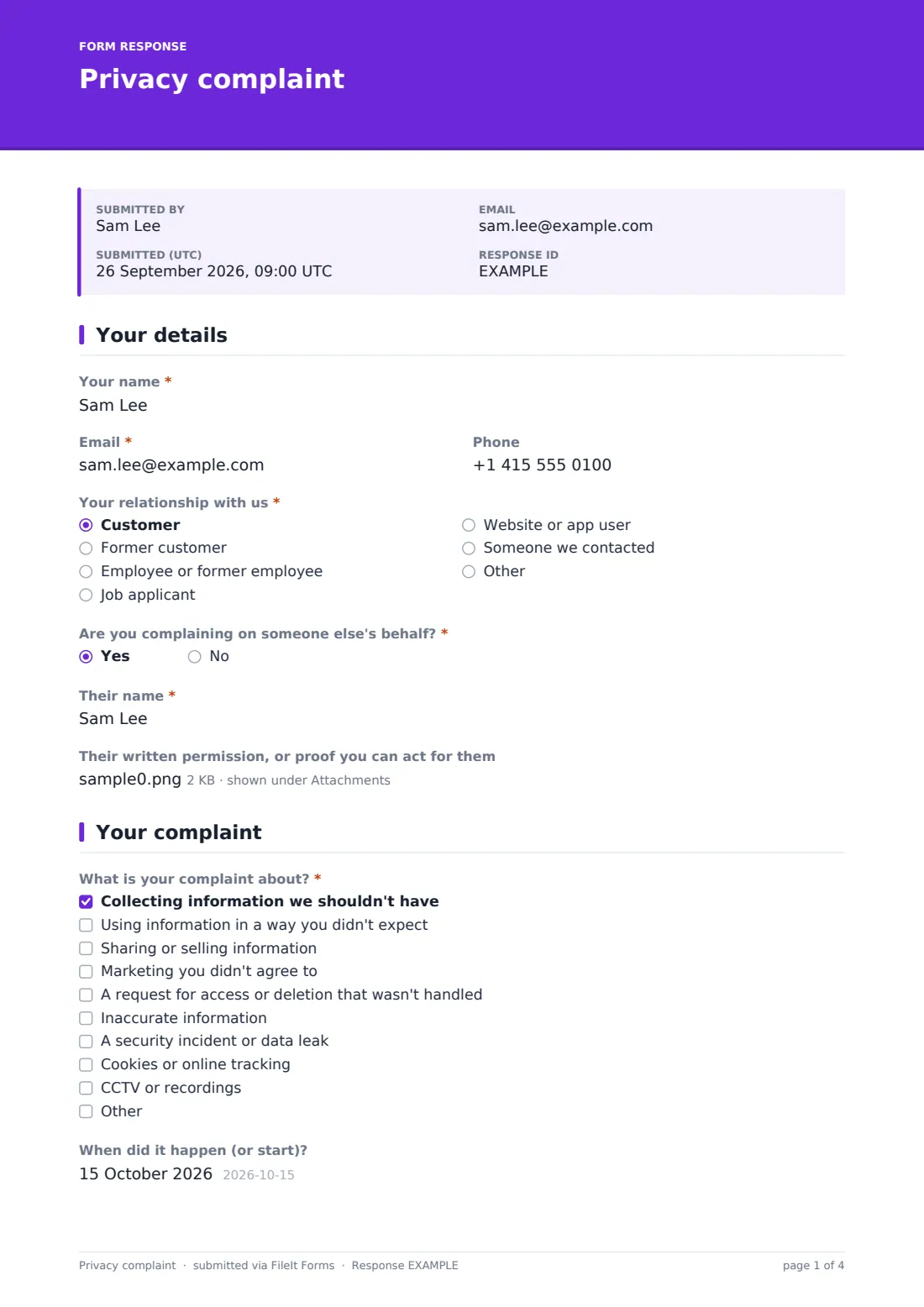
This template asks who is complaining and their relationship with you, and lets someone complain on another person's behalf with their written permission. It then asks what the complaint is about, when it happened, what happened, which information is involved, whether they've raised it before, and for any screenshots or documents.
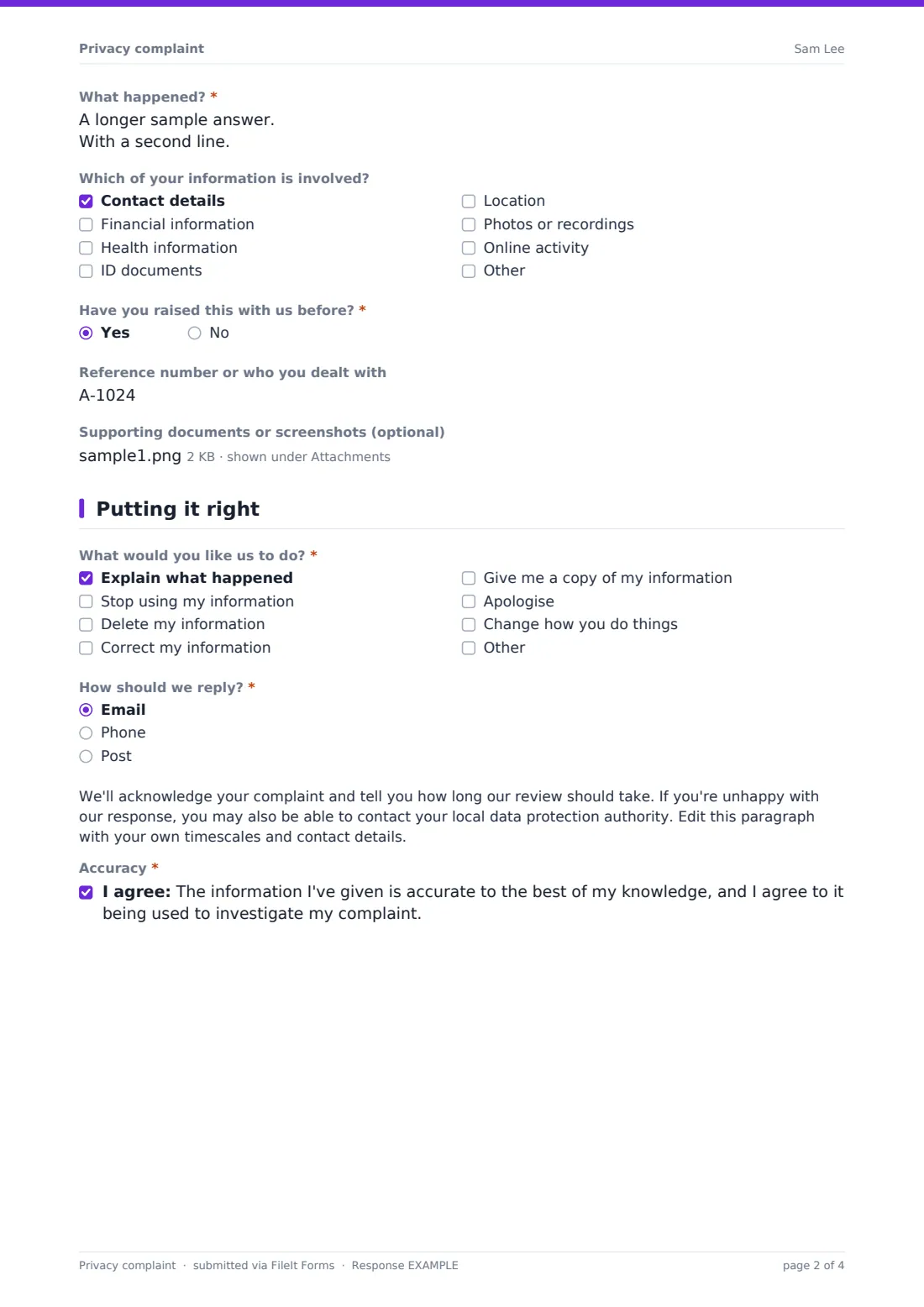
Finally it asks what they'd like you to do — explain, stop, delete, correct, give a copy, apologise or change how you work — and how to reply. Each complaint is filed as a PDF in your FileIt vault so your privacy team has a full, dated record.
- Best for
- Data protection officers, privacy and compliance teams, small businesses and charities
- Filled in by
- Customers, employees, applicants or members of the public
- Time to complete
- About 5 minutes
- Includes
- Relationship and on-behalf check, nine complaint types, details, data categories, prior contact, evidence upload and desired outcome
Who uses a privacy complaint form?
- A 'privacy concerns' link in your privacy notice
- Complaints about marketing people didn't agree to
- Concerns after a security incident
- A follow-up when an access or deletion request went unanswered
- Employees raising concerns about workplace monitoring
- A carer complaining on behalf of the person they support
Questions on this privacy complaint form
18 questions over 3 pages · includes file upload, conditional questions, multiple pages, consent checkbox.
1 Your details
- Your name*
- Email*
- Phone
- Your relationship with us* Customer · Former customer · Employee or former employee · Job applicant · Website or app user · Someone we contacted
- Are you complaining on someone else's behalf?*
- Their name* asked only when it applies
- Their written permission, or proof you can act for them asked only when it applies
2 Your complaint
- What is your complaint about?* Collecting information we shouldn't have · Using information in a way you didn't expect · Sharing or selling information · Marketing you didn't agree to · A request for access or deletion that wasn't handled · Inaccurate information · A security incident or data leak · Cookies or online tracking · CCTV or recordings
- When did it happen (or start)?
- What happened?*
- Which of your information is involved? Contact details · Financial information · Health information · ID documents · Location · Photos or recordings · Online activity
- Have you raised this with us before?*
- Reference number or who you dealt with asked only when it applies
- Supporting documents or screenshots (optional)
3 Putting it right
- What would you like us to do?* Explain what happened · Stop using my information · Delete my information · Correct my information · Give me a copy of my information · Apologise · Change how you do things
- How should we reply?* Email · Phone · Post
- Postal address* asked only when it applies
- Accuracy*
The privacy complaint form, page by page
1 Your details
Name, email and 'Your relationship with us' are required — customer, former customer, employee or former employee, job applicant, website or app user, someone you contacted, or other. 'Are you complaining on someone else's behalf?' is required; yes asks for that person's name and lets the complainant upload their written permission or proof they can act for them.
2 Your complaint
'What is your complaint about?' lists collecting information you shouldn't have, unexpected use, sharing or selling, unwanted marketing, an unhandled access or deletion request, inaccurate information, a security incident or leak, cookies or online tracking, and CCTV or recordings, with room for another reason. 'What happened?' is required. People can add when it happened, which information is involved — from contact details to health, ID documents and online activity — whether they've raised it before (with a reference), and up to five supporting files.
3 Putting it right
'What would you like us to do?' is required. 'How should we reply?' — email, phone or post, which asks for a postal address. A paragraph, ready for your own timescales, says you'll acknowledge the complaint and mentions the local data protection authority. The complainant confirms the information is accurate and agrees to it being used to investigate.
Make the template yours
- Fill in the paragraph with your acknowledgement time and your privacy contact
- Remove complaint types that don't apply, such as CCTV
- Add your data protection officer's address to NotifyEmails
- File complaints to a folder only your privacy team can see
- Link the form from your privacy notice and cookie banner
- Set the confirmation message to give a reference timescale
Tips for a better privacy complaint form
- Acknowledge every complaint quickly, even before you've investigated
- Check whether the complaint also contains an access, deletion or correction request
- Keep a log of complaints to spot recurring problems
- Verify identity before sharing personal details in your reply
- If a complaint reveals a possible breach, start your incident process straight away
- Explain what you've changed, not only what happened
Every response becomes a PDF in your vault
Each complaint is saved as a PDF titled with the complainant's name and date in your chosen vault folder, with any evidence attached, and the complainant is emailed a copy.
Search the Responses tab by name or reference, and export to CSV to keep a complaints register with dates and outcomes.
- Start from this template. It opens in the FileIt Forms designer — change any question, add pages, set the rules for when questions appear.
- Share it. Turn on a public link, or send it to people by email, each with their own link. They don’t need a FileIt account.
- Get the answers as PDFs. Each response is saved as a PDF in the vault folder you choose, with uploaded files attached — and listed in a Responses table you can export to CSV.
Privacy complaint form: frequently asked questions
Is this privacy complaint template free?
Yes. It's included in the FileIt Forms app on every account.
How is it different from a data subject access request?
An access request asks for a copy of someone's data. A complaint says something went wrong. FileIt has separate templates for access, erasure and correction requests.
Can someone complain for another person?
Yes. They answer yes to complaining on someone else's behalf, give the person's name and can upload their permission.
Can people attach screenshots?
Yes, up to five files, including images and PDFs.
Do complainants need an account?
No. They open the link and submit.
Is this legal advice?
No. It's a starting template. Rules differ between countries, states and sectors, so check the wording against your own situation and take advice where you need it.