What is the pre-arrival guest preferences form template?
The best stays often start before check-in: a cot already in the room, a quiet room away from the lift, a birthday card on the pillow, the restaurant table booked. None of that happens unless you know about it in advance — and most guests will happily tell you if you ask at the right moment.
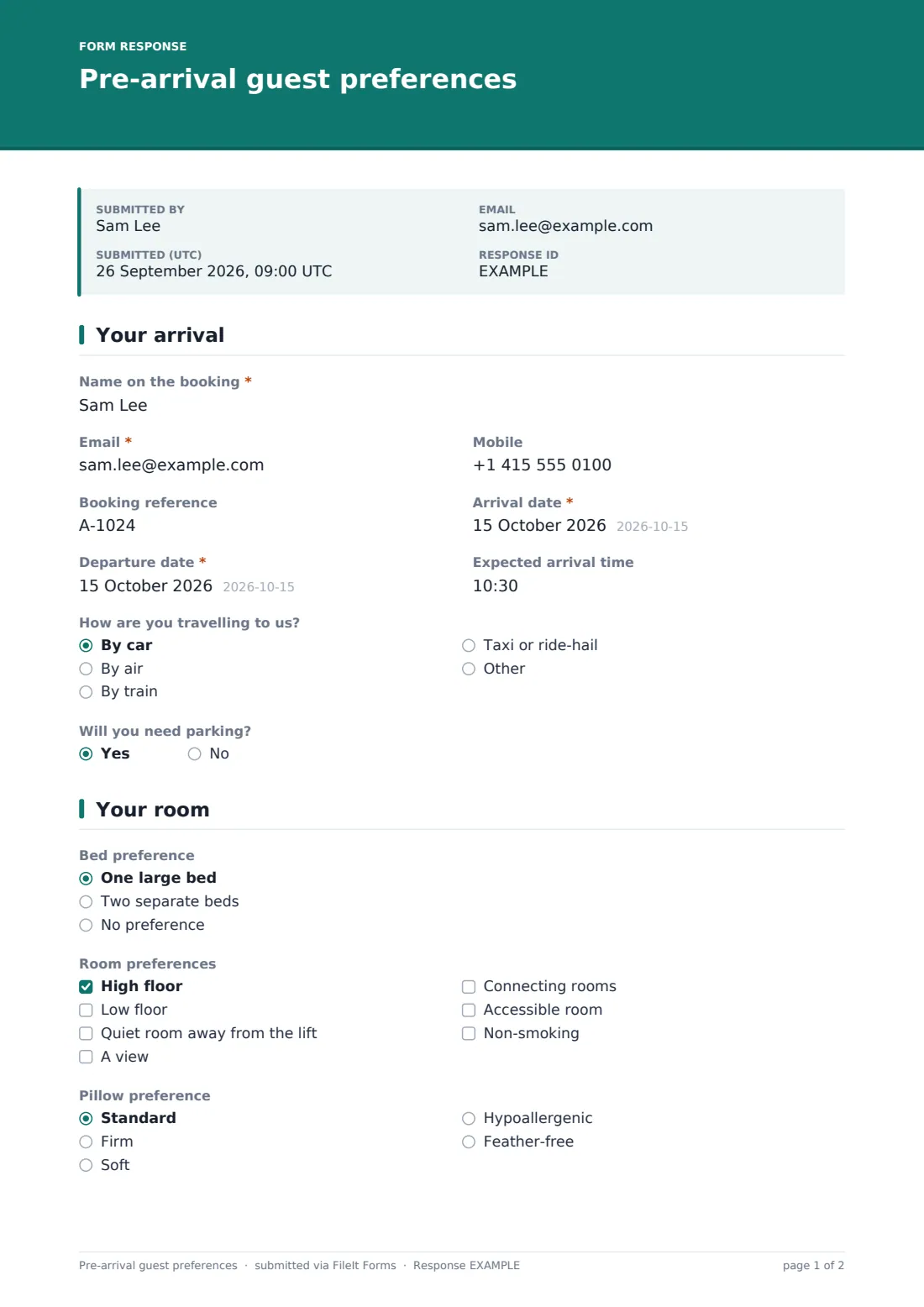
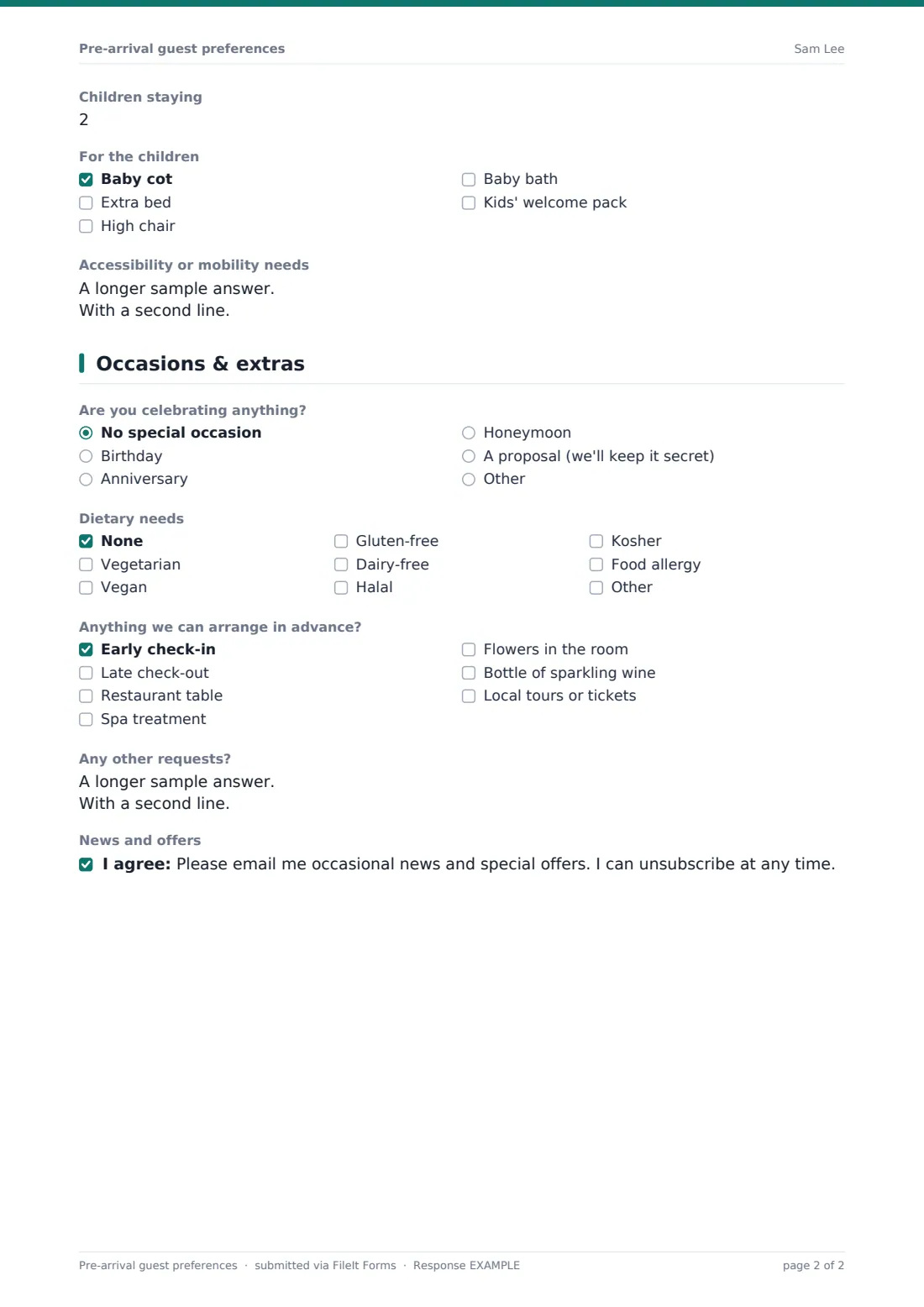
This pre-arrival preferences template is designed to be sent a few days before arrival. Guests confirm their dates and arrival time, how they're travelling, bed and room preferences, any celebrations, dietary needs and extras they'd like arranged. Follow-up questions appear only when relevant: flight details and a transfer offer for guests flying in, parking for drivers, children's items when children are staying, and allergy details when a food allergy is ticked.
Every response is saved as a PDF in your FileIt vault, so front office, housekeeping and the restaurant can all see the same request instead of relying on a note passed along at a shift change.
- Best for
- Hotels, boutique hotels, B&Bs, resorts and serviced apartments
- Filled in by
- Guests, a few days before arrival
- Time to complete
- About 3 minutes
- Includes
- Arrival and transfer details, room and pillow preferences, occasions, dietary needs, extras
Who uses a pre-arrival guest preferences form?
- A boutique hotel emails every guest a week before arrival to personalise the room
- A resort offers airport transfers to guests who say they're flying in
- A B&B asks about allergies before planning breakfast
- A hotel prepares cots and extra beds for families ahead of time
- A honeymoon or anniversary is spotted early so the team can prepare a surprise
- A concierge books restaurant tables and spa treatments before the guest arrives
Questions on this pre-arrival guest preferences form
25 questions over 3 pages · includes conditional questions, multiple pages, consent checkbox.
1 Your arrival
- Name on the booking*
- Email*
- Mobile
- Booking reference
- Arrival date*
- Departure date*
- Expected arrival time
- How are you travelling to us? By car · By air · By train · Taxi or ride-hail
- Flight number and arrival airport asked only when it applies
- Would you like us to arrange an airport transfer? asked only when it applies
- Will you need parking? asked only when it applies
2 Your room
- Bed preference One large bed · Two separate beds · No preference
- Room preferences High floor · Low floor · Quiet room away from the lift · A view · Connecting rooms · Accessible room · Non-smoking
- Pillow preference Standard · Firm · Soft · Hypoallergenic · Feather-free
- Children staying
- For the children asked only when it applies Baby cot · Extra bed · High chair · Baby bath · Kids' welcome pack
- Accessibility or mobility needs
3 Occasions & extras
- Are you celebrating anything? No special occasion · Birthday · Anniversary · Honeymoon · A proposal (we'll keep it secret)
- Tell us more asked only when it applies
- Dietary needs None · Vegetarian · Vegan · Gluten-free · Dairy-free · Halal · Kosher · Food allergy
- Allergy details* asked only when it applies
- Anything we can arrange in advance? Early check-in · Late check-out · Restaurant table · Spa treatment · Flowers in the room · Bottle of sparkling wine · Local tours or tickets
- Restaurant booking: date, time and number of people asked only when it applies
- Any other requests?
- News and offers
The pre-arrival guest preferences form, page by page
1 Your arrival
Guests give the name on the booking, email, mobile and booking reference, then their arrival and departure dates and expected arrival time. How are you travelling to us? offers car, air, train or taxi. Guests arriving by air are asked for their flight number and airport and whether they'd like a transfer; drivers are asked whether they need parking.
2 Your room
Guests pick a bed preference, tick room preferences such as a high or low floor, a quiet room, a view, connecting rooms or an accessible room, and choose a pillow type. Entering a number of children reveals a checklist for a baby cot, extra bed, high chair, baby bath or kids' welcome pack. A free-text box collects accessibility or mobility needs.
3 Occasions & extras
Are you celebrating anything? covers birthdays, anniversaries, honeymoons and secret proposals; any answer other than none opens a box for the details. Dietary needs include common options plus food allergy, which makes an allergy details box required. Guests can ask you to arrange early check-in, late check-out, a restaurant table (with date, time and party size), spa treatments, flowers, sparkling wine or local tours, add any other requests and opt in to news and offers.
Make the template yours
- Replace the extras list with the services and packages your property actually sells
- Add a question about the purpose of the stay if you tailor welcome amenities for business guests
- Change the pillow options to match your pillow menu, or remove the question
- Prefill the guest's name, email and booking reference by sending personal links
- Route responses to a Pre-arrival folder that front office checks each morning
- Add your restaurant's opening times to the restaurant booking question
Tips for a better pre-arrival guest preferences form
- Send the form 5–7 days before arrival — early enough to prepare, late enough that plans are settled
- Tell guests that room preferences depend on availability so expectations stay realistic
- Share allergy details with the kitchen in writing, not just verbally
- Keep proposal requests on a need-to-know basis within the team
- Check the day's responses at the morning briefing so every department sees them
- Follow up by email if a guest asks for something you can't provide
Every response becomes a PDF in your vault
Each response is saved as a PDF in the vault folder you choose, and the owner gets an email straight away. Guests can receive a copy of their answers by email, which doubles as a record of what they asked for.
The Responses table shows upcoming arrivals' requests in one list. Export it to CSV if you want to sort by arrival date or share a daily list with housekeeping and the restaurant.
- Start from this template. It opens in the FileIt Forms designer — change any question, add pages, set the rules for when questions appear.
- Share it. Turn on a public link, or send it to people by email, each with their own link. They don’t need a FileIt account.
- Get the answers as PDFs. Each response is saved as a PDF in the vault folder you choose, with uploaded files attached — and listed in a Responses table you can export to CSV.
Pre-arrival guest preferences form: frequently asked questions
Is this pre-arrival form template free?
Yes. It's part of the Forms app on every FileIt account, including the free plan.
Do guests need an account to fill it in?
No. Guests open the link in any browser and submit — no account needed.
Does it connect to our booking or property management system?
No. FileIt Forms doesn't integrate with property management systems. Responses are saved as PDFs and in the Responses table, and your team copies requests across as needed.
Can we send each guest a personalised link?
Yes. You can email personal links with the guest's details prefilled, or share one public link in your confirmation emails.
Are the preferences guaranteed?
That's up to you. The form tells guests that preferences depend on availability, and you can change that wording.
Can we collect payment for extras?
No. The form records requests only; take payment through your usual booking or payment system.
Is the form mobile-friendly?
Yes. Most guests will fill it in on their phone, and the form adapts to small screens.