What is the 30/60/90-day new hire check-in form template?
The first three months shape whether a new hire stays and succeeds. Regular, structured check-ins catch problems early — missing equipment, unclear expectations, goals slipping — while there's still time to fix them. Using the same form at each checkpoint makes it easy to see progress over time.
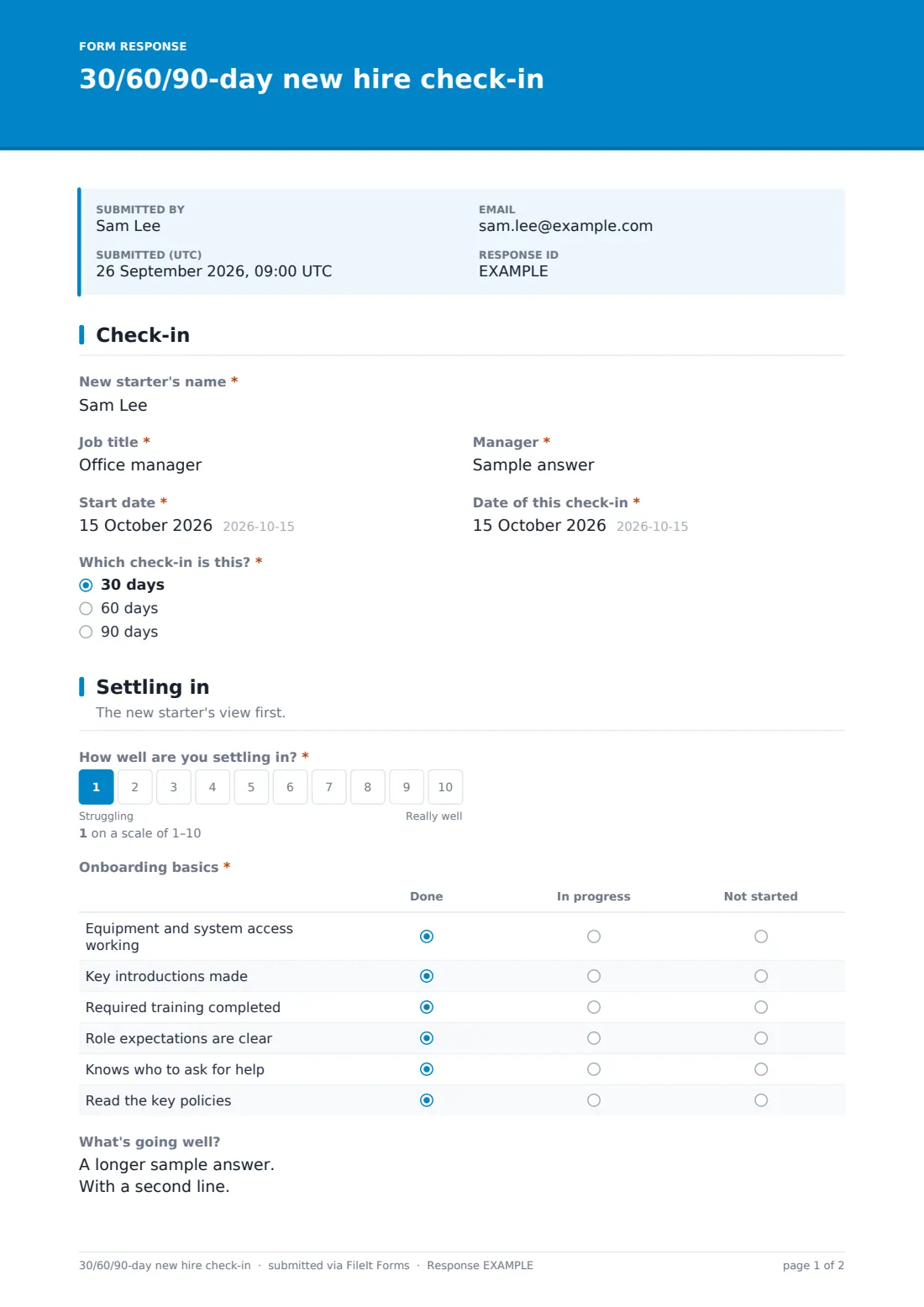
This 30/60/90-day check-in template starts with which checkpoint it is, then asks the new starter how they're settling in on a 1–10 scale and reviews onboarding basics: equipment and access, introductions, training, clarity of expectations, knowing who to ask, and key policies. It records what's going well and training completed.
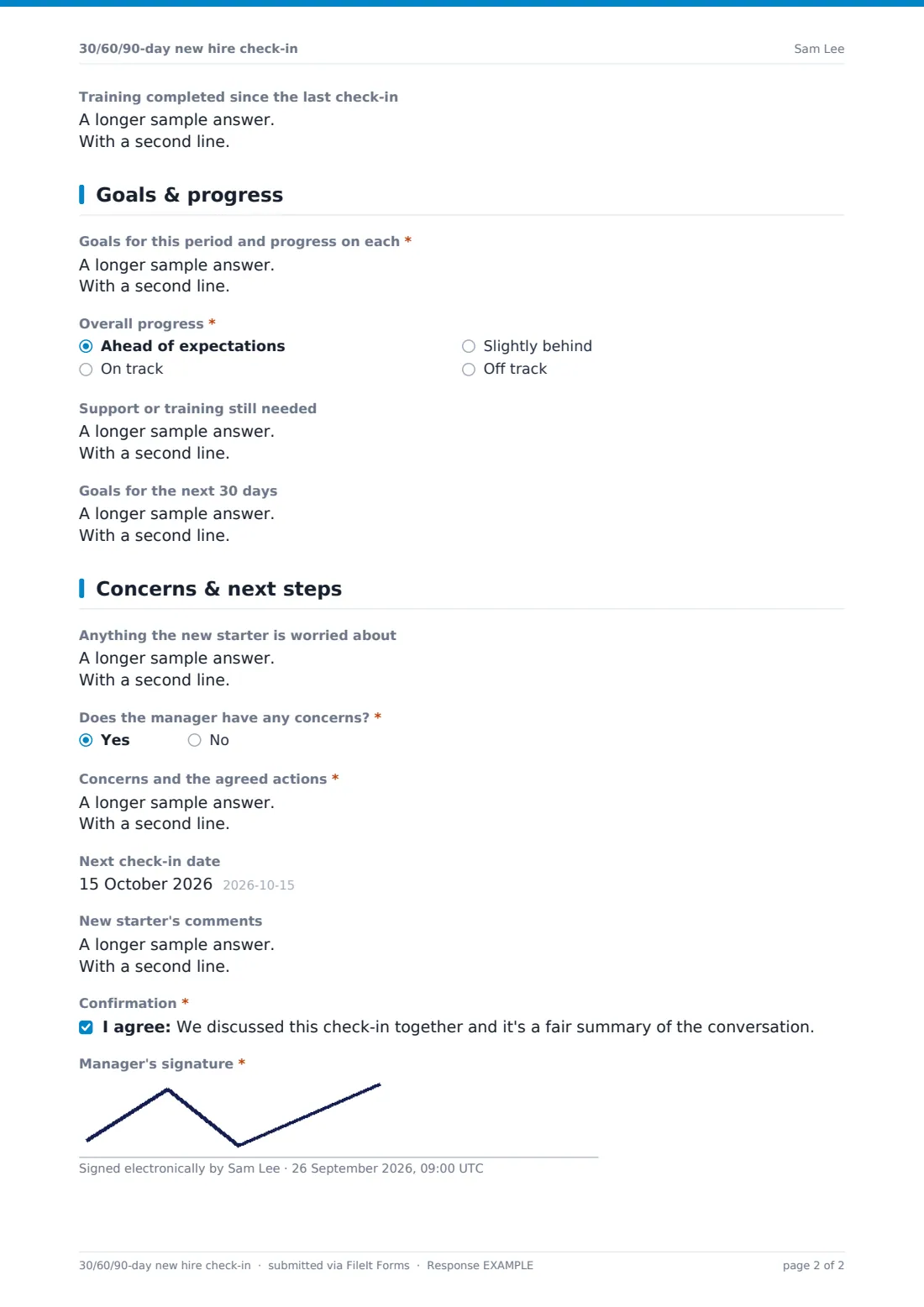
The goals page tracks progress on this period's goals and sets the next 30 days' goals — or, at 90 days, looks ahead to the end of probation. The final page covers concerns from both sides, a next check-in date and the new starter's comments. Every check-in is saved as a PDF in your FileIt vault.
- Best for
- Managers onboarding new starters
- Filled in by
- The manager, together with the new starter
- Time to complete
- About 10 minutes
- Includes
- Settling-in scale, onboarding checklist grid, goals and progress, probation outlook at 90 days, manager signature
Who uses a 30/60/90-day new hire check-in form?
- A manager running scheduled 30, 60 and 90-day reviews
- Spotting onboarding gaps like missing system access
- Setting goals for each stage of a new hire's first quarter
- Preparing for a probation review at the end of the first 90 days
- Giving new starters a regular chance to raise concerns
- HR checking onboarding quality across teams
Questions on this 30/60/90-day new hire check-in form
23 questions over 4 pages · includes signature, conditional questions, multiple pages, consent checkbox, ratings.
1 Check-in
- New starter's name*
- Job title*
- Manager*
- Start date*
- Date of this check-in*
- Which check-in is this?* 30 days · 60 days · 90 days
2 Settling in
- How well are you settling in?*
- Onboarding basics* Done · In progress · Not started
- What's going well?
- Training completed since the last check-in
3 Goals & progress
- Goals for this period and progress on each*
- Overall progress* Ahead of expectations · On track · Slightly behind · Off track
- What's getting in the way, and what will help?* asked only when it applies
- Support or training still needed
- Goals for the next 30 days asked only when it applies
- Looking ahead to the end of probation asked only when it applies On course to confirm · Some concerns to work on · Serious concerns — speak to HR
4 Concerns & next steps
- Anything the new starter is worried about
- Does the manager have any concerns?*
- Concerns and the agreed actions* asked only when it applies
- Next check-in date asked only when it applies
- New starter's comments
- Confirmation*
- Manager's signature*
The 30/60/90-day new hire check-in form, page by page
1 Check-in
The manager records the new starter's name, job title, their own name, the start date, the date of this check-in, and whether it's the 30, 60 or 90-day check-in.
2 Settling in
The new starter rates how well they're settling in from 1 to 10. A grid marks onboarding basics as done, in progress or not started: equipment and access, key introductions, required training, clear expectations, knowing who to ask, and key policies. There's room for what's going well and training completed.
3 Goals & progress
The manager records goals for the period and progress on each, then an overall progress rating from ahead to off track; off track asks what's getting in the way and what will help. Support needed is noted. At 30 and 60 days the form asks for next period's goals; at 90 days it asks about the outlook for the end of probation.
4 Concerns & next steps
The new starter's worries and any manager concerns (with agreed actions) are recorded, plus a next check-in date at 30 and 60 days and the new starter's comments. The manager confirms the summary was discussed together and signs.
Make the template yours
- Edit the onboarding checklist rows to match your onboarding plan
- Change the checkpoints if you use different intervals, like 2, 6 and 12 weeks
- Add role-specific goals as fixed questions
- Set the vault folder so check-ins file with the employee's records
- Notify HR when a manager has concerns
Tips for a better 30/60/90-day new hire check-in form
- Book all three check-ins in the calendar on the first day
- Let the new starter speak first — ask the settling-in question before giving feedback
- Fix onboarding gaps straight away rather than noting them for next time
- Keep goals specific and achievable in 30 days
- Use the 90-day check-in to prepare for a probation review
Every response becomes a PDF in your vault
Each check-in is saved as a PDF in your FileIt vault and the form owner is notified. Respondent copies are off by default; share the PDF with the new starter.
Managers can compare a new starter's check-ins in the Responses table, and HR can export to CSV to see settling-in scores and progress across new hires.
- Start from this template. It opens in the FileIt Forms designer — change any question, add pages, set the rules for when questions appear.
- Share it. Turn on a public link, or send it to people by email, each with their own link. They don’t need a FileIt account.
- Get the answers as PDFs. Each response is saved as a PDF in the vault folder you choose, with uploaded files attached — and listed in a Responses table you can export to CSV.
30/60/90-day new hire check-in form: frequently asked questions
Is this 30/60/90-day check-in template free?
Yes — it's included with the Forms app on every FileIt account, including the free plan, alongside the rest of the template gallery.
Do I need three separate forms?
No. Use the same form each time and choose the checkpoint; the goals questions adapt to 30, 60 or 90 days.
Who fills it in?
The manager, together with the new starter. The settling-in scale and concerns sections capture the new starter's view.
What happens at the 90-day check-in?
Instead of asking for next month's goals and a next check-in date, it asks for the outlook for the end of probation.
Can I change the onboarding checklist?
Yes. The grid rows can be edited in the form designer.
Does it replace a probation review?
No. It's a regular check-in. FileIt also has a probation review template for the formal decision.