
What is the job requisition form template?
Before a role is advertised, someone has to agree it should exist and that the budget is there. When requests arrive as a quick message — 'we need another developer' — approvers end up chasing salary ranges, reporting lines and justifications before they can say yes or no.
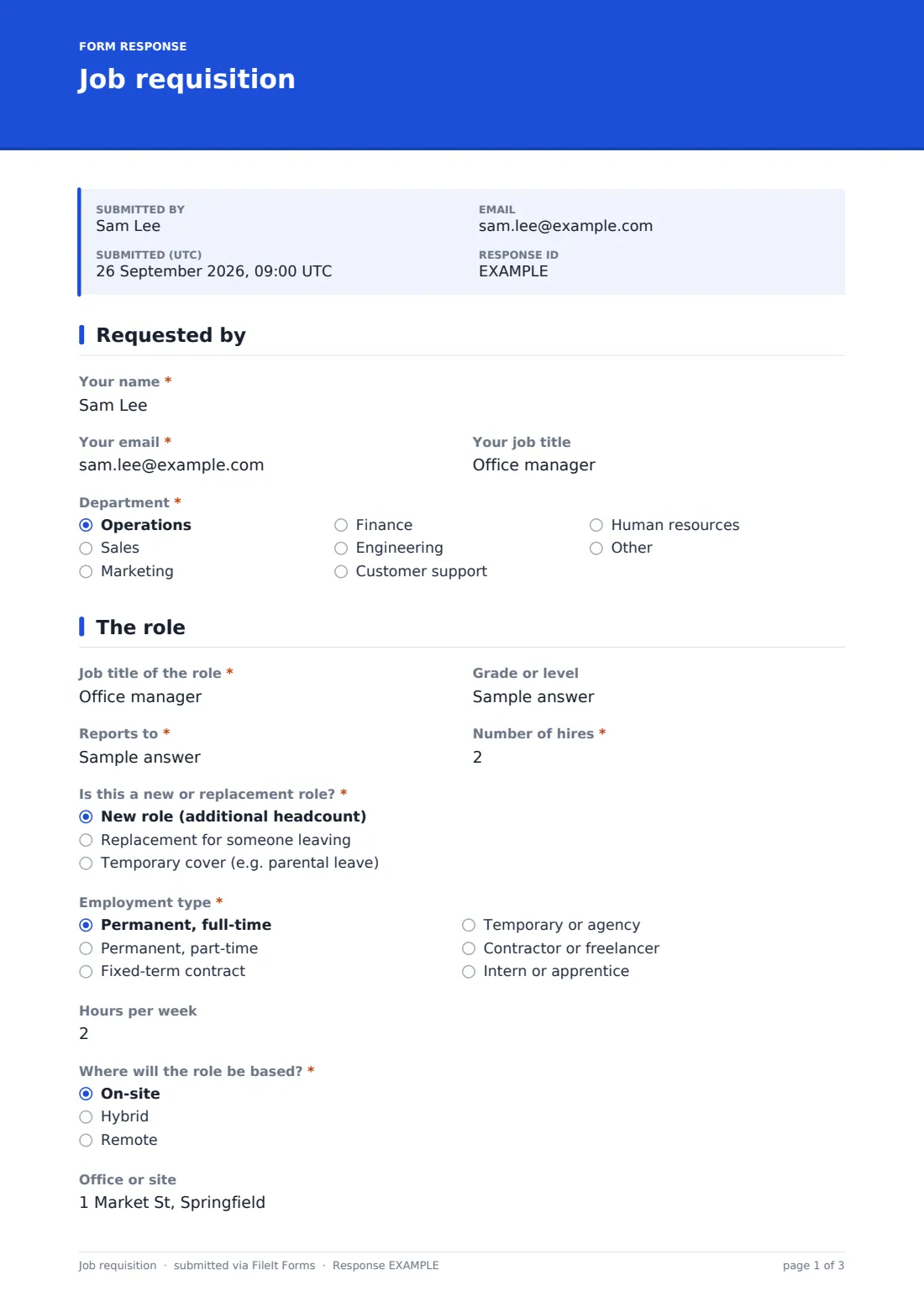
This job requisition form template asks the hiring manager for all of it up front. It captures the role, level, reporting line and headcount; whether it's a new role, a replacement or temporary cover; the employment type, hours and location; the salary range and whether it's budgeted; and a written case for why the role is needed and what happens if it isn't filled.
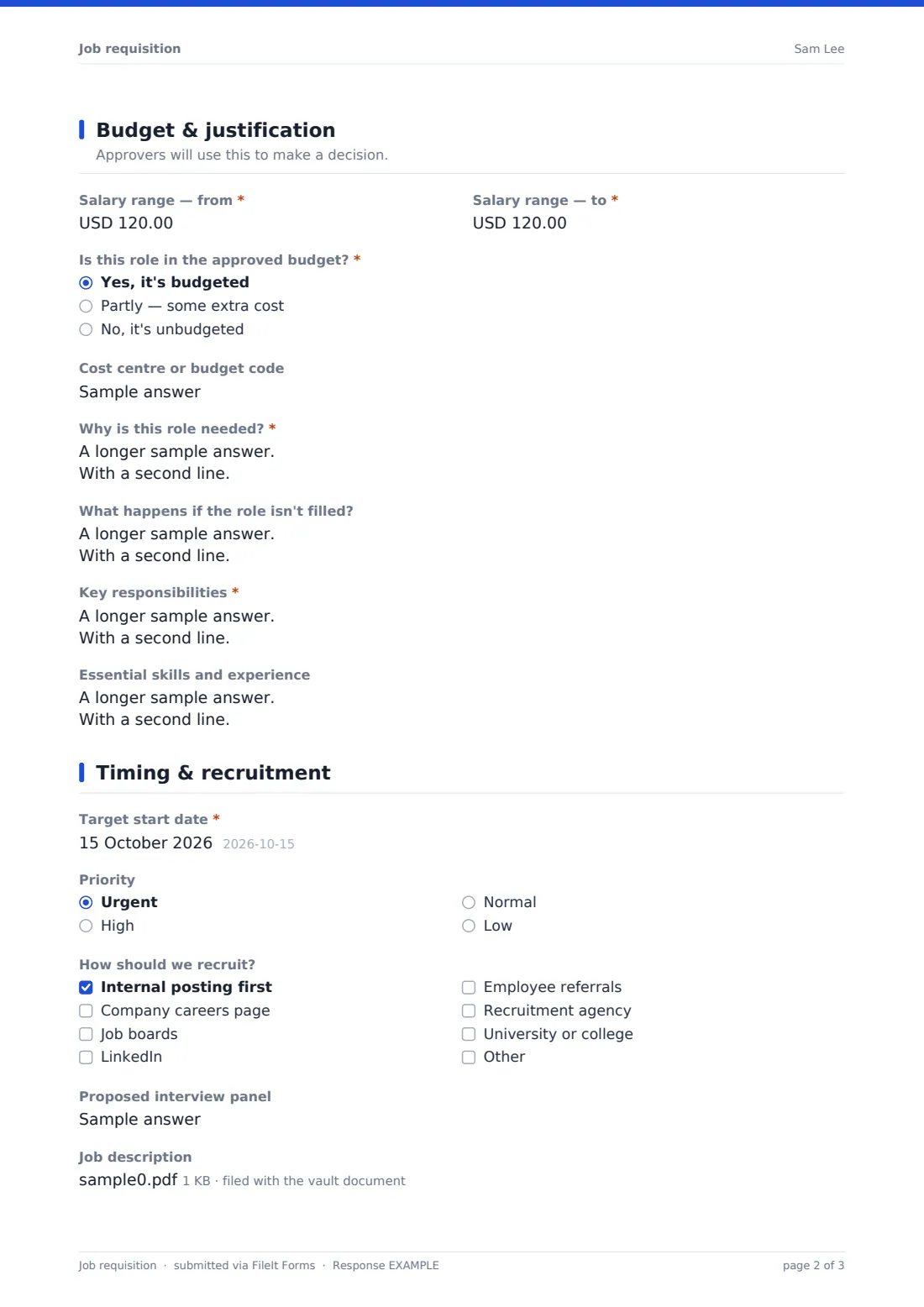
The last page covers the target start date, priority, preferred recruitment channels and proposed panel, with an upload for a job description. Each requisition is saved as a PDF in your FileIt vault, giving you a clear audit trail of what was requested, by whom and why.
- Best for
- Growing businesses that want headcount approved before recruiting
- Filled in by
- The hiring manager
- Time to complete
- About 8–10 minutes
- Includes
- Role and employment details, salary range and budget status, business justification, recruitment channels, job description upload
Who uses a job requisition form?
- A manager requesting approval for an additional team member
- Replacing an employee who has resigned, with their leaving date recorded
- Requesting temporary cover for parental leave
- Opening a fixed-term contract role for a project
- Finance reviewing unbudgeted headcount requests with a clear rationale
- HR collecting consistent role details before writing a job advert
Questions on this job requisition form
31 questions over 4 pages · includes file upload, conditional questions, multiple pages, consent checkbox.
1 Requested by
- Your name*
- Your email*
- Your job title
- Department* Operations · Sales · Marketing · Finance · Engineering · Customer support · Human resources · Other
2 The role
- Job title of the role*
- Grade or level
- Reports to*
- Number of hires*
- Is this a new or replacement role?* New role (additional headcount) · Replacement for someone leaving · Temporary cover (e.g. parental leave)
- Who is being replaced or covered?* asked only when it applies
- Their last day or leave start asked only when it applies
- Employment type* Permanent, full-time · Permanent, part-time · Fixed-term contract · Temporary or agency · Contractor or freelancer · Intern or apprentice
- Contract length asked only when it applies
- Hours per week
- Where will the role be based?* On-site · Hybrid · Remote
- Office or site asked only when it applies
3 Budget & justification
- Salary range — from*
- Salary range — to*
- Is this role in the approved budget?* Yes, it's budgeted · Partly — some extra cost · No, it's unbudgeted
- Cost centre or budget code
- How will the extra cost be covered?* asked only when it applies
- Why is this role needed?*
- What happens if the role isn't filled?
- Key responsibilities*
- Essential skills and experience
4 Timing & recruitment
- Target start date*
- Priority Urgent · High · Normal · Low
- How should we recruit? Internal posting first · Company careers page · Job boards · LinkedIn · Employee referrals · Recruitment agency · University or college
- Proposed interview panel
- Job description
- Confirmation*
The job requisition form, page by page
1 Requested by
The hiring manager gives their name, email, job title and department.
2 The role
They give the job title, grade or level, who it reports to and the number of hires. They say whether it's a new role, a replacement or temporary cover — replacements and cover ask who is leaving and when. They choose the employment type, with a contract length for fixed-term roles, the hours per week, and whether the role is on-site, hybrid or remote, with the office or site where relevant.
3 Budget & justification
The manager gives the salary range, says whether the role is budgeted, partly budgeted or unbudgeted, and adds a cost centre. Anything not fully budgeted asks how the extra cost will be covered. They then explain why the role is needed, what happens if it isn't filled, the key responsibilities and the essential skills.
4 Timing & recruitment
The target start date and priority come next, followed by preferred recruitment channels — internal posting, careers page, job boards, LinkedIn, referrals, an agency or universities — the proposed interview panel and an optional job description upload. The manager confirms that nothing is advertised or offered until the requisition is approved.
Make the template yours
- Change the salary currency to match where you hire
- Add your grade or band structure as a dropdown instead of free text
- Add finance and senior approvers to the notification emails
- Edit the recruitment channels to the ones you actually use
- Add an equipment question so IT can prepare once the role is approved
Tips for a better job requisition form
- Agree a salary range with HR before submitting so the request isn't sent back
- Write the justification in terms of business outcomes, not just workload
- Consider whether the work could be covered by redesigning an existing role
- Attach a draft job description to speed up advertising once approved
- Keep approved requisitions — they're useful when planning next year's headcount
Every response becomes a PDF in your vault
Each requisition is saved as a PDF in your FileIt vault with any job description attached, and the form owner is notified by email. The hiring manager receives a copy of what they submitted.
Approvers can review requests in the Responses table and open the PDF for the full business case. Exporting to CSV gives you a running list of requested, approved and open roles.
- Start from this template. It opens in the FileIt Forms designer — change any question, add pages, set the rules for when questions appear.
- Share it. Turn on a public link, or send it to people by email, each with their own link. They don’t need a FileIt account.
- Get the answers as PDFs. Each response is saved as a PDF in the vault folder you choose, with uploaded files attached — and listed in a Responses table you can export to CSV.
Job requisition form: frequently asked questions
Is this job requisition form template free?
Yes — it's included with the Forms app on every FileIt account, including the free plan, alongside the rest of the template gallery.
Does the form handle the approval itself?
It collects and files the request and notifies the form owner and anyone you add to the notification emails. The approval decision is made by your approvers after reviewing it.
Can it be used for replacement roles?
Yes. Choosing a replacement or temporary cover asks who is leaving or being covered and their last day or leave start date.
Can I change the currency?
Yes. The salary fields use USD by default and you can change the currency in the form designer.
What if the role isn't in the budget?
Marking the role as partly or not budgeted opens a required question on how the extra cost will be covered.
Can we attach a job description?
Yes — up to two PDF or Word files.