What is the employee referral form template?
Referrals are often one of the best sources of good candidates, but only if they're easy to make and properly recorded. A forwarded CV with 'my friend might be interested' leaves recruiters without context and makes it hard to track who referred whom when a referral reward is due.
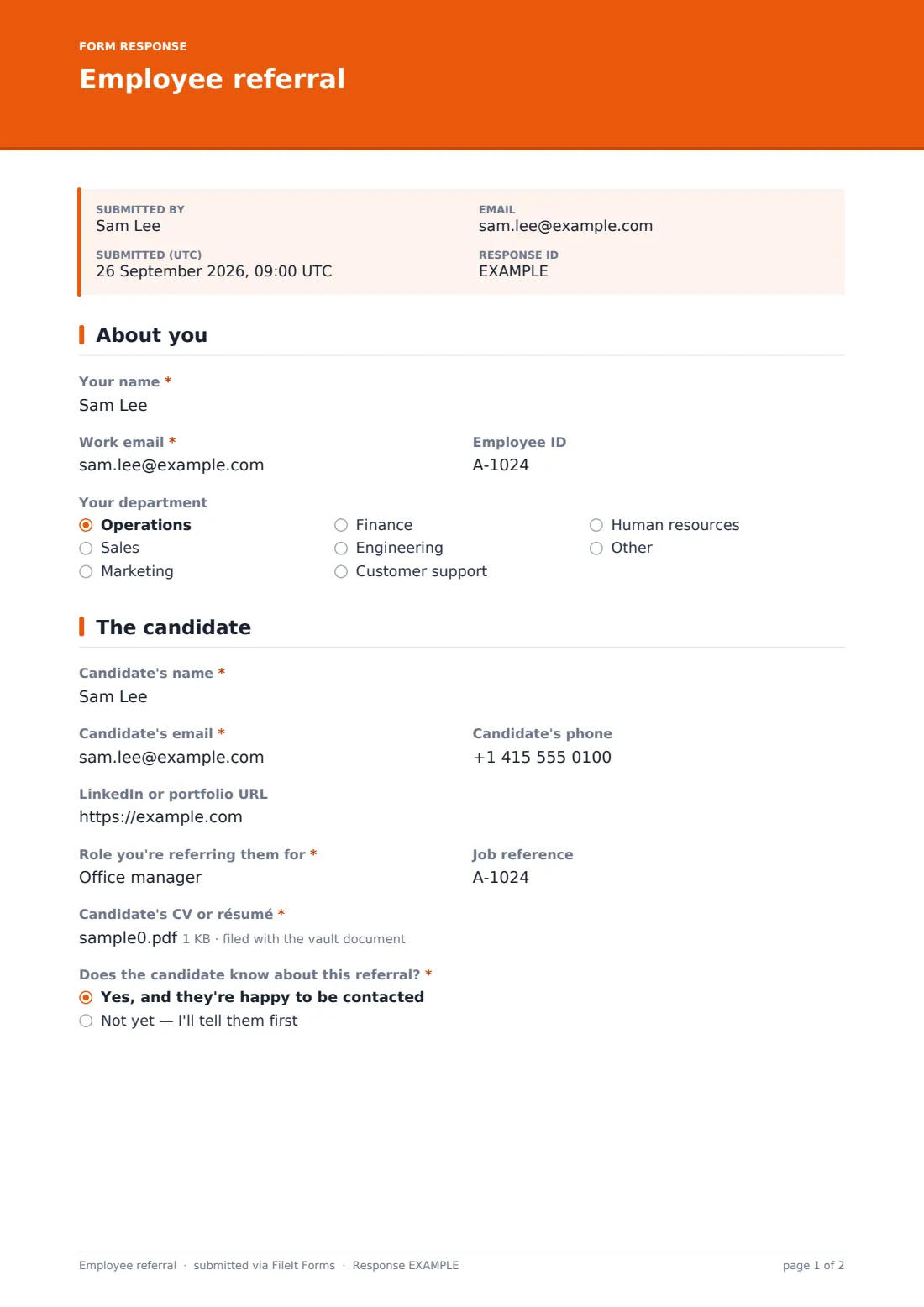
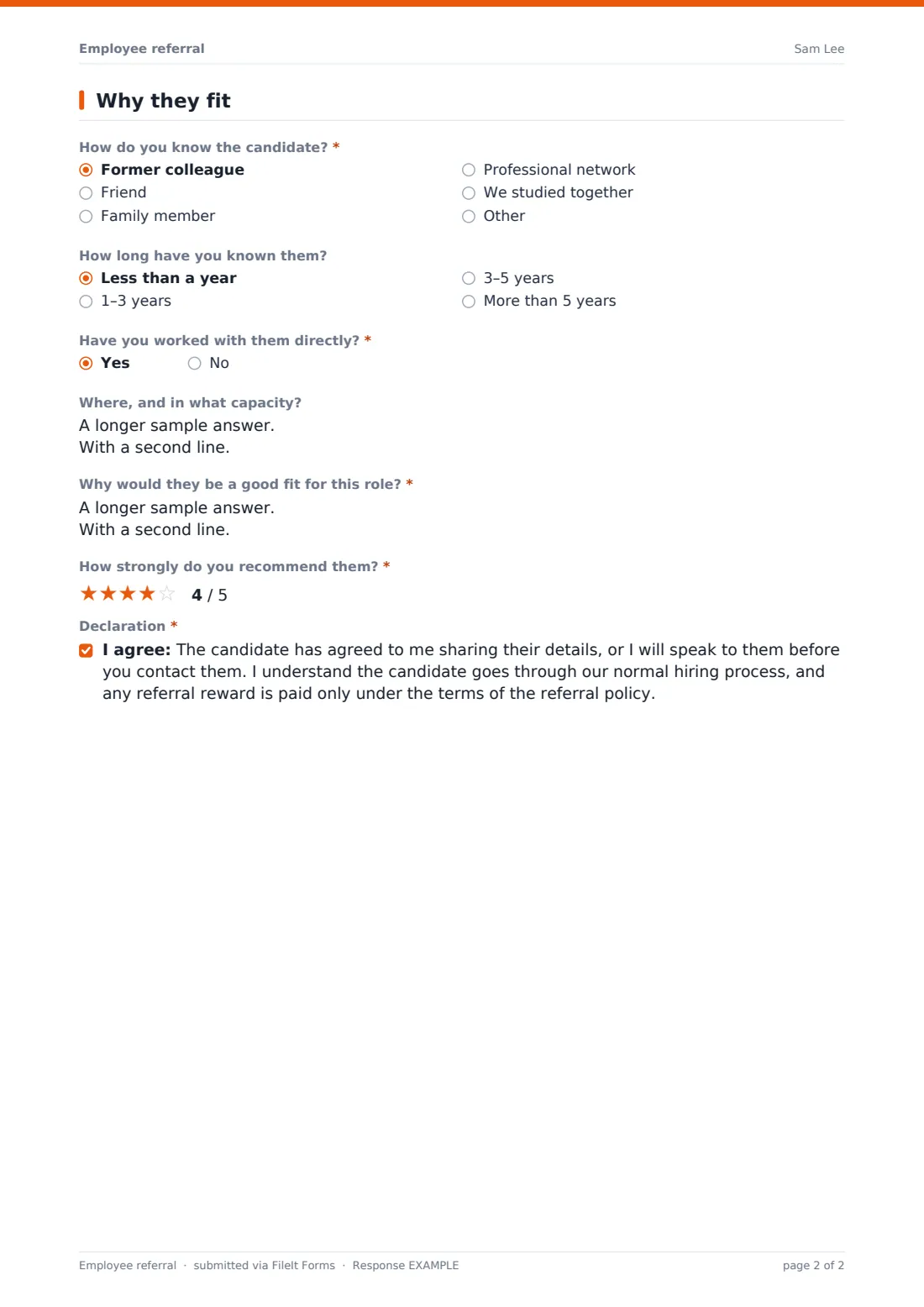
This employee referral form template captures the referring employee's details, the candidate's contact details, profile link, target role and CV, and whether the candidate knows about the referral. It then asks how the employee knows them, for how long, whether they've worked together, why they'd be a good fit, and how strongly they recommend them.
The declaration confirms the candidate has agreed to their details being shared — or that the employee will speak to them before you make contact — and that the employee understands the candidate goes through the normal hiring process. Every referral is saved as a PDF in your FileIt vault with the CV attached.
- Best for
- Companies running an employee referral programme
- Filled in by
- The employee making the referral
- Time to complete
- About 5 minutes
- Includes
- Candidate details and CV upload, relationship and fit questions, recommendation rating, declaration
Who uses a employee referral form?
- An employee referring a former colleague for an open role
- Tracking who referred which candidate for referral rewards
- Recruiters receiving referrals with context, not just a CV
- Referring a friend for a role in another department
- Declaring a family relationship up front to manage conflicts of interest
- Running a referral drive for hard-to-fill roles
Questions on this employee referral form
19 questions over 3 pages · includes file upload, conditional questions, multiple pages, consent checkbox, ratings.
1 About you
- Your name*
- Work email*
- Employee ID
- Your department Operations · Sales · Marketing · Finance · Engineering · Customer support · Human resources · Other
2 The candidate
- Candidate's name*
- Candidate's email*
- Candidate's phone
- LinkedIn or portfolio URL
- Role you're referring them for*
- Job reference
- Candidate's CV or résumé*
- Does the candidate know about this referral?* Yes, and they're happy to be contacted · Not yet — I'll tell them first
3 Why they fit
- How do you know the candidate?* Former colleague · Friend · Family member · Professional network · We studied together
- How long have you known them? Less than a year · 1–3 years · 3–5 years · More than 5 years
- Have you worked with them directly?*
- Where, and in what capacity? asked only when it applies
- Why would they be a good fit for this role?*
- How strongly do you recommend them?*
- Declaration*
The employee referral form, page by page
1 About you
The referring employee gives their name, work email, employee ID and department.
2 The candidate
They add the candidate's name, email, phone, LinkedIn or portfolio link, the role and job reference, and upload the candidate's CV. They say whether the candidate knows about the referral; if not, a note asks them to speak to the candidate first.
3 Why they fit
The employee explains how they know the candidate — former colleague, friend, family member, professional network, studied together or something else. Choosing family shows a note on conflict-of-interest rules. They say how long they've known the candidate and whether they've worked together (and where), explain why the candidate would be a good fit, rate how strongly they recommend them, and accept the declaration.
Make the template yours
- Add a dropdown of your current open roles instead of free text
- Link to your referral policy in the cover text
- Edit the declaration to match your referral reward rules
- Set the vault folder to your recruitment area
- Add your recruiter's email to notifications
Tips for a better employee referral form
- Acknowledge every referral quickly so employees keep referring
- Keep the referring employee out of assessing the candidate
- Tell referrers the outcome where you can, even if it's a no
- Make sure candidates know they've been referred before you contact them
- Keep referral reward criteria clear and written down
Every response becomes a PDF in your vault
Each referral is saved as a PDF in your FileIt vault with the CV attached, and the form owner is notified. The referring employee receives a copy of their referral.
Recruiters can review referrals in the Responses table, follow up with candidates, and export to CSV to track referral sources and rewards.
- Start from this template. It opens in the FileIt Forms designer — change any question, add pages, set the rules for when questions appear.
- Share it. Turn on a public link, or send it to people by email, each with their own link. They don’t need a FileIt account.
- Get the answers as PDFs. Each response is saved as a PDF in the vault folder you choose, with uploaded files attached — and listed in a Responses table you can export to CSV.
Employee referral form: frequently asked questions
Is this employee referral form template free?
Yes — it's included with the Forms app on every FileIt account, including the free plan, alongside the rest of the template gallery.
Is the CV upload required?
Yes. The form requires one PDF or Word file for the candidate's CV or résumé.
What if the candidate doesn't know about the referral yet?
The employee can say so, and the form asks them to speak to the candidate before you make contact.
Can employees refer family members?
Yes. Choosing 'Family member' shows a note that the employee won't be involved in assessing or managing them.
Does the form promise a referral bonus?
No. The declaration says any reward is paid only under your referral policy's terms.
Can people outside the company use it?
It's designed for employees, but anyone with the link can submit. Share it internally if you only want staff referrals.