What is the interview availability form template?
Arranging interviews by email can take days of back-and-forth: "Does Tuesday work?" "Only after three." "What about Thursday?" This template asks each shortlisted candidate for three preferred dates and times in one go, along with the dates they definitely can't do and how much notice they need.
It also asks every candidate, in the same neutral way, whether any adjustments would help at interview, from step-free access and extra time for a test to captions on video calls or questions in writing in advance. Asking everyone makes it routine and easier to answer honestly, and the details only go to the people arranging the interview.
Each reply is filed as a PDF in your FileIt vault next to the candidate's application, so the recruiter can confirm a slot and set up any adjustments before the day.
- Best for
- Recruiters and hiring managers scheduling first or second interviews
- Filled in by
- The shortlisted candidate
- Time to complete
- About 3–5 minutes
- Includes
- Three ranked date and time choices, format follow-ups, and a neutral adjustments question for every candidate
Who uses a interview availability form?
- Inviting a shortlist of candidates to interview without a long email chain
- Scheduling across time zones for remote or international roles
- Making sure interview adjustments are known and arranged in advance
- Planning an assessment day around several candidates' availability
- Giving a small team a consistent invitation process for every vacancy
Questions on this interview availability form
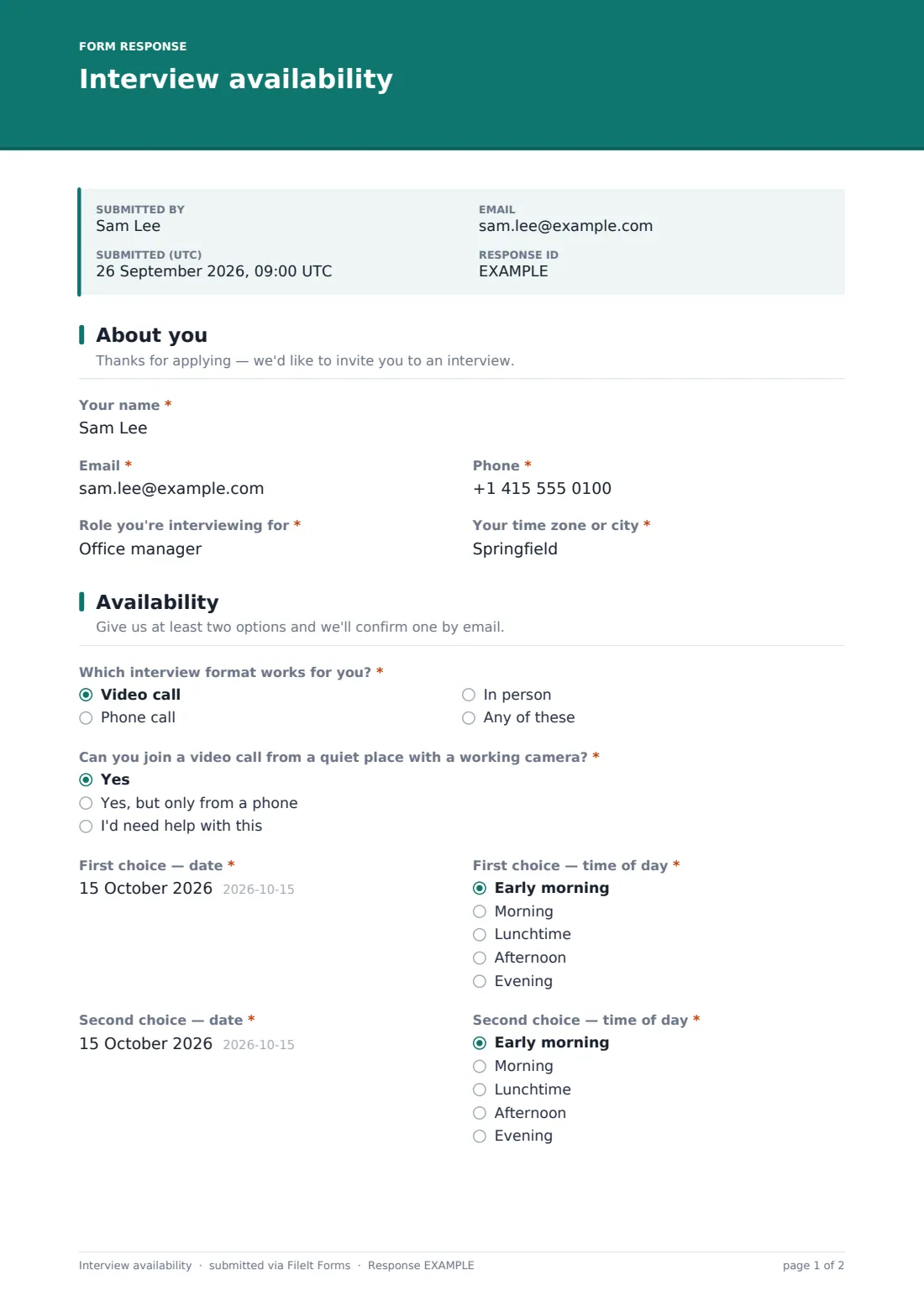
23 questions over 3 pages · includes conditional questions, multiple pages, consent checkbox.
1 About you
- Your name*
- Email*
- Phone*
- Role you're interviewing for*
- Your time zone or city*
2 Availability
- Which interview format works for you?* Video call · Phone call · In person · Any of these
- Can you join a video call from a quiet place with a working camera?* asked only when it applies Yes · Yes, but only from a phone · I'd need help with this
- Will you need help with travel costs to attend? asked only when it applies
- First choice — date*
- First choice — time of day* Early morning · Morning · Lunchtime · Afternoon · Evening
- Second choice — date*
- Second choice — time of day* Early morning · Morning · Lunchtime · Afternoon · Evening
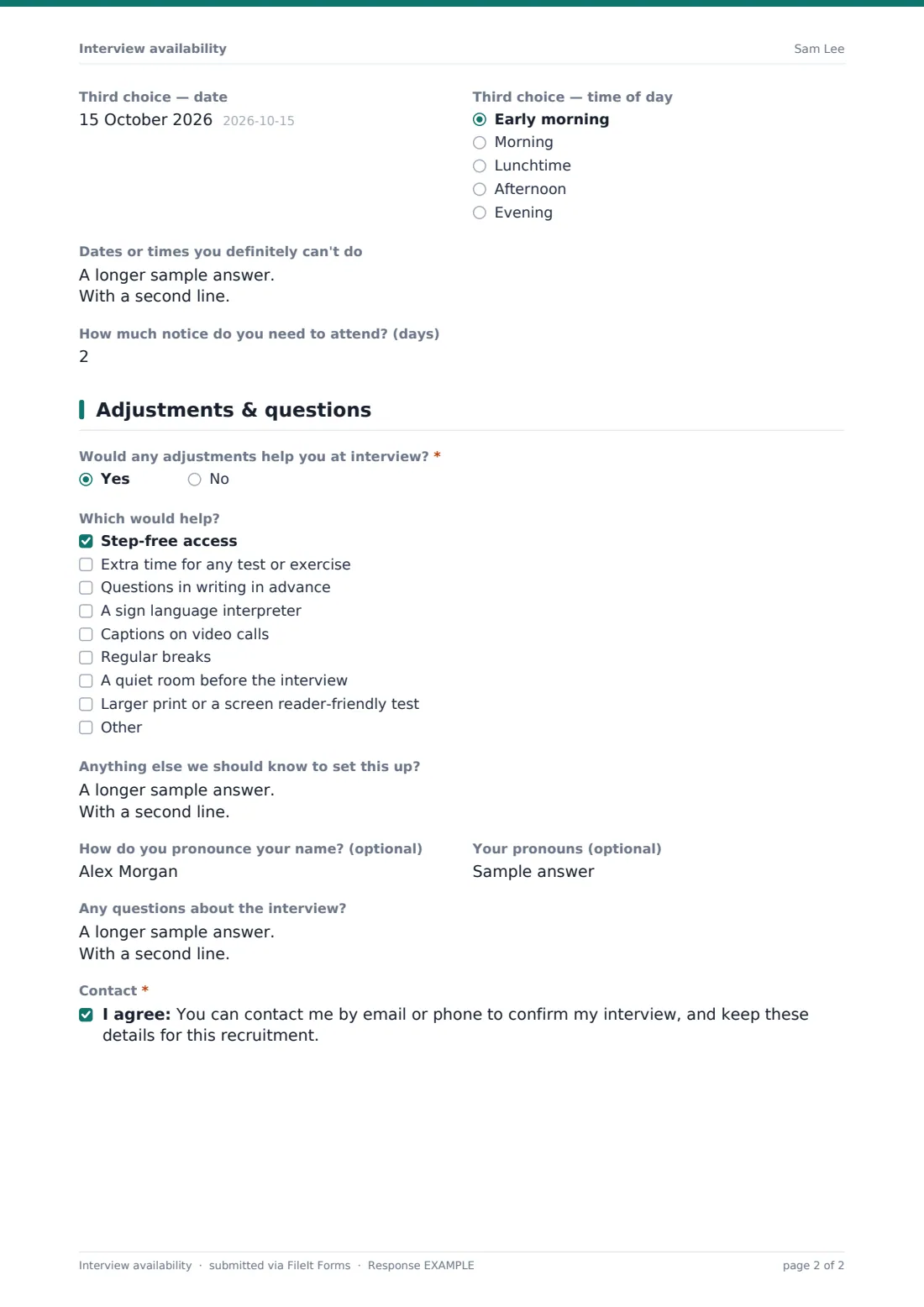
- Third choice — date
- Third choice — time of day asked only when it applies Early morning · Morning · Lunchtime · Afternoon · Evening
- Dates or times you definitely can't do
- How much notice do you need to attend? (days)
3 Adjustments & questions
- Would any adjustments help you at interview?*
- Which would help? asked only when it applies Step-free access · Extra time for any test or exercise · Questions in writing in advance · A sign language interpreter · Captions on video calls · Regular breaks · A quiet room before the interview · Larger print or a screen reader-friendly test
- Anything else we should know to set this up? asked only when it applies
- How do you pronounce your name? (optional)
- Your pronouns (optional)
- Any questions about the interview?
- Contact*
The interview availability form, page by page
1 About you
The candidate gives their name, email, phone, the role they're interviewing for, and their time zone or city, which matters as soon as anyone is hiring remotely.
2 Availability
Which interview format works for you? offers a video call, a phone call, in person, or any of these. Choosing video asks whether they can join from a quiet place with a working camera, with an honest "I'd need help with this" option. Choosing in person asks whether they'll need help with travel costs.
The candidate then gives a first and second choice of date, each paired with a time of day from early morning to evening, and an optional third choice whose time question appears once a date is picked. Two more questions cover dates or times they definitely can't do, such as holidays or a notice period, and how many days' notice they need to attend.
3 Adjustments & questions
Would any adjustments help you at interview? is asked of everyone, with help text explaining that the answer only goes to the people arranging the interview. A Yes opens a checklist covering step-free access, extra time, questions in writing in advance, a sign language interpreter, captions, regular breaks, a quiet room and screen reader-friendly tests, plus a box for anything else needed to set it up.
Optional questions ask how to pronounce their name and their pronouns, and leave space for any questions about the interview. A consent box lets you contact them to confirm and keep the details for this recruitment.
Make the template yours
- Remove formats you don't offer, or add one such as an assessment centre
- Replace the time-of-day choices with exact slots if your panel's diary is fixed
- Set a close date so the form stops taking replies once the interview round is booked
- File replies into the same vault folder as the role's job applications
- Add a question about parking or building access for in-person interviews
Tips for a better interview availability form
- Send it to candidates by email so each person gets their own link and reminders
- Ask for availability over a range of at least a week
- Confirm the slot and any adjustments in writing as soon as you can
- Ask the adjustments question of every candidate, not just some
- Share adjustment details only with the people who need to arrange them
Every response becomes a PDF in your vault
Every reply is filed as a PDF in your chosen vault folder, titled with the candidate's name, and you're notified by email. Candidates can be sent a copy of what they submitted.
Sent as emailed requests, the Share tab shows which candidates have opened and returned the form, and you can remind anyone who hasn't. Export the Responses table to CSV to lay everyone's choices side by side when you build the interview schedule.
- Start from this template. It opens in the FileIt Forms designer — change any question, add pages, set the rules for when questions appear.
- Share it. Turn on a public link, or send it to people by email, each with their own link. They don’t need a FileIt account.
- Get the answers as PDFs. Each response is saved as a PDF in the vault folder you choose, with uploaded files attached — and listed in a Responses table you can export to CSV.
Interview availability form: frequently asked questions
Is this interview availability form free?
Yes. It's a starter template in FileIt's Forms app, and you can edit every question.
Does the form book the interview automatically?
No. It collects each candidate's preferences. You choose a slot and confirm it with the candidate yourself.
Why ask every candidate about adjustments?
Asking everyone the same way makes it routine and easier to answer, so you can arrange what's needed before the day.
Do candidates need an account?
No. They open the link you send, fill in the form and submit. No sign-up is needed.
Can I stop replies after a deadline?
Yes. Set a close date in the form's settings, or give emailed requests an expiry, and late replies are turned away with a friendly message.
Can I use it for second interviews?
Yes. Duplicate the form and change the cover text for each round.