What is the information sharing consent form template?
Support services, charities, care teams and case workers rarely work alone. Helping someone often means talking to their doctor, a housing officer, a school or another charity. Doing that well means asking first and writing down exactly what the person agreed to.
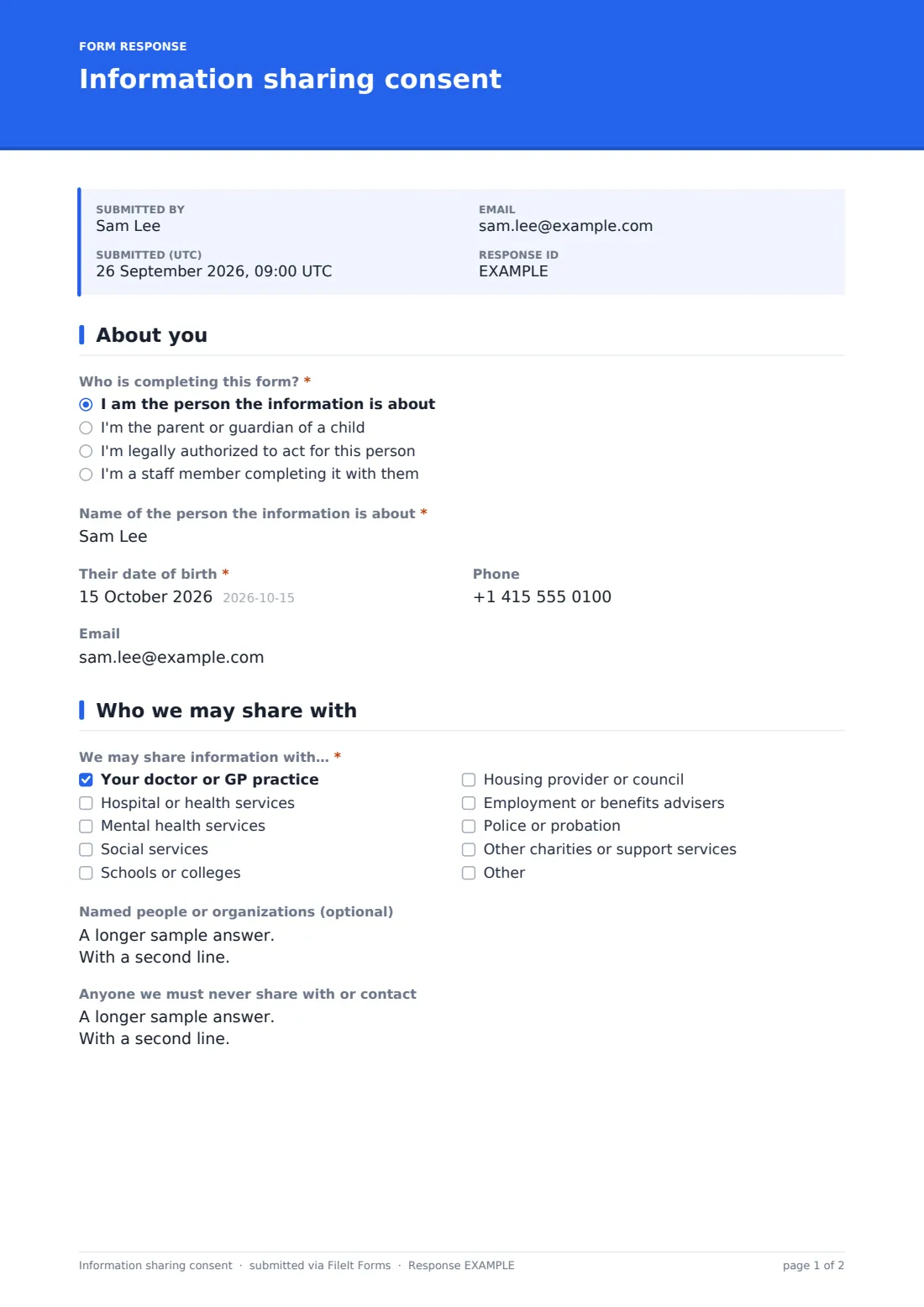
This template records who is completing the form — the person themselves, a parent or guardian, someone authorized to act for them, or a staff member completing it with them — and the person's details. It then lists organizations you might share with, plus named contacts, and a separate box for anyone you must never share with or contact.
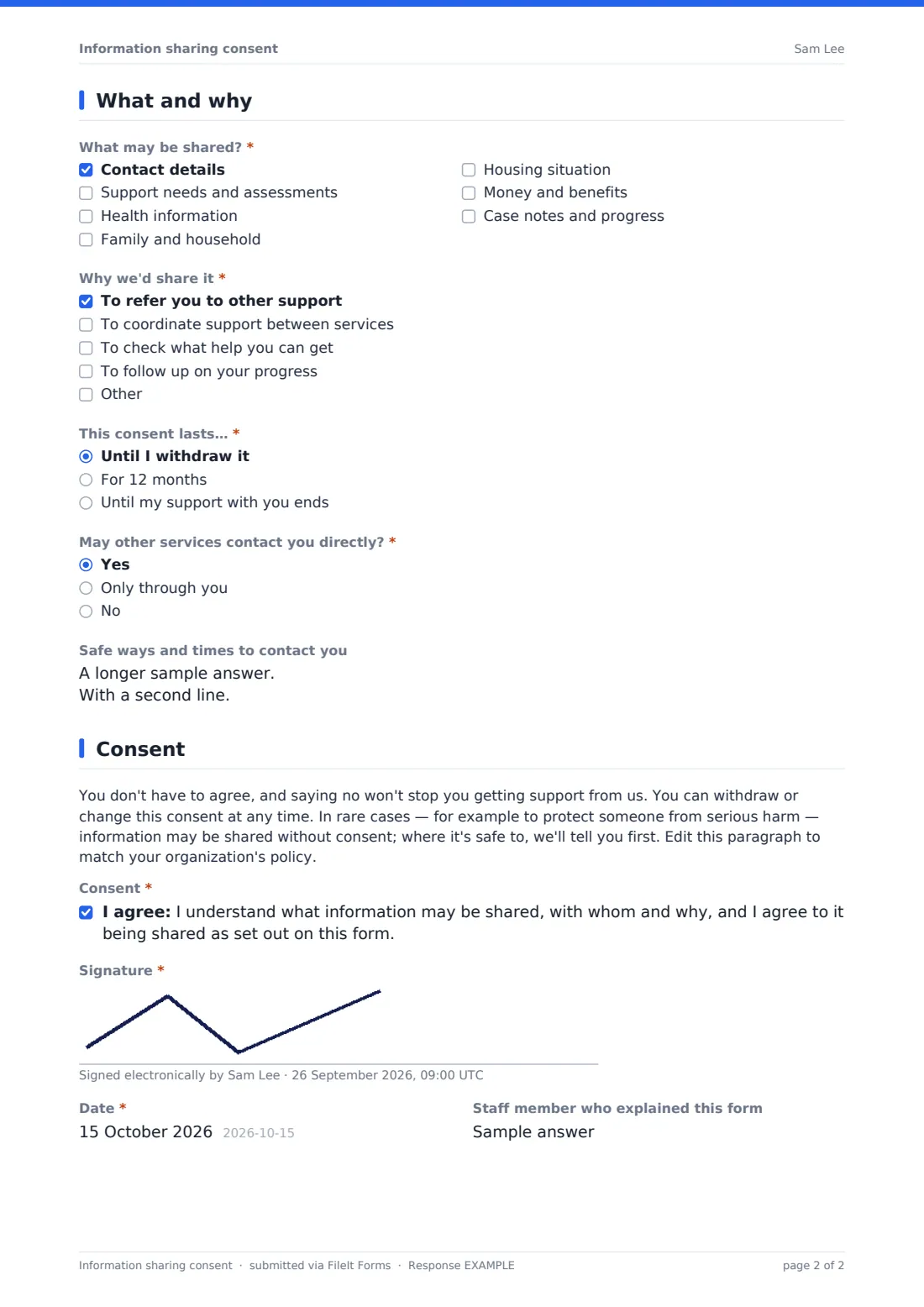
The client chooses what may be shared, why, how long consent lasts and whether other services may contact them directly, with safe contact times. A plain-language paragraph explains they can say no or change their mind. The signed form is filed as a PDF in your FileIt vault.
- Best for
- Charities, community support services, case management teams, social care and youth services
- Filled in by
- Clients, parents or guardians, or staff with the client
- Time to complete
- About 5 minutes
- Includes
- Who is completing, nine organization types, named contacts, never-share list, information types, purposes, duration, direct contact and signature
Who uses a information sharing consent form?
- Referring a client to another support service
- Coordinating support between housing, health and benefits advisers
- Multi-agency work with children and families
- Sharing progress with a funder-required partner
- Recording consent at the start of case management
- Reviewing consent annually or when support changes
Questions on this information sharing consent form
19 questions over 4 pages · includes signature, conditional questions, multiple pages, consent checkbox.
1 About you
- Who is completing this form?* I am the person the information is about · I'm the parent or guardian of a child · I'm legally authorized to act for this person · I'm a staff member completing it with them
- Name of the person the information is about*
- Their date of birth*
- Phone
- Your name* asked only when it applies
- Your relationship or authority* asked only when it applies
2 Who we may share with
- We may share information with…* Your doctor or GP practice · Hospital or health services · Mental health services · Social services · Schools or colleges · Housing provider or council · Employment or benefits advisers · Police or probation · Other charities or support services
- Named people or organizations (optional)
- Anyone we must never share with or contact
3 What and why
- What may be shared?* Contact details · Support needs and assessments · Health information · Family and household · Housing situation · Money and benefits · Case notes and progress
- Why we'd share it* To refer you to other support · To coordinate support between services · To check what help you can get · To follow up on your progress
- This consent lasts…* Until I withdraw it · For 12 months · Until my support with you ends
- May other services contact you directly?* Yes · Only through you · No
- Safe ways and times to contact you asked only when it applies
4 Consent
- Consent*
- Signature*
- Date*
- Staff member who explained this form
The information sharing consent form, page by page
1 About you
'Who is completing this form?' is required: the person the information is about, the parent or guardian of a child, someone legally authorized to act for them, or a staff member completing it with them. The person's name and date of birth are required; phone and email are optional. Anyone other than the person themselves gives their own name and their relationship or authority.
2 Who we may share with
'We may share information with…' lists the person's doctor or GP practice, hospital or health services, mental health services, social services, schools or colleges, housing provider or council, employment or benefits advisers, police or probation, and other charities or support services, with room for another. Clients can name specific people or organizations, and list 'Anyone we must never share with or contact', with help text giving a former partner or family member as examples.
3 What and why
'What may be shared?' — contact details, support needs and assessments, health information, family and household, housing situation, money and benefits, case notes and progress. 'Why we'd share it' — referral, coordinating support, checking what help is available, following up. 'This consent lasts…' until withdrawn, for 12 months, or until support ends. 'May other services contact you directly?' — yes, only through you, or no; yes asks for safe ways and times to make contact.
4 Consent
A paragraph says the person doesn't have to agree, can change their mind, and explains when information might be shared without consent. They tick the consent statement, sign and date, and the staff member who explained the form can add their name.
Make the template yours
- Edit the organization list to the partners you actually work with
- Rewrite the paragraph to match your organization's information-sharing policy
- Change the durations to your review cycle
- Use plain-language or translated versions for the people you support
- File each client's form to their own vault folder, or link it to a person or entity in Settings
- Send it as a request so the client can complete it before the first meeting
Tips for a better information sharing consent form
- Go through the form with the client rather than sending it cold
- Check the never-share list before every referral
- Share only what's needed for the purpose ticked
- Review consent when circumstances change, not just when it expires
- Record withdrawals the same day
- Offer an interpreter or easy-read version where needed
Every response becomes a PDF in your vault
Each consent is saved as a PDF titled with the person's name in the vault folder you choose. A copy is emailed when an email address is given.
Search the Responses tab by name before making a referral, and open the PDF to check which organizations and information the client agreed to.
- Start from this template. It opens in the FileIt Forms designer — change any question, add pages, set the rules for when questions appear.
- Share it. Turn on a public link, or send it to people by email, each with their own link. They don’t need a FileIt account.
- Get the answers as PDFs. Each response is saved as a PDF in the vault folder you choose, with uploaded files attached — and listed in a Responses table you can export to CSV.
Information sharing consent form: frequently asked questions
Is this information sharing consent template free?
Yes. It's included in the Forms app on every FileIt account.
Can a staff member fill it in with the client?
Yes. Choose 'I'm a staff member completing it with them', and the client signs on the same screen.
Can a parent complete it for a child?
Yes. Choose the parent or guardian option and give your relationship.
How does a client withdraw consent?
The form tells them they can withdraw at any time. Record the withdrawal and stop sharing; you can keep a note in the vault next to the original.
Do clients need a FileIt account?
No. They use the link, an emailed request, or your device.
Is this legal advice?
No. It's a starting template. Rules differ between countries, states and sectors, so check the wording against your own situation and take advice where you need it.