What is the beneficiary intake form template?
A beneficiary intake form is the first step most charities, food banks, advice services and community groups take before they can help someone: who they are, how to reach them safely, what their household looks like, and what kind of support they're asking for. Getting this right on paper is slow and easy to lose track of — forms get filed in different drawers, handwriting is hard to read under pressure, and there's no easy way to see who asked for what.
This beneficiary intake form template lets someone register for support from a phone, tablet or shared computer, in their own time or with a staff member sitting alongside them. It asks about safe ways to make contact first, then works through household size, housing situation and the specific kinds of help being requested, before closing with a plain-English consent section about keeping and sharing their information.
Every submission becomes a PDF saved straight into your FileIt vault, filed under whatever folder your organisation uses for that case or programme. There's no separate system to check, no paper trail to shred later — the record is simply there, ready when a caseworker follows up.
- Best for
- Charities, food banks, advice services, faith groups and community organisations registering someone for support
- Filled in by
- The person seeking support, alone or with a staff member's help
- Time to complete
- About 8-10 minutes, depending on how many needs are ticked
- Includes
- Conditional follow-up questions, a signature field, consent statements
Who uses a beneficiary intake form?
- A food bank registering a new household before their first food parcel
- A debt or benefits advice charity taking initial details before booking an appointment
- A homelessness outreach team recording someone's housing situation and urgency
- A faith-based welfare group logging a request for practical or pastoral support
- A community hub capturing referrals passed on by a school, GP or council office
- A multi-service charity routing a new contact to the right internal team based on their needs
Questions on this beneficiary intake form
30 questions over 4 pages · includes signature, conditional questions, multiple pages, consent checkbox.
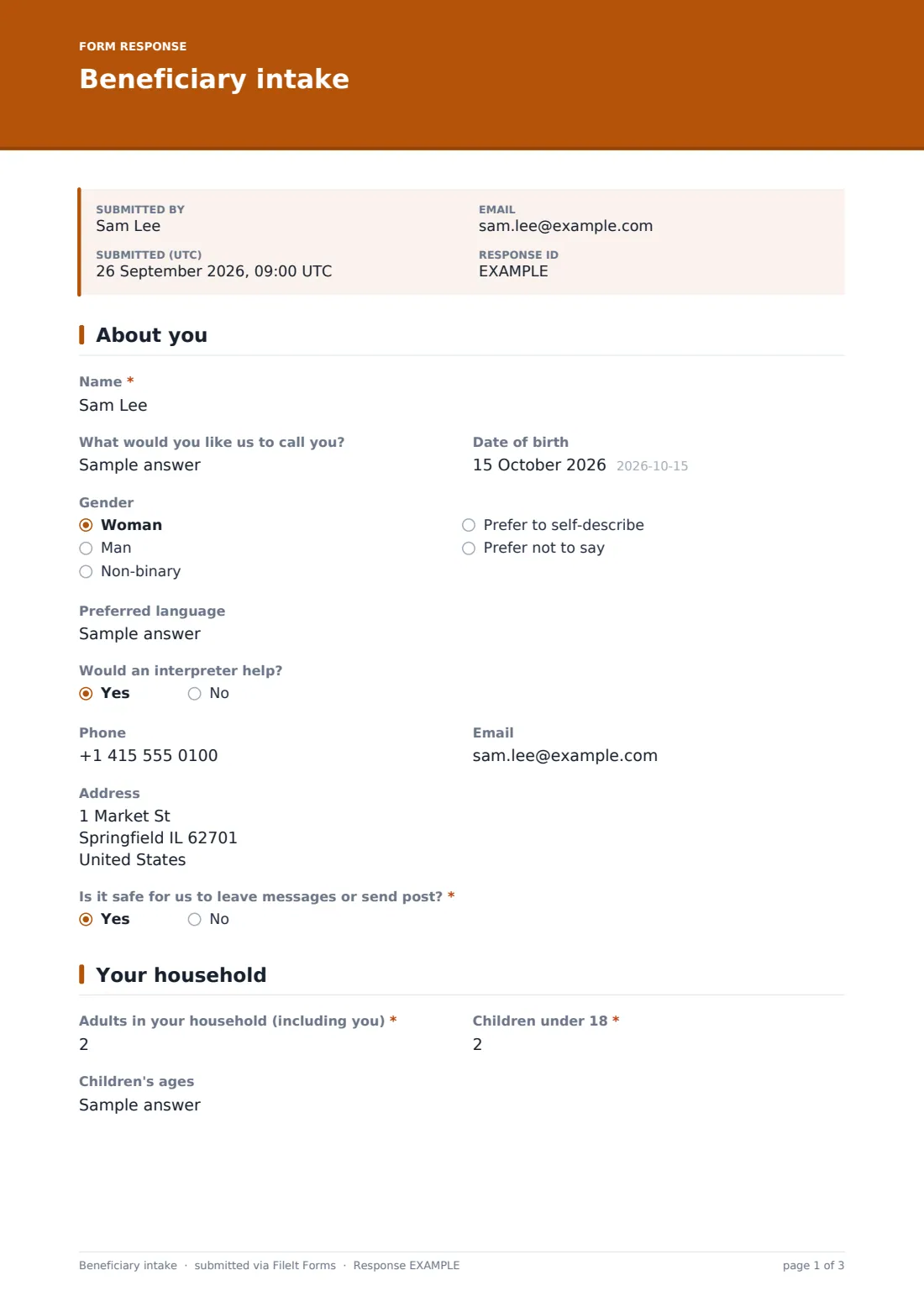
1 About you
- Name*
- What would you like us to call you?
- Date of birth
- Gender Woman · Man · Non-binary · Prefer to self-describe · Prefer not to say
- Preferred language
- Would an interpreter help? asked only when it applies
- Phone
- Address
- Is it safe for us to leave messages or send post?*
- How can we contact you safely?* asked only when it applies
2 Your household
- Adults in your household (including you)*
- Children under 18*
- Children's ages asked only when it applies
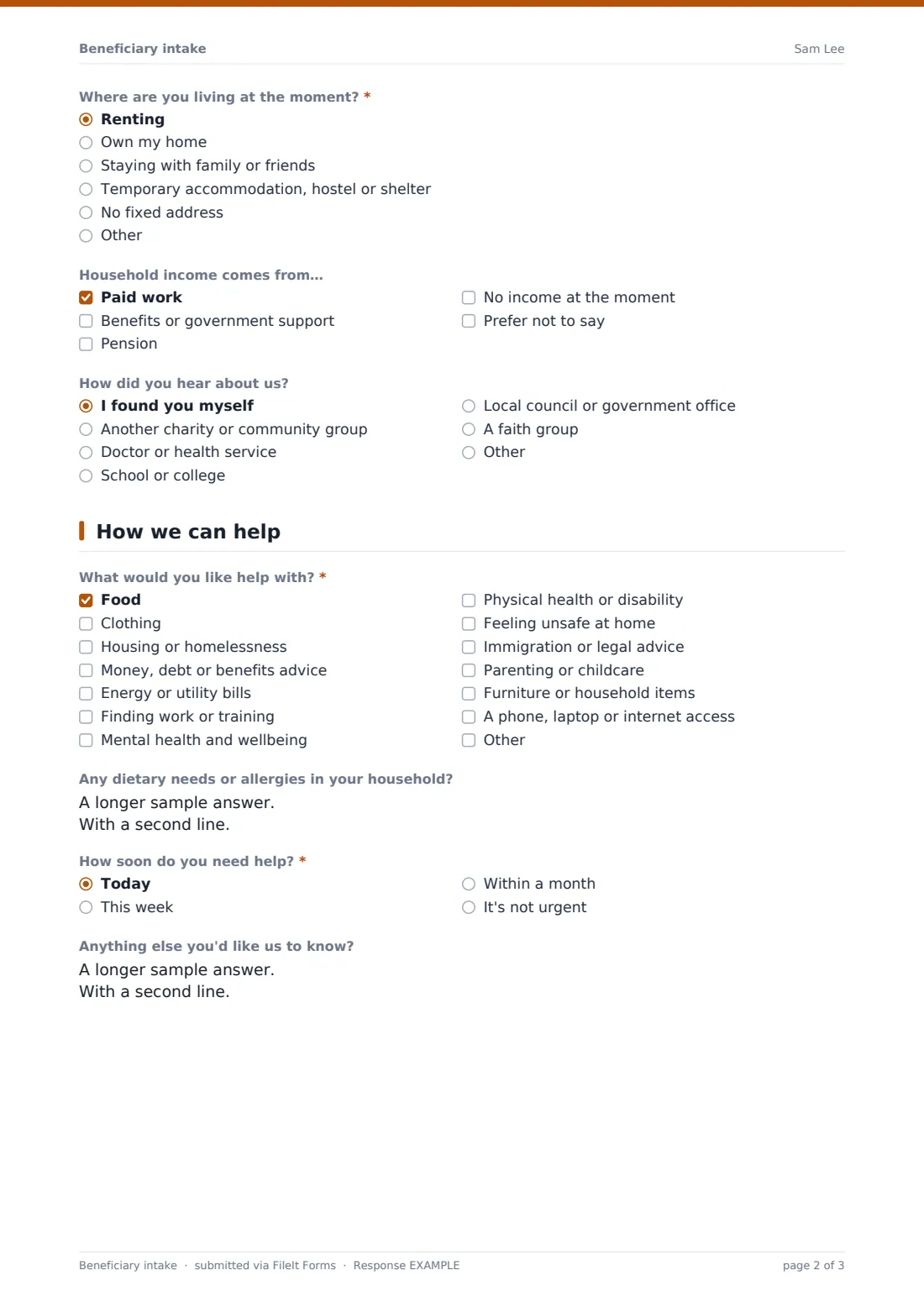
- Where are you living at the moment?* Renting · Own my home · Staying with family or friends · Temporary accommodation, hostel or shelter · No fixed address
- Household income comes from… Paid work · Benefits or government support · Pension · No income at the moment · Prefer not to say
- How did you hear about us? I found you myself · Another charity or community group · Doctor or health service · School or college · Local council or government office · A faith group
- Name of the person or organisation who referred you asked only when it applies
3 How we can help
- What would you like help with?* Food · Clothing · Housing or homelessness · Money, debt or benefits advice · Energy or utility bills · Finding work or training · Mental health and wellbeing · Physical health or disability · Feeling unsafe at home · Immigration or legal advice · Parenting or childcare · Furniture or household items
- Any dietary needs or allergies in your household? asked only when it applies
- How urgent is your housing situation?* asked only when it applies I have nowhere to stay tonight · I may lose my home in the next few weeks · I'm worried about the future · My home needs repairs or isn't suitable
- Roughly how much do you owe in total? asked only when it applies Under 1,000 · 1,000 – 5,000 · 5,000 – 20,000 · Over 20,000 · Not sure
- Are you safe right now?* asked only when it applies
- How soon do you need help?* Today · This week · Within a month · It's not urgent
- Anything else you'd like us to know?
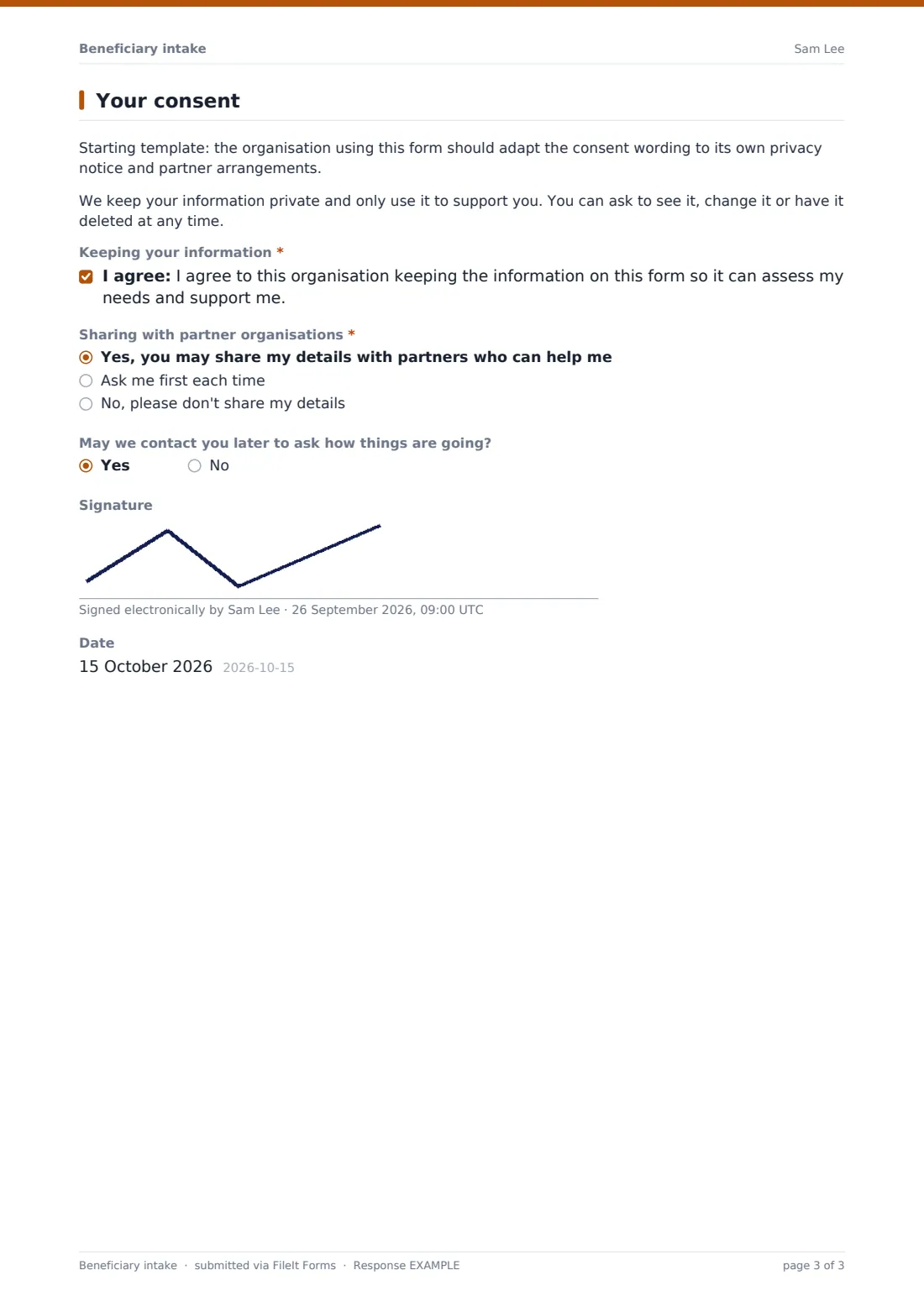
4 Your consent
- Keeping your information*
- Sharing with partner organisations* Yes, you may share my details with partners who can help me · Ask me first each time · No, please don't share my details
- May we contact you later to ask how things are going?
- Signature
- Date
The beneficiary intake form, page by page
1 About you
The form opens gently, asking for a Name and what the person would like to be called, along with optional Date of birth, Gender and Preferred language fields — all clearly optional so nobody feels forced to disclose more than they want to. If a Preferred language is entered, a follow-up question asks whether an interpreter would help, so staff can arrange one in advance rather than discovering the need on the day.
Contact details come next: Phone, Email and Address, with a note that the address can be left blank if the person doesn't have a fixed one. The most important question on this page is Is it safe for us to leave messages or send post? — answering No opens a required How can we contact you safely? box, so the organisation never accidentally puts someone at risk by calling at the wrong time or leaving a message an abuser might see.
2 Your household
This page asks how many Adults and Children under 18 are in the household, and if there are children, a Children's ages field appears so staff can flag any age-specific support (school uniforms, childcare, age-appropriate food). A Where are you living at the moment radio question covers renting, owning, staying with family, temporary accommodation or no fixed address, and an optional Household income comes from checklist gives a light-touch picture of financial circumstances without demanding payslips or bank statements.
A How did you hear about us question, with a follow-up for the referring person or organisation's name, helps charities understand which referral routes — GPs, schools, other charities, faith groups — are actually bringing people in, which is useful when reporting to funders or trustees.
3 How we can help
The core of the form is What would you like help with?, a checklist covering food, clothing, housing, money and debt, energy bills, work and training, mental health, physical health, safety at home, immigration or legal advice, parenting, household items and digital access. Each selection can trigger its own follow-up: ticking Food opens a question about dietary needs and allergies; ticking Housing asks how urgent the situation is, from repairs needed through to nowhere to stay tonight; ticking Money shows a rough range for how much is owed, to help match the person to the right adviser.
If someone ticks Feeling unsafe at home, the form asks directly Are you safe right now? — answering No shows a plain message telling them to call their local emergency number if they're in immediate danger, and reassures them a team member will follow up as a priority using the safe contact method they gave earlier. The page ends with How soon do you need help and an open Anything else you'd like us to know box for anything that didn't fit the checkboxes.
4 Your consent
The final page is where the organisation should adapt the wording to match its own privacy notice — the template includes a note reminding whoever sets it up to do exactly that. It explains in plain terms that information is kept private and used only to support the person, and that they can ask to see, change or delete it at any time, before a consent statement confirms they're happy for the organisation to hold what they've shared.
A further Sharing with partner organisations question lets the person choose between allowing sharing with partners like food banks or housing providers, being asked each time, or refusing sharing altogether — an important layer of control for people who may be dealing with several agencies at once. An optional Signature and Date close the form, marked as optional in case a staff member is completing it together with the person on a shared device.
Make the template yours
- Rewrite the consent and sharing wording on page 4 to match your organisation's own privacy notice and any partner data-sharing agreements
- Add or remove items in the What would you like help with checklist to match the services your organisation actually offers
- Turn off Collect respondent name/email entirely for an anonymous drop-in version, if your setting calls for it
- Set the vault folder so each submission files automatically under a "New referrals" or per-programme folder for caseworkers to review
- Add a conditional question under a specific need (for example, a follow-up under Physical health or disability) if your team routinely asks for more detail there
- Turn on an email notification to a shared caseworker inbox so nobody misses a same-day request marked urgent
Tips for a better beneficiary intake form
- Ask only for what you'll actually use — every extra required field is a reason for someone in a difficult situation to give up partway through
- Keep the safe-contact question near the top; nothing else matters if a message reaches someone at the wrong time
- Explain briefly, in the form's page descriptions, what happens after someone submits, so they aren't left wondering if it worked
- Review the consent and data-sharing wording with whoever handles data protection at your organisation before publishing the form
- If a lot of people won't have a fixed address or email, make sure related fields stay optional rather than required
- Check submissions regularly rather than relying on memory — a form marked urgent that sits unread for days defeats its purpose
Every response becomes a PDF in your vault
When someone submits the form, FileIt turns their answers into a PDF and saves it in the vault folder your organisation has chosen, with the person's stated needs, household details and consent choices all in one document. If you've switched on owner notifications, a staff member is emailed as soon as a new intake comes in, which matters when someone has marked their situation as urgent or unsafe.
From there, the Responses table gives your team a filterable list of everyone who has registered, so a caseworker can open any submission's PDF, see exactly what was asked for, and follow up using the contact method the person said was safe. Because every record lives in the same vault as the rest of your organisation's documents, there's nothing extra to back up or lose track of, and CSV export makes it straightforward to pull a caseload list for a report to funders or trustees.
- Start from this template. It opens in the FileIt Forms designer — change any question, add pages, set the rules for when questions appear.
- Share it. Turn on a public link, or send it to people by email, each with their own link. They don’t need a FileIt account.
- Get the answers as PDFs. Each response is saved as a PDF in the vault folder you choose, with uploaded files attached — and listed in a Responses table you can export to CSV.
Beneficiary intake form: frequently asked questions
Is this beneficiary intake form template free?
Yes. It's one of the ready-made templates included in the FileIt Forms app on every account, including the free plan. You can use it as it is or edit every question.
Does the person filling it in need a FileIt account?
No. Anyone you send the link to, or who finds it through a public link, can fill in the form without signing up for anything.
How do we get the responses afterwards?
Each submission becomes a PDF automatically filed in your FileIt vault, and you can also browse, filter and export all responses as a CSV from the Responses table.
Can we make this form anonymous?
You can set the respondent-identity setting to not collect name or email at all, though the form's own Name field will still appear unless you remove it in the designer.
Is this form legally binding or does it meet data protection requirements on its own?
No — this is a starting template, not legal advice. Before you publish it, check the consent and information-sharing wording against your own privacy notice and the rules that apply in your area.
Can we send this form to people by email instead of a public link?
Yes. You can email personal links to specific people, each one prefilled with that person's name and email, alongside or instead of a public link.
What happens if someone says they're not safe right now?
The form shows them a message to call their local emergency number if they're in immediate danger and reassures them your team will follow up using the safe contact details they provided — but your staff still need to monitor submissions promptly for this to work.
Can uploaded documents be attached to a beneficiary's record?
This template doesn't include a file upload field, but you can add one in the designer (for example, for proof of address) and any file a respondent uploads is attached to that response's PDF.