
What is the transcript or certificate request form template?
Records offices get requests for transcripts, replacement certificates and verification letters from former students all over the world, often years after they left. Before releasing anything, staff need to find the right record and confirm the person asking is who they say they are.
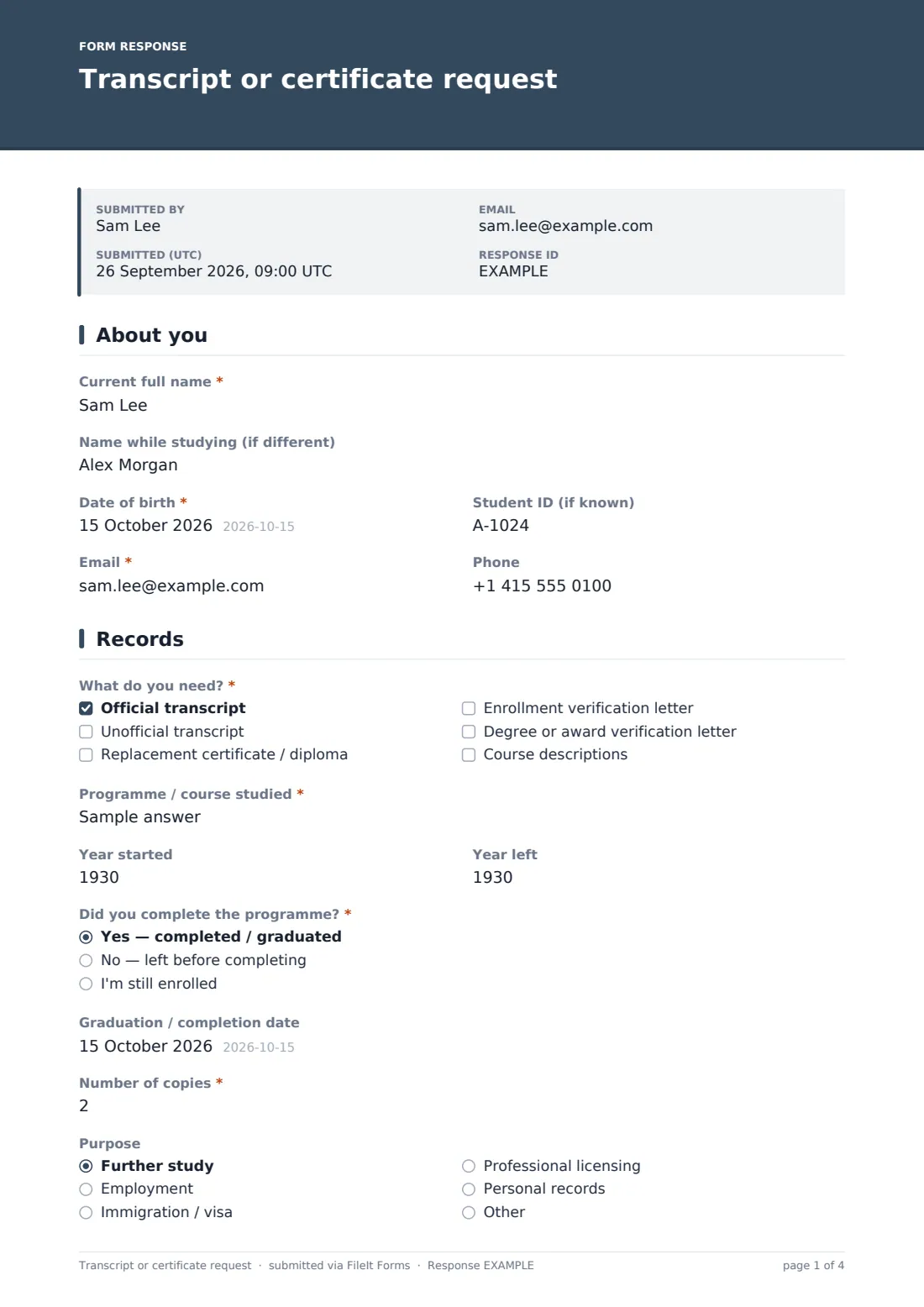
This template collects current and former names, date of birth, student ID, the documents needed, the programme and years attended, whether the programme was completed, the number of copies and purpose, how the records should be delivered, photo ID and proof of a name change, followed by a fee acknowledgement, a signed release and a signature.
Each request becomes a signed PDF in your vault with the ID attached, ready for the records team to process.
- Best for
- Schools, colleges, universities and training providers
- Filled in by
- Former or current students
- Time to complete
- About 5–10 minutes
- Includes
- Delivery options with conditional addresses, ID and name-change uploads, a fee acknowledgement and a signed release
Who uses a transcript or certificate request form?
- Former students needing an official transcript for further study
- Replacement certificates or diplomas after loss or damage
- Enrollment or degree verification letters for employers
- Records for immigration or professional licensing
- Sending transcripts directly to another institution
- Requests from students whose names have changed
Questions on this transcript or certificate request form
25 questions over 4 pages · includes signature, file upload, conditional questions, multiple pages, consent checkbox.
1 About you
- Current full name*
- Name while studying (if different)
- Date of birth*
- Student ID (if known)
- Email*
- Phone
2 Records
- What do you need?* Official transcript · Unofficial transcript · Replacement certificate / diploma · Enrollment verification letter · Degree or award verification letter · Course descriptions
- Programme / course studied*
- Year started
- Year left
- Did you complete the programme?* Yes — completed / graduated · No — left before completing · I'm still enrolled
- Graduation / completion date asked only when it applies
- Number of copies*
- Purpose Further study · Employment · Immigration / visa · Professional licensing · Personal records · Other
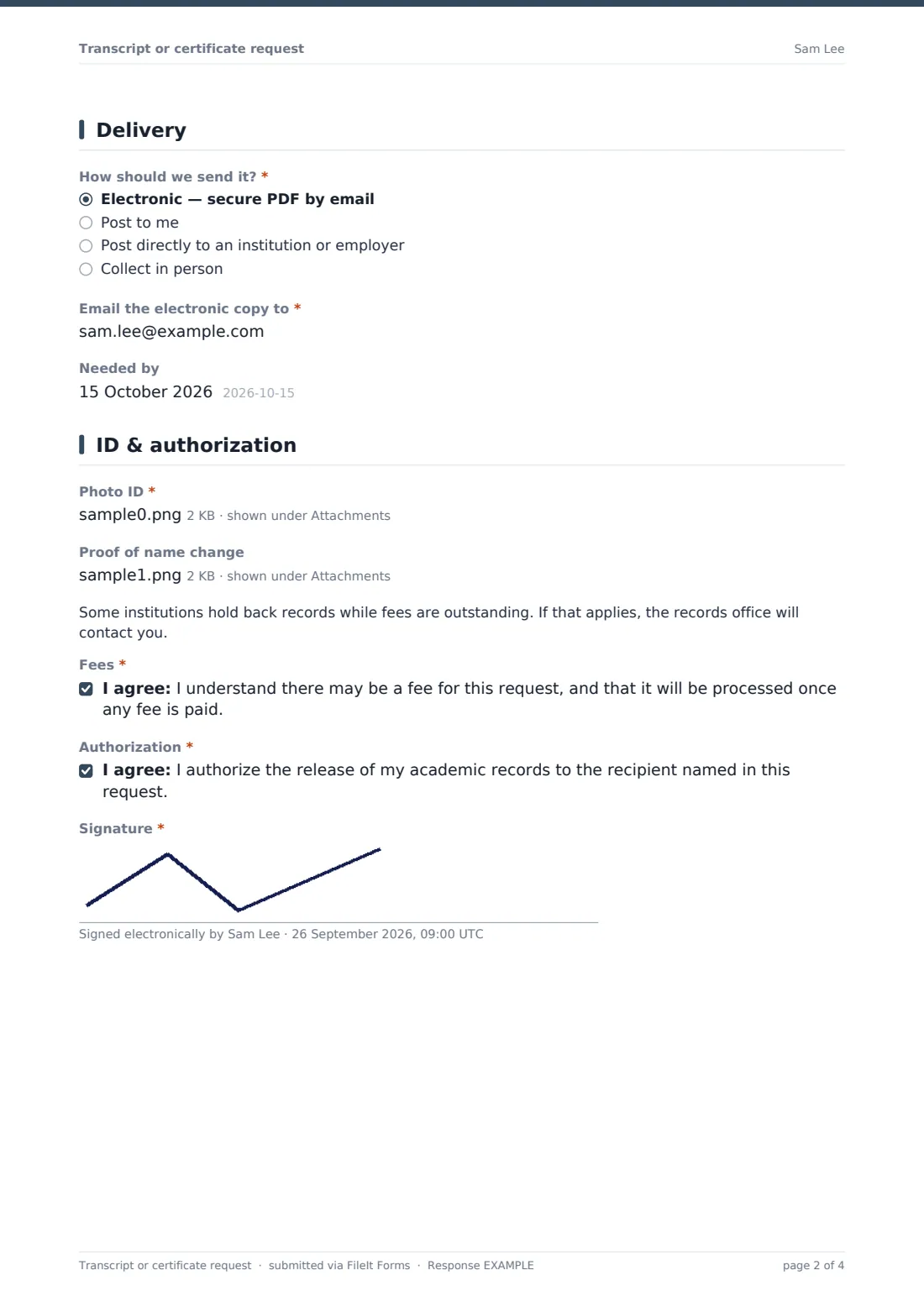
3 Delivery
- How should we send it?* Electronic — secure PDF by email · Post to me · Post directly to an institution or employer · Collect in person
- Email the electronic copy to* asked only when it applies
- Postal address* asked only when it applies
- Recipient organization and department* asked only when it applies
- Recipient's address* asked only when it applies
- Needed by
4 ID & authorization
- Photo ID*
- Proof of name change asked only when it applies
- Fees*
- Authorization*
- Signature*
The transcript or certificate request form, page by page
1 About you
The requester gives their current full name, any name used while studying, date of birth and email, with optional student ID and phone.
2 Records
A required checklist covers official and unofficial transcripts, a replacement certificate or diploma, enrollment or award verification letters and course descriptions. The programme is required, with years started and left. The requester says whether they completed the programme — a yes asks for the completion date — then how many copies they need, and the purpose.
3 Delivery
Requesters choose electronic delivery (which asks for an email), post to themselves (which asks for their address), post to an institution or employer (which asks for the recipient and address) or collection in person (which shows a note about bringing ID and authorizing anyone collecting for them). An optional date records any deadline.
4 ID & authorization
Photo ID is required. If a former name was given, the form asks for proof of the name change. A note explains that some institutions hold back records while fees are outstanding. The requester acknowledges any fee, authorizes release to the recipient named and signs.
Make the template yours
- Add your fees to the cover text or the fee statement
- Remove document types you don't issue
- Add a dropdown of campuses or schools if you hold records for several
- File requests in a folder per month for processing
- Add your records office to notifications
- Change the delivery options to match what you offer
Tips for a better transcript or certificate request form
- Check ID against the record before releasing anything
- Ask requesters for former names — they're the most common reason records can't be found
- Confirm fees before processing
- Send official electronic transcripts only by secure means
- Keep a log of what was sent and where
- Tell requesters about processing times up front
Every response becomes a PDF in your vault
When a request is submitted, FileIt saves it as a signed PDF with the ID and any name-change proof attached and files it in your chosen vault folder. The records team is notified, and the requester can receive a copy.
Records staff typically use the Responses table to work through requests by date and deadline, and the CSV export to log what was sent, where and when.
- Start from this template. It opens in the FileIt Forms designer — change any question, add pages, set the rules for when questions appear.
- Share it. Turn on a public link, or send it to people by email, each with their own link. They don’t need a FileIt account.
- Get the answers as PDFs. Each response is saved as a PDF in the vault folder you choose, with uploaded files attached — and listed in a Responses table you can export to CSV.
Transcript or certificate request form: frequently asked questions
Is this transcript request template free?
Yes. It's included with the Forms app on every FileIt account, including the free plan.
Why does the form ask for photo ID?
So the records office can confirm the requester's identity before releasing records.
Can records be sent straight to another institution?
Yes. Choosing post to an institution or employer asks for the recipient's name and address.
What if the requester's name has changed?
The form asks for the name used while studying and, if one is given, proof of the name change.
Does the form take payment?
No. The requester acknowledges any fee, and you take payment separately.
Do requesters need a FileIt account?
No. They fill in and sign the form from a link without an account.