What is the recommendation letter request form template?
Teachers and professors write a lot of reference letters, often in a rush before the same deadlines. The best letters come from specific details, but those details usually arrive scattered across emails — or not at all.
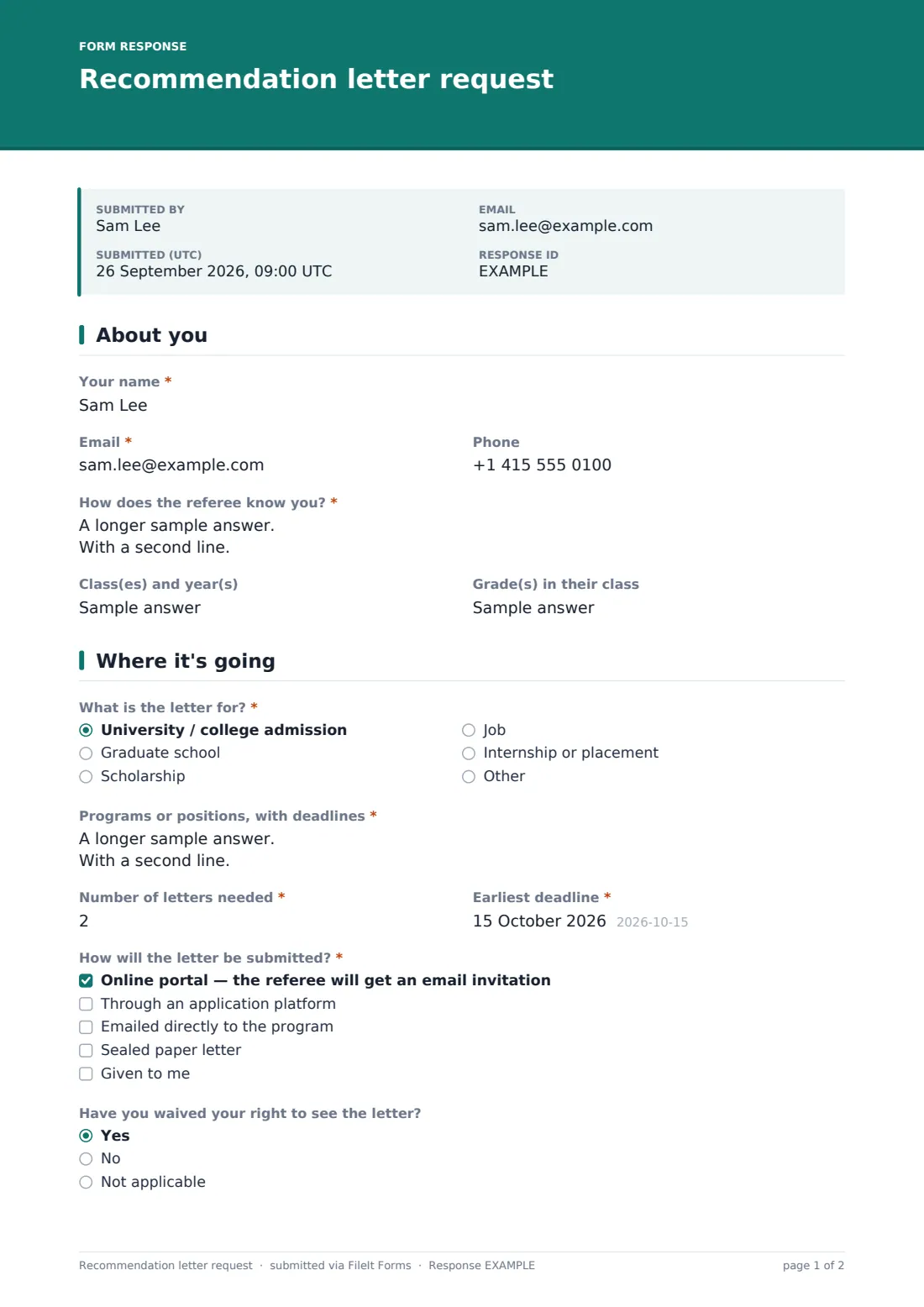
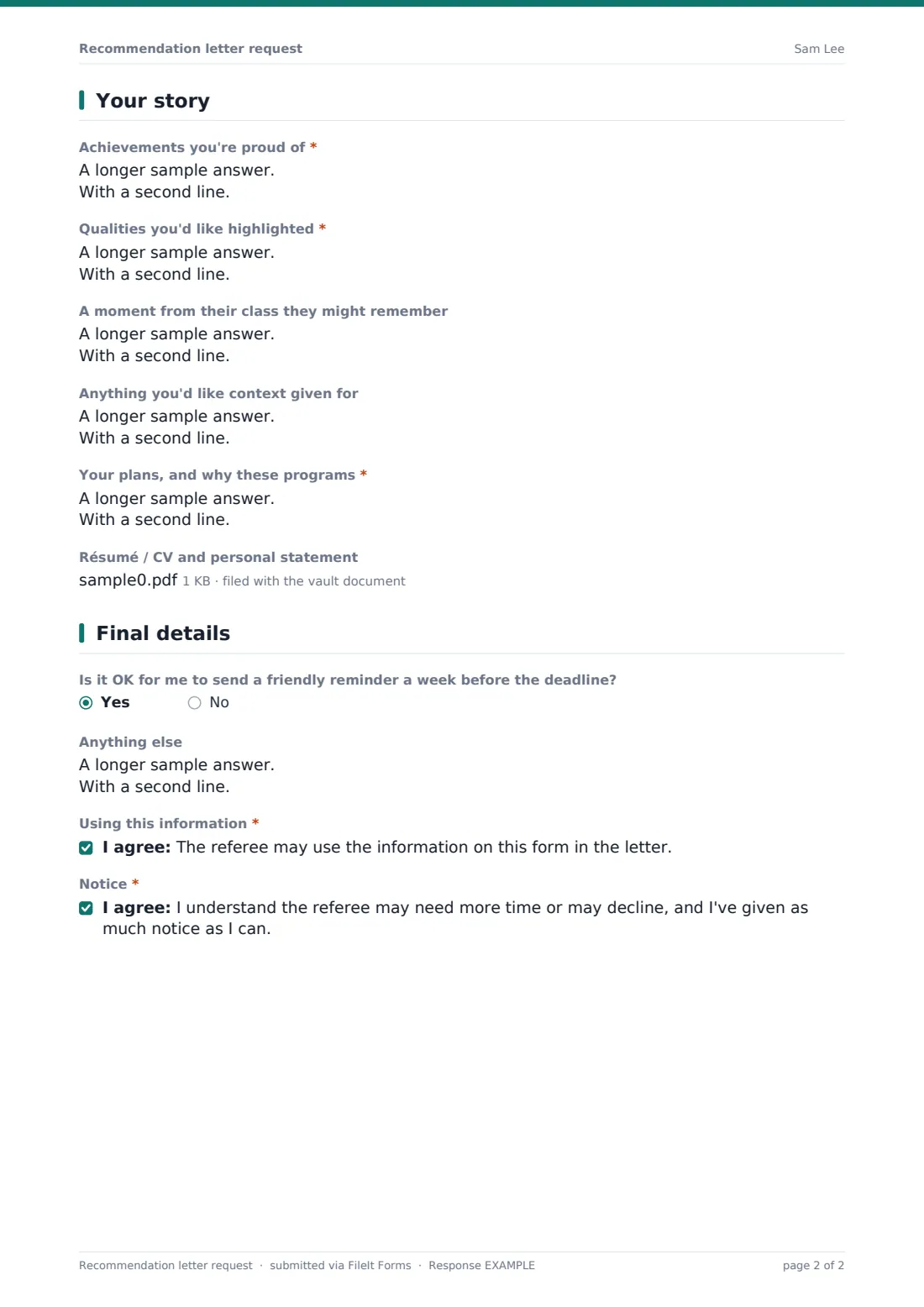
This template works like a brag sheet with the logistics built in: how the student knows the referee, what the letter is for, which programs or positions and their deadlines, how many letters, how they'll be submitted, and whether the student has waived their right to see it. Then come achievements, qualities to highlight, a memorable moment, any context, goals, and a CV or personal statement upload.
Each request becomes a PDF in your vault so you have everything in one place when you sit down to write.
- Best for
- Teachers, school counselors, professors and supervisors
- Filled in by
- Students asking for a reference
- Time to complete
- About 10–15 minutes
- Includes
- Deadline and submission details, a brag-sheet section, CV upload and two acknowledgements
Who uses a recommendation letter request form?
- High school students applying to college or university
- Graduate school applications that need faculty letters
- Scholarship applications
- Job and internship references
- School counselors collecting information for many students at once
- Keeping a record of letters written each season
Questions on this recommendation letter request form
22 questions over 4 pages · includes file upload, multiple pages, consent checkbox.
1 About you
- Your name*
- Email*
- Phone
- How does the referee know you?*
- Class(es) and year(s)
- Grade(s) in their class
2 Where it's going
- What is the letter for?* University / college admission · Graduate school · Scholarship · Job · Internship or placement
- Programs or positions, with deadlines*
- Number of letters needed*
- Earliest deadline*
- How will the letter be submitted?* Online portal — the referee will get an email invitation · Through an application platform · Emailed directly to the program · Sealed paper letter · Given to me
- Have you waived your right to see the letter? Yes · No · Not applicable
3 Your story
- Achievements you're proud of*
- Qualities you'd like highlighted*
- A moment from their class they might remember
- Anything you'd like context given for
- Your plans, and why these programs*
- Résumé / CV and personal statement
4 Final details
- Is it OK for me to send a friendly reminder a week before the deadline?
- Anything else
- Using this information*
- Notice*
The recommendation letter request form, page by page
1 About you
The student gives their name and email (phone optional) and explains how the referee knows them. Optional fields cover the classes and years and the grades in the referee's class.
2 Where it's going
The student says what the letter is for — university, graduate school, scholarship, job, internship or something else — and lists the programs or positions with their deadlines. The number of letters, earliest deadline and how the letter will be submitted are required: an online portal invitation, an application platform, email, a sealed paper letter or given to the student. An optional question records whether they've waived the right to see the letter.
3 Your story
Required boxes cover achievements, qualities to highlight and the student's plans and reasons for applying. Optional boxes invite a memorable moment from the referee's class and any context they'd like given, such as a dip in grades. A résumé, CV or personal statement can be uploaded.
4 Final details
The student says whether a reminder a week before the deadline is OK and adds anything else. Two acknowledgements confirm the referee may use the information in the letter and that the referee may need more time or decline.
Make the template yours
- Add your own notice period to the cover text
- Add questions specific to your subject or role
- Set up separate forms for college and job references
- File requests in a folder per application season
- Close the form after your last deadline for the year
- Remove the waiver question for job references
Tips for a better recommendation letter request form
- Ask students to submit well before the earliest deadline
- Check the submission method — portal invitations often go to spam
- Use the memorable moment prompt — it's often the best line in a letter
- Keep a copy of each letter you write alongside the request
- Reuse the same request for multiple letters to the same kind of program
- Be honest with students if you can't write a strong letter
Every response becomes a PDF in your vault
When a student submits, FileIt saves the request as a PDF with any uploaded CV and files it in your chosen vault folder. You're notified, and the student can receive a PDF copy.
Many teachers sort requests by earliest deadline in the Responses table and work through them in order, keeping the PDF open while they write.
- Start from this template. It opens in the FileIt Forms designer — change any question, add pages, set the rules for when questions appear.
- Share it. Turn on a public link, or send it to people by email, each with their own link. They don’t need a FileIt account.
- Get the answers as PDFs. Each response is saved as a PDF in the vault folder you choose, with uploaded files attached — and listed in a Responses table you can export to CSV.
Recommendation letter request form: frequently asked questions
Is this recommendation letter request template free?
Yes. It's included with the Forms app on every FileIt account, including the free plan.
Can students upload a CV or personal statement?
Yes. Up to three files — PDFs or Word documents.
Does the form send the letter?
No. It gathers what you need to write the letter. You submit it by the method the student chose.
What does waiving the right to see the letter mean?
Some application systems ask students whether they waive their right to read the letter. The form records their answer so you know.
Can I see deadlines at a glance?
Yes. The earliest deadline is a date field you can sort by in the Responses table.
Do students need a FileIt account?
No. They fill in the form from a link without an account.