What is the order form form template?
Taking orders by phone or email means retyping details, misreading handwriting, and hoping nobody forgets to mention a delivery instruction. This template gives customers a structured way to list what they want to order — up to four items, or a full list attached as a file — along with delivery preferences and billing details, without ever asking for card details on the form itself.
That last point matters: this is an order request, not a checkout. It's built for businesses that confirm availability and pricing before taking payment, whether that's a small wholesaler, a shop that also sells by request, or a service business collecting a purchase order number from a business customer.
Every submitted order becomes a PDF filed automatically in your FileIt vault, so nothing is scribbled on a notepad and lost — you have a complete, dated record of exactly what was ordered, by whom, before you ever pick up the phone to confirm it.
- Best for
- Small shops, wholesalers and service businesses taking orders before invoicing
- Filled in by
- Customers, whether ordering for themselves or on behalf of a business
- Time to complete
- About 3-5 minutes for a typical order
- Includes
- Up to four line items that expand as needed, a file upload for longer lists, and delivery or collection options
Who uses a order form form?
- A small wholesaler taking repeat orders from regular retail customers
- A print or craft business collecting product, size and colour options before confirming a quote
- A local shop offering online ordering for collection or local delivery
- A B2B supplier collecting a customer's purchase order number alongside the order itself
- A caterer or bakery taking custom orders that don't fit a standard e-commerce checkout
- Any business that wants to confirm stock and pricing before taking payment, rather than processing a card automatically
Questions on this order form form
31 questions over 3 pages · includes file upload, conditional questions, multiple pages, consent checkbox.
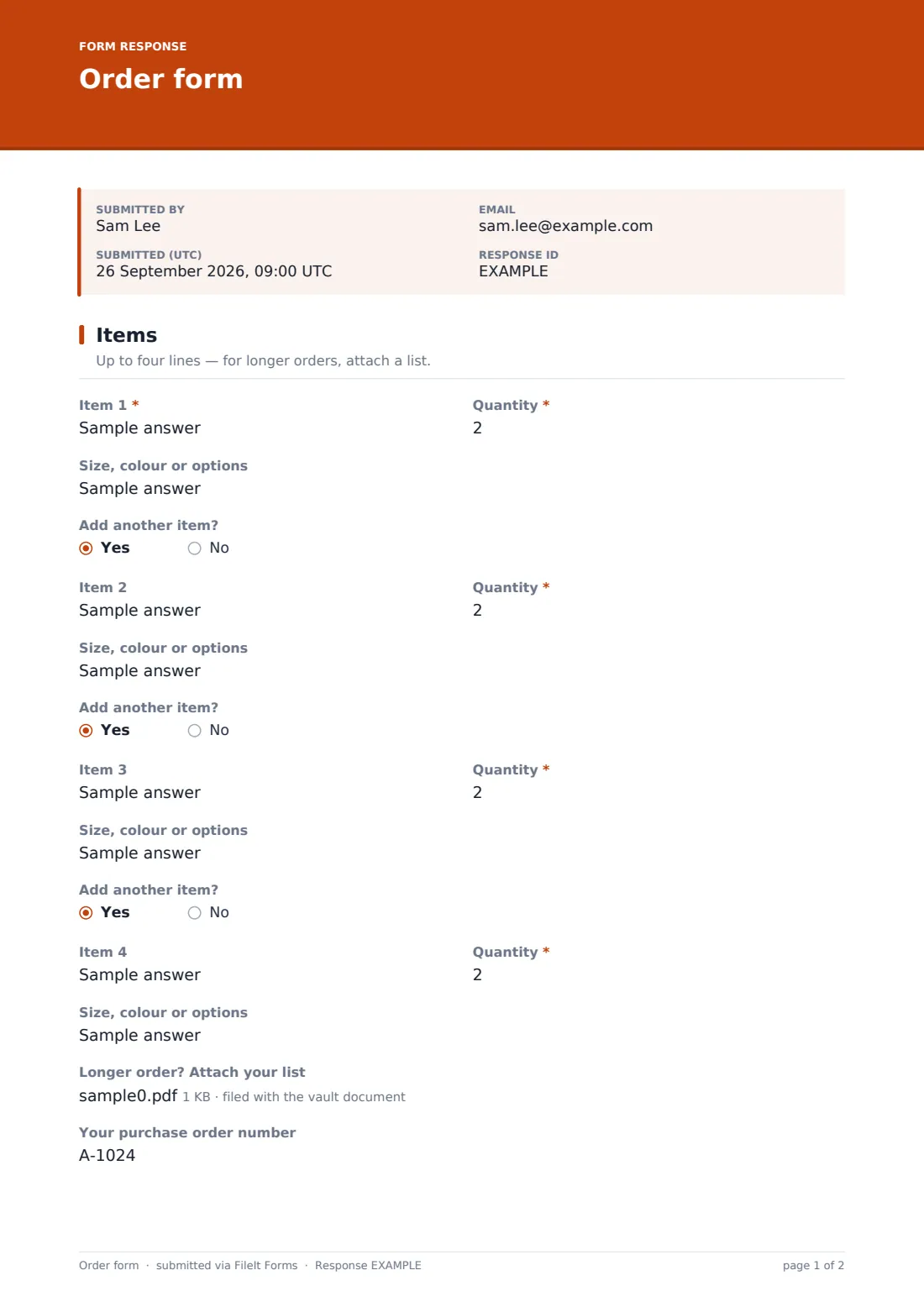
1 Items
- Item 1*
- Quantity*
- Size, colour or options asked only when it applies
- Add another item? asked only when it applies
- Item 2 asked only when it applies
- Quantity* asked only when it applies
- Size, colour or options asked only when it applies
- Add another item? asked only when it applies
- Item 3 asked only when it applies
- Quantity* asked only when it applies
- Size, colour or options asked only when it applies
- Add another item? asked only when it applies
- Item 4 asked only when it applies
- Quantity* asked only when it applies
- Size, colour or options asked only when it applies
- Longer order? Attach your list
- Your purchase order number
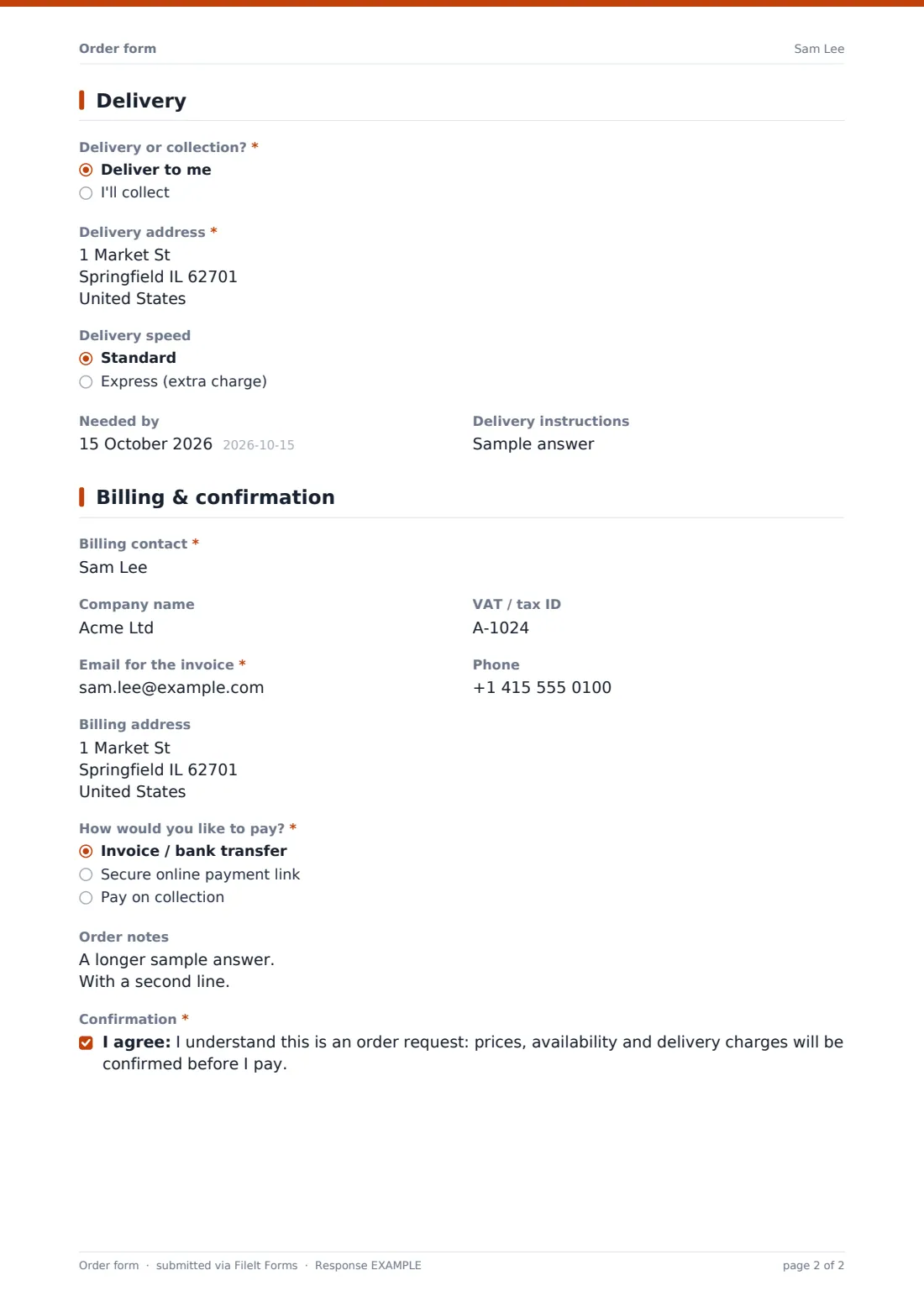
2 Delivery
- Delivery or collection?* Deliver to me · I'll collect
- Delivery address* asked only when it applies
- Delivery speed asked only when it applies Standard · Express (extra charge)
- Needed by
- Delivery instructions asked only when it applies
3 Billing & confirmation
- Billing contact*
- Company name
- VAT / tax ID asked only when it applies
- Email for the invoice*
- Phone
- Billing address
- How would you like to pay?* Invoice / bank transfer · Secure online payment link · Pay on collection
- Order notes
- Confirmation*
The order form form, page by page
1 Items
The order starts with Item 1 — product name or code, quantity, and any size, colour or option notes. Once the first item is filled in, an Add another item? question appears, revealing Item 2 if answered yes, and so on up to four items total, each with its own quantity and options field. For anything longer, a file upload lets the customer attach their own list instead of typing everything into the form, and an optional Your purchase order number field is included for business customers who track orders that way.
2 Delivery
Customers choose Delivery or collection?. Choosing delivery reveals a full delivery address, a Delivery speed choice between standard and express, and a space for delivery instructions like a gate code or reception note. A Needed by date is asked either way, so time-sensitive orders don't get missed.
3 Billing & confirmation
The final page collects a Billing contact, optional Company name and VAT / tax ID for business invoices, Email for the invoice, Phone, and a billing address if it's different from delivery. Customers choose how they'd like to pay — invoice / bank transfer, a secure payment link, or pay on collection — before confirming they understand this is an order request: prices, availability and delivery charges will be confirmed before they pay.
Make the template yours
- Increase the number of line items beyond four if your typical order is usually longer
- Add a required field for a discount code or account number if you offer trade pricing
- Turn off the collection option if your business only ever delivers, or vice versa
- Set the document title to include the customer's name and order date so orders are easy to find and reference later
- File orders by customer or by order date, depending on how you like to organise your vault
- Add your own payment methods to the radio options if you offer something the default list doesn't cover
Tips for a better order form form
- Confirm stock and pricing quickly after an order comes in — customers expect a fast response even though this isn't an instant checkout
- Encourage customers with long or complex orders to use the file upload rather than cramming everything into four line items
- Ask for a purchase order number up front if you regularly deal with business customers who need one on the invoice
- Keep delivery instructions visible to whoever is packing or dispatching the order, not just in the confirmation email
- Set a clear needed-by expectation in your confirmation message if you can't always meet a customer's requested date
Every response becomes a PDF in your vault
Once a customer submits their order, FileIt turns it into a PDF and files it in your vault, and you get an email notification straight away. If you've enabled it, the customer also receives their own PDF copy, so there's a shared, unambiguous record of exactly what was requested before any money changes hands.
Most businesses use the Responses table to work through new orders in the order they arrive, checking stock and pricing before sending an invoice or payment link. Because every order is saved with its own PDF, it's simple to pull one up later if a customer asks what exactly they ordered, or to export the whole list to CSV for bulk processing.
- Start from this template. It opens in the FileIt Forms designer — change any question, add pages, set the rules for when questions appear.
- Share it. Turn on a public link, or send it to people by email, each with their own link. They don’t need a FileIt account.
- Get the answers as PDFs. Each response is saved as a PDF in the vault folder you choose, with uploaded files attached — and listed in a Responses table you can export to CSV.
Order form form: frequently asked questions
Is this order form template free?
Yes, it's included in FileIt's Forms app on every account, including the free plan, and every field can be edited.
Does the customer need a FileIt account to place an order?
No. You share the form as a public link or send it directly to a customer, and they submit their order without creating an account.
Does this form take payment?
No — this is an order request only. It never asks for card details; you confirm availability and pricing, then send an invoice or a separate secure payment link.
Do we get a record of every order?
Yes, each submission is automatically saved as a PDF in your FileIt vault, and all orders are also visible and exportable from the Responses table.
Can customers order more than four items?
Yes — the form includes a file upload specifically for longer order lists, so customers aren't limited to the four built-in line items.
Can this be used for business customers who need a purchase order number?
Yes, there's a dedicated field for a purchase order number, along with company name and VAT/tax ID fields for business invoicing.
Can we offer both delivery and collection?
Yes, the customer chooses between delivery and collection, and the delivery address and instructions only appear when delivery is selected.
Is the order automatically confirmed?
No — the form makes clear this is a request, and the customer confirms they understand prices, availability and delivery charges will be confirmed before they pay.