What is the one-on-one meeting notes form template?
Regular one-on-ones are one of the most useful habits a manager can have. Their value leaks away, though, when the notes live in a private notebook or nowhere at all. Actions get forgotten, the same blocker comes up three weeks running, and at review time nobody can remember what was said in March.
This template gives every one-on-one the same shape. It covers how the team member is feeling, wins, priorities, blockers and whatever else came up. Feedback is captured in both directions, and the meeting closes with clear action items and a date for the next one. Either the manager or the team member can fill it in, and both confirm the notes are shared.
Each submission is filed in your FileIt vault as a dated PDF. Over months, that builds a history of the working relationship you can scroll back through before a review or a difficult conversation.
- Best for
- Managers running weekly, fortnightly or monthly one-on-ones with their team
- Filled in by
- The manager or the team member, during or right after the meeting
- Time to complete
- About 5-10 minutes
- Includes
- A how-are-you-feeling scale, two-way feedback fields and structured action items
Who uses a one-on-one meeting notes form?
- A new manager building a steady one-on-one habit with each direct report
- A team that wants one-on-one actions written down rather than remembered
- An organisation asking managers to keep a light record of regular check-ins
- A remote team where one-on-ones are the main regular contact between manager and report
- Keeping track of career-development conversations between formal reviews
- Preparing for a performance review by looking back over months of one-on-one notes
Questions on this one-on-one meeting notes form
23 questions over 4 pages · includes conditional questions, multiple pages, consent checkbox, ratings.
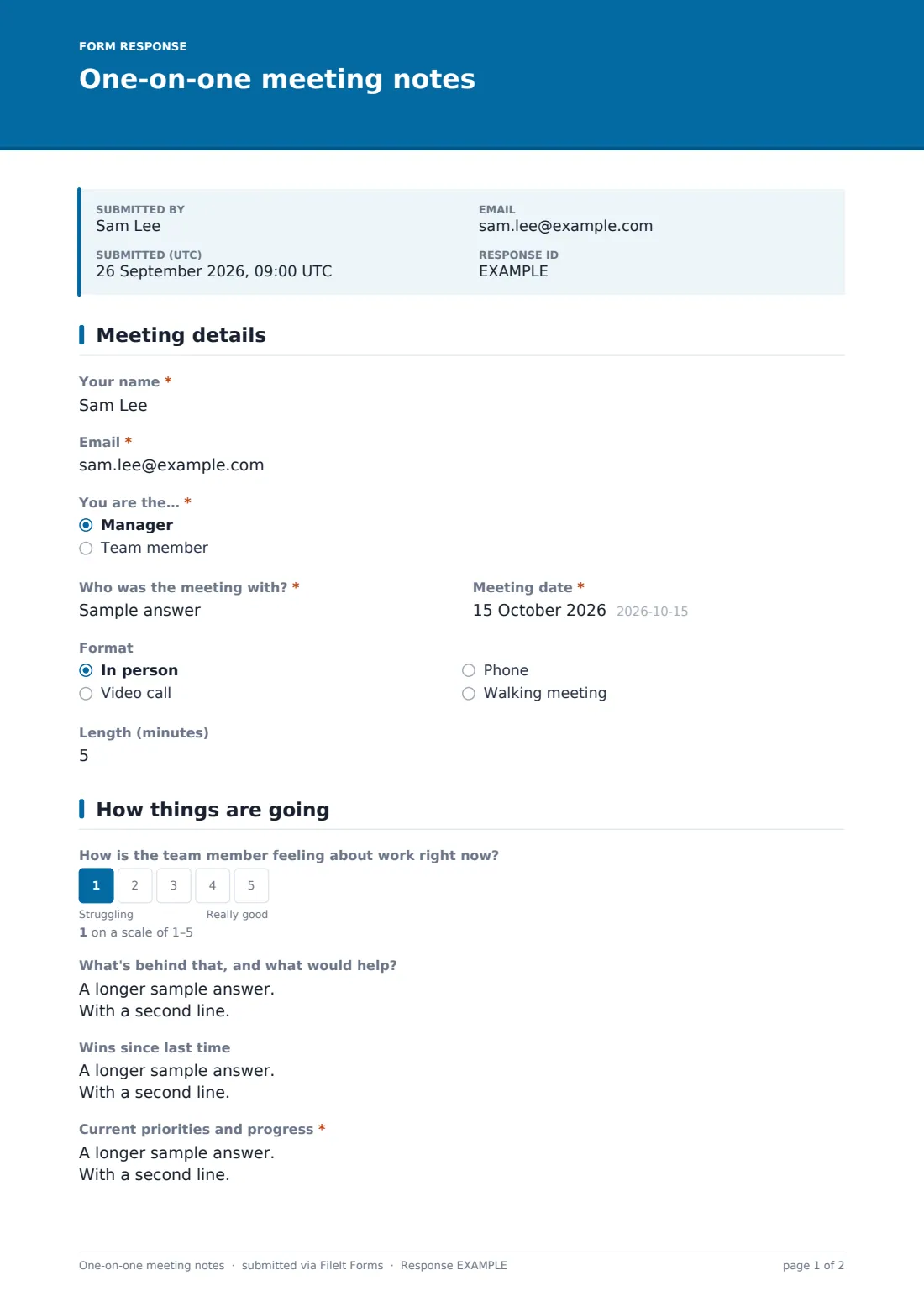
1 Meeting details
- Your name*
- Email*
- You are the…* Manager · Team member
- Who was the meeting with?*
- Meeting date*
- Format In person · Video call · Phone · Walking meeting
- Length (minutes)
2 How things are going
- How is the team member feeling about work right now?
- What's behind that, and what would help? asked only when it applies
- Wins since last time
- Current priorities and progress*
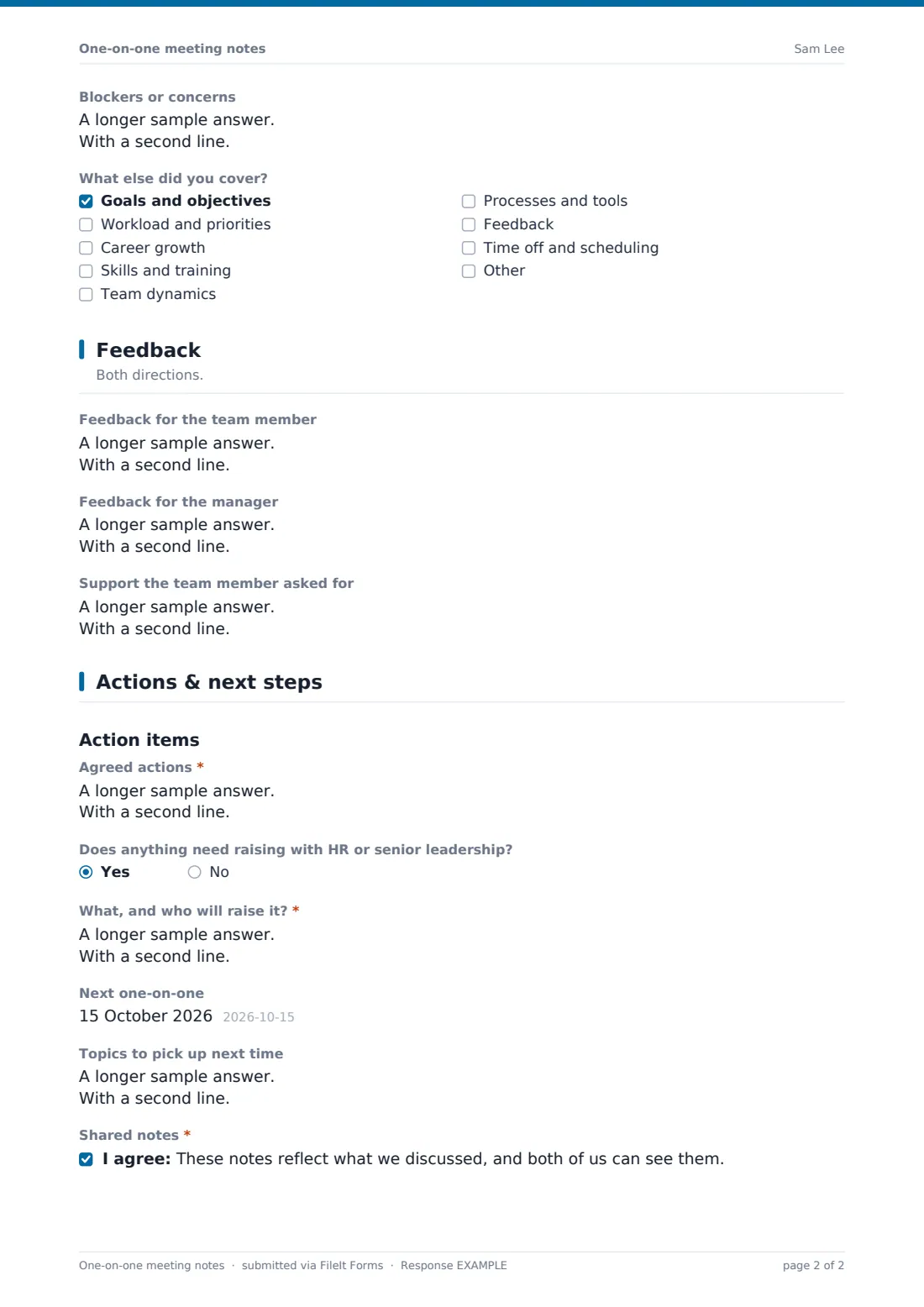
- Blockers or concerns
- What else did you cover? Goals and objectives · Workload and priorities · Career growth · Skills and training · Team dynamics · Processes and tools · Feedback · Time off and scheduling
- Career and development notes asked only when it applies
3 Feedback
- Feedback for the team member
- Feedback for the manager
- Support the team member asked for
4 Actions & next steps
- Agreed actions*
- Does anything need raising with HR or senior leadership?
- What, and who will raise it?* asked only when it applies
- Next one-on-one
- Topics to pick up next time
- Shared notes*
The one-on-one meeting notes form, page by page
1 Meeting details
The person recording gives their name and email and says whether they're the manager or the team member. They add who the meeting was with, the Meeting date, the Format (in person, video, phone or a walking meeting) and its length in minutes.
2 How things are going
A 1-5 scale asks how the team member is feeling about work. Anything below 3 opens a follow-up asking what's behind it and what would help, with a reminder to keep sensitive health details out of the notes. Then come Wins since last time, a required Current priorities and progress, and Blockers or concerns. A checklist records other topics covered, such as goals, workload, career growth, skills, team dynamics, processes, feedback and time off. Ticking career growth opens a notes field for it.
3 Feedback
Three optional fields capture feedback for the team member, feedback for the manager, and any support the team member asked for. The help text nudges towards specific, behaviour-based feedback rather than general impressions.
4 Actions & next steps
Agreed actions are required, one per line with what, who and by when. If anything needs raising with HR or senior leadership, the form asks what it is and who will raise it. It closes with the date of the next one-on-one, topics to pick up then, and a confirmation that the notes reflect the discussion and are shared.
Make the template yours
- Add your team's standing agenda items as extra questions so they come up every time
- Require respondents' name and email in the form settings so every set of notes is tied to whoever recorded it
- File each person's one-on-ones in their own vault folder to keep a running history
- Add the team member's email to notifications so they get a copy of the manager's notes automatically
- Trim the form to wins, blockers and actions for a quick weekly check-in, and keep the full version for monthly ones
- Remove the wellbeing scale if your organisation handles wellbeing through a separate check-in
Tips for a better one-on-one meeting notes form
- Let the team member own the agenda. It's their meeting as much as yours
- Start each one-on-one by reviewing last time's action items before anything new
- Keep notes factual and brief, and write nothing you wouldn't be comfortable with the other person reading
- Use the feedback-for-the-manager field and act on what comes up. People stop giving upward feedback that goes nowhere
- Protect the slot. A one-on-one that keeps getting cancelled tells people where they rank
Every response becomes a PDF in your vault
When the notes are submitted, FileIt saves them as a PDF in your vault and emails the form owner. The person who filled it in gets a copy too, so both people leave with the same list of actions.
Because every one-on-one is dated and filed, you can see a person's run of meetings in the Responses table or in their vault folder. That makes it easy to spot a blocker that keeps coming back, or to gather examples before a performance review.
- Start from this template. It opens in the FileIt Forms designer — change any question, add pages, set the rules for when questions appear.
- Share it. Turn on a public link, or send it to people by email, each with their own link. They don’t need a FileIt account.
- Get the answers as PDFs. Each response is saved as a PDF in the vault folder you choose, with uploaded files attached — and listed in a Responses table you can export to CSV.
One-on-one meeting notes form: frequently asked questions
Is this one-on-one meeting template free?
Yes. It's included in FileIt's Forms app on every account, including the free plan, and every question can be edited.
Do both people need a FileIt account?
No. The form is shared as a link. Whoever records the meeting fills it in and submits it without an account.
Who should fill in the notes, the manager or the team member?
Either. The form asks who is recording, so teams can decide what works for them. Some managers have the team member take notes to build ownership.
Can we record sensitive wellbeing issues here?
The form asks only how the person is feeling and what would help, and reminds you to keep sensitive health details out. Anything confidential is better handled through HR's own process.
How do we track action items between meetings?
Actions are listed one per line with an owner and date. Open the previous PDF at the start of the next one-on-one to review them.
Can I see all one-on-ones with one person?
Yes. Filter the Responses table by name, or file each person's notes into their own vault folder.