What is the nonconformance report form template?
A nonconformance report is the starting point for sorting out a quality problem: what was supposed to happen, what actually happened, how much is affected, and what will be done with it. When NCRs are half-filled paper forms or a line in a spreadsheet, the key facts — the exact requirement, the quantity, the containment — often go missing.
This template puts the NCR in a clear order: where the problem was found and what it relates to, the requirement set against what was found, quantities and severity, then containment, disposition and whether a corrective action is needed. Use as is asks for a concession reference, and customer-found problems ask for the complaint reference.
Each NCR is saved as a signed PDF in your FileIt vault with photos and measurement records attached, building up the documented history that quality management systems generally expect you to keep.
- Best for
- Manufacturers, engineering firms, labs and any team running a quality management system
- Filled in by
- Inspectors, operators or quality staff who find the problem
- Time to complete
- About 6–10 minutes
- Includes
- Requirement vs. finding, severity with a critical alert, containment, six disposition options, CAPA link, signature
Who uses a nonconformance report form?
- An inspector rejecting parts at incoming inspection
- An operator stopping a batch that's out of tolerance
- Recording a customer complaint as a formal nonconformance
- Logging a procedure that wasn't followed, found at internal audit
- Documenting a use-as-is decision with its concession reference
- Building a record of scrap and rework costs by supplier or part
Questions on this nonconformance report form
32 questions over 4 pages · includes signature, file upload, conditional questions, multiple pages.
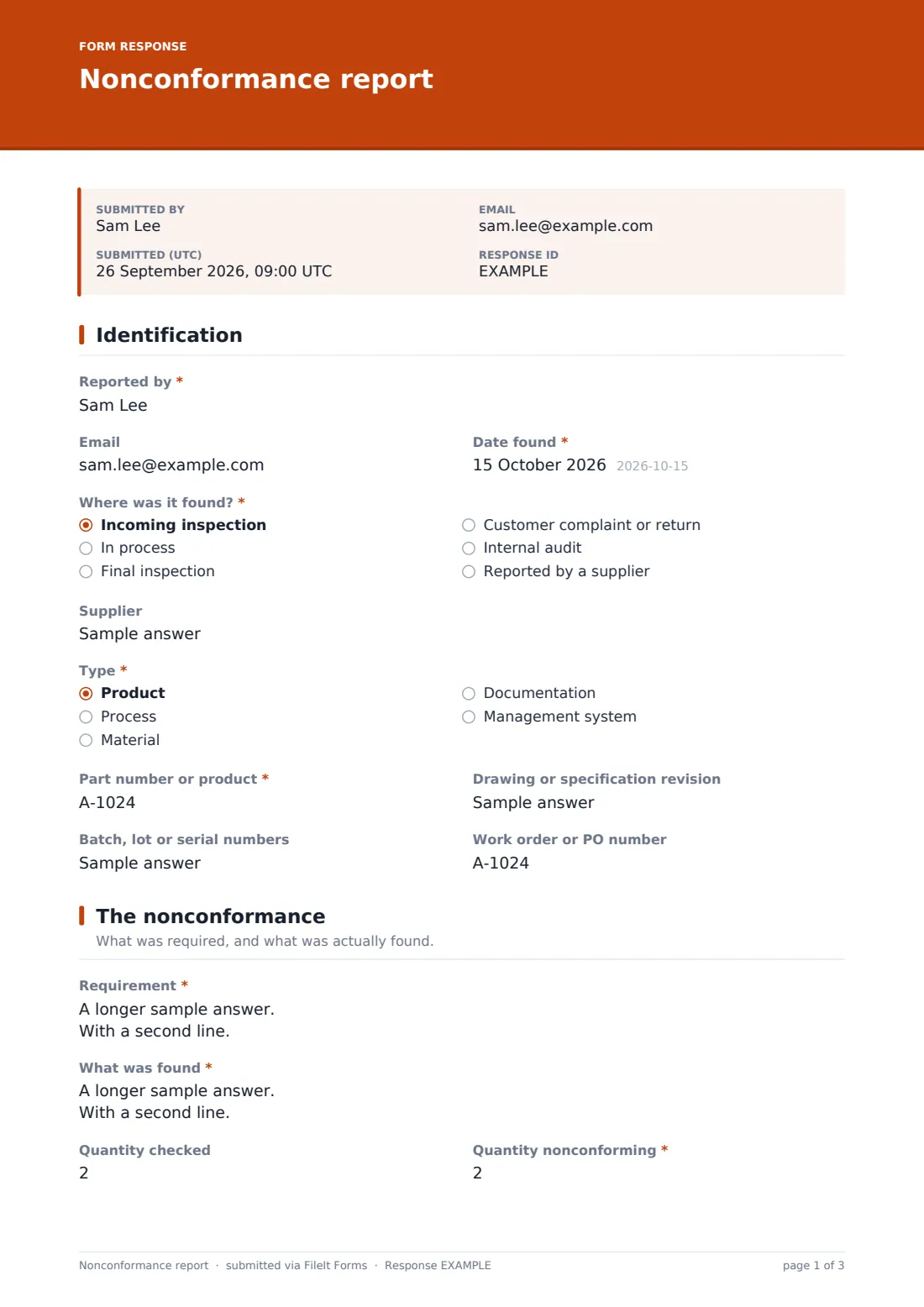
1 Identification
- Reported by*
- Date found*
- Where was it found?* Incoming inspection · In process · Final inspection · Customer complaint or return · Internal audit · Reported by a supplier
- Customer and complaint reference* asked only when it applies
- Supplier
- Type* Product · Process · Material · Documentation · Management system
- Part number or product*
- Drawing or specification revision
- Batch, lot or serial numbers
- Work order or PO number
2 The nonconformance
- Requirement*
- What was found*
- Quantity checked
- Quantity nonconforming*
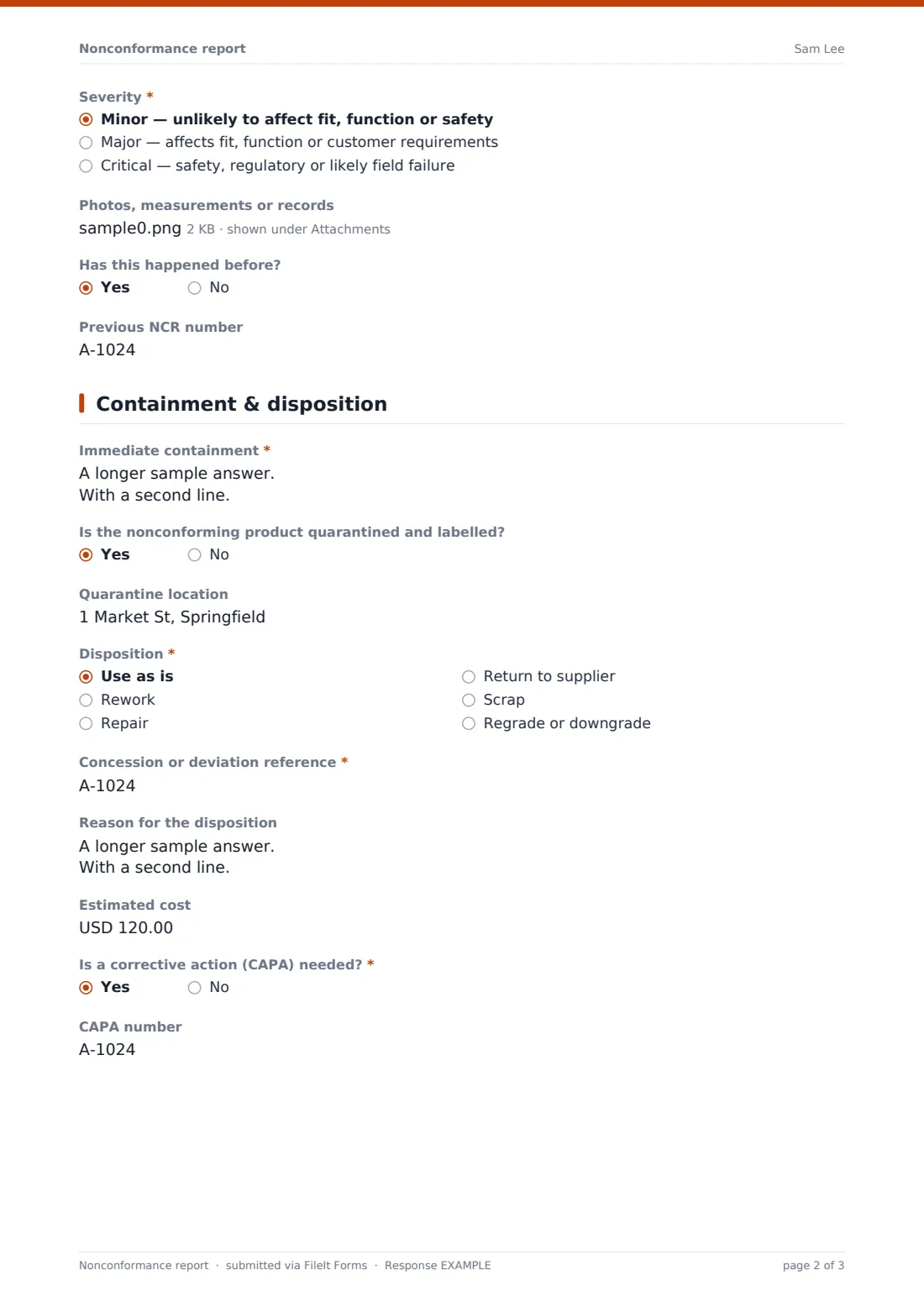
- Severity* Minor — unlikely to affect fit, function or safety · Major — affects fit, function or customer requirements · Critical — safety, regulatory or likely field failure
- Photos, measurements or records
- Has this happened before?
- Previous NCR number asked only when it applies
3 Containment & disposition
- Immediate containment*
- Is the nonconforming product quarantined and labelled?
- Quarantine location asked only when it applies
- Disposition* Use as is · Rework · Repair · Return to supplier · Scrap · Regrade or downgrade
- Concession or deviation reference* asked only when it applies
- Reason for the disposition
- Estimated cost
- Is a corrective action (CAPA) needed?*
- CAPA number asked only when it applies
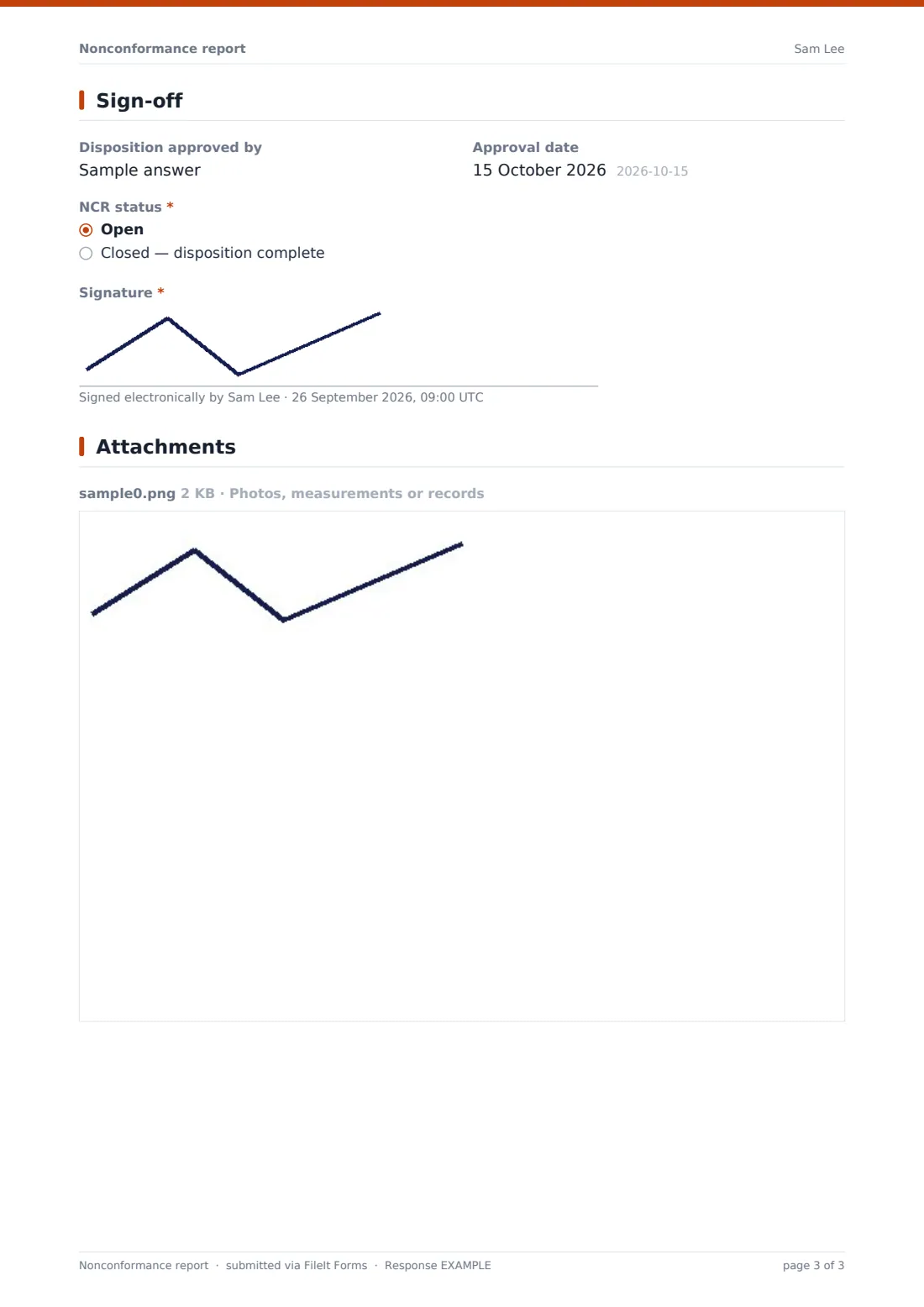
4 Sign-off
- Disposition approved by
- Approval date
- NCR status* Open · Closed — disposition complete
- Signature*
The nonconformance report form, page by page
1 Identification
The reporter gives their name, email and the date found, then where it was found: incoming inspection, in process, final inspection, customer complaint or return, internal audit, or reported by a supplier. Customer-found problems ask for the customer and complaint reference.
The NCR is then tied to its subject: the supplier if relevant, the type (product, process, material, documentation or management system), part number, drawing revision, batch or serial numbers, and work order or PO.
2 The nonconformance
Two required boxes sit at the heart of the NCR: the Requirement, as the specification, drawing or procedure states it, and What was found. Quantities checked and nonconforming come next, then a severity from minor to critical — choosing critical shows a reminder to stop processing or shipment and tell the quality lead. Photos, measurements or records can be attached, and repeat problems ask for the previous NCR number.
3 Containment & disposition
The immediate containment actions are required, along with whether the product is quarantined and where. The disposition is chosen from use as is, rework, repair, return to supplier, scrap, or regrade. Use as is asks for the concession or deviation reference. The reason for the disposition, an estimated cost and whether a CAPA is needed (with its number) complete the page.
4 Sign-off
The form records who approved the disposition and when, whether the NCR is open or closed, and the reporter's signature.
Make the template yours
- Add your own severity definitions or a risk rating that matches your quality manual
- Replace the free-text part number with a dropdown of your products
- Add a cost breakdown (scrap, rework, sorting, freight) if you track cost of poor quality
- Add your quality manager to the notification emails
- Add a supplier response section for supplier-caused NCRs
- Change the currency on the cost field
Tips for a better nonconformance report form
- Quote the requirement exactly, including the drawing or document revision
- Describe what was found with measurements, not opinions
- Contain first, then investigate — check stock, WIP and shipped goods
- Get a documented concession before using nonconforming product as is
- Raise a CAPA for repeat or critical problems rather than just fixing the batch
- Review NCRs by part and supplier regularly to find patterns
Every response becomes a PDF in your vault
Each NCR is saved as a signed PDF in your chosen vault folder, with photos and records attached, and the form owner is notified by email so quality can review the disposition.
The Responses table lets you filter NCRs by source, severity, disposition or status and export them to CSV for trend analysis or management review. If a CAPA is needed, the corrective action request template carries the investigation forward.
- Start from this template. It opens in the FileIt Forms designer — change any question, add pages, set the rules for when questions appear.
- Share it. Turn on a public link, or send it to people by email, each with their own link. They don’t need a FileIt account.
- Get the answers as PDFs. Each response is saved as a PDF in the vault folder you choose, with uploaded files attached — and listed in a Responses table you can export to CSV.
Nonconformance report form: frequently asked questions
Is this nonconformance report template free?
Yes. It's included in the FileIt Forms app on every account, including the free plan.
Does this NCR form make us ISO 9001 compliant?
No form can do that on its own. It gives you a structured, dated record of nonconformances and their disposition. How you use it within your quality system is up to you and your auditor.
Can we link an NCR to a corrective action?
Yes. The form asks whether a CAPA is needed and records its number. Pair it with the corrective action request template for the investigation.
What happens when we choose "Use as is"?
The form requires a concession or deviation reference, so the approval to use nonconforming product is recorded.
Can we attach measurement data?
Yes. The upload accepts photos, PDFs and spreadsheets, up to six files.
Do operators need a FileIt account?
No. Anyone with the form's link can raise an NCR, from a phone or a shop-floor terminal.
Can we close an NCR later?
Each submission is a fixed record. Many teams submit when the disposition is decided, or submit a second record when it's closed and keep both in the vault.
Can we track the cost of nonconformances?
There's an optional estimated cost field. Export the Responses table to CSV to total costs by part, supplier or month.