What is the mortgage pre-qualification form template?
Before a broker can say what a client might borrow, they need the same handful of facts every time: who's applying, what they earn, what they already owe, whether their credit history has any blemishes, and how big a deposit they have. This template gathers all of it in one sitting, so the first call can be about options rather than questions.
The form adapts as the client answers. A joint application opens fields for the second applicant's name, email and income; self-employed clients are asked how many years of accounts they have; a remortgage asks for the current balance instead of where they are in the buying process; and saying yes to past credit problems opens a box for details, with a reassurance that it doesn't rule them out.
Every submission is saved as a PDF in your FileIt vault together with any payslips or statements the client uploads, so the enquiry and its paperwork sit in one place ready for a full application.
- Best for
- Mortgage brokers, advisers and lenders qualifying new enquiries
- Filled in by
- The prospective borrower, on behalf of one or two applicants
- Time to complete
- About 10 minutes
- Includes
- Joint-applicant and self-employed branches, credit history, deposit sources, optional document upload and consent
Who uses a mortgage pre-qualification form?
- A broker sending a link to every new enquiry before the first phone call
- First-time buyers checking what they could borrow before house hunting
- Homeowners looking to remortgage when a fixed rate is ending
- Buy-to-let investors outlining a new purchase
- Estate agents passing buyer leads to a partner broker with the basics already captured
- Couples or family members applying jointly
- Self-employed clients who need a lender comfortable with their income type
Questions on this mortgage pre-qualification form
40 questions over 5 pages · includes file upload, conditional questions, multiple pages, consent checkbox.
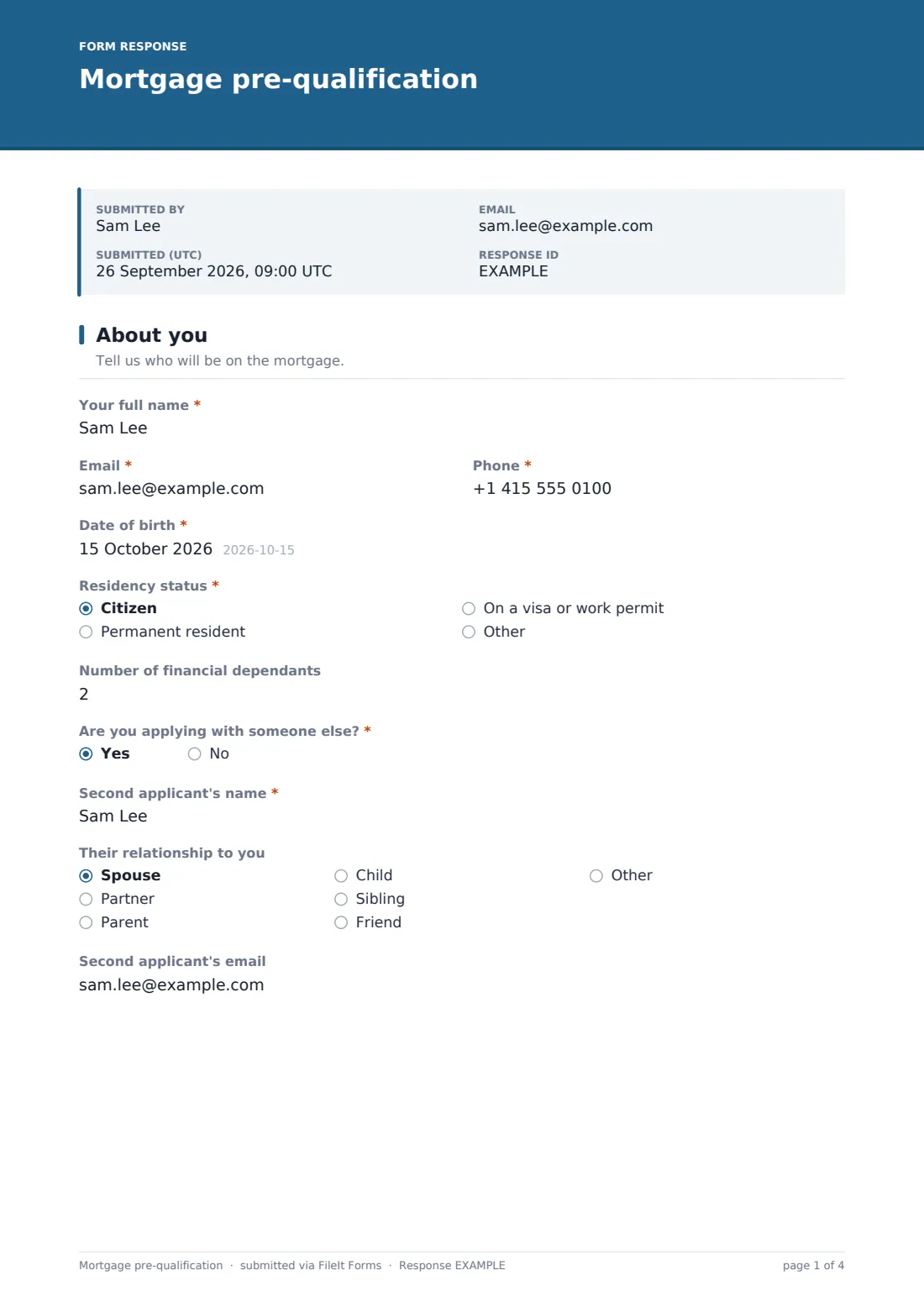
1 About you
- Your full name*
- Email*
- Phone*
- Date of birth*
- Residency status* Citizen · Permanent resident · On a visa or work permit · Other
- Number of financial dependants
- Are you applying with someone else?*
- Second applicant's name* asked only when it applies
- Their relationship to you asked only when it applies Spouse · Partner · Parent · Child · Sibling · Friend · Other
- Second applicant's email asked only when it applies
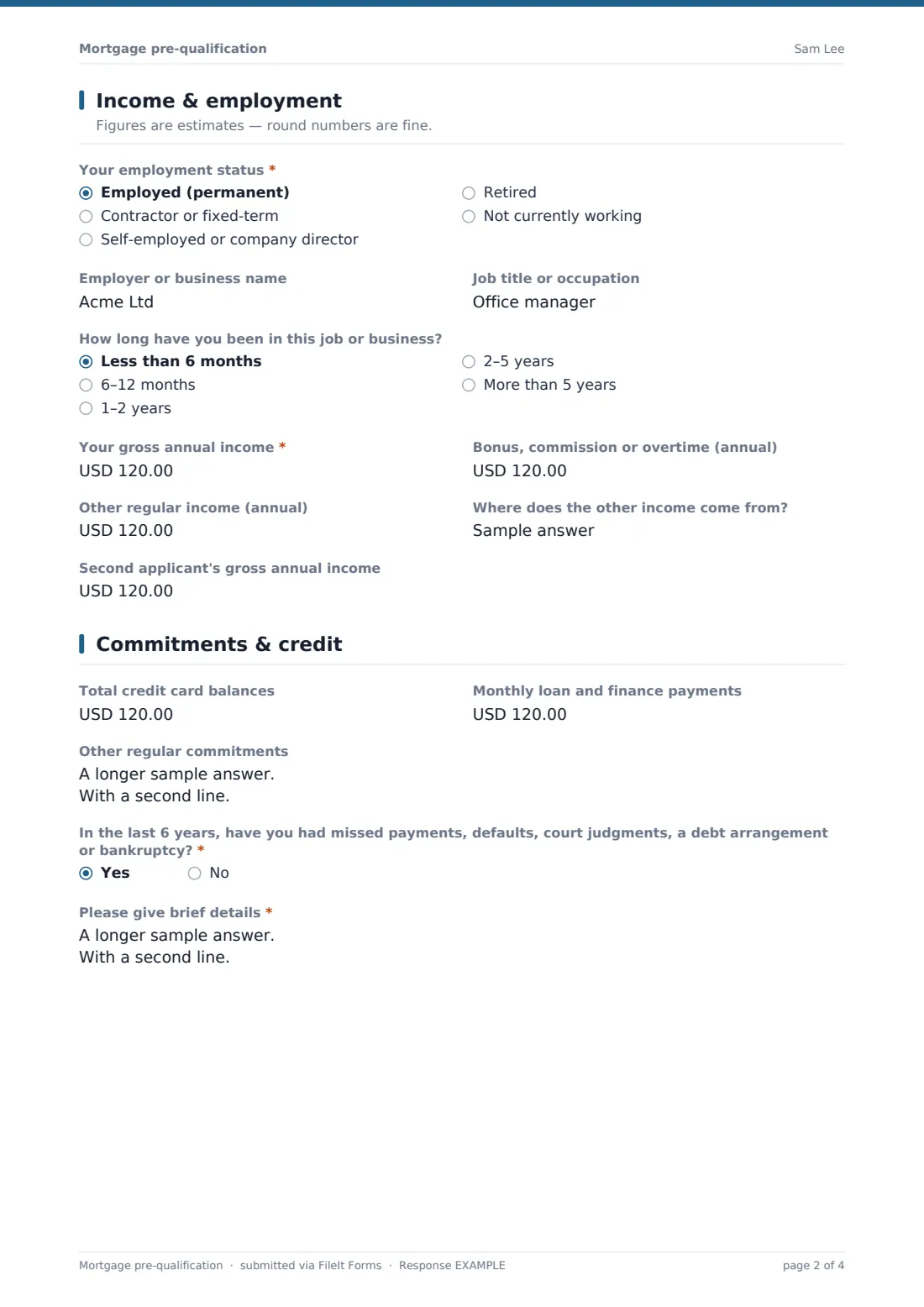
2 Income & employment
- Your employment status* Employed (permanent) · Contractor or fixed-term · Self-employed or company director · Retired · Not currently working
- Employer or business name asked only when it applies
- Job title or occupation asked only when it applies
- How long have you been in this job or business? asked only when it applies Less than 6 months · 6–12 months · 1–2 years · 2–5 years · More than 5 years
- Years of filed accounts or tax returns asked only when it applies
- Your gross annual income*
- Bonus, commission or overtime (annual)
- Other regular income (annual)
- Where does the other income come from? asked only when it applies
- Second applicant's gross annual income asked only when it applies
3 Commitments & credit
- Total credit card balances
- Monthly loan and finance payments
- Other regular commitments
- In the last 6 years, have you had missed payments, defaults, court judgments, a debt arrangement or bankruptcy?*
- Please give brief details* asked only when it applies
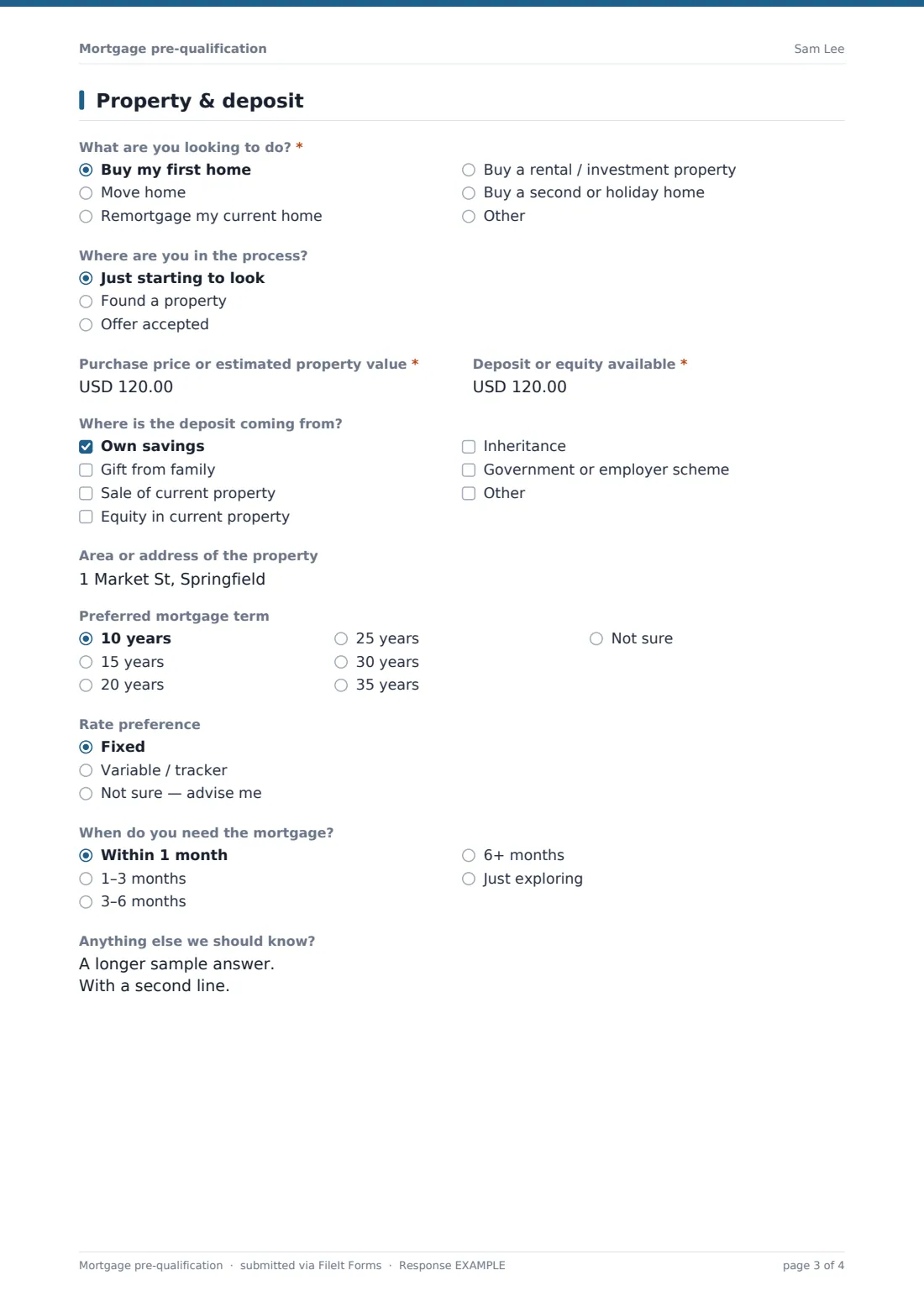
4 Property & deposit
- What are you looking to do?* Buy my first home · Move home · Remortgage my current home · Buy a rental / investment property · Buy a second or holiday home
- Where are you in the process? asked only when it applies Just starting to look · Found a property · Offer accepted
- Purchase price or estimated property value*
- Deposit or equity available*
- Where is the deposit coming from? Own savings · Gift from family · Sale of current property · Equity in current property · Inheritance · Government or employer scheme
- Outstanding balance on the current mortgage asked only when it applies
- Area or address of the property
- Preferred mortgage term 10 years · 15 years · 20 years · 25 years · 30 years · 35 years · Not sure
- Rate preference Fixed · Variable / tracker · Not sure — advise me
- When do you need the mortgage? Within 1 month · 1–3 months · 3–6 months · 6+ months · Just exploring
- Anything else we should know?
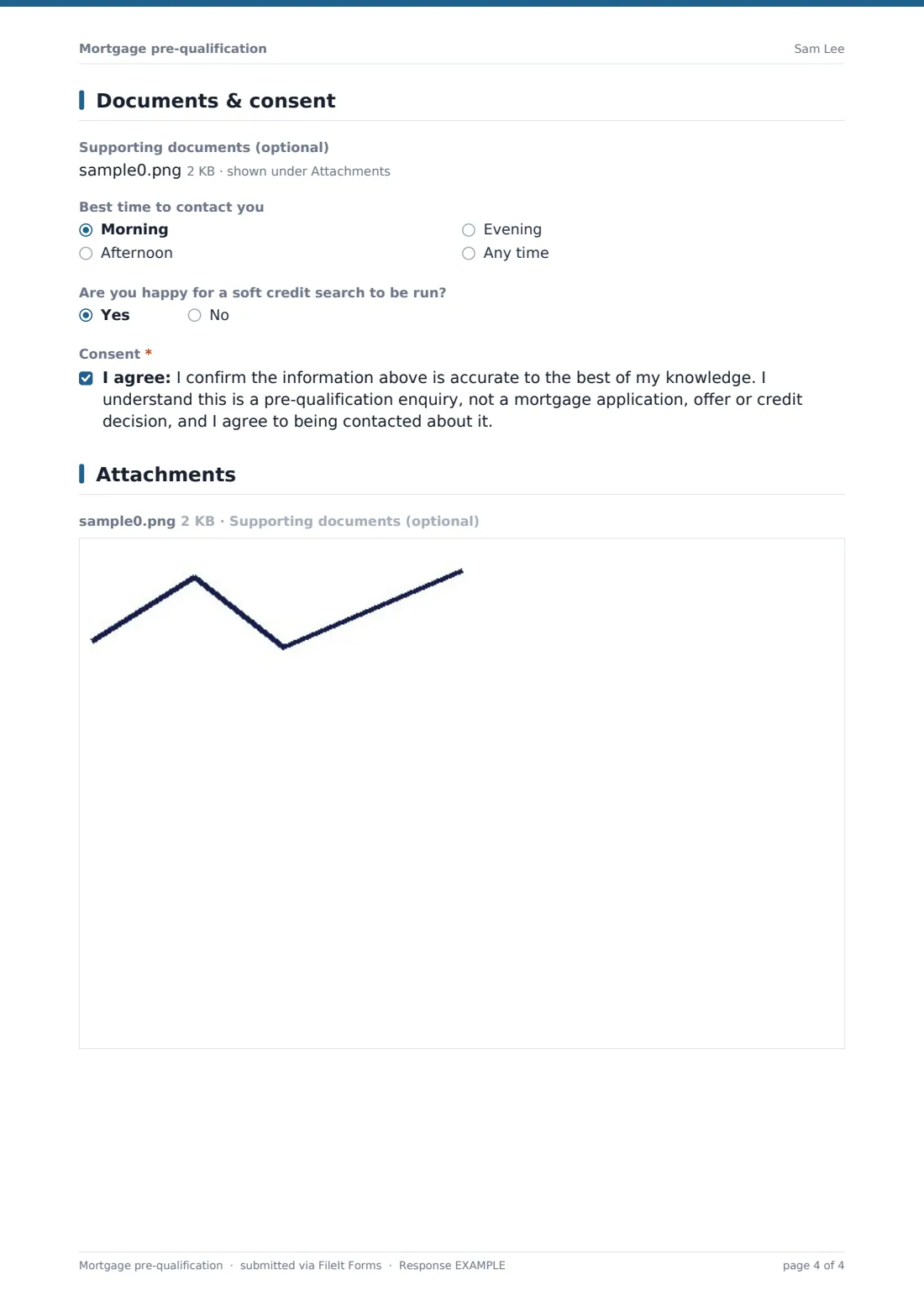
5 Documents & consent
- Supporting documents (optional)
- Best time to contact you Morning · Afternoon · Evening · Any time
- Are you happy for a soft credit search to be run?
- Consent*
The mortgage pre-qualification form, page by page
1 About you
The applicant gives their name, contact details, date of birth, residency status and number of dependants. Answering yes to "Are you applying with someone else?" opens fields for the second applicant's name, relationship and email.
2 Income & employment
An employment status question covers employed, contract, self-employed, retired and not working. Anyone not retired is asked for their employer, job title and time in the role, and self-employed clients are asked how many years of accounts or tax returns they have filed. Gross income, bonus or overtime and other regular income follow — with a prompt for where other income comes from when it's entered — plus the second applicant's income on joint applications.
3 Commitments & credit
Credit card balances, monthly loan payments and other regular commitments such as childcare or maintenance give a picture of outgoings. A single yes/no asks about missed payments, defaults, judgments, debt arrangements or bankruptcy in the last six years, and a yes opens a required box for brief details.
4 Property & deposit
The client says whether they're buying a first home, moving, remortgaging, buying to let or buying a second home, and — unless remortgaging — how far along they are. The purchase price, deposit and its sources, the current mortgage balance for remortgages, location, preferred term, fixed or variable preference and timeframe complete the picture, with a free-text box for anything else.
5 Documents & consent
An optional upload takes up to six payslips, tax returns or statements. The client picks a good time to be contacted, says whether a soft credit search is acceptable, and ticks a consent confirming the information is accurate and that this is an enquiry, not an application or credit decision.
Make the template yours
- Change the currency on the money questions to match your market
- Add your lender panel's specific income types, such as foreign income or benefit types, to the other-income help text
- Rename residency options to match local terms like visa subclasses or settled status
- Route submissions to a vault folder per adviser or per client
- Add notification emails so the assigned adviser hears about each new enquiry straight away
- Remove the soft credit search question if you don't run one at this stage
- Set the document title to include the purchase type for easy sorting
Tips for a better mortgage pre-qualification form
- Ask clients to enter figures before tax, and to round — precise numbers come later with payslips
- Encourage honesty on the credit history question; knowing up front helps you choose a suitable lender
- Include student loan and buy-now-pay-later payments under monthly loans, since many lenders count them
- For gifted deposits, note who the gift is from — most lenders will need a letter from the giver later
- Follow up quickly: enquiries are warmest in the first day after they submit
Every response becomes a PDF in your vault
Each pre-qualification is saved as a PDF in the vault folder you choose, with any uploaded payslips or statements attached, and the account owner is notified by email. If a copy to the respondent is on, the client gets their own PDF of what they submitted.
Advisers typically review the figures, run their own affordability calculation or sourcing, and call the client back. The Responses table lets you see every enquiry in one list and export them to CSV for your pipeline or CRM.
- Start from this template. It opens in the FileIt Forms designer — change any question, add pages, set the rules for when questions appear.
- Share it. Turn on a public link, or send it to people by email, each with their own link. They don’t need a FileIt account.
- Get the answers as PDFs. Each response is saved as a PDF in the vault folder you choose, with uploaded files attached — and listed in a Responses table you can export to CSV.
Mortgage pre-qualification form: frequently asked questions
Is this mortgage pre-qualification form free?
Yes. It's one of the starter templates in FileIt's Forms app, available on every plan including free, and you can edit every question.
Does the form calculate how much someone can borrow?
No. It collects the information an adviser needs to make that assessment — the calculation and any lender decision stay with you.
Is filling it in a credit application?
No. The consent wording makes clear it's a pre-qualification enquiry, not an application, offer or credit decision. You can edit that wording to match your own process.
Does the client need a FileIt account?
No. Share it by public link or email it to the client; they can fill it in without signing up.
Can two people apply together?
Yes. Answering yes to applying with someone else adds the second applicant's name, relationship, email and income.
Can I use a different currency?
Yes. Each money question has its own currency setting in the designer.
Can clients upload payslips?
Yes, the last page has an optional upload for up to six PDFs or images.