
What is the financial planning fact-find form template?
Every financial plan starts with a fact-find, and doing it line by line in the first meeting eats time that could go on the client's actual questions. This template lets clients fill in the facts at home, at their own pace, so the meeting can start from a complete picture.
It covers the areas advisers normally need: who's in the household and who depends on them, income and spending, the home and mortgage, savings, investments and debts, retirement savings and protection cover, and whether there's a will. The last page turns to goals, with a free-text box for the client to say what matters most in their own words and a simple scale for how they feel about investment swings.
Branches keep it relevant: partner questions only appear if the client wants them included, dependant questions only when there are dependants, and mortgage figures only for homeowners with a mortgage. Each completed fact-find is saved as a PDF in your FileIt vault with any statements the client uploaded.
- Best for
- Independent financial advisers, planners and wealth managers onboarding new clients
- Filled in by
- The client, optionally covering their spouse or partner
- Time to complete
- About 15 minutes
- Includes
- Six pages covering family, income, assets, pensions, protection and goals, plus statement uploads
Who uses a financial planning fact-find form?
- Sending a fact-find to a new client before the first meeting
- Annual reviews, where clients update figures that have changed
- Couples planning together, with the partner's details and income included
- Planners offering a one-off retirement review
- Advisers taking on clients from a retiring colleague who need a fresh baseline
- Protection specialists who want the wider financial context before recommending cover
Questions on this financial planning fact-find form
37 questions over 6 pages · includes file upload, conditional questions, multiple pages, consent checkbox, ratings.
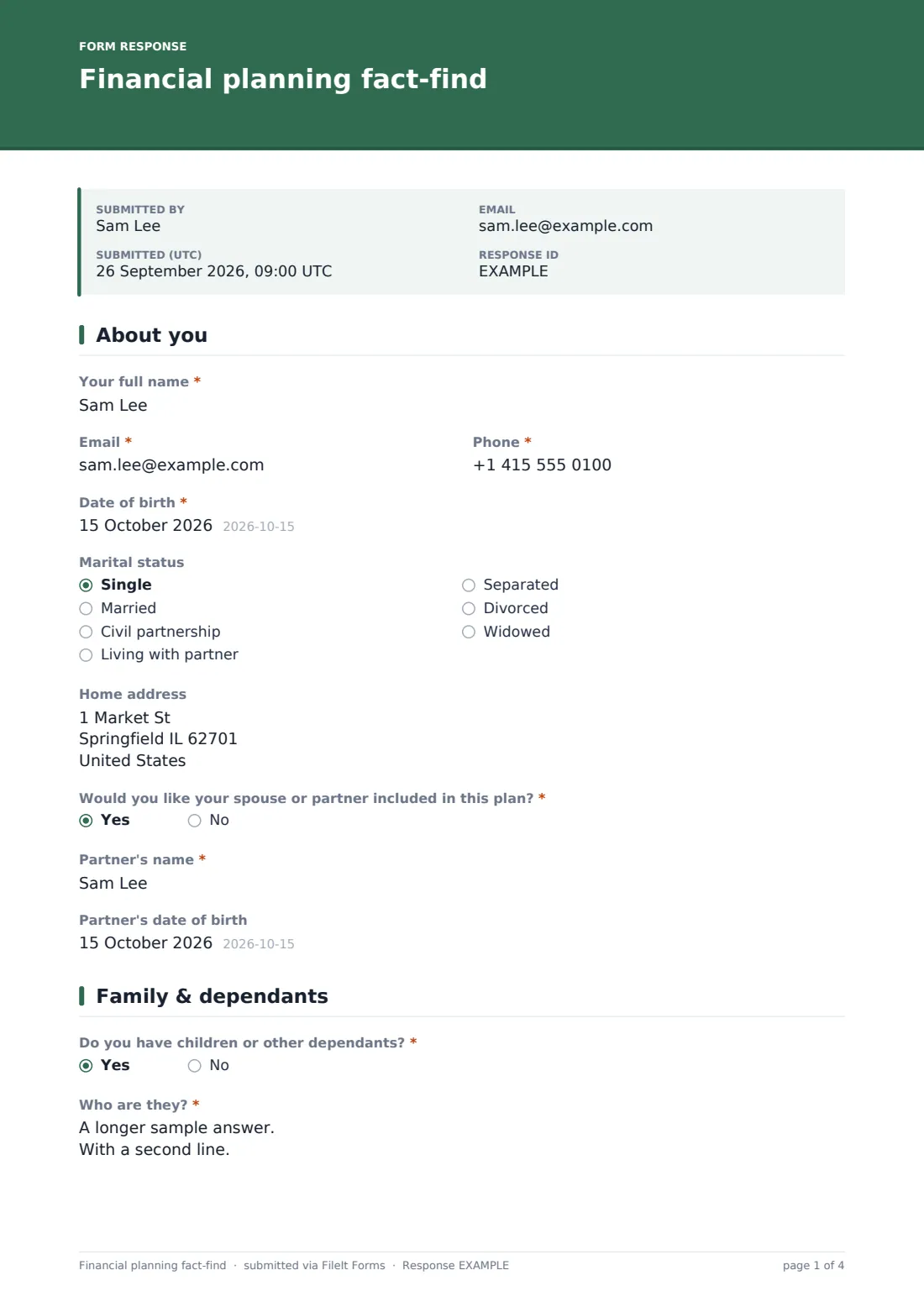
1 About you
- Your full name*
- Email*
- Phone*
- Date of birth*
- Marital status Single · Married · Civil partnership · Living with partner · Separated · Divorced · Widowed
- Home address
- Would you like your spouse or partner included in this plan?*
- Partner's name* asked only when it applies
- Partner's date of birth asked only when it applies
2 Family & dependants
- Do you have children or other dependants?*
- Who are they?* asked only when it applies
- Costs you expect to help with asked only when it applies School fees · University or college · Weddings · A first home deposit · Care for a parent or relative
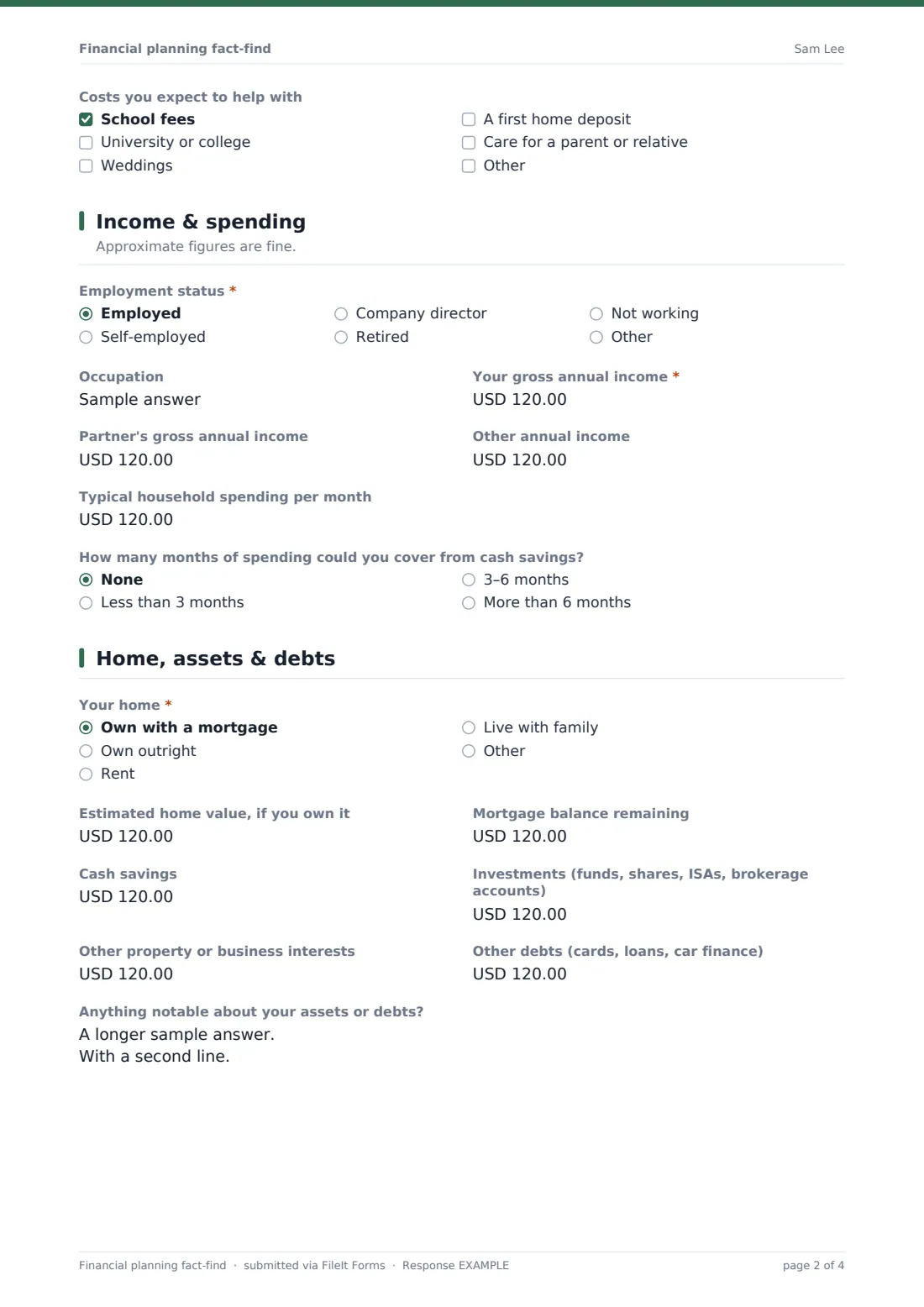
3 Income & spending
- Employment status* Employed · Self-employed · Company director · Retired · Not working · Other
- Occupation
- Your gross annual income*
- Partner's gross annual income asked only when it applies
- Other annual income
- Typical household spending per month
- How many months of spending could you cover from cash savings? None · Less than 3 months · 3–6 months · More than 6 months
4 Home, assets & debts
- Your home* Own with a mortgage · Own outright · Rent · Live with family
- Estimated home value, if you own it asked only when it applies
- Mortgage balance remaining asked only when it applies
- Cash savings
- Investments (funds, shares, ISAs, brokerage accounts)
- Other property or business interests
- Other debts (cards, loans, car finance)
- Anything notable about your assets or debts?
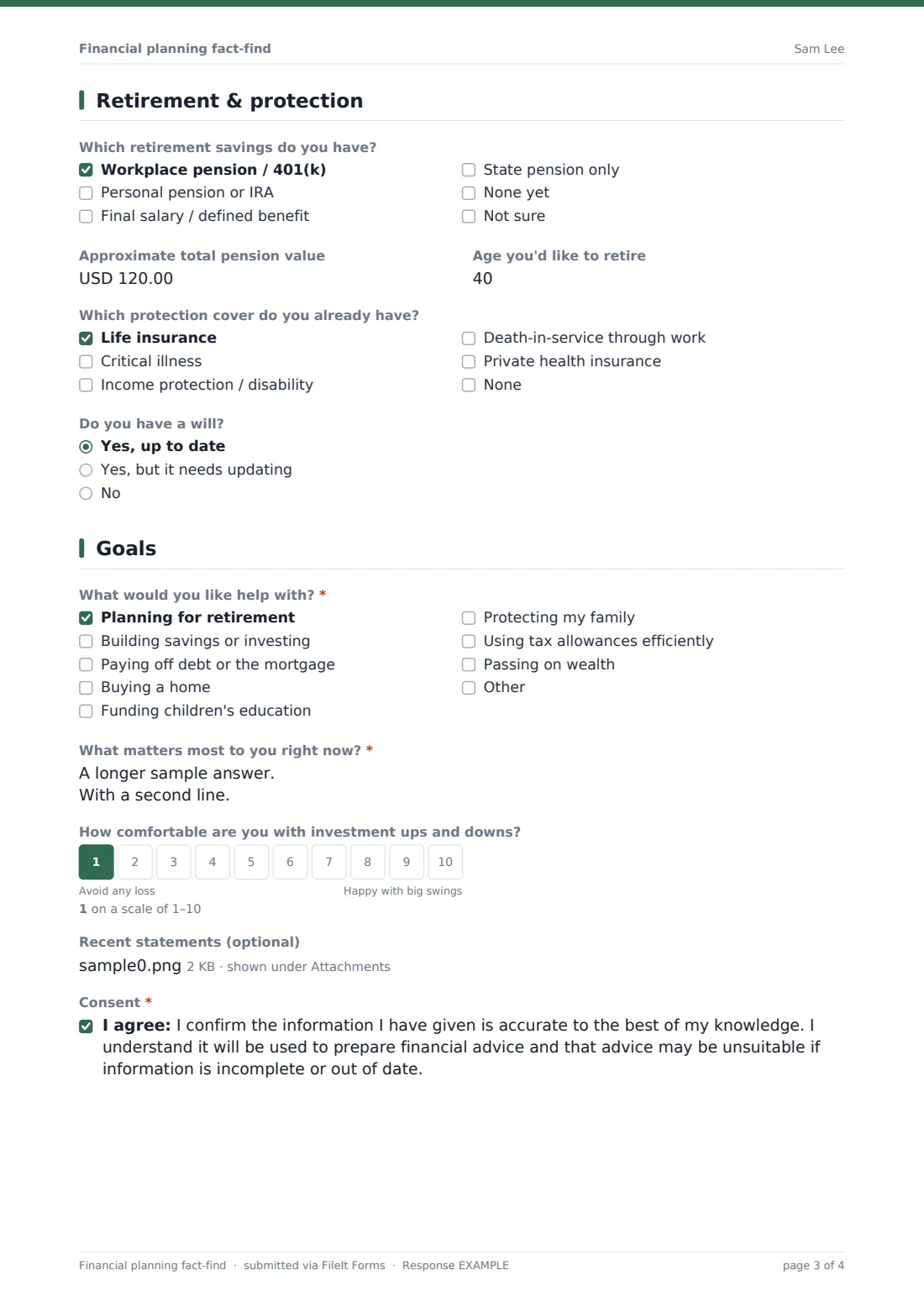
5 Retirement & protection
- Which retirement savings do you have? Workplace pension / 401(k) · Personal pension or IRA · Final salary / defined benefit · State pension only · None yet · Not sure
- Approximate total pension value
- Age you'd like to retire
- Which protection cover do you already have? Life insurance · Critical illness · Income protection / disability · Death-in-service through work · Private health insurance · None
- Do you have a will? Yes, up to date · Yes, but it needs updating · No
6 Goals
- What would you like help with?* Planning for retirement · Building savings or investing · Paying off debt or the mortgage · Buying a home · Funding children's education · Protecting my family · Using tax allowances efficiently · Passing on wealth
- What matters most to you right now?*
- How comfortable are you with investment ups and downs?
- Recent statements (optional)
- Consent*
The financial planning fact-find form, page by page
1 About you
Name, contact details, date of birth, marital status and address. The client chooses whether their spouse or partner should be included; if so, the partner's name and date of birth are asked for.
2 Family & dependants
A yes/no about children or other dependants opens a required box for who they are and whether they rely on the client financially, and a checklist of future costs such as school fees, university, a first home deposit or care for a relative.
3 Income & spending
Employment status and occupation, then gross income for the client and — when included — their partner, other income and typical monthly spending. A final question asks how many months of spending cash savings could cover.
4 Home, assets & debts
The client says whether they own with a mortgage, own outright, rent or live with family; owners give the home value, and mortgage holders the balance remaining. Cash savings, investments, other property or business interests and other debts follow, with a box for anything notable like an expected inheritance.
5 Retirement & protection
Which retirement savings the client has and an approximate total, the age they'd like to retire, what protection cover is already in place, and whether their will is up to date.
6 Goals
A checklist of what they'd like help with, a required box for what matters most right now, a 1–10 scale for comfort with investment ups and downs, an optional upload for up to ten statements, and a consent confirming the information is accurate.
Make the template yours
- Swap the pension option labels to match your market — for example 401(k) and IRA, or workplace and SIPP
- Add your firm's formal risk profiling questionnaire as an extra page, or send it separately
- Change the currency on all money fields
- Add a question about ethical or sustainable investing preferences
- File each fact-find into a client folder in the vault by setting the destination folder
- Add the assigned adviser as a notification email
- Remove the retirement page for clients who only want protection advice
Tips for a better financial planning fact-find form
- Tell clients up front that estimates are fine; an unfinished fact-find is less useful than a rough complete one
- Ask for statements in the same form so figures can be checked before the meeting
- Use the "what matters most" answer to open the meeting — it's often more revealing than the figures
- Send the same form at each annual review so changes are easy to compare
- Treat the risk scale as a conversation starter, not a formal risk profile
Every response becomes a PDF in your vault
The completed fact-find is saved as a PDF in the vault folder you choose, along with any statements the client attached, and you receive an email notification. With a respondent copy turned on, the client also gets a PDF of their answers to keep.
Advisers usually review the PDF ahead of the first meeting, note gaps to discuss, and keep it on file as the baseline for the advice. The Responses table lists every fact-find and can export them to CSV.
- Start from this template. It opens in the FileIt Forms designer — change any question, add pages, set the rules for when questions appear.
- Share it. Turn on a public link, or send it to people by email, each with their own link. They don’t need a FileIt account.
- Get the answers as PDFs. Each response is saved as a PDF in the vault folder you choose, with uploaded files attached — and listed in a Responses table you can export to CSV.
Financial planning fact-find form: frequently asked questions
Is this fact-find template free?
Yes. It's a starter template in FileIt's Forms app on every plan, including free, and can be edited freely.
Does this replace a regulated suitability process?
No. It's a way to collect information; how you use it in your advice process, and any regulatory requirements, remain your responsibility.
Can a couple complete one form together?
Yes. Choosing to include a spouse or partner adds their name, date of birth and income.
Do clients need an account to fill it in?
No. Send it by email or share a link — no FileIt account is needed.
Can clients upload statements?
Yes. The last page accepts up to ten PDFs or images of pension, investment or mortgage statements.
Can I change the currency?
Yes, each money field has its own currency setting in the designer.
Is the risk question a full risk profile?
No, it's a single 1–10 scale. For a fuller assessment, pair it with the investment risk profile template.