
What is the rental application form template?
A rental application form asks a prospective tenant for their employment, income, household and reference details in one submission, instead of a landlord chasing separate emails, photos of payslips and a scanned ID over several days. It's built to gather what a landlord typically needs to make a decision, without turning the process into a long back-and-forth.
Paper applications and email threads are easy to misplace, and it's hard to compare applicants fairly when each one sends information in a different format. A form asks every applicant the same questions in the same order, with income proof and photo ID uploaded directly, so applications land ready to review.
This template runs on FileIt's Forms app, included on every FileIt account including the free plan. Applicants fill it in without needing a FileIt account, and every application — including uploaded documents — becomes a PDF that's automatically filed in your vault, ready to compare against other applicants for the same property.
- Best for
- Landlords, letting agents and property managers screening rental applicants
- Filled in by
- Prospective tenants applying for a property
- Time to complete
- About 10 minutes
- Includes
- Employment and income fields, pet and household details, ID and income-proof upload, signature
Who uses a rental application form?
- A landlord collecting applications for a single available property
- A letting agent comparing several applicants for the same listing side by side
- An applicant with pets providing details up front so it's clear before a decision is made
- A self-employed applicant uploading tax documents in place of standard payslips
- A landlord requiring photo ID and a signed consent to credit and reference checks before shortlisting
- A property manager building a consistent, comparable record across every applicant for a portfolio
Questions on this rental application form
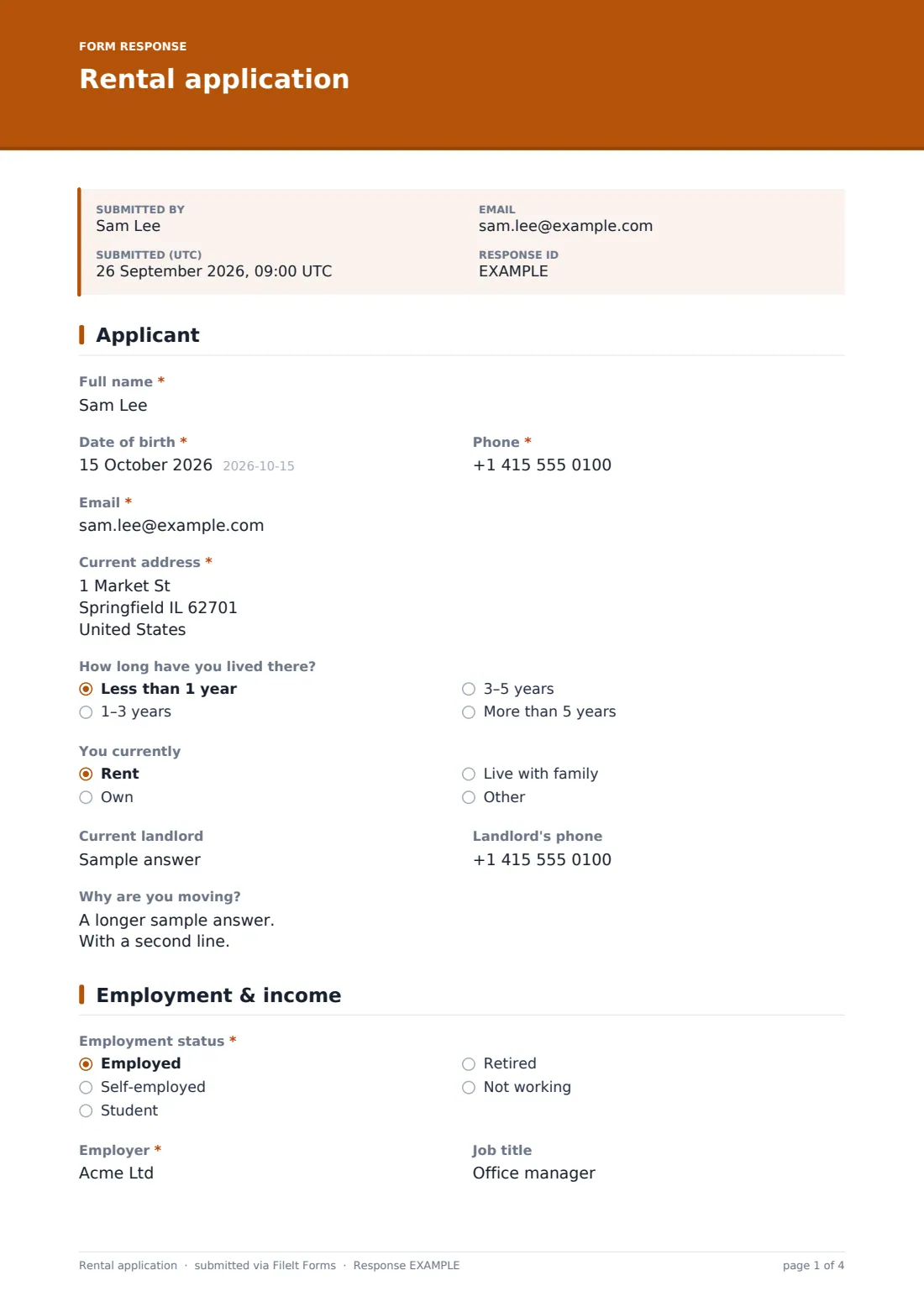
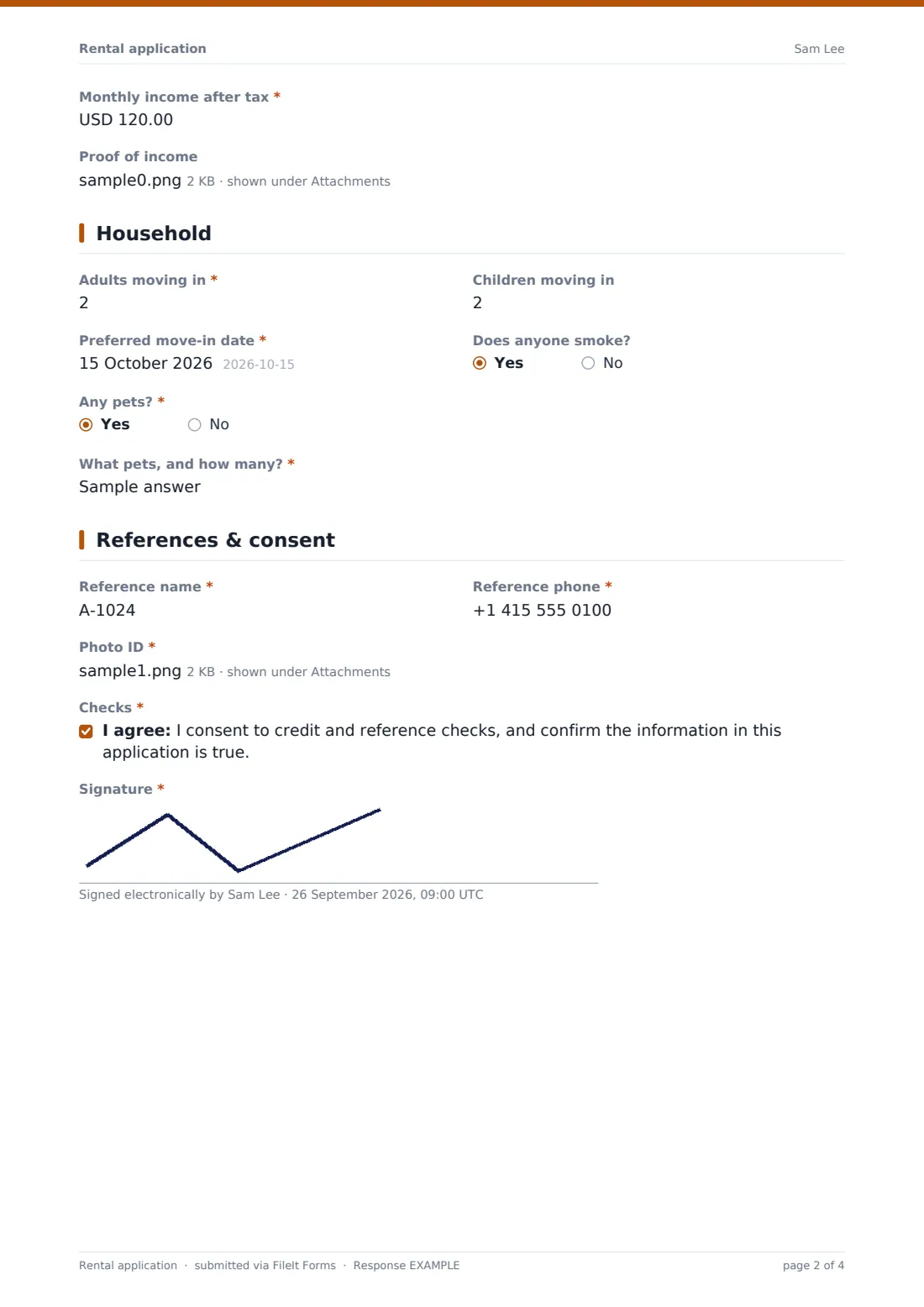
26 questions over 4 pages · includes signature, file upload, conditional questions, multiple pages, consent checkbox.
1 Applicant
- Full name*
- Date of birth*
- Phone*
- Email*
- Current address*
- How long have you lived there? Less than 1 year · 1–3 years · 3–5 years · More than 5 years
- You currently Rent · Own · Live with family · Other
- Current landlord asked only when it applies
- Landlord's phone asked only when it applies
- Why are you moving?
2 Employment & income
- Employment status* Employed · Self-employed · Student · Retired · Not working
- Employer* asked only when it applies
- Job title asked only when it applies
- Monthly income after tax*
- Proof of income
3 Household
- Adults moving in*
- Children moving in
- Preferred move-in date*
- Does anyone smoke?
- Any pets?*
- What pets, and how many?* asked only when it applies
4 References & consent
- Reference name*
- Reference phone*
- Photo ID*
- Checks*
- Signature*
The rental application form, page by page
1 Applicant
The form opens with Full name, Date of birth, Phone and Email, followed by the applicant's Current address, How long have you lived there?, and whether they currently rent, own or live with family. Choosing "rent" opens fields for the current landlord's name and phone, giving the new landlord a lead for a reference, and Why are you moving? adds useful context to the application.
2 Employment & income
Employment status covers employed, self-employed, student, retired or not working, and choosing employed opens fields for Employer and Job title. Monthly income after tax is required for every applicant regardless of employment status, and an optional Proof of income upload accepts recent payslips, a contract or a tax return — useful for self-employed applicants who don't have standard payslips to offer.
3 Household
Adults moving in and Children moving in establish exactly who would occupy the property, and Preferred move-in date sets timing expectations. Does anyone smoke? is a simple yes/no, and Any pets? is required, opening a field for the type and number of pets whenever the answer is yes — giving the landlord a clear picture before deciding whether pets fit the property's terms.
4 References & consent
Reference name and phone captures one contact — typically an employer or a previous landlord — for the landlord to call before finalising a decision. Photo ID is a required upload, and the applicant finishes by consenting to credit and reference checks and confirming the information given is true, followed by a drawn signature that closes out the application.
Make the template yours
- Add a second reference field if your screening process typically checks more than one
- Set a minimum income multiple against the rent directly in your listing information, since the form doesn't calculate this automatically
- Route applications for each property into its own vault folder so they're easy to compare
- Turn on a maximum number of responses if you only want to review a set number of applicants
- Add a closing date once you've shortlisted enough applications for a property
- Adjust the currency on the income field to match your local market
Tips for a better rental application form
- Ask every applicant for the same property to complete the same form, so comparisons stay fair
- Check your local rules on what you can and can't ask or require from applicants before finalising your questions
- Follow up references by phone rather than relying only on the written contact details
- Keep pet and household questions early enough that unsuitable applications are clear before a full review
- Store completed applications securely and only as long as your local data rules require
- Let unsuccessful applicants know promptly once a decision has been made
Every response becomes a PDF in your vault
As soon as an applicant submits the form, FileIt saves it — including their uploaded ID and income proof — as a PDF named with the applicant's name, and files it in the vault folder you've set up for that property. With owner notification and a copy to the applicant both switched on by default, you're alerted immediately and the applicant has a record of what they submitted.
From there, most landlords and agents use the Responses table to see every application for a property side by side, open each PDF to check documents, and export the list to CSV to track progress through referencing and decisions. The usual next step is contacting references and confirming a decision with the successful applicant.
- Start from this template. It opens in the FileIt Forms designer — change any question, add pages, set the rules for when questions appear.
- Share it. Turn on a public link, or send it to people by email, each with their own link. They don’t need a FileIt account.
- Get the answers as PDFs. Each response is saved as a PDF in the vault folder you choose, with uploaded files attached — and listed in a Responses table you can export to CSV.
Rental application form: frequently asked questions
Is this rental application form template free?
Yes. It's included with the Forms app on every FileIt account, including the free plan.
Do applicants need a FileIt account to apply?
No. Applicants fill in and submit the form using only the link you share, without ever needing a FileIt account.
How do I get applications as PDFs?
Every submission, including uploaded ID and income proof, is automatically saved as a PDF in the vault folder you choose, and you can browse or export the full list from the Responses table.
Does this form run the actual credit or reference check?
No. FileIt collects the applicant's consent and contact details as a PDF — running the credit check itself is done through your own referencing provider or process.
Can applicants upload proof of income and ID?
Yes. Both are supported as file uploads, accepting PDFs and common image formats, up to 10 MB per file.
Is this application legally binding once signed?
FileIt doesn't provide legal advice, and a signed application isn't the same as a tenancy agreement — it's a starting point for screening, and any tenancy terms should be set out in your own lease document.
Can I add or remove questions to match my own screening process?
Yes. Every field, including the household and pet questions, can be edited, removed or added to in the designer.
Can I limit how many applications I receive for one property?
Yes — you can set a maximum number of responses or a closing date once you've received enough applications to shortlist.