What is the in-room dining order form template?
Room service orders taken over the phone are easy to mishear — a room number, a cooking preference, a nut allergy. The paper doorknob menu is no better: it's filled in at midnight and collected at three. This in-room dining order form lets guests choose their dishes on their own phone, at their own pace, and sends the kitchen a clear, written order.
The template covers the three ways guests actually order: as soon as possible, at a set time, or breakfast tomorrow in a half-hour window. Follow-up questions appear only when they're needed — the eggs question for a cooked breakfast, the cooking question for a burger, the milk question when drinks are chosen — so the form stays short. Every guest is asked whether anyone eating has a food allergy or intolerance, and a yes needs a description before the order can go.
Each order is also saved as a PDF in your FileIt vault, giving you a timestamped record of what was asked for, which room it went to and how the guest chose to pay.
- Best for
- Hotels, serviced apartments and resorts offering room service
- Filled in by
- The guest, on their phone, from a QR code or link in the room
- Time to complete
- About 2 minutes
- Includes
- Delivery timing, breakfast and all-day menu, a required allergy question, room charge consent
Who uses a in-room dining order form?
- Replacing the paper breakfast doorknob card with a QR code on the bedside table
- Late-night room service when the switchboard is short-staffed
- Serviced apartments offering a breakfast basket delivered to the door
- Boutique hotels that want a simple room service menu without an ordering app
- Keeping a written record of allergy information given with each order
Questions on this in-room dining order form
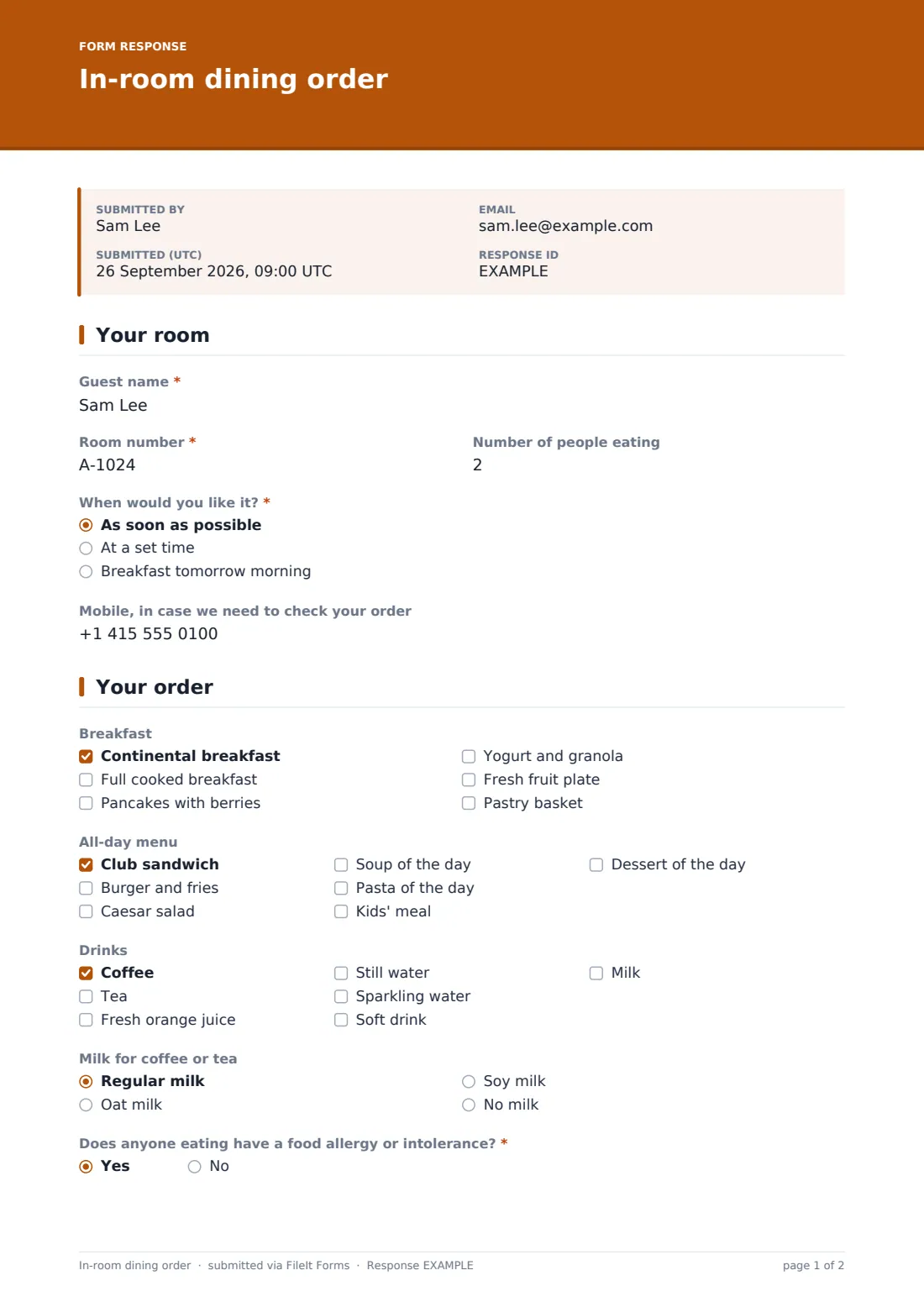
18 questions over 2 pages · includes conditional questions, multiple pages, consent checkbox.
1 Your room
- Guest name*
- Room number*
- Number of people eating
- When would you like it?* As soon as possible · At a set time · Breakfast tomorrow morning
- Delivery time* asked only when it applies
- Breakfast delivery window* asked only when it applies 6:30–7:00 · 7:00–7:30 · 7:30–8:00 · 8:00–8:30 · 8:30–9:00 · 9:00–9:30 · 9:30–10:00
- Mobile, in case we need to check your order
2 Your order
- Breakfast Continental breakfast · Full cooked breakfast · Pancakes with berries · Yogurt and granola · Fresh fruit plate · Pastry basket
- How would you like your eggs?* asked only when it applies Fried · Scrambled · Poached · Boiled
- All-day menu Club sandwich · Burger and fries · Caesar salad · Soup of the day · Pasta of the day · Kids' meal · Dessert of the day
- How would you like your burger cooked?* asked only when it applies Medium · Medium-well · Well done
- Drinks Coffee · Tea · Fresh orange juice · Still water · Sparkling water · Soft drink · Milk
- Milk for coffee or tea asked only when it applies Regular milk · Oat milk · Soy milk · No milk
- Does anyone eating have a food allergy or intolerance?*
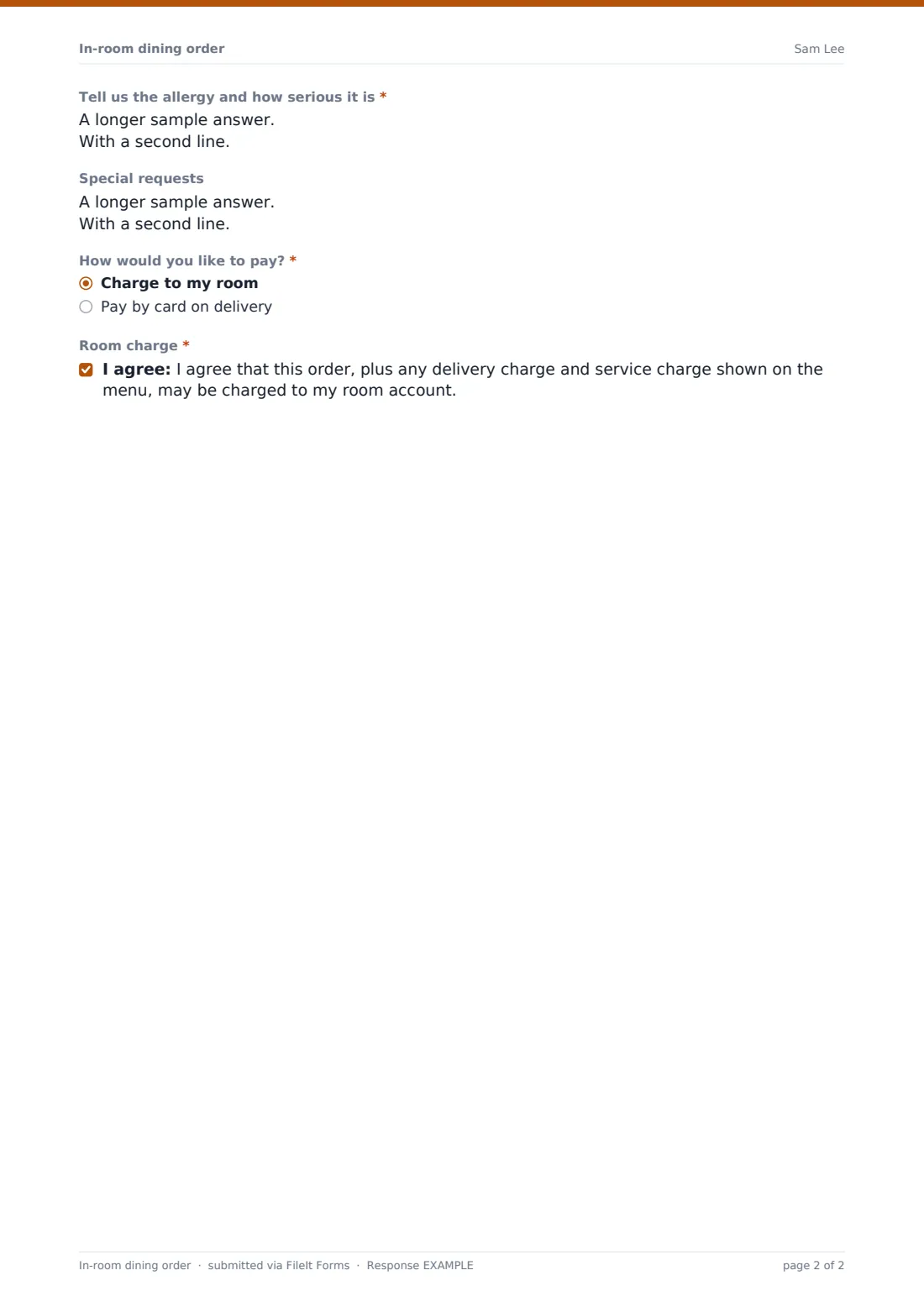
- Tell us the allergy and how serious it is* asked only when it applies
- Special requests
- How would you like to pay?* Charge to my room · Pay by card on delivery
- Room charge* asked only when it applies
The in-room dining order form, page by page
1 Your room
The guest gives their name, room number and the number of people eating. "When would you like it?" offers as soon as possible, at a set time, or breakfast tomorrow morning. A set time asks for the delivery time. Breakfast tomorrow asks for a half-hour "Breakfast delivery window" between 6:30 and 10:00. An optional mobile number lets the kitchen check anything unclear.
2 Your order
The order has three menu sections. "Breakfast" lists continental, full cooked, pancakes with berries, yogurt and granola, a fruit plate and a pastry basket, and choosing the cooked breakfast asks "How would you like your eggs?". "All-day menu" covers a club sandwich, burger and fries, Caesar salad, soup and pasta of the day, a kids' meal and dessert. The burger opens a cooking question. "Drinks" includes coffee, tea, juice, waters, a soft drink and milk, and choosing any drink asks which milk to bring.
The question "Does anyone eating have a food allergy or intolerance?" is required, and a yes asks for the allergy and how serious it is. Help text says the kitchen will call the room if a dish can't be made safely. After special requests comes "How would you like to pay?". Charging to the room shows a consent that the order, plus any delivery and service charge on the menu, may go on the room account.
Make the template yours
- Replace the dishes with your own menu, and add prices to the option labels if you like
- Change the breakfast delivery windows to match your kitchen's hours
- Set the vault folder to a room service folder so the night manager can find orders
- Turn off the public link outside room service hours, and turn it back on with the same link and QR code
- Add the kitchen's email address to the notification list so orders arrive there directly
- Change the accent colour to match your hotel's branding
Tips for a better in-room dining order form
- Print the QR code from the Share tab on a card for each room
- Make sure someone is watching for notifications whenever the link is on
- Call the room to confirm any order with an allergy before cooking
- Keep breakfast windows to half an hour so the kitchen can plan the trays
- Check the room number against the guest name before charging the room
Every response becomes a PDF in your vault
Each order is filed as a PDF in your vault and an email notice goes to you and anyone on the notification list, such as the kitchen or the duty manager. The template ships with the guest copy switched off, since most guests don't need an email for a sandwich; you can switch it on in Settings.
In the Responses table you can search by room number or guest name, open any order's PDF, and export a day's orders to CSV to reconcile against room charges.
- Start from this template. It opens in the FileIt Forms designer — change any question, add pages, set the rules for when questions appear.
- Share it. Turn on a public link, or send it to people by email, each with their own link. They don’t need a FileIt account.
- Get the answers as PDFs. Each response is saved as a PDF in the vault folder you choose, with uploaded files attached — and listed in a Responses table you can export to CSV.
In-room dining order form: frequently asked questions
Is this room service order form free?
Yes. It's one of the ready-made templates in the Forms app on every FileIt account, including the free plan.
Do guests need to download an app?
No. They scan the QR code or open the link and order in their phone's browser. No account is needed.
Does the form take payment?
No. The guest chooses to charge the room or pay by card on delivery; you post the charge or take the card through your own systems.
How does the kitchen see new orders?
Each submission sends an email notice to the form owner and any extra addresses you add in Settings, and appears at once in the Responses tab.
Can I stop orders when room service is closed?
Yes. Switch the public link off on the Share tab. Switching it back on brings back the same link, so printed QR codes keep working.
Is the allergy question optional?
No. Every guest must answer it, and a yes requires details. You can edit the wording in the designer, but we suggest keeping it required.