What is the electronic records consent form template?
Before sending statements by email or asking a customer to sign online, many businesses need that customer's agreement to receive records electronically. The agreement is more meaningful when the customer has been told how it works, what they need to open the documents, and how to get paper instead.
This template covers those points in order. It explains electronic delivery and the technology needed, lets the customer choose which documents go paperless, checks they can open PDFs, offers paper copies where they still want them, and explains how to withdraw. Three separate consents cover delivery, e-signatures and access.
Each consent is saved as a signed, dated PDF in the vault folder you choose.
- Best for
- Banks, insurers, landlords, accountants and service businesses going paperless
- Filled in by
- Customers or clients
- Time to complete
- About 2 minutes
- Includes
- Disclosure text, document choices, PDF access check, paper-copy option, three consents, signature
Who uses a electronic records consent form?
- Switching existing customers to e-statements and e-invoices
- Getting agreement to e-signatures before sending a contract
- Onboarding new clients who'll sign everything online
- Landlords moving leases and notices to email
- Insurance brokers sending policy documents electronically
- Recording who still wants some documents on paper
Questions on this electronic records consent form
15 questions over 4 pages · includes signature, conditional questions, multiple pages, consent checkbox.
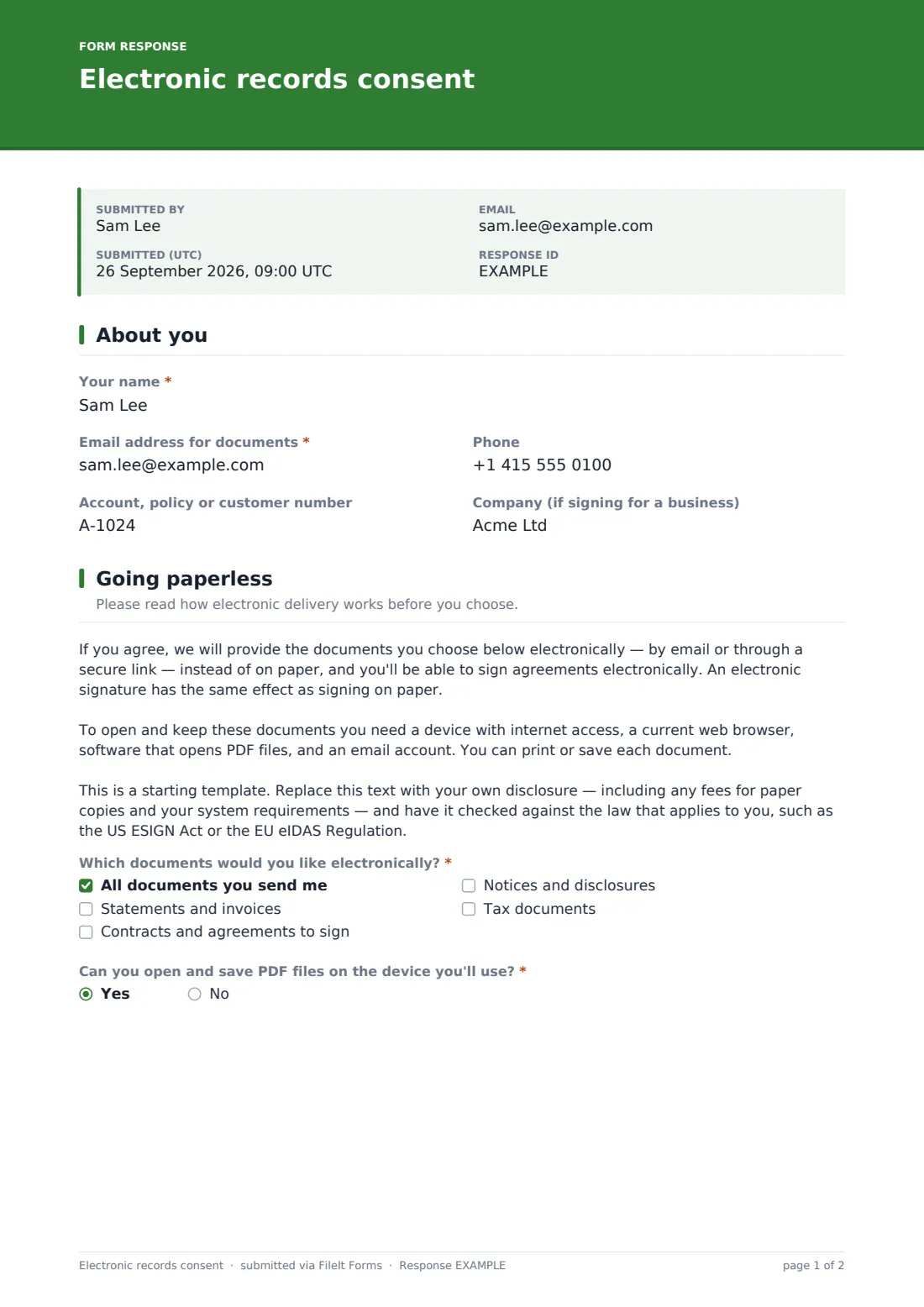
1 About you
- Your name*
- Email address for documents*
- Phone
- Account, policy or customer number
- Company (if signing for a business)
2 Going paperless
- Which documents would you like electronically?* All documents you send me · Statements and invoices · Contracts and agreements to sign · Notices and disclosures · Tax documents
- Can you open and save PDF files on the device you'll use?*
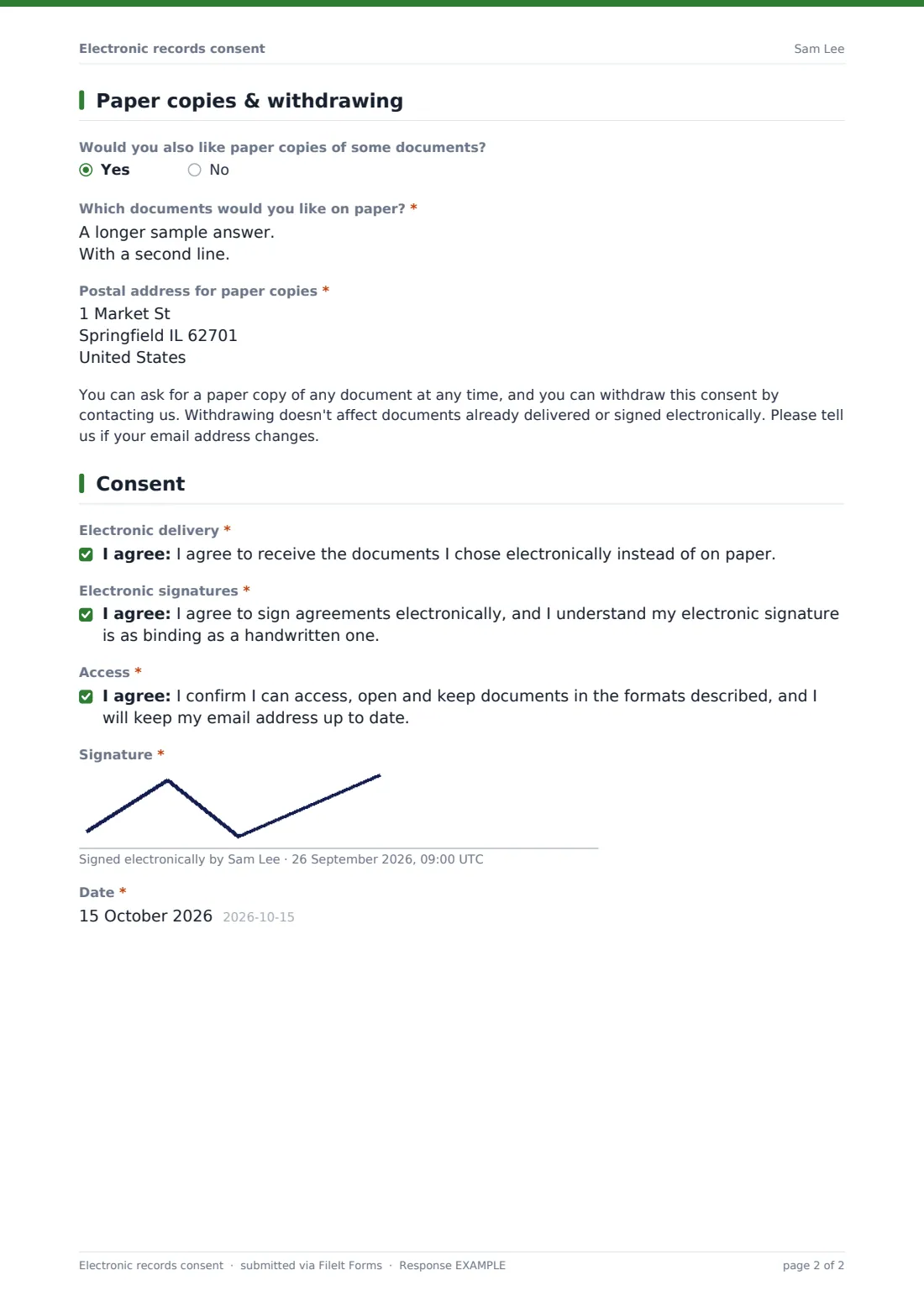
3 Paper copies & withdrawing
- Would you also like paper copies of some documents?
- Which documents would you like on paper?* asked only when it applies
- Postal address for paper copies* asked only when it applies
4 Consent
- Electronic delivery*
- Electronic signatures*
- Access*
- Signature*
- Date*
The electronic records consent form, page by page
1 About you
Name and the email address for documents are required. Phone, an account or policy number, and a company name for business customers are optional.
2 Going paperless
A disclosure paragraph explains that chosen documents will be sent by email or secure link, that an electronic signature has the same effect as a paper one, and what the customer needs to open and keep documents — with a note for the owner to replace it with their own wording, fees and requirements. The customer ticks which documents they want electronically — everything, statements, contracts to sign, notices or tax documents — and confirms they can open PDFs. If they can't, a note explains the options.
3 Paper copies & withdrawing
An optional question asks whether they'd still like some documents on paper; yes asks which ones and a postal address. A paragraph explains that paper copies can be requested at any time, consent can be withdrawn, and email changes should be reported.
4 Consent
Three separate statements cover electronic delivery, electronic signatures, and the customer's ability to access the documents. Signature and date complete the form.
Make the template yours
- Replace the disclosure with your own wording, system requirements and any fee for paper copies
- Adjust the document types to match what you actually send
- Add your contact details for paper requests and withdrawals
- Send it as a request to each existing customer during a paperless campaign
- Route consents into each customer's folder in your vault
- Use your brand color and a friendlier cover message
Tips for a better electronic records consent form
- Keep the version of the disclosure each customer agreed to — it may change over time
- Never make paper harder to get than it needs to be
- Update records promptly when someone withdraws consent or changes email
- Test the process on a phone — many customers will open documents there
- Some documents may have special delivery rules; check before sending them electronically
- Have the wording reviewed against the e-signature and consumer rules that apply to you — this is a starting template, not legal advice
Every response becomes a PDF in your vault
Each consent is filed as a signed PDF in your chosen vault folder, and the customer receives a copy by email. You can be notified of every new consent.
Use the Responses table to see who has gone paperless and who still wants paper copies, and export the list to update your billing or document system.
- Start from this template. It opens in the FileIt Forms designer — change any question, add pages, set the rules for when questions appear.
- Share it. Turn on a public link, or send it to people by email, each with their own link. They don’t need a FileIt account.
- Get the answers as PDFs. Each response is saved as a PDF in the vault folder you choose, with uploaded files attached — and listed in a Responses table you can export to CSV.
Electronic records consent form: frequently asked questions
Is this electronic records consent template free to use?
Yes. It's one of FileIt's ready-made templates, and every FileIt account, including the free plan, includes the Forms app and its full library of templates.
Do people filling in this form need a FileIt account?
No. Anyone with the link, or an emailed request, can complete and submit the form without creating a FileIt account. Only the form owner needs one.
Does this form satisfy the ESIGN Act's consumer consent rules?
It follows the usual elements — disclosure, scope, paper copies, withdrawal and access — but it's a starting template, not legal advice. Have your wording and process checked before relying on it.
Why check that people can open PDFs?
Consent to electronic records is only meaningful if the person can actually open them, so the form asks directly and explains the options if they can't.
Can customers choose only some documents?
Yes. They tick which types of document they want electronically, and can ask for paper copies of others.
How do customers withdraw consent?
The form tells them to contact you. FileIt doesn't change your document delivery automatically, so update your own systems when someone withdraws.
Can I use FileIt to collect the e-signatures afterwards?
Yes. This form's own signature field records the consent itself, and FileIt's eSignature app lets you send contracts and other PDFs to customers for signing, with a signed copy filed back into your vault once everyone has signed.