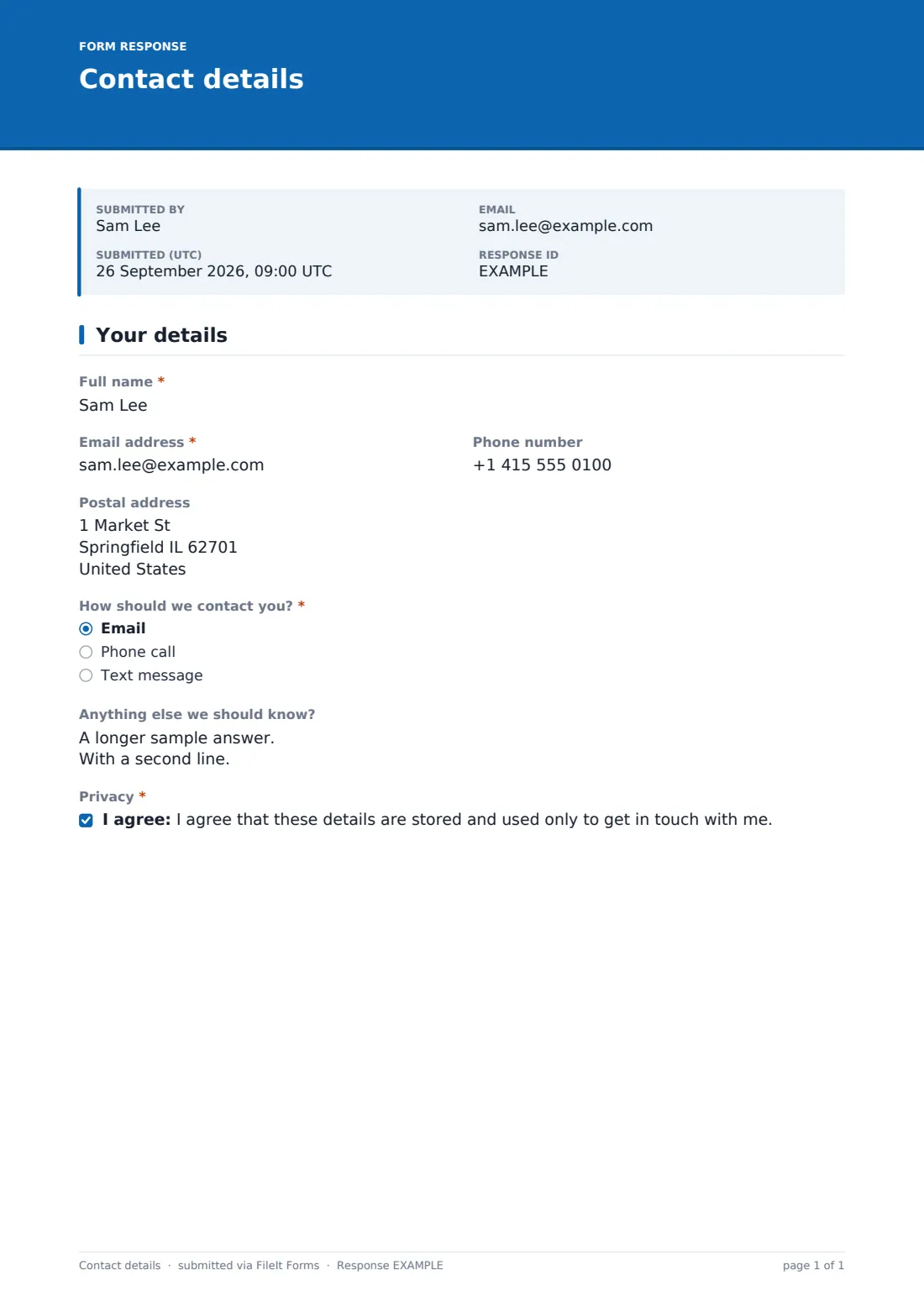
What is the contact details form template?
Sometimes you don't need a long intake process — you just need someone's current name, email, phone number and address, confirmed in their own words. A contact details form template gives you exactly that: one short, clear page that takes a minute to fill in, instead of chasing details over email or trying to read handwriting on a paper sign-up sheet.
Collecting contact details online also means fewer mistakes. People type their own email address and phone number rather than having someone else transcribe it, and a required contact preference means you know upfront whether to call, email, or text — instead of guessing and getting it wrong.
Built in FileIt, this template turns every submission into a PDF saved straight into your vault, in the folder you choose. Whether you're updating one client's file or building a directory for a whole group, each response becomes its own clean, dated record.
- Best for
- Businesses, clubs, schools and community groups collecting or refreshing basic contact information
- Filled in by
- The individual whose details are being collected or updated
- Time to complete
- About 2 minutes
- Includes
- Conditional question, a privacy consent statement, one focused page
Who uses a contact details form?
- A small business asking new clients to confirm their name, email and phone before the first appointment
- A club, class or community group building or refreshing a contact directory for its members
- A landlord or property manager collecting up-to-date contact details for tenants
- A school or activity organizer asking a parent to confirm their preferred contact method
- A business updating an existing customer's record after a move or a change of phone number
- Any organizer who wants one link to send out instead of asking people to reply to an email with their details
Questions on this contact details form
8 questions · includes conditional questions, consent checkbox.
1 Your details
- Full name*
- Email address*
- Phone number
- Postal address
- How should we contact you?* Email · Phone call · Text message
- Best time to call asked only when it applies Morning (9–12) · Afternoon (12–5) · Evening (5–8)
- Anything else we should know?
- Privacy*
The contact details form, page by page
1 Your details
Because this is a single, focused page, it naturally splits into a few groups of questions. It opens with the basics: Full name and Email address, both required, alongside an optional Phone number and an optional Postal address field for anyone who needs a mailing address on file.
Next comes How should we contact you?, a required choice between Email, Phone call, or Text message. Choosing Phone call reveals a Best time to call dropdown — Morning (9-12), Afternoon (12-5), or Evening (5-8) — so whoever calls back doesn't interrupt someone at a bad time, without cluttering the form with a scheduling question for people who'd rather be emailed or texted.
An optional Anything else we should know? long-answer field gives room for a short note — a preferred name, a scheduling constraint, anything that doesn't fit the fields above — and the form closes with a required Privacy consent statement confirming the details are stored and used only to get in touch with the person who submitted them.
Make the template yours
- Add fields for a company name, job title, or department if you're collecting contact details in a business or supplier context
- Turn Phone number into a required field if you plan to call people rather than email them
- Add a dropdown for which team, class, or location the contact relates to, if you manage more than one
- Set the vault folder so each submission files under the right family member, client, or entity automatically
- Adjust the Document title in settings so each PDF is easy to find later, for example naming it after the person and the date
- Allow multiple responses if the same person might update their details more than once, or turn it off if you only want one submission per person
- Send an email notification to a specific team inbox so new or updated contact details reach the right person straightaway
Tips for a better contact details form
- Ask only for what you'll actually use — a short form gets completed faster and with fewer abandoned attempts
- Make the contact preference question required so you're never guessing how someone wants to be reached
- Periodically ask existing contacts to resubmit the form so your records don't go stale as people change numbers or move
- Keep the privacy statement honest and specific about what the details will be used for
- If you're building a directory, decide upfront whether details will be shared with others, and say so clearly before people submit
- Review new submissions promptly if the form is meant to trigger a follow-up call or email
Every response becomes a PDF in your vault
As soon as someone submits their contact details, FileIt converts the response into a PDF and files it in your vault, in the folder you've set up for it. You get an email notification the moment it arrives, and if you've turned on the optional copy, the person who filled it in receives their own PDF confirming what they submitted.
From there, most people either use the new record to reach out directly, or file it alongside an existing client or member record for future reference. The Responses table lists every submission with filters, so you can search for a specific person, check when their details were last updated, or export the whole list to CSV for a mailing or a phone list.
- Start from this template. It opens in the FileIt Forms designer — change any question, add pages, set the rules for when questions appear.
- Share it. Turn on a public link, or send it to people by email, each with their own link. They don’t need a FileIt account.
- Get the answers as PDFs. Each response is saved as a PDF in the vault folder you choose, with uploaded files attached — and listed in a Responses table you can export to CSV.
Contact details form: frequently asked questions
Is this contact details form template free?
Yes. This template and the Forms app are included on every FileIt account, including the free plan, with nothing extra to unlock.
Does someone need a FileIt account to fill this in?
No. You send a public link or a personal email invite, and the person filling it in doesn't need an account of their own.
How do I get the submitted contact details as a PDF?
Each submission is automatically turned into a PDF and saved in your FileIt vault, in whichever folder you've chosen for the form.
How do I create a contact details form online?
Start from this template in FileIt's Forms app, adjust the fields you need in the drag-and-drop designer, then share it by link or email.
Can I use this form to update someone's existing details rather than collect them for the first time?
Yes — many people reuse the same form link periodically, and each new submission is saved as its own dated PDF so you can see when details last changed.
Can I require a phone number instead of making it optional?
Yes, every field in the designer can be marked required or optional, so you can adjust Phone number, Postal address, or any other field to fit your needs.
Will this form add someone to a mailing list automatically?
No — FileIt doesn't manage mailing lists or send marketing emails. This form only collects the details and saves them as a PDF in your vault; what you do with them afterward is up to you.
Can I limit how many times someone can submit the form?
Yes, the form settings let you allow or stop multiple responses, and set a maximum number of responses or a closing date if needed.