What is the client intake form template?
The first conversation with a new client goes so much better when you already know what they want, roughly what they can spend, and when they need it done. Chasing that information over a back-and-forth email thread wastes both sides' time and often means the same questions get asked again on the call. A client intake form fixes that by collecting the essentials up front, in one place, before you ever pick up the phone.
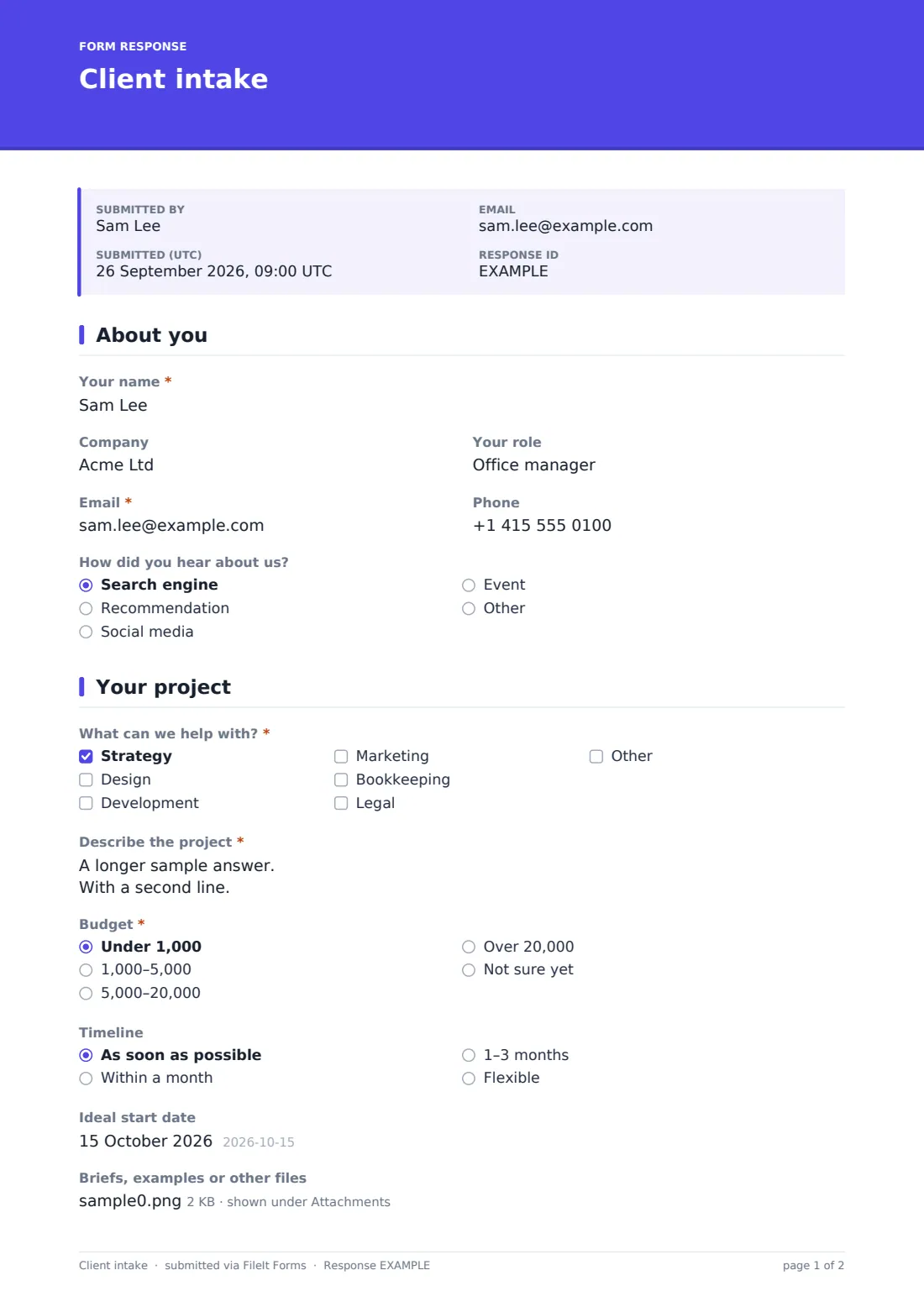
This template is deliberately short, just two pages, built for a prospective client to complete in a couple of minutes from a link on your website, an email signature or a proposal. It asks who they are, how they found you, what kind of help they're after, and gives them room to describe the project, their budget bracket and their ideal timeline in their own words, with an option to attach a brief or reference files.
Every submission lands in your FileIt vault as a PDF the moment it's sent, with any attached files kept alongside it. There's no separate inbox to check and no client account required; they just fill in the form and hit submit, and you get a clean, organized record of every enquiry you've ever received.
- Best for
- Freelancers, consultants and small agencies qualifying new client enquiries
- Filled in by
- A prospective client, before or instead of an initial phone call
- Time to complete
- About 3 minutes
- Includes
- Conditional question, file upload for briefs, privacy consent
Who uses a client intake form?
- A freelance designer or developer replacing a generic contact mailbox with a structured enquiry form
- A marketing or bookkeeping consultancy screening leads by budget range before booking a discovery call
- A small agency that wants every new enquiry filed the same way, regardless of which team member first responds
- A service business capturing how prospects found them, to see which referral sources actually bring in work
- A solo consultant collecting a project brief and reference files up front, so the first call can focus on questions rather than repeating what's already been written down
- Anyone who currently fields new business enquiries by email and wants a single, searchable record of them instead
Questions on this client intake form
14 questions over 2 pages · includes file upload, conditional questions, multiple pages, consent checkbox.
1 About you
- Your name*
- Company
- Your role
- Email*
- Phone
- How did you hear about us? Search engine · Recommendation · Social media · Event · Other
- Where did you hear about us? asked only when it applies
2 Your project
- What can we help with?* Strategy · Design · Development · Marketing · Bookkeeping · Legal
- Describe the project*
- Budget* Under 1,000 · 1,000–5,000 · 5,000–20,000 · Over 20,000 · Not sure yet
- Timeline As soon as possible · Within a month · 1–3 months · Flexible
- Ideal start date
- Briefs, examples or other files
- Privacy*
The client intake form, page by page
1 About you
This page gathers the essentials for getting back in touch: Your name, Company (optional, for anyone enquiring on behalf of a business), Your role, Email, and Phone. A How did you hear about us? dropdown offers Search engine, Recommendation, Social media, Event, or Other, and choosing Other opens a short text field asking exactly where, which is a simple way to build a picture of which marketing or referral channels are actually converting into enquiries.
Keeping this page short matters: a long list of personal questions before someone even explains what they need is one of the fastest ways to lose a prospective client's attention.
2 Your project
The second page gets into the actual work. What can we help with? is a checkbox list, Strategy, Design, Development, Marketing, Bookkeeping, Legal, with an option for anything else, so it adapts to whatever mix of services a business offers. Describe the project is an open long-text field prompting for goals, who it's for, and what success looks like, which is far more useful for a first read than a one-line summary.
Budget is asked as a straightforward range, Under 1,000, 1,000-5,000, 5,000-20,000, Over 20,000, or Not sure yet, so there's no awkward guessing game about whether an enquiry is a realistic fit before the call happens. Timeline and an Ideal start date round out the planning picture, and a file upload lets the prospective client attach a brief, mood board or spec document. A short privacy consent line closes the form, confirming their details will be used to prepare a proposal and to work together.
Make the template yours
- Swap the What can we help with? list for your own service names; the checkboxes are entirely editable, including the catch-all fallback option
- Adjust the Budget ranges to match your typical project sizes, whether that means lower thresholds for a freelancer or higher ones for an agency
- Add a conditional question that only appears for certain services, for example extra fields for development enquiries but not for bookkeeping ones
- Turn on an emailed notification to more than one address if enquiries should reach a sales inbox as well as you personally
- File responses straight into a dedicated new-enquiries vault folder so they never mix with active client paperwork
- Set a maximum number of responses or a closing date if you're temporarily not taking on new work and want the form to stop collecting
- Change the confirmation message to set expectations on response time, so the prospective client knows roughly when to expect to hear back
Tips for a better client intake form
- Ask for a budget range rather than an exact figure; it's less intimidating for the prospect and still tells you what you need to know
- Keep the project description prompt open-ended, since a client's own words often reveal priorities a tick-box list would miss
- Only make fields required if you genuinely can't proceed without the answer; phone numbers, for instance, are often optional in practice
- Review submissions promptly, since an intake form only helps conversion if the reply still feels timely
- Use the referral-source question to actually inform where you spend marketing time, not just as background trivia
- Ask only for what you need to qualify and prepare a response; a client intake form is not the place for a full contract or scope of work
Every response becomes a PDF in your vault
The moment a prospective client submits the form, FileIt saves it as a PDF in your vault, complete with any brief or reference files they attached. You, and any extra addresses you've added, get an email notification straight away, so a promising enquiry doesn't sit unseen for days.
From there, most businesses open the Responses table, skim the budget and project description, and decide whether to book a call or send a quote. Because every enquiry is filed the same way, it's easy to compare this month's leads side by side, export the list to CSV for a pipeline review, or simply search back for a name when a prospect finally gets in touch again.
- Start from this template. It opens in the FileIt Forms designer — change any question, add pages, set the rules for when questions appear.
- Share it. Turn on a public link, or send it to people by email, each with their own link. They don’t need a FileIt account.
- Get the answers as PDFs. Each response is saved as a PDF in the vault folder you choose, with uploaded files attached — and listed in a Responses table you can export to CSV.
Client intake form: frequently asked questions
Is this client intake form template free?
Yes. It's included in FileIt's Forms template library on every plan, including free, and every field can be edited, added or removed in the designer.
Does a prospective client need a FileIt account to fill it in?
No. Share a public link or email it directly and they complete it without signing up for anything.
How do I get each enquiry as a PDF?
Every submission is automatically saved as a PDF in your FileIt vault folder of choice, with any uploaded files attached to it.
Can I ask for a project budget without putting a client off?
Using budget ranges rather than an exact number, as this template does, tends to feel less intrusive while still helping you judge fit before a call.
Can this replace my contact page?
It can work well as a more structured alternative; share the form link instead of, or alongside, a plain contact form to collect more useful detail upfront.
Can I require a phone number or make it optional?
Yes, every field's required setting can be changed in the designer, so you can decide what a prospect must provide before submitting.
Can I attach a proposal template to this instead of building my own?
This template only collects the enquiry; proposals and contracts are handled outside FileIt, but you can store your own proposal documents in the vault alongside the intake response.