

What is the contractor onboarding form template?
Bringing on a freelancer or contractor usually means chasing the same handful of details by email: their business name, a tax number, how they charge, whether they carry insurance, and where to send payment. It's easy for one of those to get missed until an invoice bounces or a payment fails. This contractor onboarding form template puts all of it on one online form, in an order that makes sense, so nothing gets left out.
An online form beats a scattered email thread because every contractor answers the same questions in the same format, required fields stop a half-finished submission going through, and the person filling it in doesn't need a FileIt account — you just share a link or send them an email invite. Conditional questions keep the form short for people it doesn't apply to: someone working as a sole trader never sees the company registration question, and no one sees insurance policy fields unless they say they're insured.
The moment a contractor submits, FileIt turns their answers into a PDF and drops it straight into your vault, in whatever folder you choose — under that contractor's name, or a general "Contractors" folder, whichever suits how you organize your business. Any uploaded tax form or insurance certificate is attached to that same PDF, so the record and its supporting documents travel together.
- Best for
- Small businesses and agencies onboarding freelancers, consultants or contractors
- Filled in by
- The contractor or freelancer, no FileIt account needed
- Time to complete
- About 8–10 minutes
- Includes
- Conditional questions, file upload, e-signature, consent statement
Who uses a contractor onboarding form?
- A design or marketing agency bringing on a new freelance contributor for a project
- A small business hiring its first independent contractor and formalizing the paperwork
- A bookkeeper or accountant collecting tax and bank details before running the first payment
- A construction or trades company registering subcontractors before they start on site
- A startup replacing a back-and-forth email chain with one consistent onboarding step
- An operations manager who needs insurance proof on file before a contractor can start work
Questions on this contractor onboarding form
29 questions over 5 pages · includes signature, file upload, conditional questions, multiple pages, consent checkbox.
1 You & your business
- Your name*
- Email*
- Phone*
- How do you work?* As an individual / sole trader · Through my own limited company · Through a partnership · Through an agency or umbrella company
- Registered business name* asked only when it applies
- Business address*
- Website or portfolio
2 Tax & registration
- Country of tax residence*
- Tax identification number*
- Company registration number asked only when it applies
- Are you registered for VAT / GST / sales tax?*
- VAT / GST number* asked only when it applies
- Tax form or registration certificate
3 Engagement & rates
- Services you'll provide*
- Expected start date
- Expected end date
- How do you charge?* Hourly rate · Day rate · Fixed project fee · Monthly retainer
- Rate or fee (before tax)*
- Invoicing Weekly · Monthly · On milestones · On completion
4 Insurance & payment
- Do you hold professional or public liability insurance?*
- Insurer and policy number asked only when it applies
- Policy expiry date* asked only when it applies
- Insurance certificate asked only when it applies
- Account holder name*
- Bank name*
- IBAN / account number*
- SWIFT / BIC, sort code or routing number
5 Agreement
- Agreement*
- Signature*
The contractor onboarding form, page by page
1 You & your business
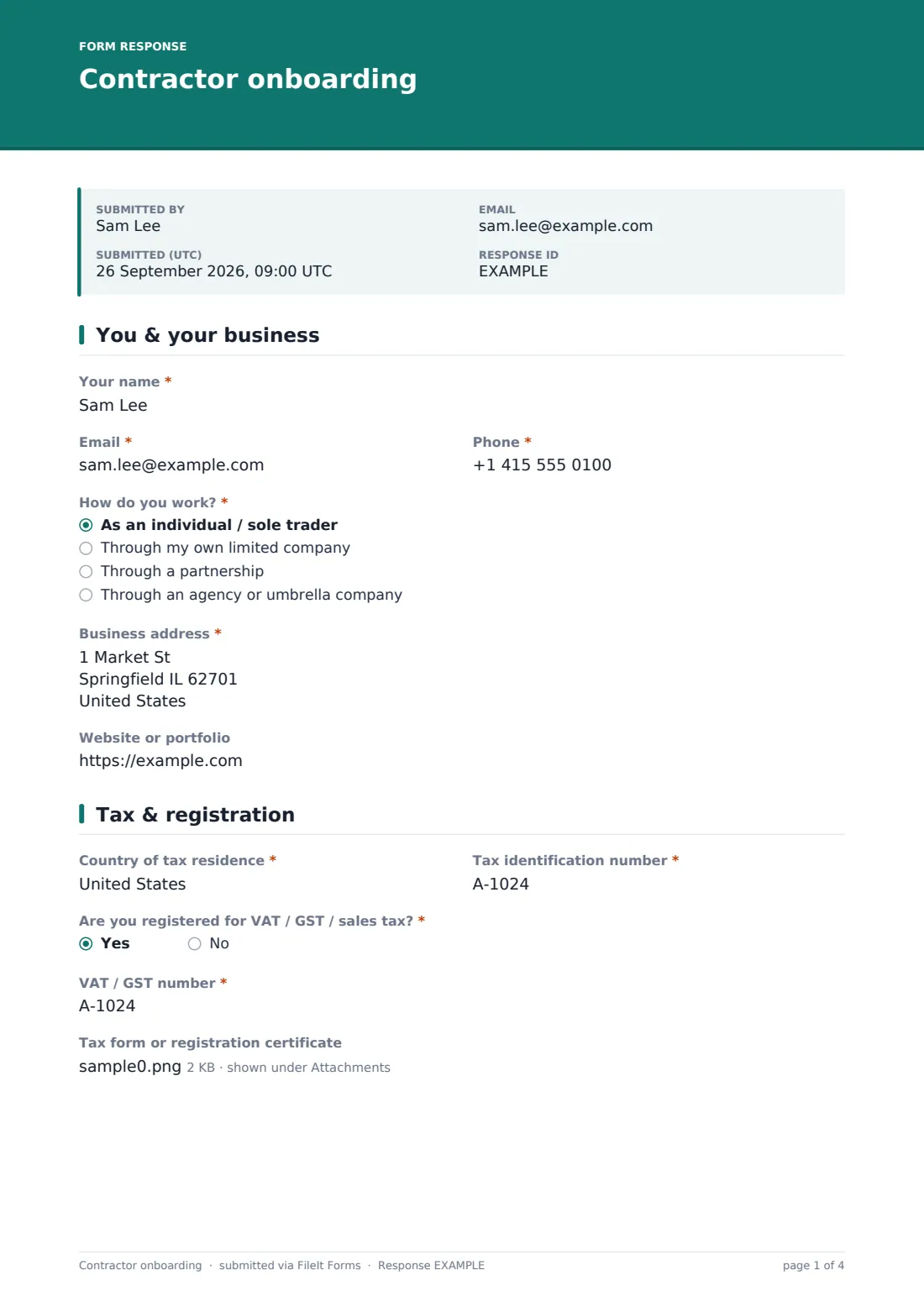
The form opens with the basics: the contractor's name, email and phone, then a "How do you work?" question — as an individual or sole trader, through their own limited company, through a partnership, or through an agency or umbrella company. Answering anything other than "sole trader" reveals a required "Registered business name" field, so the form only asks for company details from people who actually have a registered company.
Everyone then gives a business address and, optionally, a website or portfolio link. Keeping this on its own page means the contractor isn't dropped straight into tax questions before you've even got their basic contact details right.
2 Tax & registration
This page asks for the country of tax residence and a tax identification number — the help text notes it could be a UTR, EIN, TIN, ABN, OIB or whatever your local tax authority issues, since the template is written to work across countries. A company registration number only appears if the contractor said they work through a limited company on the previous page.
A yes/no question asks whether they're registered for VAT, GST or sales tax; answering yes reveals a required field for that number. An optional file upload lets them attach a tax form or registration certificate — a W-9 or W-8BEN in the US, for example, or a company certificate elsewhere — if you've asked them to provide one.
3 Engagement & rates
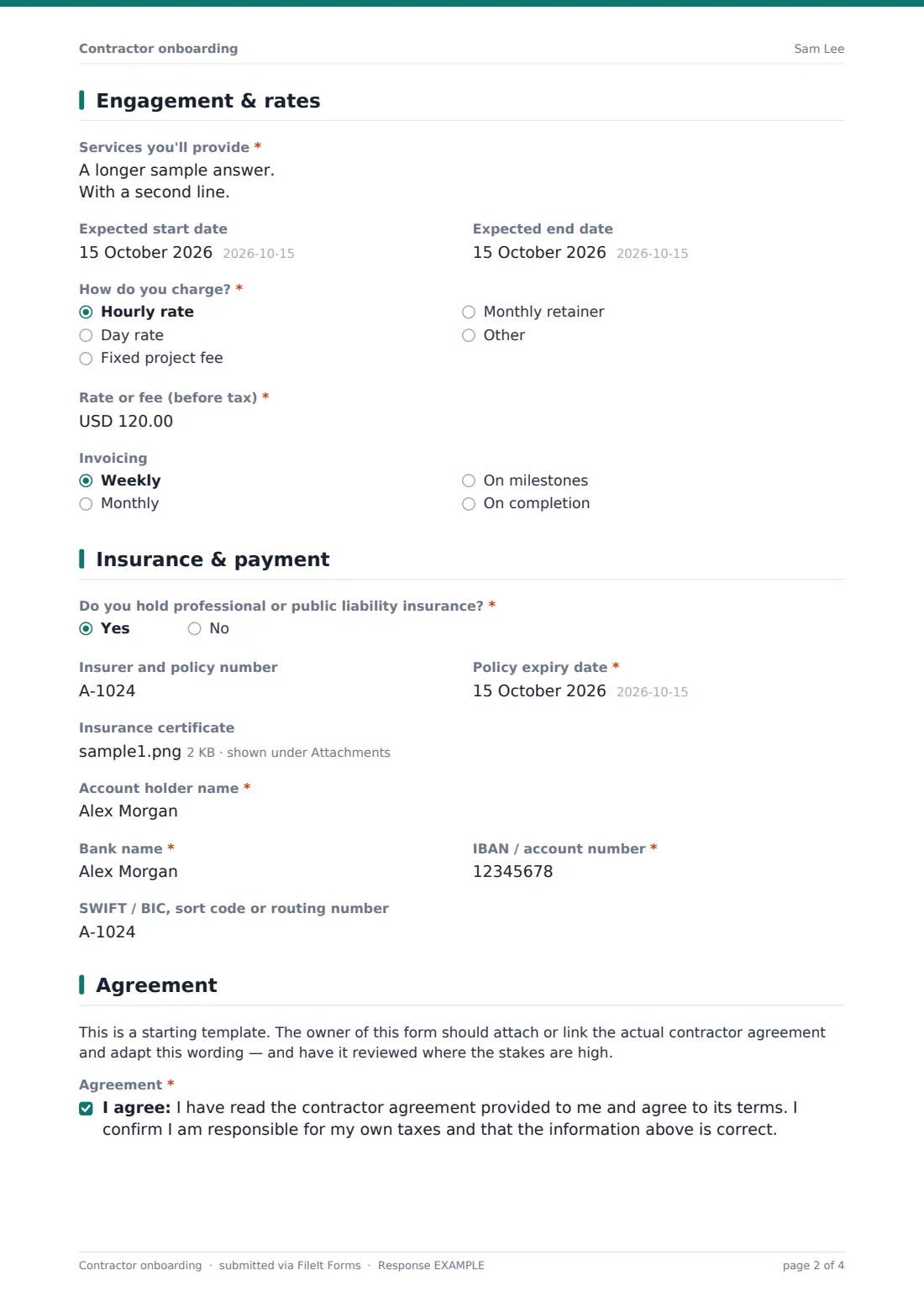
Here the contractor describes the services they'll provide in their own words, and gives an expected start date and, if it isn't ongoing work, an end date. A "How do you charge?" question offers hourly, day rate, fixed project fee or monthly retainer, with an "other" option in case none of those fit.
A currency field captures the rate or fee before tax, and a dropdown lets them indicate how they'd like to invoice — weekly, monthly, on milestones, or on completion. Having this in writing from day one heads off disagreements later about what was agreed.
4 Insurance & payment
A yes/no question asks whether the contractor holds professional or public liability insurance. Answer yes and three more fields appear: the insurer and policy number, a required policy expiry date, and an optional upload for the certificate itself — useful if your business needs proof of cover on file before work starts.
The same page collects payment details: account holder name, bank name, IBAN or account number, and SWIFT/BIC, sort code or routing number, so whoever runs payroll or accounts payable has everything needed to pay the first invoice without a follow-up email.
5 Agreement
A short note reminds the form's owner that this is a starting point — the actual contractor agreement should be attached or linked separately and adapted to the engagement, with a proper review where the stakes are high. The contractor then confirms, via a consent checkbox, that they've read the agreement provided to them, agree to its terms, and are responsible for their own taxes, before signing on a signature pad.
That combination of a plain-language declaration and a drawn signature gives you a dated, self-contained record of what the contractor agreed to when they started.
Make the template yours
- Add a question for a preferred payment currency if you work with contractors across several countries
- Add conditional logic so a non-disclosure or confidentiality question only appears for contractors working with sensitive client data
- Set the folder, family member or entity so every onboarding PDF files itself under that contractor's name automatically
- Turn on an email notification to your accounts or HR inbox for every new submission, plus a copy for the contractor's own records
- Add or remove rate options to match how your business actually pays — day rate, sprint, deliverable-based, and so on
- Set a maximum number of responses or a closing date if the form is only open while you're actively recruiting
- Swap the agreement wording and consent statement for your own contractor terms before sharing the link
Tips for a better contractor onboarding form
- Only ask for the tax and bank details you actually need to pay someone — collecting more than that just creates a bigger record to protect
- Make the insurance question required if your business or insurer needs proof of cover before a contractor can start
- Ask for a website or portfolio link so you have a quick reference for who you're working with, without turning the form into an interview
- Set a closing date or maximum response count if you're only onboarding a handful of people for one project, so the link doesn't sit open indefinitely
- Review the agreement wording and consent statement with someone who understands contractor law where you operate — this template is a starting point, not legal advice
- Keep the confirmation message specific about what happens next, such as when the first invoice or payment will go out
Every response becomes a PDF in your vault
As soon as a contractor submits the form, FileIt turns their answers into a single PDF — including any uploaded tax form or insurance certificate — and files it in the vault folder you've chosen. If you turned on owner notifications, you get an email the moment it lands, and if you enabled a copy for the respondent, the contractor receives their own PDF for their records too.
From there, most businesses check the Responses table, confirm the bank and tax details against what's needed for payroll, and open the PDF directly when a question comes up later — no digging through old emails. Because everything is saved centrally, exporting all your contractors' records to CSV for an accountant or a compliance check takes a couple of clicks.
- Start from this template. It opens in the FileIt Forms designer — change any question, add pages, set the rules for when questions appear.
- Share it. Turn on a public link, or send it to people by email, each with their own link. They don’t need a FileIt account.
- Get the answers as PDFs. Each response is saved as a PDF in the vault folder you choose, with uploaded files attached — and listed in a Responses table you can export to CSV.
Contractor onboarding form: frequently asked questions
Is this contractor onboarding form template free?
Yes. It's included with the Forms app on every FileIt account, including the free plan, along with the other 160 ready-made templates.
Does the contractor need a FileIt account to fill it in?
No. You share a public link or send a personal email invite, and they fill it in and submit — no sign-up required on their end.
How do I get the contractor's submitted details as a PDF?
FileIt automatically converts every submission into a PDF and saves it in your vault, in the folder you've configured, with any uploaded files attached.
Can I ask for tax details that fit my country?
Yes — the tax ID field is deliberately generic (it mentions examples like UTR, EIN or ABN), and you can edit the label, help text or add extra fields in the designer to match your own country's requirements.
Can I make the insurance section required?
You can edit any field's required setting in the designer. The template asks about insurance with a yes/no question and only shows the policy details if the contractor says yes, but you can change that logic to suit your process.
Is the agreement in this template legally binding?
No template wording is presented as legally binding by FileIt. The agreement section is a starting point — attach your own contractor agreement and have it reviewed for your situation before relying on it.
Can I send this to more than one contractor at once?
Yes — share one public link with everyone, or send individual email invites, each with the contractor's name and email prefilled, if you'd rather track responses per person.
Where do I see all the contractors who've submitted this form?
The Responses table lists every submission with filters, and you can open any individual PDF or export the whole list to CSV.