What is the direct deposit authorization form template?
Whether you're setting up a new employee's first paycheck, processing a bank change, or letting someone split their pay across two accounts, getting bank details by email or a shared spreadsheet is exactly the kind of thing that goes wrong: a transposed digit, an old account number, details sitting in an inbox longer than they should. This template puts the whole request — new setup, a change, or a cancellation — behind one structured form with a signature at the end.
An online form doesn't remove the responsibility to check what's entered, but it does make sure every field the payment run needs is filled in the same way every time, and it can ask for a voided check or bank letter alongside the numbers so mistakes are easier to catch before the first payment goes out.
Every submission becomes a signed PDF in your vault the moment it's completed, so payroll or finance always has a dated authorization on file — not a message buried in someone's inbox.
- Best for
- Payroll, HR and finance teams setting up or changing how someone gets paid
- Filled in by
- The employee or payee receiving the payment
- Time to complete
- About 4 minutes (longer when splitting pay across two accounts)
- Includes
- Conditional questions, optional split deposit, file upload, signature
Who uses a direct deposit authorization form?
- HR teams onboarding a new employee who needs their first paycheck set up correctly
- Payroll teams processing a bank-detail change without relying on email
- Employees who want part of their pay sent automatically to a savings account
- Contractors or vendors being paid directly rather than by check
- Organizations that want a signed, dated authorization on file for every bank-detail change, not just the current one
- Finance teams who want a voided check or bank letter attached to every new setup, as a second check against typos
Questions on this direct deposit authorization form
25 questions over 4 pages · includes signature, file upload, conditional questions, multiple pages, consent checkbox.
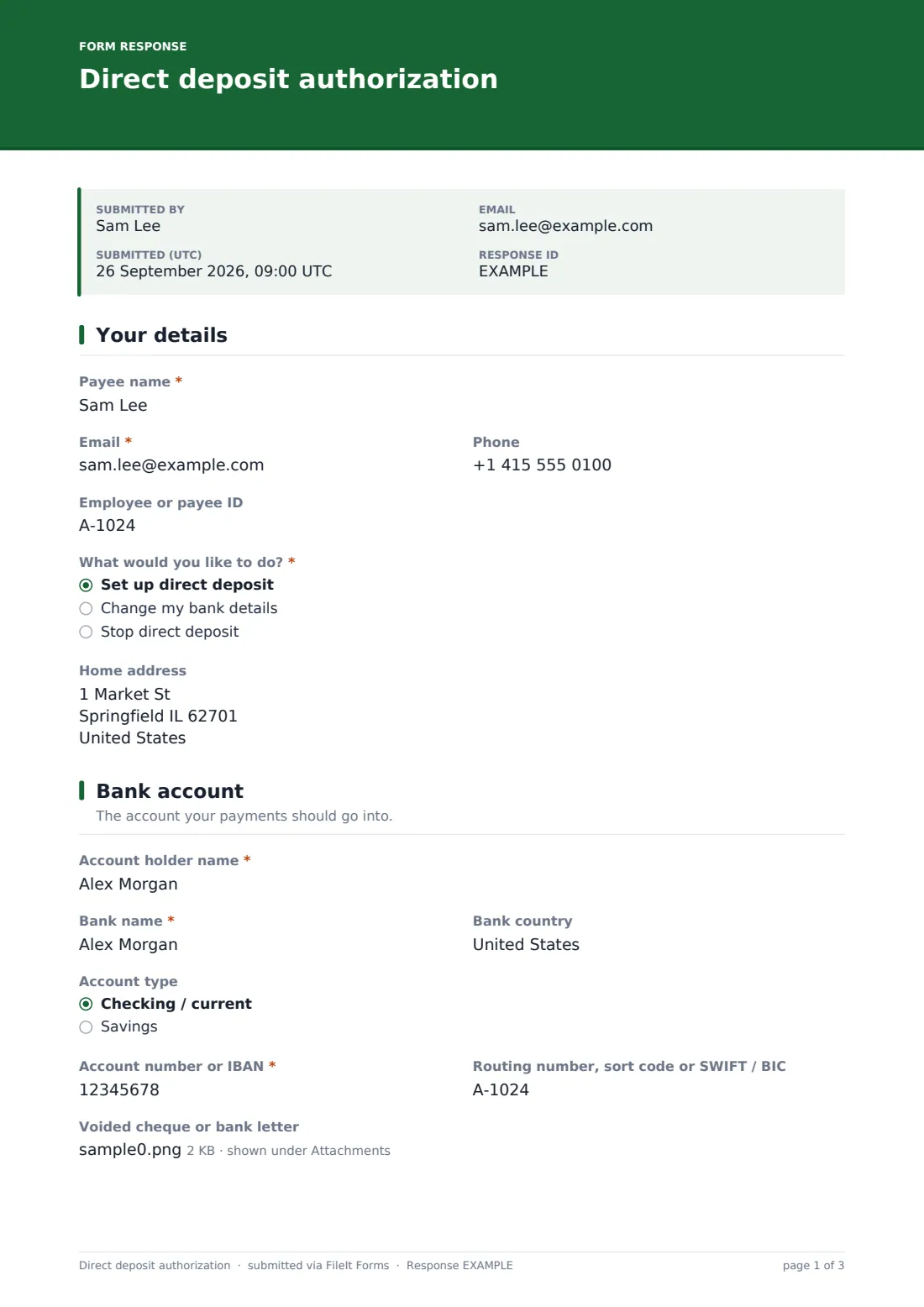
1 Your details
- Payee name*
- Email*
- Phone
- Employee or payee ID
- What would you like to do?* Set up direct deposit · Change my bank details · Stop direct deposit
- Home address
2 Bank account
- Account holder name* asked only when it applies
- Bank name* asked only when it applies
- Bank country asked only when it applies
- Account type asked only when it applies Checking / current · Savings
- Account number or IBAN* asked only when it applies
- Routing number, sort code or SWIFT / BIC asked only when it applies
- Voided cheque or bank letter asked only when it applies
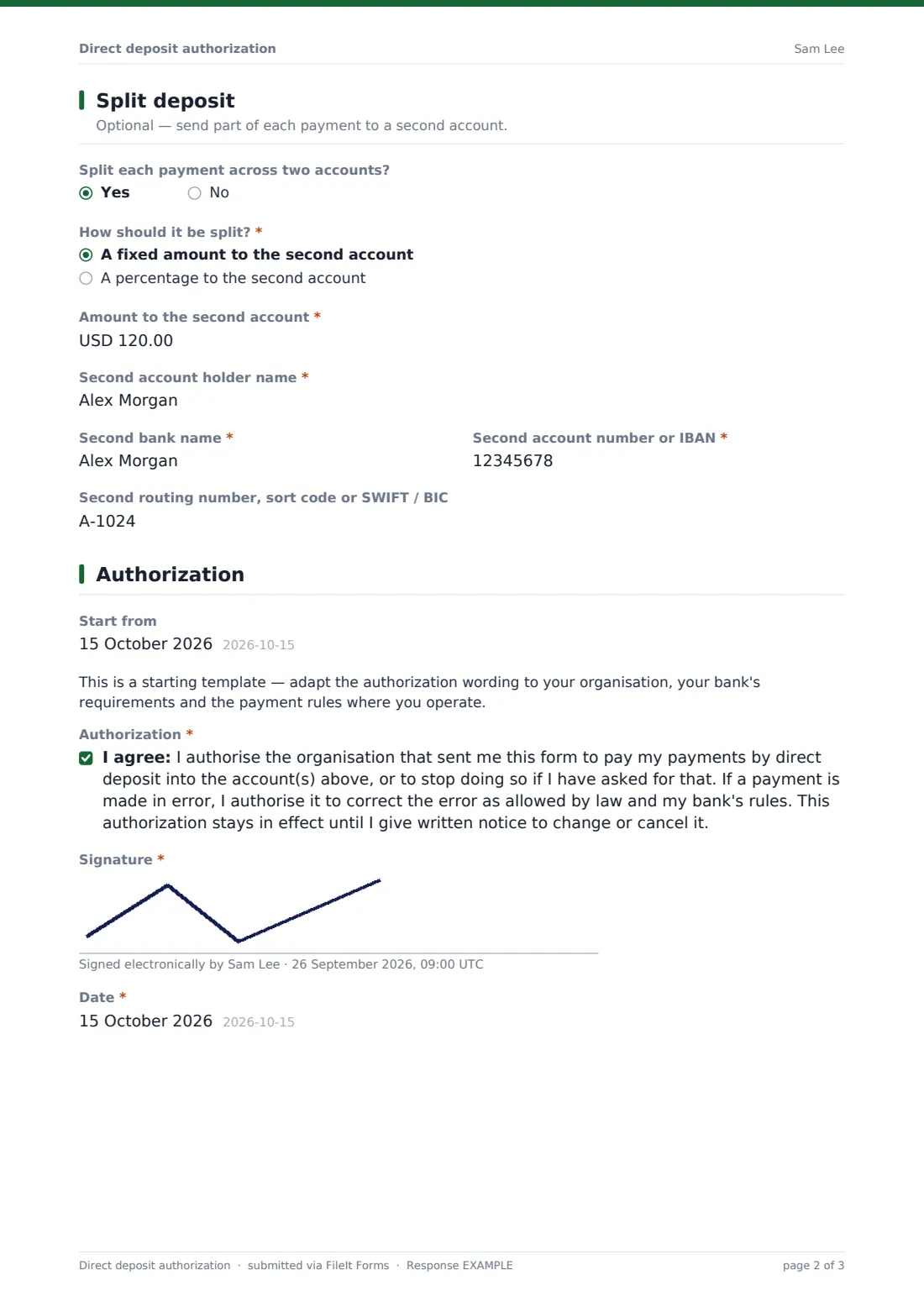
3 Split deposit
- Split each payment across two accounts? asked only when it applies
- How should it be split?* asked only when it applies A fixed amount to the second account · A percentage to the second account
- Amount to the second account* asked only when it applies
- Percentage to the second account* asked only when it applies
- Second account holder name* asked only when it applies
- Second bank name* asked only when it applies
- Second account number or IBAN* asked only when it applies
- Second routing number, sort code or SWIFT / BIC asked only when it applies
4 Authorization
- Start from
- Authorization*
- Signature*
- Date*
The direct deposit authorization form, page by page
1 Your details
The form starts by asking What would you like to do? — set up direct deposit, change existing bank details, or stop direct deposit altogether — which determines what the rest of the form asks for. Alongside the payee's name, email, phone and an optional employee or payee ID, a home address field is available if your payroll records need one. Choosing Stop direct deposit skips straight past the bank-account questions, since there's nothing new to collect.
2 Bank account
For anyone setting up or changing their deposit, this page collects the account holder's name exactly as the bank shows it, the bank's name and country, and whether it's a checking/current or savings account. The core details — Account number or IBAN, and Routing number, sort code or SWIFT/BIC — are what the payment run actually needs, and an optional upload for a voided check or bank letter gives payroll a second source to check the numbers against before the first payment is sent.
3 Split deposit
This page only matters if the payee wants their pay divided between two accounts. Split each payment across two accounts? reveals How should it be split? — either a fixed amount or a percentage — followed by the matching field: Amount to the second account, or Percentage to the second account. Whatever is entered here comes off each payment, with the remainder going to the main account on the previous page; the payee then supplies the second account's holder name, bank and account number the same way as before.
4 Authorization
The final page asks when the change should start from, includes a reminder that this is a starting template to adapt to your organization's own requirements, and presents the authorization statement itself: that the payee is authorizing payments into the account(s) given, or authorizing them to stop, and that this stays in effect until they give written notice otherwise. A signature and date close the form.
Make the template yours
- Adjust the authorization wording to match your organization's own payroll policy and the rules of your bank or payment provider
- Add a field for department or cost center if your payroll system needs one
- Make the voided check or bank letter upload required rather than optional, if your process calls for it
- Turn off split deposit entirely if your payroll system doesn't support it
- Route completed authorizations to a restricted Payroll or Finance folder in the vault
- Set the document title to include the effective date, so filenames sort in the order changes take effect
Tips for a better direct deposit authorization form
- Ask for a voided check or bank letter alongside the typed details — it's a fast way to catch a mistyped digit before a payment fails
- Confirm a new or changed account with a small test deposit if your payment provider supports one, especially for the first payment
- Keep bank-detail changes in a restricted folder, since account numbers are sensitive information
- Have a way to verify unusual requests, such as a change submitted right before payday, through another channel — payment-redirection scams often target this exact process
- Give the payee a clear way to confirm their change has gone through, rather than leaving them to assume it worked
Every response becomes a PDF in your vault
Once the payee signs and submits, FileIt saves the completed authorization as a PDF in the vault folder you've set up for payroll records, with any voided check or bank letter attached, and notifies whoever you've set to receive new submissions. Because it's signed and dated, it stands as the payee's own record of exactly what they authorized, even if the underlying account details are later queried.
From there, payroll or finance typically opens the response, checks the account and routing details against the attached document, and updates the payment system before the next pay run. The Responses table and CSV export make it straightforward to review several change requests together if a few come in around the same time.
- Start from this template. It opens in the FileIt Forms designer — change any question, add pages, set the rules for when questions appear.
- Share it. Turn on a public link, or send it to people by email, each with their own link. They don’t need a FileIt account.
- Get the answers as PDFs. Each response is saved as a PDF in the vault folder you choose, with uploaded files attached — and listed in a Responses table you can export to CSV.
Direct deposit authorization form: frequently asked questions
Is this direct deposit authorization template free to use?
Yes. It's part of FileIt's template library, available on every account including the free plan, with no extra cost for the template or the Forms designer.
Do employees need a FileIt account to submit their bank details?
No. The payee fills in and signs the form from a link or an emailed request without creating any account. Only the organization sending the form needs a FileIt account.
How do I get each authorization as a signed PDF?
Every completed form is automatically saved as a PDF, including the signature, in the vault folder you chose when you set up the form. You can open any response from the Responses table or export the whole list to CSV.
Is the signature on this form legally binding?
The form captures a signature drawn on screen alongside a written authorization statement, which many organizations treat the same way as a paper form, but whether it satisfies your bank's or jurisdiction's own requirements is something to check yourself — FileIt makes no legal determination about it.
Can employees split their pay between two accounts?
Yes. An optional Split deposit page lets the payee send a fixed amount or a percentage of each payment to a second account, with the rest going to the account entered earlier.
Is uploading a voided check required?
Not by default — it's optional in the template, though you can make it required in the designer if your process calls for it.
How securely are the bank details stored?
Answers submitted through FileIt forms, including account numbers, are encrypted at rest in your vault.
Can I use this form for contractors as well as employees?
Yes. The wording refers generically to a payee, and every label and question can be edited in the designer if you want to tailor it for contractors or vendors specifically.