What is the bookkeeping client intake form template?
Quoting a new bookkeeping client properly means knowing more than just their business name — you need their structure, what software they're already using, how far behind their books are, roughly how many transactions flow through each month, and which services they actually want. Gathering all that over a phone call or a back-and-forth email thread eats time you could spend on billable work.
This bookkeeping client intake form template asks for exactly that, in one structured pass: business profile, current bookkeeping setup, transaction and invoice volumes, and the specific services the prospect is interested in, from ongoing bookkeeping and payroll to catch-up work and software migration. It's built so a rough estimate is enough for the volume questions — precision can come later, once you've won the engagement.
Each submission is automatically turned into a PDF and filed in your FileIt vault, so every prospective client's intake sits alongside their contract, correspondence and other paperwork from day one, without you retyping anything into a separate CRM.
- Best for
- Bookkeepers, accounting firms and freelance finance professionals qualifying new clients
- Filled in by
- The business owner or the person who manages their finances
- Time to complete
- About 7-9 minutes for a business with typical volumes
- Includes
- Conditional questions based on tax registration, software and services chosen
Who uses a bookkeeping client intake form?
- A bookkeeping practice qualifying inbound leads from its website before a discovery call
- An accounting firm scoping a catch-up bookkeeping project for a client who's fallen behind
- A freelance bookkeeper collecting details before sending a fixed-fee proposal
- A firm deciding whether a prospect needs payroll services alongside bookkeeping
- A practice standardizing its onboarding so every new client gets asked the same questions
- A bookkeeper assessing software migration needs before moving a client off spreadsheets
Questions on this bookkeeping client intake form
31 questions over 4 pages · includes conditional questions, multiple pages.
1 Your business
- Your name*
- Email*
- Phone*
- Business name*
- Business structure Sole trader / sole proprietor · Partnership · Limited company / corporation · LLP / LLC · Charity or nonprofit · Other
- What does the business do?
- Business address
- Financial year end
- Number of employees
- Registered for VAT, GST or sales tax?
- How often do you file? asked only when it applies Monthly · Quarterly · Annually
2 Current setup
- What do you use for your books today?* Xero · QuickBooks · Sage · Zoho Books · FreeAgent · Spreadsheets · Paper records · Nothing yet
- Can you give us access to your files or login as an accountant user? asked only when it applies
- How up to date are your books?* Up to date · 1–3 months behind · 3–12 months behind · More than a year behind
- Records need catching up from asked only when it applies
- Business bank accounts
- Business credit cards
- Other ways you take or make payments Card terminal / POS · Online payments (e.g. Stripe, PayPal) · Marketplaces (e.g. Amazon, Etsy) · Cash · Business loans or finance
3 Volumes
- Bank transactions per month (all accounts)* Under 50 · 50–200 · 200–500 · 500–1,000 · Over 1,000
- Sales invoices you issue per month
- Supplier bills per month
- Do you trade in more than one currency?
- Which currencies? asked only when it applies
- Do you hold stock or inventory?
4 Services
- Which services are you interested in?* Ongoing bookkeeping · Bank reconciliation · Sending invoices and chasing payment · Paying supplier bills · Payroll · VAT / GST / sales tax returns · Management reports · Year-end preparation for your accountant · Catch-up bookkeeping · Software setup or migration
- How many people on payroll? asked only when it applies
- Pay frequency asked only when it applies Weekly · Every two weeks · Twice a month · Monthly
- How often would you like reports? asked only when it applies Monthly · Quarterly · Annually
- When would you like to start?
- Monthly budget (optional)
- Anything else we should know?
The bookkeeping client intake form, page by page
1 Your business
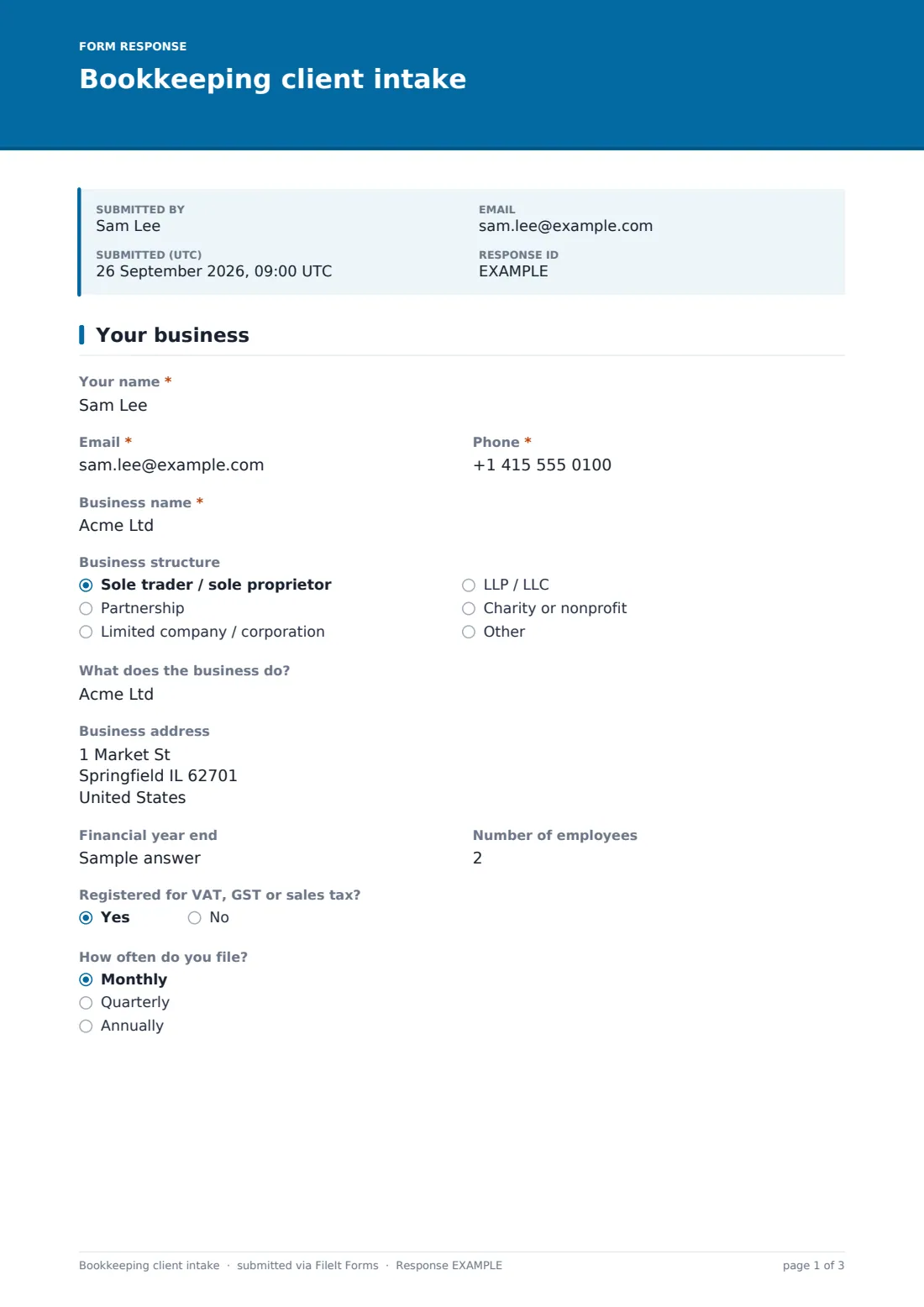
The form opens with the prospect's own Your name, Email, Phone and Business name, followed by a Business structure dropdown covering sole trader, partnership, limited company, LLP/LLC, charity or nonprofit, and other. A short What does the business do? field and an optional Business address round out the basic profile, and Financial year end and Number of employees give the bookkeeper an early sense of complexity and payroll scope.
A Registered for VAT, GST or sales tax? question closes the page, and answering yes reveals How often do you file, whether monthly, quarterly or annually — a detail that directly shapes what a sales-tax filing service would look like for this client.
2 Current setup
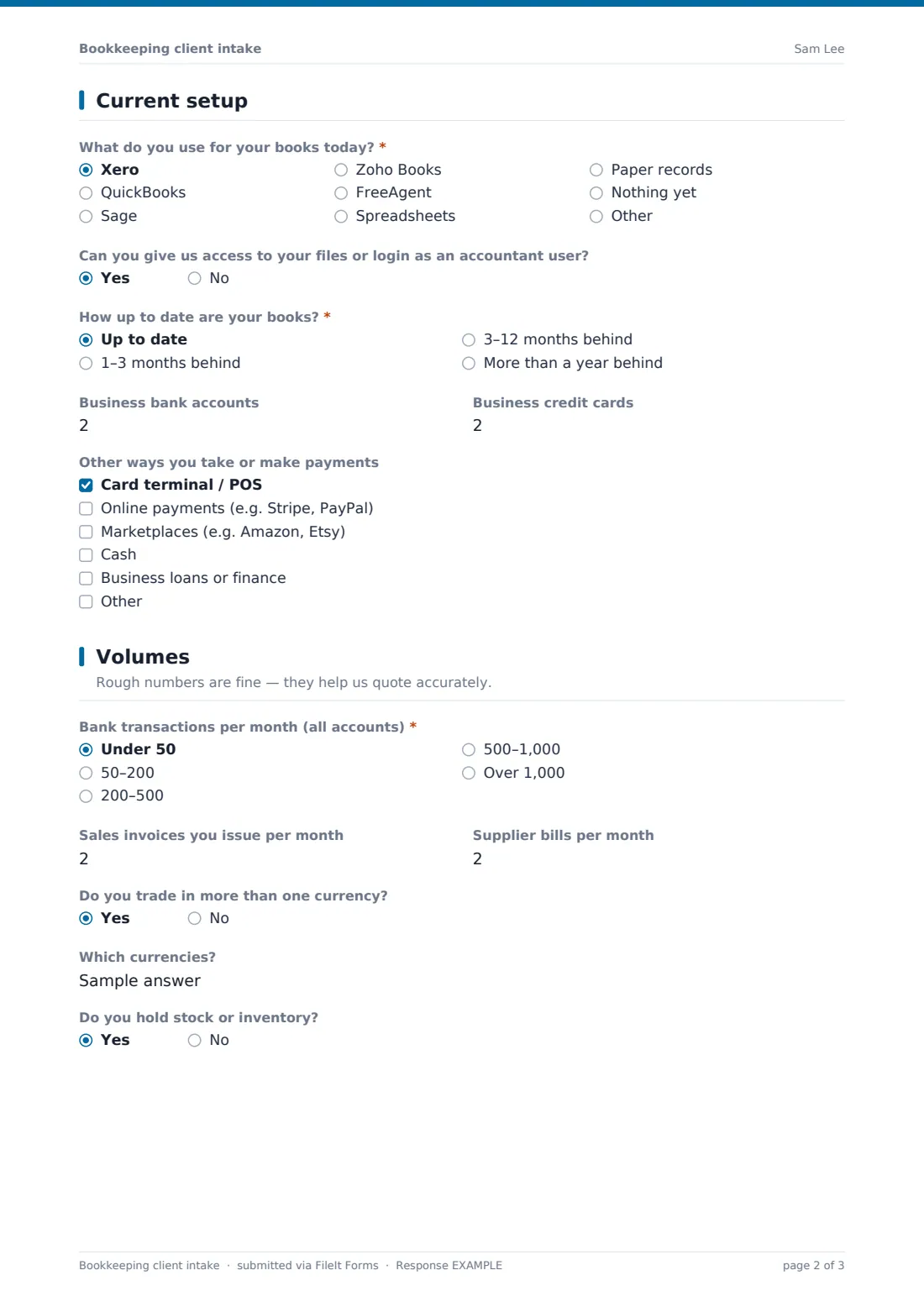
Page two asks What do you use for your books today?, listing Xero, QuickBooks, Sage, Zoho Books, FreeAgent, spreadsheets, paper records or nothing yet, with an "other" option for anything not listed. If any software is chosen, a follow-up asks whether the client can grant an accountant-level login, which matters for how quickly work can actually begin.
How up to date are your books? ranges from up to date through to more than a year behind, and choosing anything but current opens a Records need catching up from date field, so the bookkeeper knows exactly how much catch-up work is involved. Business bank accounts, Business credit cards and a checklist of Other ways you take or make payments — card terminals, online payments, marketplaces, cash, business loans — complete the picture of how money actually moves through the business.
3 Volumes
This page is explicitly framed with rough numbers are fine — they help us quote accurately, which lowers the bar for a prospect who doesn't have exact figures to hand. Bank transactions per month is a required range from under 50 to over 1,000, alongside optional counts for Sales invoices you issue per month and Supplier bills per month, all of which feed directly into how much bookkeeping time a job will take.
Do you trade in more than one currency? opens a short Which currencies? field when answered yes, flagging any extra complexity around foreign exchange, and a final Do you hold stock or inventory? question tells the bookkeeper whether inventory accounting needs to be part of the scope.
4 Services
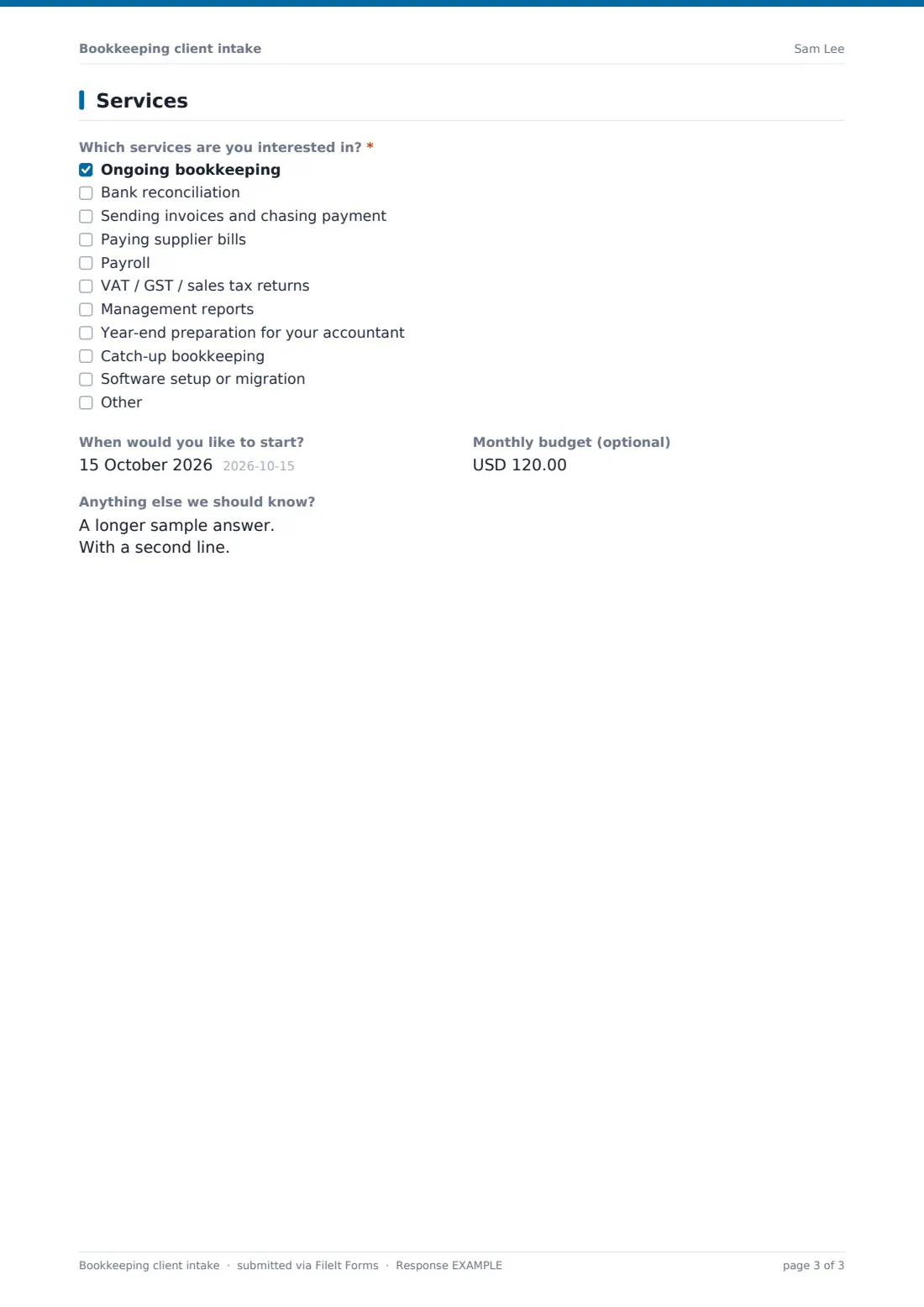
The last page asks Which services are you interested in?, covering ongoing bookkeeping, bank reconciliation, invoicing and chasing payment, paying supplier bills, payroll, VAT/GST/sales tax returns, management reports, year-end preparation, catch-up bookkeeping and software setup or migration. Ticking Payroll opens two extra questions — How many people on payroll and Pay frequency — and ticking Management reports opens a How often would you like reports question, so the quote can reflect exactly the cadence the client expects.
The form finishes with When would you like to start?, an optional Monthly budget figure, and an open Anything else we should know? box for context like an upcoming deadline or a previous bookkeeper's handover — details that often shape how a proposal is framed.
Make the template yours
- Adjust the software options to match what's popular with your typical client base, or add other packages your firm supports
- Change the currency on the budget field to match the currency your practice quotes in
- Add a conditional question under Catch-up bookkeeping asking for the name of any previous bookkeeper, if handovers are common for your firm
- Route submissions into a "New client leads" vault folder so your team can review and quote them in one place
- Turn on an email notification so a partner or account manager is alerted the moment a new intake arrives
- Add a maximum response limit if you only want to accept a set number of new client inquiries per month
Tips for a better bookkeeping client intake form
- Keep the volume questions approximate on purpose — asking for exact transaction counts upfront discourages prospects from finishing the form
- Follow up quickly once a submission arrives; bookkeeping inquiries often go to whichever firm responds first
- Use the software-access question to plan your onboarding call rather than assuming access will be simple to arrange
- Ask about catch-up timelines early, since months of backlog can change your pricing and timeline significantly
- Keep the services checklist current with what your firm actually offers, so you're not fielding requests you can't fulfil
- Store each intake alongside the signed engagement letter once a client is onboarded, so the full history stays together
Every response becomes a PDF in your vault
Once a prospect submits the form, FileIt saves their answers as a PDF in the vault folder your practice has set up, with everything from business structure and software to transaction volumes and requested services on one document. If you've turned on notifications, a partner or account manager gets an email the moment a new intake lands, so a promising lead doesn't sit unanswered.
From there, your team can review the PDF, use the Responses table to compare intakes across prospects, and export the list to a CSV for tracking new business pipeline. Because everything is already saved in your FileIt vault, the intake becomes the first document in that client's folder the moment they sign on, with no re-entry needed.
- Start from this template. It opens in the FileIt Forms designer — change any question, add pages, set the rules for when questions appear.
- Share it. Turn on a public link, or send it to people by email, each with their own link. They don’t need a FileIt account.
- Get the answers as PDFs. Each response is saved as a PDF in the vault folder you choose, with uploaded files attached — and listed in a Responses table you can export to CSV.
Bookkeeping client intake form: frequently asked questions
Is this bookkeeping client intake form template free?
Yes. It's one of the ready-made templates in the FileIt Forms app, available on every account including the free plan, and every question can be edited.
Does the prospective client need a FileIt account to fill it in?
No. They can complete the form from a link you share, with no account or sign-up required on their end.
How do we get the completed intake forms?
Each submission is saved automatically as a PDF in your FileIt vault, and you can browse, filter and export every response from the Responses table, including as a CSV.
Can we ask for financial documents like bank statements through this form?
You can add a file upload question in the designer if you'd like prospects to attach documents, though the template as built doesn't request them by default.
Does filling in this form commit someone to becoming a client?
No — it's an intake and quoting tool, not a contract. Any engagement should still be confirmed with your own letter of engagement or contract.
Can we send this form only to specific leads instead of publishing it publicly?
Yes, you can email a personal link to each prospect, prefilled with their name and email, instead of or as well as sharing a public link.
How do we handle a client who's a year or more behind on their books?
The Records need catching up from question captures the starting point for that catch-up work, which you can use to scope a separate catch-up engagement before ongoing bookkeeping begins.
Can this template also collect payroll details?
Yes — selecting Payroll in the services checklist reveals questions about headcount and pay frequency, enough to start scoping a payroll quote.