What is the customer referral form template?
Word of mouth is still how many small businesses win their best customers, but referrals often arrive as a passing comment: "You should call my neighbour." Without a name, a number or any sign that the neighbour expects the call, they rarely go anywhere. This template turns that comment into a proper referral.
The customer says who they are, then who they're referring (a person or a business), how they know them, and what they might be interested in. The form asks plainly whether the person knows you'll be in touch, and if not, reminds the customer to check with them first. The customer confirms they have permission to share the contact details, and chooses how they'd like to be thanked if the referral qualifies.
Each referral is filed as a PDF in your FileIt vault, giving you a record of who referred whom, when, and what was agreed about the reward.
- Best for
- Service businesses, agencies, trades and shops with a referral or loyalty programme
- Filled in by
- An existing customer
- Time to complete
- About 3 minutes
- Includes
- Person or business follow-ups, a permission check, reward choice and two consent statements
Who uses a customer referral form?
- A refer-a-friend link in your email newsletter or receipts
- An accountant or agency asking clients to introduce other businesses
- A trades business collecting neighbour referrals after a job
- A gym or studio running a member-get-member offer
- Keeping a dated record of each referral for rewarding it fairly later
Questions on this customer referral form
21 questions over 3 pages · includes conditional questions, multiple pages, consent checkbox.
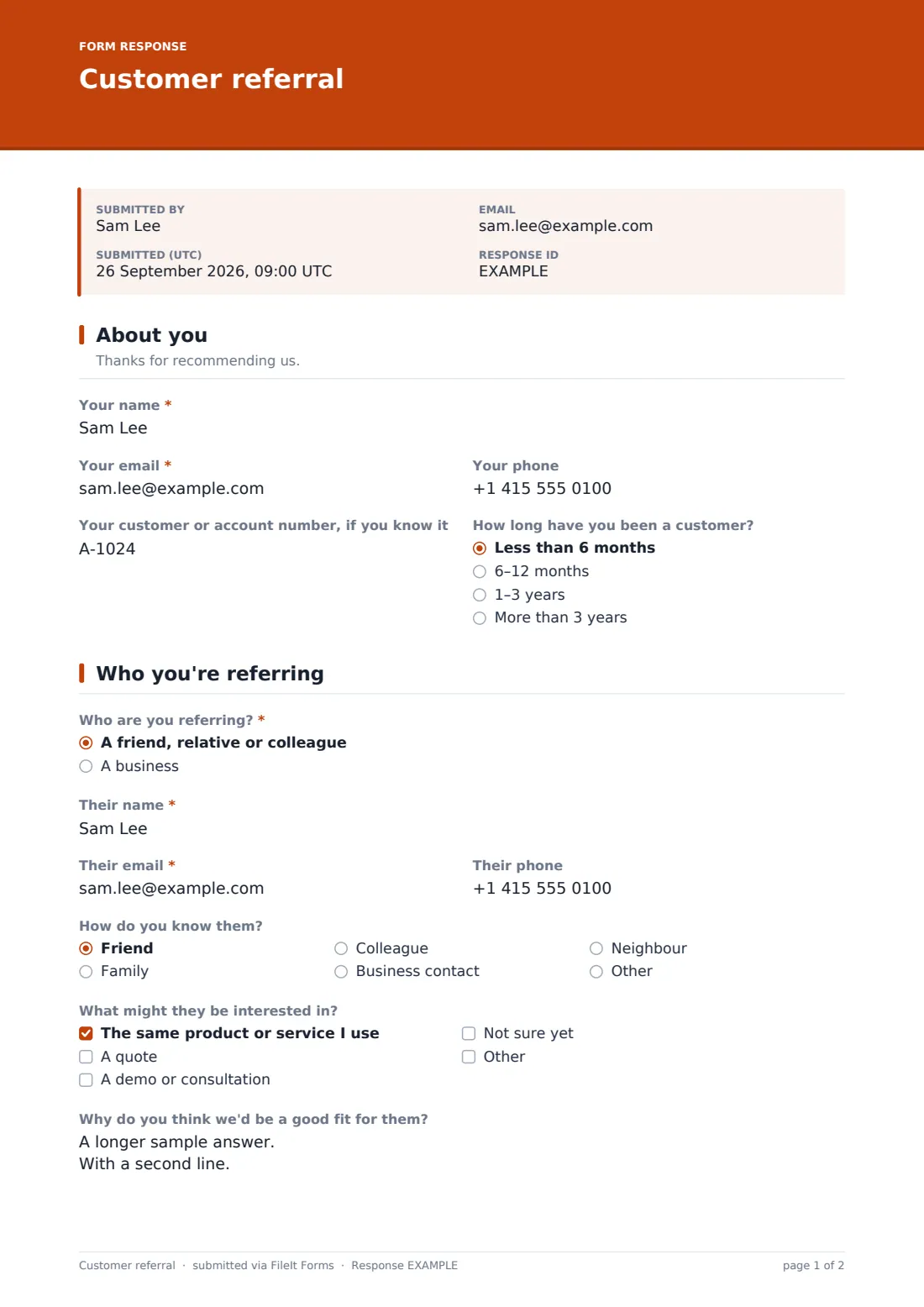
1 About you
- Your name*
- Your email*
- Your phone
- Your customer or account number, if you know it
- How long have you been a customer? Less than 6 months · 6–12 months · 1–3 years · More than 3 years
2 Who you're referring
- Who are you referring?* A friend, relative or colleague · A business
- Their name*
- Business name* asked only when it applies
- Their role at the business asked only when it applies
- Their email*
- Their phone
- How do you know them? Friend · Family · Colleague · Business contact · Neighbour · Other
- What might they be interested in? The same product or service I use · A quote · A demo or consultation · Not sure yet
- Why do you think we'd be a good fit for them?
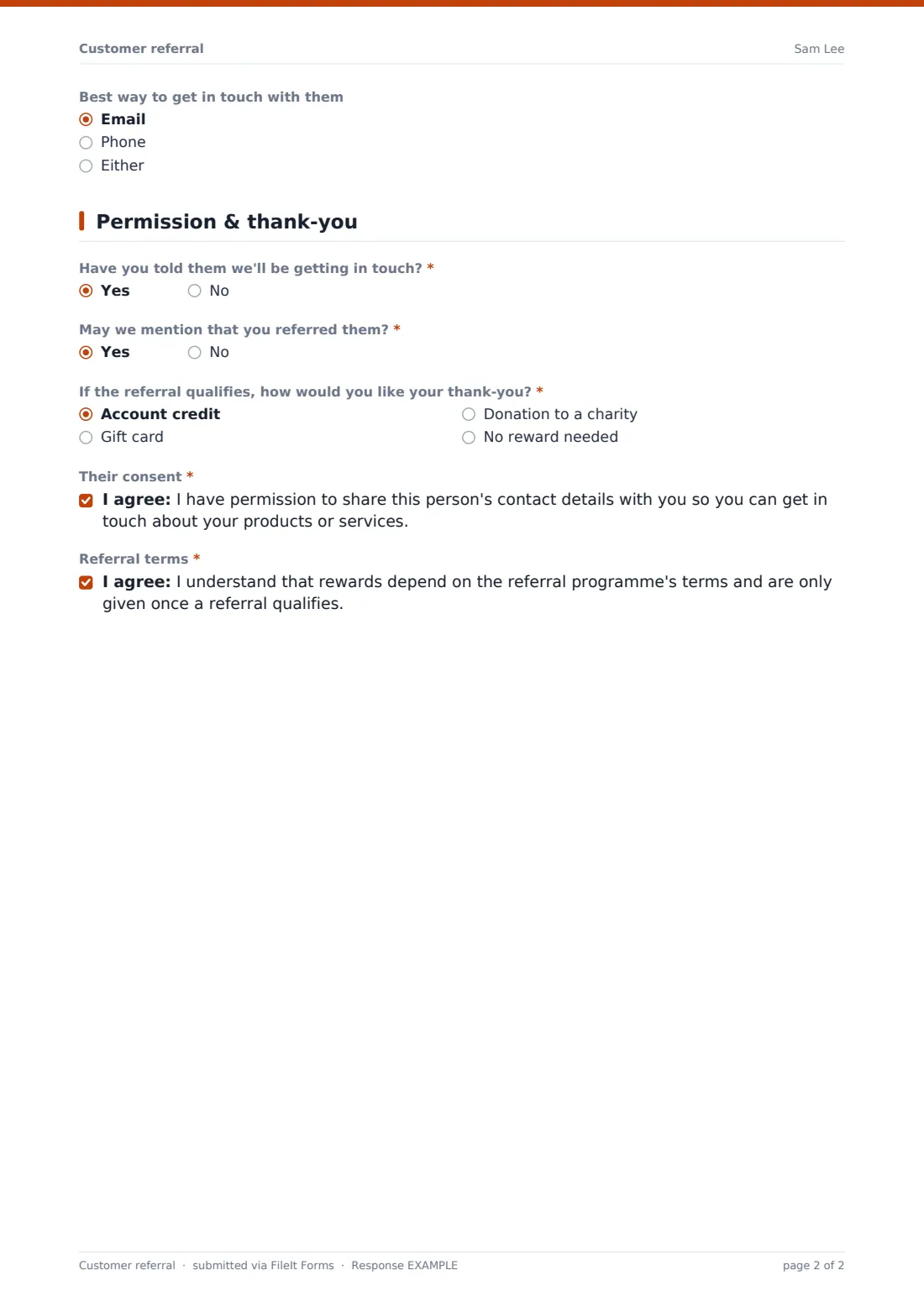
- Best way to get in touch with them Email · Phone · Either
3 Permission & thank-you
- Have you told them we'll be getting in touch?*
- May we mention that you referred them?*
- If the referral qualifies, how would you like your thank-you?* Account credit · Gift card · Donation to a charity · No reward needed
- Which charity?* asked only when it applies
- Their consent*
- Referral terms*
The customer referral form, page by page
1 About you
The customer gives their name, email and phone, their customer or account number if they know it, and how long they've been a customer, from less than six months to more than three years.
2 Who you're referring
Who are you referring? offers a friend, relative or colleague, or a business. Choosing a business adds the business name and the person's role there. Either way the form asks for their name, email and phone, and how the customer knows them.
Two optional questions add context: what they might be interested in, from the same product or service to a quote or a demo, and Why do you think we'd be a good fit for them?. A last question records the best way to get in touch: email, phone or either.
3 Permission & thank-you
Have you told them we'll be getting in touch? is required. A No shows a short message asking the customer to check with them first. The customer says whether you may mention that they made the referral.
If the referral qualifies, they choose their thank-you: account credit, a gift card, a donation to a charity (which asks which charity), or no reward at all. Two consent boxes close the form. One confirms they have permission to share the person's details. The other acknowledges that rewards follow your programme's terms.
Make the template yours
- Replace the reward options with what your programme actually offers
- Rewrite the referral terms statement to match your own programme
- Add a dropdown of your services so referrals arrive already sorted
- Send new referrals straight to your sales inbox with extra notification addresses
- Set a close date if the referral offer only runs for a season
Tips for a better customer referral form
- Only contact referred people who are expecting to hear from you
- Thank the referrer quickly, even before the referral qualifies
- Keep the reward simple and easy to explain
- Tell referrers how it went, since it makes them more likely to refer again
- Put the link where happy customers already are, such as receipts or a thank-you email
Every response becomes a PDF in your vault
Each referral is filed in your vault as a PDF titled with the referrer's name and the date, and you get an email straight away. With an emailed copy on, the customer receives the PDF as a record of their referral.
The Responses table lists every referral. Search for a referrer or a referred business, or export to CSV to track which referrals became customers and which rewards are due.
- Start from this template. It opens in the FileIt Forms designer — change any question, add pages, set the rules for when questions appear.
- Share it. Turn on a public link, or send it to people by email, each with their own link. They don’t need a FileIt account.
- Get the answers as PDFs. Each response is saved as a PDF in the vault folder you choose, with uploaded files attached — and listed in a Responses table you can export to CSV.
Customer referral form: frequently asked questions
Is this customer referral form free?
Yes. It's a starter template in FileIt's Forms app, and you can change any question.
Does it check that the referred person agreed to be contacted?
The customer has to confirm they have permission to share the details, and the form asks whether the person knows you'll be in touch. How you act on that is up to you.
Does FileIt pay out the rewards?
No. The form records the referral and the reward the customer chose. You decide whether it qualifies and handle the reward yourself.
Can customers refer more than one person?
Each response covers one referral, and the public link allows more than one response, so customers can simply fill it in again.
Do customers need a FileIt account?
No. Anyone with the link can fill it in on a phone or computer.
Can I use it for business-to-business referrals?
Yes. Choosing A business adds the business name and the contact's role.