What is UI-2.7 Remuneration whilst in employment?
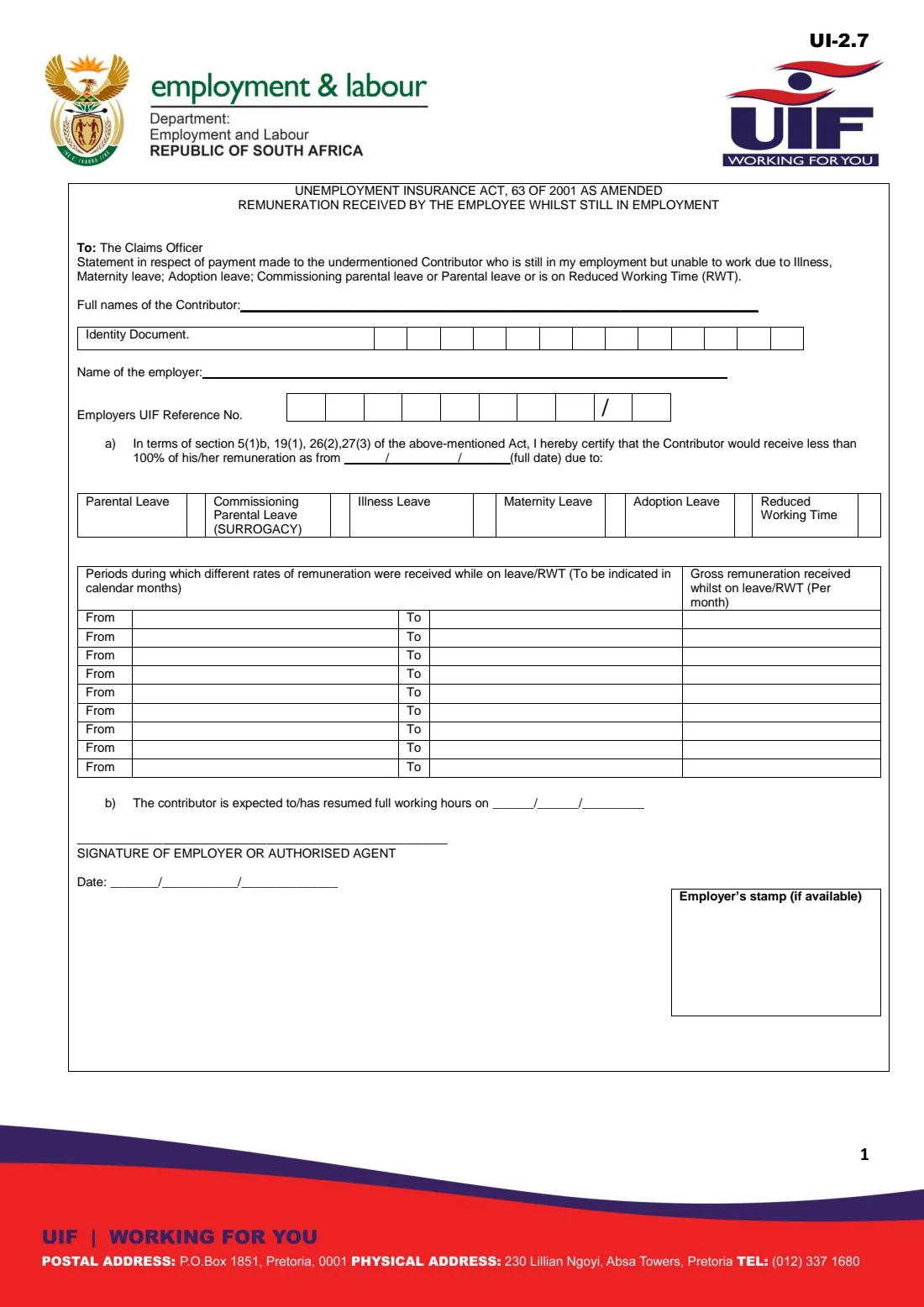
The UI-2.7 is a one-page Unemployment Insurance Fund form addressed to the claims officer. The employer certifies that a contributor who is still in its employment is unable to work because of illness, maternity leave, adoption leave, parental leave or commissioning parental leave, or is on reduced working time (RWT), and that the contributor would receive less than 100% of their remuneration from a given date. The form cites sections 5(1)(b), 19(1), 26(2) and 27(3) of the Unemployment Insurance Act.
The heart of the form is a table of periods, in calendar months, during which different rates of pay were received while on leave or reduced working time, with the gross remuneration per month for each. The UIF needs this because benefits are only paid where the employee's pay has dropped, and the amount depends on what the employer still paid. The employer also gives the date the employee is expected to return, or returned, to full working hours.
FileIt walks the employer through every box, pre-fills the employee's name and the employer's name, checks the employee's South African ID number, prints each ID digit in its own box and each amount in rand in the right-hand column. The filled official PDF is saved in your FileIt vault and can be sent for e-signature. You then give it to the employee to lodge with their claim; FileIt never submits anything to the UIF.
- Who fills it
- The employer (or an authorised agent) of the employee who is claiming
- Given to
- The employee, who lodges it with their UIF claim; it is addressed to the claims officer
- When
- When an employee who is still employed claims illness, maternity, adoption, parental or reduced work time benefits
- Signatures
- The employer or authorised agent signs and dates it; a stamp if available
- Periods per form
- Nine rows of from / to dates with the gross remuneration per month
- Edition
- UI-2.7 as published by the Department (no edition date printed; file dated November 2019)
Who needs to fill out UI-2.7 Remuneration whilst in employment?
- Employers whose employee is on maternity leave and claiming maternity benefits from the UIF.
- Employers of an employee who is off sick for an extended period and claiming illness benefits.
- Employers of an employee on adoption, parental or commissioning parental (surrogacy) leave.
- Employers that have put staff on reduced working time, where the employees claim reduced work time benefits.
- Households that employ a domestic worker who is on maternity or sick leave.
When to use UI-2.7 Remuneration whilst in employment
- When your employee asks for it to complete their UIF benefit claim.
- Once you know the dates and the pay you made, or will make, while the employee is away or on reduced hours.
- Again if the claims officer asks for an updated statement, for example when the leave is extended.
What you need before you start
- The employee's full names and 13-digit ID number (or passport number for a foreign employee).
- Your name as employer and your UIF reference number with its check digit.
- The date from which the employee received less than full pay, and the reason (type of leave or reduced working time).
- Your payroll records: each period at a different rate and the gross remuneration paid per month in it.
- The date the employee is expected to return, or returned, to full working hours, if known.
What’s on UI-2.7 Remuneration whilst in employment
The 2019 edition has 1 page. FileIt asks for it in 4 parts, and it is signed by Employer:
- Employee and employerEmployer
- a) Certificate of reduced remunerationEmployer
- Periods and remuneration received while on leave / RWTEmployer
- b) Return to full hours, signature and dateEmployer
How to fill out UI-2.7 Remuneration whilst in employment, step by step
1 Contributor and employer
Write the full names of the contributor (the employee who is claiming) and their identity document number, one digit per box. Then the name of the employer and the employer's UIF reference number: the digits go in the boxes before the printed slash and the check digit in the box after it.
2 a) The certificate
By completing part a) you certify that the contributor would receive less than 100% of their remuneration from the full date you give, and you mark the reason with an X: parental leave, commissioning parental leave (surrogacy), illness leave, maternity leave, adoption leave or reduced working time.
3 Periods and remuneration
Fill in one row for each period, in calendar months, during which a different rate of pay was received while on leave or reduced working time: the from and to dates, and the gross remuneration received per month in that period. Enter 0 for a period with no pay at all. The form has nine rows.
4 b) Return to full hours
Give the date the contributor is expected to resume, or has resumed, full working hours. Leave it blank if you don't know yet.
5 Signature, date and stamp
The employer or authorised agent signs on the line, dates the form and adds the employer's stamp if one is available.
Common mistakes to avoid
- Entering the employee's normal salary instead of the remuneration actually received while on leave or reduced hours.
- Leaving gaps or overlaps between periods, or giving an end date before the start date. FileIt flags a period that ends before it starts.
- Forgetting the check digit of the UIF reference number, or writing the employee's ID number with a typing mistake. FileIt checks the ID number's date of birth and check digit.
- Marking more than one reason, or none.
- Handing the employee an unsigned form.
After you fill it out
Print the filled UI-2.7 from your FileIt vault, or send it for e-signature, and sign it as the employer or authorised agent. Add your stamp if you have one.
Give it to the employee. They lodge it with their own claim form, for example the UI-2.2 for illness benefits, the UI-2.3 for maternity benefits or the UI-2.1 for reduced work time.
Keep a copy with your payroll records, in case the claims officer asks you to confirm the figures.
Fill out UI-2.7 Remuneration whilst in employment online with FileIt
- Pick the person. Choose someone from People and FileIt fills in their name, date of birth, address and other details it already knows.
- Answer plain-language questions. One part of the form at a time, with the official help text beside each question — 35 fields in all. Your answers save as you go.
- Check the live preview. Watch your answers land on the real Unemployment Insurance Fund (UIF), Department of Employment and Labour form, and let FileIt do any worksheet arithmetic.
- Generate the official PDF. FileIt prints your answers into the agency’s own PDF and files it in that person’s folder in your vault. Sign it, or send it for e-signature.
FileIt fills the form — it never files or submits anything for you. Deliver the finished form to whoever asked for it, the way the form’s instructions say.
Start UI-2.7 Remuneration whilst in employment now — it’s freeUI-2.7 Remuneration whilst in employment: frequently asked questions
What is the UI-2.7 form?
It is the employer's statement to the UIF claims officer of the remuneration received by an employee who is still employed but unable to work because of illness, maternity, adoption, parental or commissioning parental leave, or who is on reduced working time.
Who completes the UI-2.7, the employer or the employee?
The employer, or an authorised agent, completes and signs it. The employee then lodges it with their own benefit claim.
What remuneration do I enter?
The gross remuneration actually received by the employee per month while on leave or reduced working time, for each period at a different rate. If nothing was paid in a period, enter 0.
Do I need a UI-2.7 for an employee who has resigned or been dismissed?
No. The UI-2.7 is for an employee who is still in your employment. A former employee claims unemployment benefits on the UI-2.1, supported by your UI-19 declaration.
Can I fill in the UI-2.7 online with FileIt?
Yes. FileIt guides you through each box, checks the ID number and dates, and prints everything on the official UI-2.7 PDF, which is saved in your vault. You can sign it by hand or send it for e-signature, then give it to the employee. FileIt does not submit it to the UIF.
What if there were more than nine periods at different rates?
The form prints nine rows. Complete a second UI-2.7 for the remaining periods.
Official sources
- Blank form (PDF), published by Unemployment Insurance Fund (UIF), Department of Employment and Labour: https://www.labour.gov.za/DocumentCenter/Forms/Unemployment%20Insurance%20Fund/UI-2_7-remuneration-whilst-in-employment.pdf
- Official instructions and guidance: https://www.labour.gov.za/DocumentCenter/Pages/Forms.aspx
- Edition shown on this page: UI-2.7 (no edition date printed; the Department's file is dated 27 November 2019) (checked 2026-10-01).
FileIt is not affiliated with or endorsed by Unemployment Insurance Fund (UIF), Department of Employment and Labour or any government. This page explains the form in general terms and is not legal, tax or immigration advice. Always read the official instructions, and check that you are using the edition the recipient accepts. Page last reviewed 2026-10-01.