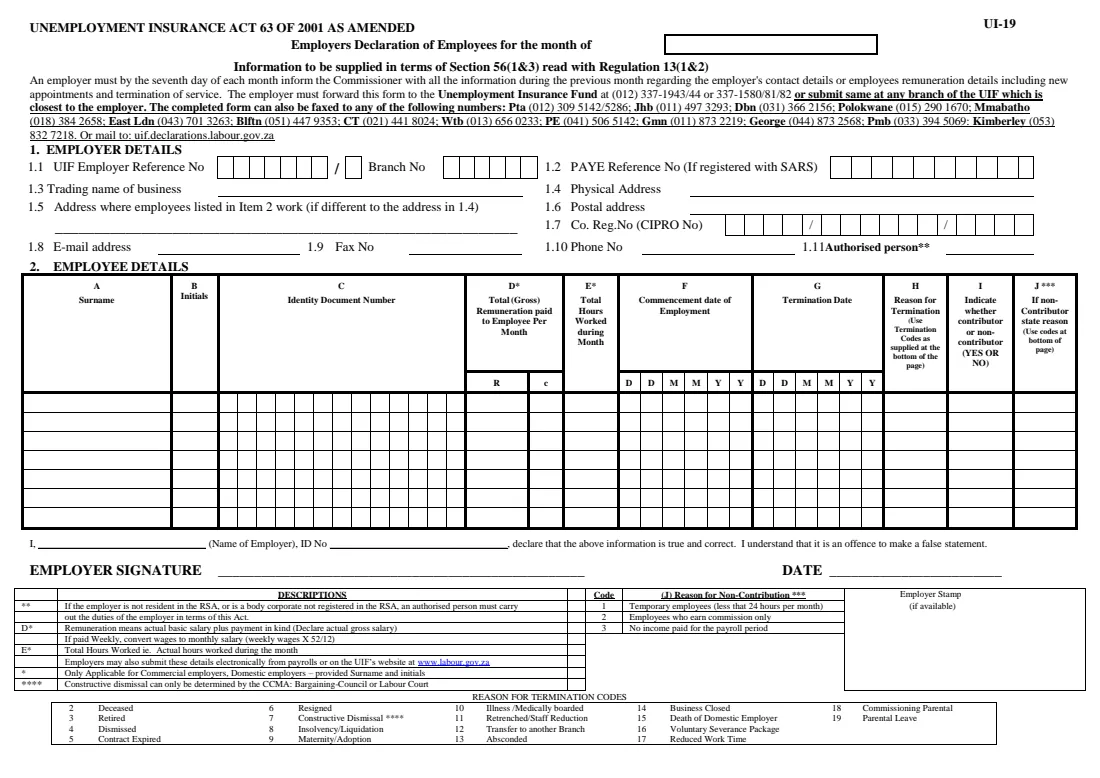
What is UI-19 Employer's declaration of employees?
The UI-19 is the Unemployment Insurance Fund's Employer's Declaration of Employees. Under section 56 of the Unemployment Insurance Act, read with regulation 13, an employer must tell the UIF each month about its contact details and its employees' remuneration, including new appointments and terminations of service. The form printed by the Department of Employment and Labour says this must be done by the seventh day of each month for the previous month.
It matters for more than compliance. When an employee later claims unemployment, maternity, illness or other UIF benefits, the Fund relies on the employer's declarations to confirm the person worked for you, what they earned and why they left. A missing or wrong UI-19 is one of the most common reasons a claim is delayed — and the same form is used by a family that employs a domestic worker, gardener or nanny as by a large company.
FileIt guides you through every box of the gazetted UI-19: your employer details, then one employee at a time for up to the seven lines the form prints. It checks South African ID numbers (date of birth and check digit), splits the monthly pay into the rand and cents columns, prints the dates in the DDMMYY boxes and the termination and non-contributor codes. The filled official PDF is saved in your FileIt vault, can be sent for e-signature, and you then email, fax, post or hand it in yourself — FileIt never submits anything to the UIF.
- Who fills it
- The employer — a business, or a household that employs a domestic worker
- Given to
- The Unemployment Insurance Fund (by fax, post, email or at a labour centre), or declared online instead
- When
- Every month, by the seventh day, for the previous month (as printed on the form)
- Signatures
- The employer (or authorised person) signs and dates the declaration
- Edition
- UI-19, gazetted 4 November 2019
- Employees per form
- Seven lines; use another UI-19 for more
Who needs to fill out UI-19 Employer's declaration of employees?
- Every employer registered with the UIF that has employees working more than 24 hours a month.
- Households that employ a domestic worker, gardener, driver or nanny — domestic employers declare their workers too.
- Small businesses without a payroll system that prefer a paper declaration to uFiling.
- An employer whose employee has resigned, been dismissed, retrenched or whose contract ended, so the termination is on record for the employee's claim.
- A new employer sending its first declaration together with the UI-8 registration form.
- An authorised person acting for an employer that is not resident in South Africa or a body corporate not registered here.
When to use UI-19 Employer's declaration of employees
- Monthly, by the seventh day, covering the previous month's pay and staff changes.
- When you take on a new employee — they appear with their commencement date.
- When an employee leaves — give the termination date and the reason code from the bottom of the form.
- With your UI-8 when you first register as an employer, unless you say the employees' details will be declared electronically.
- When an employee asks you to confirm their UIF history before they claim benefits.
What you need before you start
- Your UIF employer reference number (7 digits and a check digit) and, if you have one, your SARS PAYE reference number.
- Your trading name, physical and postal addresses, phone number and e-mail address.
- Your company registration number, if the employer is a company or close corporation.
- Each employee's surname, initials and 13-digit ID number (or passport number for a foreign employee).
- Each employee's total gross remuneration for the month, including payment in kind — weekly wages converted with weekly wage x 52 / 12.
- The hours each employee actually worked during the month.
- Start dates and, for anyone who left, the termination date and reason.
- Your own ID number for the declaration.
What’s on UI-19 Employer's declaration of employees
The 2019 edition has 1 page. FileIt asks for it in 9 parts, and it is signed by Employer:
- 1 Employer detailsEmployer
- 2 Employee 1Employer
- 2 Employee 2Employer
- 2 Employee 3Employer
- 2 Employee 4Employer
- 2 Employee 5Employer
- 2 Employee 6Employer
- 2 Employee 7Employer
- Declaration and signatureEmployer
How to fill out UI-19 Employer's declaration of employees, step by step
1 Month of declaration
Write the month the declaration covers in the box at the top — normally the month that has just ended. FileIt prints the month and year you choose.
2 1. Employer details (1.1 to 1.11)
Item 1.1 is your UIF employer reference number, printed in the seven boxes with the check digit after the slash, and your branch number if the UIF registered you with branches. Item 1.2 is your SARS PAYE reference number, only if you're registered with SARS — many household employers aren't.
Items 1.3 to 1.10 are your trading name, physical address, the address where the employees work if it's different, postal address, company registration number, e-mail, fax and phone. Item 1.11 is only for an authorised person acting for an employer that isn't resident in South Africa or a foreign body corporate.
3 2. Employee details — columns A to C
Each line is one employee: surname, initials and identity document number. FileIt prints the 13-digit ID number one digit per box and checks it is a genuine South African ID number (the first six digits are the date of birth and the last is a check digit). For a foreign employee, enter the passport number instead.
4 Columns D and E — remuneration and hours
Column D is the total gross remuneration paid to the employee for the month: actual basic salary plus payment in kind, in rand and cents. If you pay weekly, the form tells you to convert to a monthly figure with weekly wages x 52 / 12. Column E is the total hours actually worked during the month. You type the amount once in FileIt and it is printed split across the R and c columns.
5 Columns F to H — dates and reason for termination
Column F is the date the employee started working for you and column G the termination date, both printed as DDMMYY in the boxes. If an employee left, column H needs one of the termination codes printed at the bottom of the form — for example 5 for contract expired, 6 for resigned, 11 for retrenched or 15 for death of a domestic employer. The form notes that constructive dismissal can only be determined by the CCMA, a bargaining council or the Labour Court.
6 Columns I and J — contributor or non-contributor
Column I is YES for an employee who contributes to the UIF and NO for one who doesn't. For a non-contributor, column J gives the reason code: 1 for temporary employees working less than 24 hours a month, 2 for employees who earn commission only, or 3 where no income was paid for the payroll period.
7 Declaration, signature and date
The employer writes their name and ID number and declares the information is true and correct — the form warns that a false statement is an offence. Sign on the EMPLOYER SIGNATURE line, date it, and add your stamp if you have one.
Common mistakes to avoid
- Declaring late — the form says the information is due by the seventh day of each month for the previous month.
- Leaving out payment in kind, or entering weekly wages without converting them to a monthly figure.
- Typing an ID number wrongly — the UIF matches claims on it. FileIt flags numbers that fail the check digit.
- Giving a termination date with no reason code, or using constructive dismissal (code 7) without a CCMA, bargaining council or Labour Court finding.
- Marking an employee as a non-contributor without one of the three reasons in column J.
- Forgetting to declare a domestic worker because the household isn't a business.
- Sending an unsigned form, or not keeping a copy of what you sent and when.
After you fill it out
Print the filled UI-19 from your FileIt vault, or send it for e-signature first, and sign it as the employer. The form says you may forward it to the Unemployment Insurance Fund, submit it at any UIF branch closest to you, fax it to one of the regional numbers printed on it, or mail it to the UIF declarations address printed on it. Employers can also declare electronically from payroll or online instead.
Keep the signed copy — FileIt files it in the vault under the right person or household — together with proof of when and how you sent it. If an employee later claims benefits, it is your record of what you declared.
Repeat the declaration every month. When someone joins or leaves, their start or termination date and reason must appear on that month's UI-19.
Fill out UI-19 Employer's declaration of employees online with FileIt
- Pick the person. Choose someone from People and FileIt fills in their name, date of birth, address and other details it already knows.
- Answer plain-language questions. One part of the form at a time, with the official help text beside each question — 101 fields in all. Your answers save as you go.
- Check the live preview. Watch your answers land on the real Unemployment Insurance Fund (UIF), Department of Employment and Labour form, and let FileIt do any worksheet arithmetic.
- Generate the official PDF. FileIt prints your answers into the agency’s own PDF and files it in that person’s folder in your vault. Sign it, or send it for e-signature.
FileIt fills the form — it never files or submits anything for you. Deliver the finished form to whoever asked for it, the way the form’s instructions say.
Start UI-19 Employer's declaration of employees now — it’s freeUI-19 Employer's declaration of employees: frequently asked questions
What is the UI-19 form used for?
It is the employer's monthly declaration to the Unemployment Insurance Fund: who works for you, what they earned and how many hours they worked, and who started or left during the month. The UIF uses it to process employees' benefit claims.
Do I need to complete a UI-19 for my domestic worker?
Yes. Households that employ a domestic worker are employers under the Unemployment Insurance Act and declare their workers like any other employer. The form even has a termination code for the death of a domestic employer.
When is the UI-19 due?
The form states that an employer must, by the seventh day of each month, inform the Commissioner of the previous month's information, including new appointments and terminations of service.
Where do I send the UI-19?
According to the form, you can forward it to the Unemployment Insurance Fund, submit it at the UIF branch closest to you, fax it to one of the regional numbers printed on the form, or mail it to the UIF declarations address printed on it. You can also declare electronically instead of on paper.
Can I fill in the UI-19 online with FileIt?
Yes. FileIt walks you through each box, checks ID numbers and dates, and prints your answers on the official gazetted UI-19 PDF, which is saved in your vault. You can send it for e-signature, then deliver it to the UIF yourself — FileIt does not submit it.
What if I have more than seven employees?
The form prints seven employee lines. Fill in another UI-19 for the remaining employees, or declare electronically.
What does 'non-contributor' mean on the UI-19?
It is an employee who doesn't contribute to the UIF for the month, for one of the three reasons printed on the form: temporary employees working less than 24 hours a month, employees who earn commission only, or no income paid for the payroll period.
Which termination code should I use?
Use the code printed at the bottom of the form that matches why the employment ended — for example 6 for resigned, 4 for dismissed, 5 for contract expired or 11 for retrenched. Choose carefully, because the reason affects the employee's claim.
Official sources
- Blank form (PDF), published by Unemployment Insurance Fund (UIF), Department of Employment and Labour: https://www.labour.gov.za/DocumentCenter/Forms/Unemployment%20Insurance%20Fund/UI-19%20-%20Gazetted%204%20November%202019.pdf
- Official instructions and guidance: https://www.labour.gov.za/DocumentCenter/Pages/Forms.aspx
- Edition shown on this page: UI-19, gazetted 4 November 2019 (checked 2026-09-26).
FileIt is not affiliated with or endorsed by Unemployment Insurance Fund (UIF), Department of Employment and Labour or any government. This page explains the form in general terms and is not legal, tax or immigration advice. Always read the official instructions, and check that you are using the edition the recipient accepts. Page last reviewed 2026-09-26.