What is UI-8 UIF employer registration?
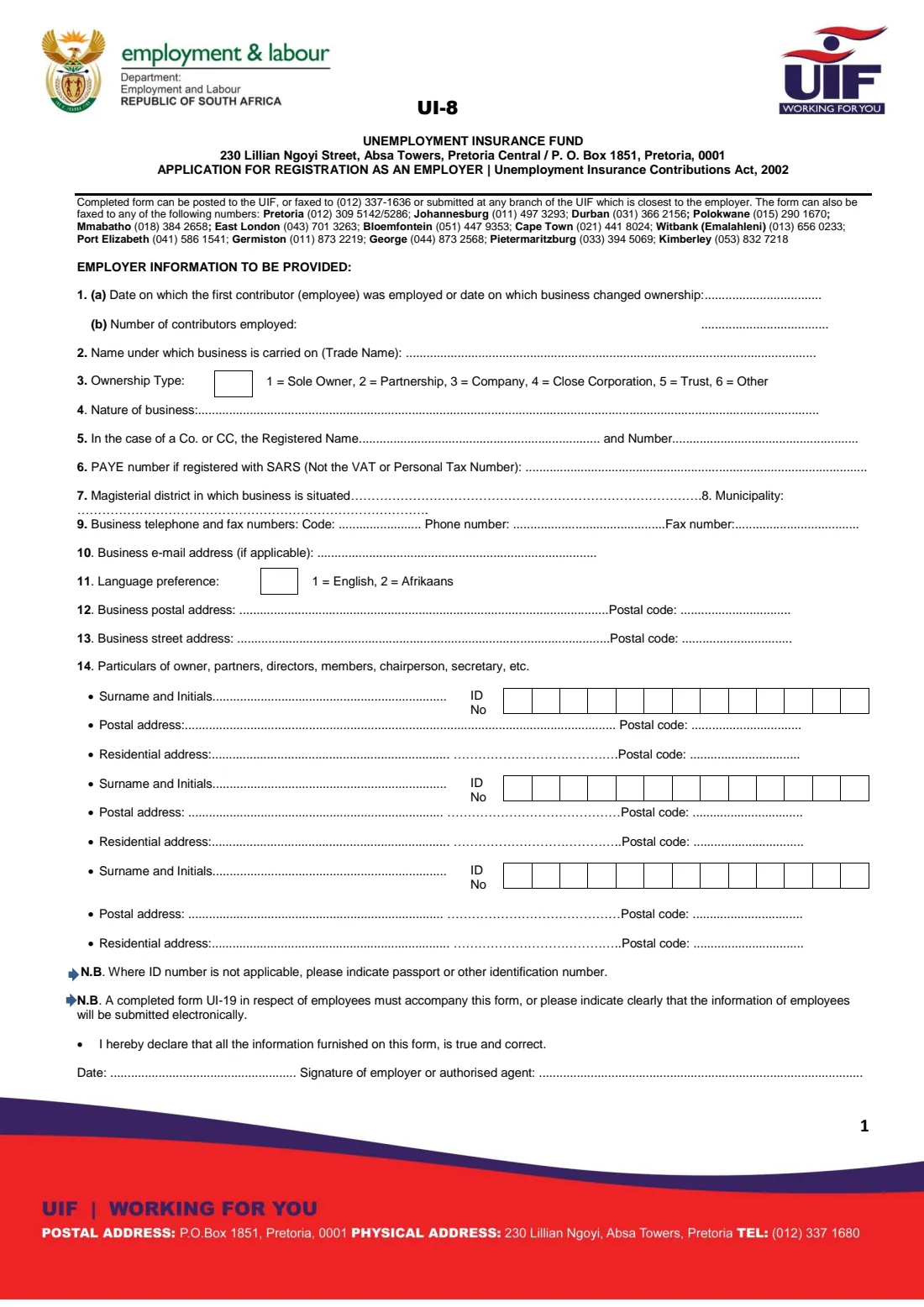
The UI-8 is the Unemployment Insurance Fund's Application for Registration as an Employer under the Unemployment Insurance Contributions Act, 2002. It gives the UIF the basic facts about your business or household — when you first employed someone, how many people you employ, your ownership type, addresses and contact details — and the details of the owners, partners, directors or members.
Registration is how the UIF gives you an employer reference number, which you then use on every monthly UI-19 declaration and which your employees' benefit claims depend on. A family that employs a domestic worker, gardener or nanny registers in the same way as a company; the household simply uses its own name and describes the nature of its 'business' as a private household.
FileIt takes you through the UI-8 question by question, prints your answers on the dotted lines and in the code boxes of the official PDF, checks South African ID numbers, and pre-fills names and contact details from the People in your vault. The finished form is saved in your FileIt vault and can be sent for e-signature; you then post, fax or hand it in yourself — FileIt never submits it to the UIF.
- Who fills it
- The employer or an authorised agent — a business or a household with employees
- Given to
- The Unemployment Insurance Fund: by post, fax or at the nearest UIF branch
- When
- When you employ your first employee, or when a business changes ownership
- Signatures
- The employer or authorised agent signs and dates the declaration
- Goes with
- A completed UI-19 listing the employees, unless they will be declared electronically
- Edition
- UI-8 as published by the Department (no edition date printed)
Who needs to fill out UI-8 UIF employer registration?
- A new business taking on its first employee.
- A household that starts employing a domestic worker, gardener, caregiver or nanny.
- Someone who has bought or taken over a business that employs people, recording the date ownership changed.
- Sole owners, partnerships, companies, close corporations and trusts — the form has an ownership code for each.
- An authorised agent registering on behalf of an employer.
When to use UI-8 UIF employer registration
- As soon as you employ your first employee — question 1(a) asks for that date.
- When a business changes ownership and the new owner must register.
- Instead of registering online, if you prefer or need a paper application.
- Together with your first UI-19 declaration of employees.
What you need before you start
- The date you first employed someone (or the date the business changed ownership) and how many employees you have.
- Your trade name and a short description of what the business does.
- The registered name and registration number for a company or close corporation.
- Your SARS PAYE number, if registered (not the VAT or personal tax number).
- The magisterial district and municipality where the business is situated.
- Phone, fax and e-mail details, and your postal and street addresses with postal codes.
- For each owner, partner, director or member: surname and initials, ID number (or passport number), and postal and residential addresses.
- A completed UI-19 for your employees, if you're not declaring them electronically.
What’s on UI-8 UIF employer registration
The 2026 edition has 1 page. FileIt asks for it in 5 parts, and it is signed by Employer:
- Employer information (questions 1 to 13)Employer
- 14 Owner, partner, director or member 1Employer
- 14 Owner, partner, director or member 2Employer
- 14 Owner, partner, director or member 3Employer
- Employee details and declarationEmployer
How to fill out UI-8 UIF employer registration, step by step
1 1. First employee and number of employees
Question 1(a) asks the date on which the first contributor (employee) was employed, or the date on which the business changed ownership. Question 1(b) is the number of contributors you employ.
2 2 to 5. Trade name, ownership and registered name
Question 2 is the name under which the business is carried on. Question 3 is a code box: 1 sole owner, 2 partnership, 3 company, 4 close corporation, 5 trust, 6 other — a private household is normally a sole owner. Question 4 describes the nature of the business, and question 5 asks a company or close corporation for its registered name and number.
3 6 to 8. PAYE number, magisterial district and municipality
Question 6 is your PAYE number if you're registered with SARS — the form stresses it is not the VAT or personal tax number. Questions 7 and 8 are the magisterial district and the municipality in which the business is situated. There's little room after 'Municipality', so FileIt prints it on the dotted line beneath.
4 9 to 11. Contact details and language
Question 9 is the business telephone dialling code, phone number and fax number; question 10 an e-mail address if you have one. Question 11 is your language preference as a code: 1 for English, 2 for Afrikaans.
5 12 and 13. Postal and street addresses
Give the business postal address and street address, each with its four-digit postal code.
6 14. Particulars of owners, partners, directors and members
The form has room for three people — owner, partners, directors, members, chairperson, secretary and so on. For each, give surname and initials, ID number in the 13 boxes, and postal and residential addresses with postal codes. Where an ID number doesn't apply, the form asks for a passport or other identification number.
7 UI-19 and declaration
The form says a completed UI-19 for your employees must accompany it, or you must indicate clearly that the employees' information will be submitted electronically — FileIt prints whichever you choose. Then declare that the information is true and correct, date it, and sign as employer or authorised agent.
Common mistakes to avoid
- Giving the VAT or personal income tax number in question 6 instead of the PAYE number.
- Leaving out the registered name and number for a company or close corporation.
- Forgetting to attach the UI-19, or to say the employees' details will be submitted electronically.
- Writing an ID number with a typo — FileIt checks the date of birth and check digit of South African ID numbers.
- Using a trade name for a household that doesn't match the employer's own name, which makes later claims harder to match.
- Not signing the declaration.
After you fill it out
Print the UI-8 from your FileIt vault, or send it for e-signature first, and sign it. The form says it can be posted to the UIF, faxed to the number printed at the top or one of the regional fax numbers, or submitted at the UIF branch closest to you. Include the UI-19 unless you've said the employees will be declared electronically.
Keep a copy with proof of when you sent it. Once the UIF registers you, record your employer reference number — you'll need it for every monthly UI-19 declaration.
If the business changes ownership later, the new owner registers with a fresh UI-8.
Fill out UI-8 UIF employer registration online with FileIt
- Pick the person. Choose someone from People and FileIt fills in their name, date of birth, address and other details it already knows.
- Answer plain-language questions. One part of the form at a time, with the official help text beside each question — 42 fields in all. Your answers save as you go.
- Check the live preview. Watch your answers land on the real Unemployment Insurance Fund (UIF), Department of Employment and Labour form, and let FileIt do any worksheet arithmetic.
- Generate the official PDF. FileIt prints your answers into the agency’s own PDF and files it in that person’s folder in your vault. Sign it, or send it for e-signature.
FileIt fills the form — it never files or submits anything for you. Deliver the finished form to whoever asked for it, the way the form’s instructions say.
Start UI-8 UIF employer registration now — it’s freeUI-8 UIF employer registration: frequently asked questions
Who has to register with the UIF as an employer?
Any employer with employees covered by the Unemployment Insurance Act, including households that employ domestic workers. The UI-8 is the paper registration form; employers can also register online.
Do domestic employers use the UI-8?
Yes. A household employing a domestic worker registers as an employer. Use your own name as the trade name, choose ownership type 1 (sole owner) and describe the business as a private household.
Where do I send the UI-8?
The form says it can be posted to the UIF, faxed to the numbers printed on it, or submitted at the UIF branch closest to you. FileIt prepares the form but does not send it.
Can I fill in the UI-8 online with FileIt?
Yes. FileIt guides you through each question and prints your answers on the official UI-8 PDF, saved in your vault. You can send it for e-signature and then deliver it to the UIF yourself.
What is the difference between the UI-8 and the UI-19?
The UI-8 registers you as an employer once. The UI-19 is the declaration of employees that goes with it and is then sent every month with each employee's pay, hours and any terminations.
Which PAYE number does question 6 want?
Your SARS employer PAYE reference number, if you're registered for PAYE. The form states it is not the VAT or personal tax number. Leave it blank if you're not registered.
What if a director has no South African ID number?
The form asks you to give a passport or other identification number where an ID number is not applicable.
Official sources
- Blank form (PDF), published by Unemployment Insurance Fund (UIF), Department of Employment and Labour: https://www.labour.gov.za/DocumentCenter/Forms/Unemployment%20Insurance%20Fund/UI-8_application-for-registration-as-an-employer.pdf
- Official instructions and guidance: https://www.labour.gov.za/DocumentCenter/Pages/Forms.aspx
- Edition shown on this page: UI-8 (no edition date printed) (checked 2026-09-26).
FileIt is not affiliated with or endorsed by Unemployment Insurance Fund (UIF), Department of Employment and Labour or any government. This page explains the form in general terms and is not legal, tax or immigration advice. Always read the official instructions, and check that you are using the edition the recipient accepts. Page last reviewed 2026-09-26.