What is UI-2.3 UIF maternity benefits claim?
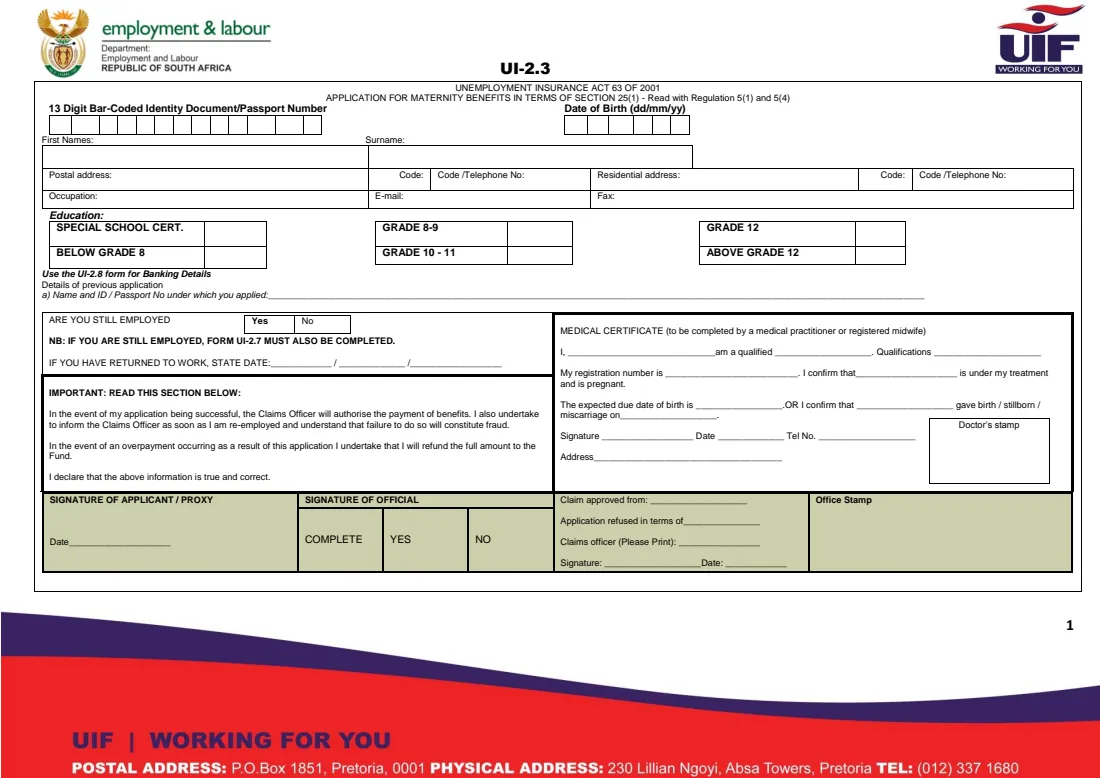
The UI-2.3 is the Unemployment Insurance Fund's Application for Maternity Benefits in terms of section 25(1) of the Unemployment Insurance Act, read with regulations 5(1) and 5(4). A contributor who is pregnant, or who has given birth, had a stillbirth or a miscarriage, uses it to claim maternity benefits from the UIF.
The form has three parts for you and your practitioner: your personal and contact details, whether you are still employed or have returned to work, and a medical certificate that a medical practitioner or registered midwife completes to confirm the pregnancy and the expected due date — or the date of the birth, stillbirth or miscarriage. It ends with your undertaking to tell the claims officer when you are re-employed and to refund any overpayment.
FileIt helps you prepare the UI-2.3: it guides you through each box, pre-fills your details from your People records, checks your ID number against your date of birth, and prints everything on the official PDF. If your doctor or midwife gives you their details, you can type the medical certificate part too — they still sign and stamp it by hand. The finished form is saved in your FileIt vault; you print it, sign it and lodge it yourself — FileIt never submits a claim, and you can also claim online on uFiling.
- Who fills it
- The applicant (mother), with the medical certificate completed by a doctor or registered midwife
- Given to
- A Department of Employment and Labour labour centre (or claim online on uFiling instead)
- When
- During pregnancy (with the expected due date) or after the birth, stillbirth or miscarriage
- Signatures
- Applicant or proxy by hand; the practitioner signs and stamps the medical certificate
- Also needed
- The UI-2.8 banking details form; a UI-2.7 from the employer if you are still employed
- Edition
- UI-2.3 as published by the Department (no edition date printed)
Who needs to fill out UI-2.3 UIF maternity benefits claim?
- Employees and domestic workers who contributed to the UIF and are on maternity leave.
- Mothers whose employer does not pay full salary during maternity leave.
- Women who had a stillbirth or a miscarriage and are claiming maternity benefits.
- A proxy lodging the claim on the mother's behalf — the signature box reads 'applicant / proxy'.
- Mothers who prefer to prepare the paper claim before visiting a labour centre rather than claiming online.
When to use UI-2.3 UIF maternity benefits claim
- When you go on maternity leave and your doctor or midwife has confirmed the expected due date.
- After the birth, stillbirth or miscarriage, with the date on the medical certificate.
- When you return to work — the form asks for the date you returned.
- Before your visit to the labour centre, so the form and medical certificate are ready.
What you need before you start
- Your 13-digit bar-coded ID document or smart ID card (or passport).
- Your postal and residential addresses with postal codes, phone numbers and e-mail.
- Your occupation and highest level of education.
- Details of any previous UIF application: the name and ID or passport number used.
- Whether you are still employed, and the date you returned to work if you have.
- The medical certificate completed by your doctor or registered midwife: their name, qualifications, registration number, the due date or date of birth, and their signature and stamp.
- The UI-2.8 banking details form and, if you are still employed, a UI-2.7 completed by your employer.
What’s on UI-2.3 UIF maternity benefits claim
The 2026 edition has 1 page. FileIt asks for it in 4 parts:
- Your detailsApplicant
- EmploymentApplicant
- Medical certificate (doctor or registered midwife)Doctor or midwife
- Important: declarationApplicant
How to fill out UI-2.3 UIF maternity benefits claim, step by step
1 Identity number and date of birth
Enter your 13-digit bar-coded identity document number (or passport number) and your date of birth as dd/mm/yy. FileIt checks that a South African ID number is valid and matches your date of birth.
2 Names, addresses, contact details and education
Give your first names and surname as in your ID, postal and residential addresses with codes, telephone numbers, occupation, e-mail and fax, and tick your highest level of education.
3 Details of previous application
If you have applied to the UIF before, give the name and ID or passport number you used. Your banking details go on the separate UI-2.8 form.
4 Are you still employed?
Answer Yes or No. The form states that if you are still employed, form UI-2.7 must also be completed — that is your employer's statement of what they pay you during your leave. If you have returned to work, give the date on the three day / month / year lines.
5 Medical certificate
This part is completed by a medical practitioner or registered midwife. They give their name, profession, qualifications and registration number, and confirm either that you are under their treatment and pregnant, with the expected due date, or that you gave birth, had a stillbirth or a miscarriage on a given date. They sign, date it, add their phone number and address, and stamp the box. In FileIt this part is optional; the practitioner's signature and stamp are always by hand.
6 Important: declaration and signature
You undertake to inform the claims officer as soon as you are re-employed, accept that failure to do so is fraud, and agree to refund any overpayment. You or your proxy sign and date the shaded SIGNATURE OF APPLICANT / PROXY box; the rest of the shaded strip is for the claims officer.
Common mistakes to avoid
- Handing in the form without the medical certificate completed, signed and stamped.
- Forgetting the UI-2.7 from your employer when you are still employed.
- An ID number that doesn't match your date of birth.
- Putting bank details on this form instead of the UI-2.8.
- Leaving out the return-to-work date after you have gone back to work.
- Not signing the applicant or proxy box.
After you fill it out
Print the UI-2.3 from your FileIt vault. Ask your doctor or midwife to complete (or check), sign and stamp the medical certificate, then sign the applicant box yourself. Take it to your labour centre with your ID, the UI-2.8 banking details form and, if you are still employed, your employer's UI-2.7. You can also claim online on uFiling instead of using the paper form.
Keep a copy of the signed form and the medical certificate in your FileIt vault — it is useful for follow-ups and for your baby's and your own records.
Tell the claims officer as soon as you return to work, as the declaration requires.
Fill out UI-2.3 UIF maternity benefits claim online with FileIt
- Pick the person. Choose someone from People and FileIt fills in their name, date of birth, address and other details it already knows.
- Answer plain-language questions. One part of the form at a time, with the official help text beside each question — 30 fields in all. Your answers save as you go.
- Check the live preview. Watch your answers land on the real Unemployment Insurance Fund (UIF), Department of Employment and Labour form, and let FileIt do any worksheet arithmetic.
- Generate the official PDF. FileIt prints your answers into the agency’s own PDF and files it in that person’s folder in your vault.
FileIt fills the form — it never files or submits anything for you. Deliver the finished form to whoever asked for it, the way the form’s instructions say.
Start UI-2.3 UIF maternity benefits claim now — it’s freeUI-2.3 UIF maternity benefits claim: frequently asked questions
What is the UI-2.3 form?
It is the Unemployment Insurance Fund's application for maternity benefits under section 25(1) of the Unemployment Insurance Act. It includes a medical certificate completed by a doctor or registered midwife.
Who completes the medical certificate on the UI-2.3?
A medical practitioner or registered midwife. They confirm the pregnancy and expected due date, or the date of the birth, stillbirth or miscarriage, and sign and stamp it.
Can I claim maternity benefits after a miscarriage or stillbirth?
The UI-2.3's medical certificate provides for a practitioner to confirm that the applicant gave birth, had a stillbirth or a miscarriage on a given date, so these are covered by the form.
Do I need a UI-2.7 as well?
The form states that if you are still employed, form UI-2.7 must also be completed. Your employer fills it in.
Where do I submit the UI-2.3?
At a Department of Employment and Labour labour centre, where a claims officer processes it, or you can claim online on uFiling instead. FileIt prepares the form but does not submit it.
Can I fill in the UI-2.3 online with FileIt?
Yes. FileIt guides you through the form, checks your ID number and dates, and prints your answers on the official UI-2.3 PDF saved in your vault. You then print it and sign it by hand, and your practitioner signs and stamps their part.
Can someone else hand in the claim for me?
The signature box is headed 'Signature of applicant / proxy', so the form allows a proxy to sign. Check with the labour centre what they need from a proxy.
Official sources
- Blank form (PDF), published by Unemployment Insurance Fund (UIF), Department of Employment and Labour: https://www.labour.gov.za/DocumentCenter/Forms/Unemployment%20Insurance%20Fund/UI-2-3_application-for-martenity-benefits.pdf
- Official instructions and guidance: https://www.labour.gov.za/DocumentCenter/Pages/Forms.aspx
- Edition shown on this page: UI-2.3 (no edition date printed) (checked 2026-09-26).
FileIt is not affiliated with or endorsed by Unemployment Insurance Fund (UIF), Department of Employment and Labour or any government. This page explains the form in general terms and is not legal, tax or immigration advice. Always read the official instructions, and check that you are using the edition the recipient accepts. Page last reviewed 2026-09-26.