What is the trip planning questionnaire form template?
Planning a tailor-made trip starts with a lot of questions: who's going, where, when, for how much, and what kind of holiday they actually enjoy. Asking them one email at a time makes for a slow start, and important details — a child's age, a flexible date, a strong dislike of early starts — easily get missed.
This trip planning questionnaire collects it all in one go across four short pages: the travellers, the trip itself, budget and travel style, and practicalities like passports, visas and insurance. Children's ages are asked only when children are travelling, and the budget can be given per person or for the whole group, with a checklist of what it should cover.
Each completed questionnaire is saved as a PDF in your FileIt vault, giving you a clear brief to work from and a record of what the client asked for when you send your proposal.
- Best for
- Travel agents, tour operators, honeymoon planners and travel advisors
- Filled in by
- Clients planning a trip
- Time to complete
- About 6–8 minutes
- Includes
- Travellers, dates and flexibility, budget, accommodation and flight class, interests, pace, passports and insurance
Who uses a trip planning questionnaire form?
- A travel agent sends the questionnaire before a first consultation call
- A honeymoon planner collects a couple's dream experiences and budget
- A family travel specialist gathers children's ages and interests
- A tour operator qualifies enquiries from its website
- A corporate travel team plans an incentive trip
- A travel advisor keeps a record of each client's preferences for future trips
Questions on this trip planning questionnaire form
31 questions over 4 pages · includes conditional questions, multiple pages, consent checkbox, ratings.
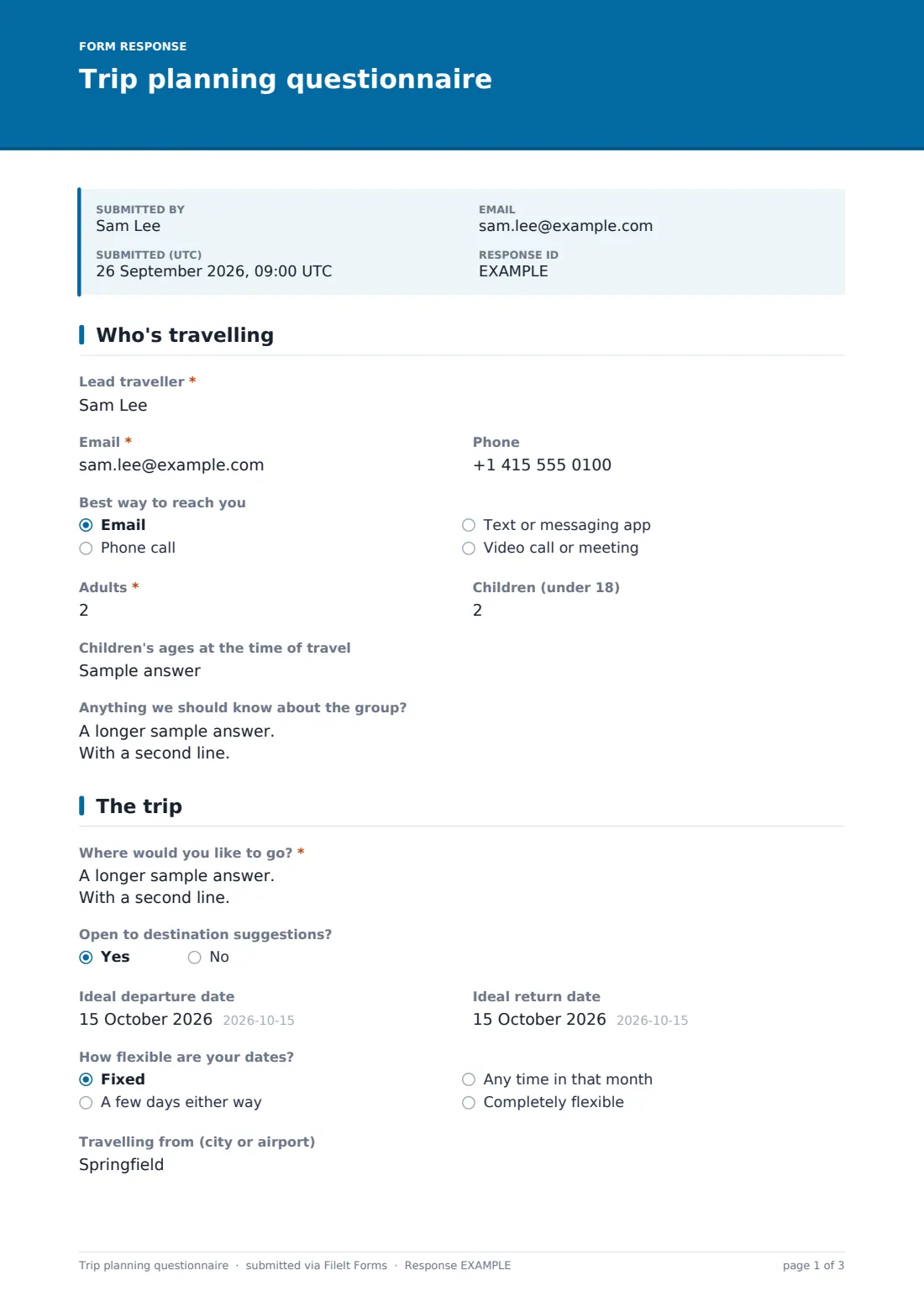
1 Who's travelling
- Lead traveller*
- Email*
- Phone
- Best way to reach you Email · Phone call · Text or messaging app · Video call or meeting
- Adults*
- Children (under 18)
- Children's ages at the time of travel asked only when it applies
- Anything we should know about the group?
2 The trip
- Where would you like to go?*
- Open to destination suggestions?
- Ideal departure date
- Ideal return date
- How flexible are your dates? Fixed · A few days either way · Any time in that month · Completely flexible
- Travelling from (city or airport)
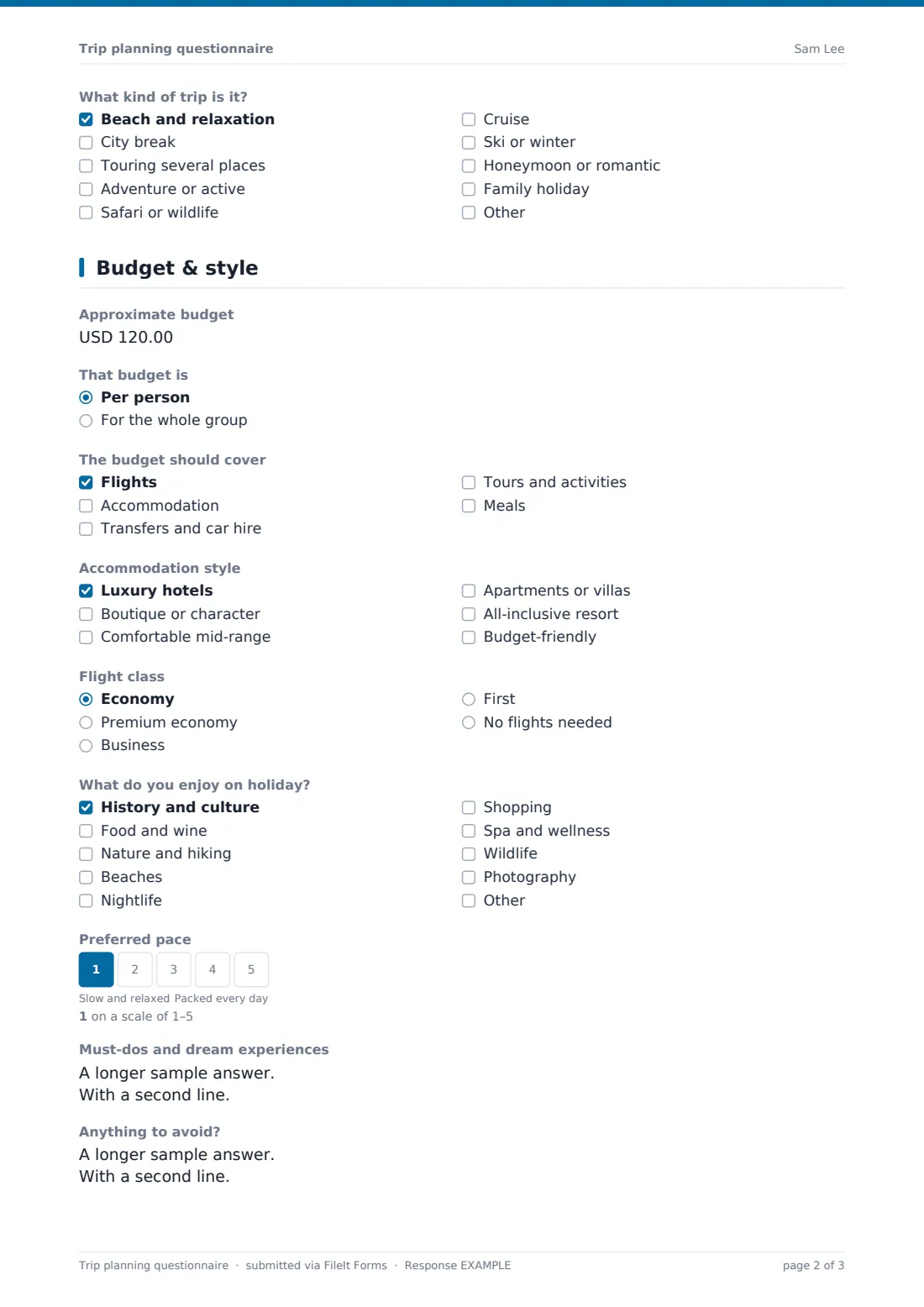
- What kind of trip is it? Beach and relaxation · City break · Touring several places · Adventure or active · Safari or wildlife · Cruise · Ski or winter · Honeymoon or romantic · Family holiday
3 Budget & style
- Approximate budget
- That budget is Per person · For the whole group
- The budget should cover Flights · Accommodation · Transfers and car hire · Tours and activities · Meals
- Accommodation style Luxury hotels · Boutique or character · Comfortable mid-range · Apartments or villas · All-inclusive resort · Budget-friendly
- Flight class Economy · Premium economy · Business · First · No flights needed
- What do you enjoy on holiday? History and culture · Food and wine · Nature and hiking · Beaches · Nightlife · Shopping · Spa and wellness · Wildlife · Photography
- Preferred pace
- Must-dos and dream experiences
- Anything to avoid?
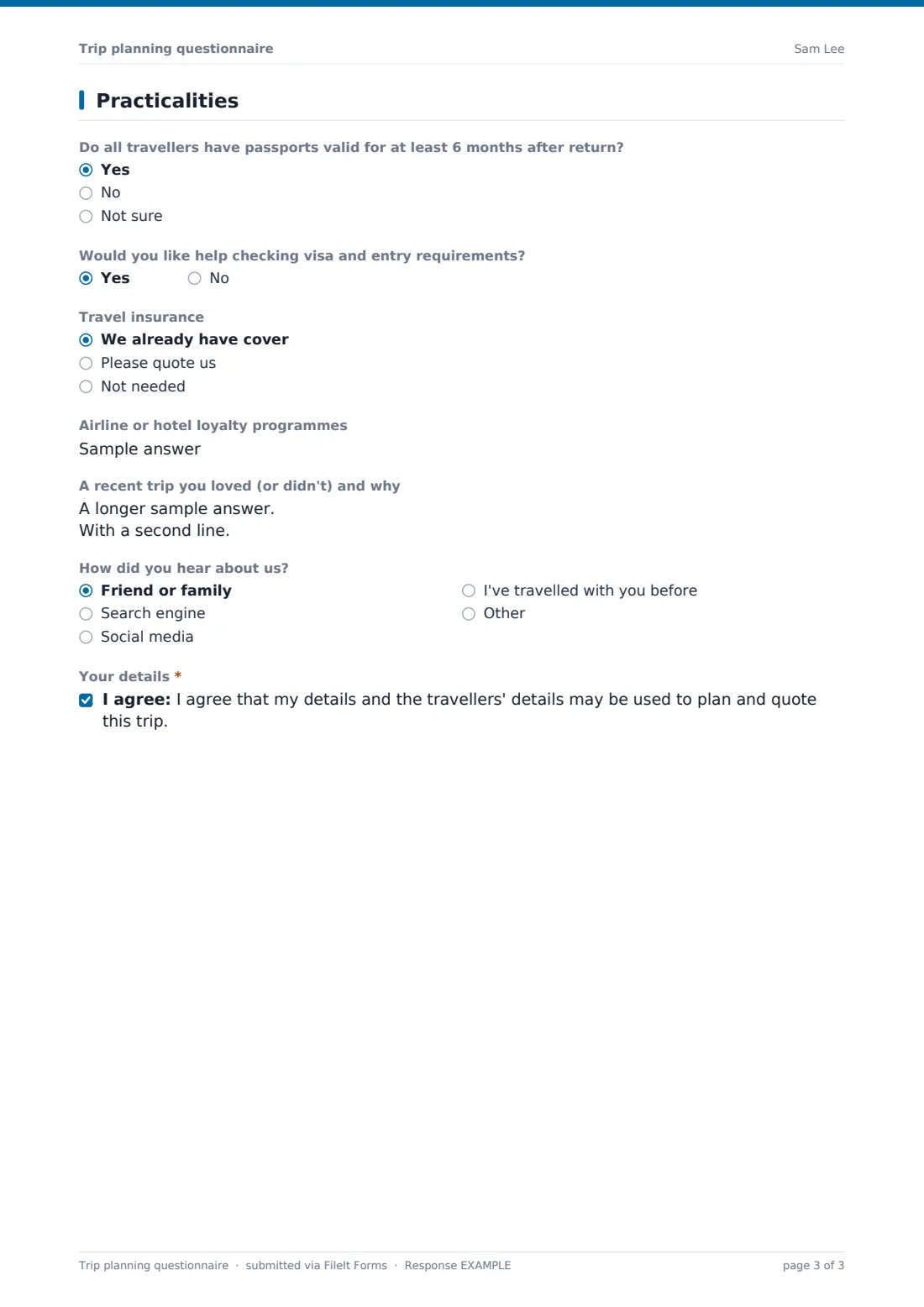
4 Practicalities
- Do all travellers have passports valid for at least 6 months after return? Yes · No · Not sure
- Would you like help checking visa and entry requirements?
- Travel insurance We already have cover · Please quote us · Not needed
- Airline or hotel loyalty programmes
- A recent trip you loved (or didn't) and why
- How did you hear about us? Friend or family · Search engine · Social media · I've travelled with you before · Other
- Your details*
The trip planning questionnaire form, page by page
1 Who's travelling
The lead traveller gives their name, email and phone and the best way to reach them. They enter the number of adults and children; if there are children, a field asks their ages at the time of travel. An open box covers anything about the group, such as mobility, medical or dietary needs.
2 The trip
Clients describe where they'd like to go and whether they're open to suggestions, give ideal departure and return dates and say how flexible those dates are, from fixed to completely flexible. They add where they're travelling from and tick the kind of trip — beach, city, touring, adventure, safari, cruise, ski, honeymoon or family.
3 Budget & style
An approximate budget is given per person or for the whole group, with a checklist of what it should cover (flights, accommodation, transfers, activities, meals). Clients choose accommodation styles and flight class, tick their interests, set their preferred pace on a 1–5 scale from slow and relaxed to packed every day, and list must-dos and anything to avoid.
4 Practicalities
The last page asks whether passports are valid for at least six months after return, whether the client would like help checking visa requirements, their travel insurance situation and any loyalty programmes. A recent trip they loved (or didn't) gives useful insight, followed by how they heard about you and a required consent to use their details to plan and quote the trip.
Make the template yours
- Change the budget currency to the one you quote in
- Edit the trip types and interests to match the destinations you specialise in
- Add a question about preferred airlines or seat requirements
- Remove the flight class question if you only sell land arrangements
- Add your consultation booking link to the confirmation message
- Route questionnaires to a folder per consultant
Tips for a better trip planning questionnaire form
- Send the questionnaire before your first call so the conversation starts from their answers
- Take the must-dos and things to avoid seriously — they often decide whether a proposal lands
- Check passport validity early; it's a common last-minute problem
- Confirm whether the budget includes flights before quoting
- Keep past questionnaires to personalise future trips for returning clients
Every response becomes a PDF in your vault
Each questionnaire is saved as a PDF in the vault folder you choose, the owner is notified by email, and the client can receive a copy of their answers.
Use the Responses table to see new enquiries at a glance and export to CSV if you track leads in a spreadsheet.
- Start from this template. It opens in the FileIt Forms designer — change any question, add pages, set the rules for when questions appear.
- Share it. Turn on a public link, or send it to people by email, each with their own link. They don’t need a FileIt account.
- Get the answers as PDFs. Each response is saved as a PDF in the vault folder you choose, with uploaded files attached — and listed in a Responses table you can export to CSV.
Trip planning questionnaire form: frequently asked questions
Is this trip planning questionnaire free?
Yes. It's included in the Forms app on every FileIt account, including the free plan.
Do clients need a FileIt account?
No. Clients fill it in from a link with no account needed.
Can I change the currency of the budget question?
Yes. The budget field's currency can be changed in the designer.
Does the form book anything?
No. It collects the brief. You plan, quote and book the trip through your usual systems.
Can I send it to an existing client with their details filled in?
Yes. Send a personal link and their name and email are prefilled.
Is the questionnaire long for clients?
It's four short pages, and most questions are optional, so clients can answer in as much detail as they like.
Can I add my own questions?
Yes. Add, remove or reorder any question in the designer.