What is the shelter intake form template?
Shelter intake often happens late at night, with a tired and sometimes frightened guest, and a staff member or volunteer who needs to get the essentials down quickly: who has arrived, who is with them, where they slept last night, what they need before morning, and whether there's any health or safety issue staff must know about. A clear intake form helps make sure those questions are asked the same way every time, whoever is on shift.
This template is designed to be filled in by staff with the guest. Questions about children only appear when children are present, health and medication details only when there's something to record, and a yes to fleeing violence shows a safety reminder and asks who must not be told the guest is there. The last page records agreement to house rules, the guest's choice about sharing information with partner agencies, and their signature.
Each intake is saved as a private PDF in your FileIt vault, giving you a dated record for each guest without a paper file to lose.
- Best for
- Emergency shelters, night shelters, winter shelters and refuges
- Filled in by
- Staff or volunteers, together with the guest
- Time to complete
- About 10 minutes
- Includes
- Household, tonight's needs, health, safety flags, house rules and information-sharing choice
Who uses a shelter intake form?
- A night shelter registering guests as they arrive each evening
- A church-run winter shelter using volunteers on a rota
- A family shelter recording children's ages and baby supply needs
- A refuge noting safety concerns and people who must not be told a guest is there
- An emergency shelter opened after a fire or flood
Questions on this shelter intake form
31 questions over 5 pages · includes signature, conditional questions, multiple pages, consent checkbox.
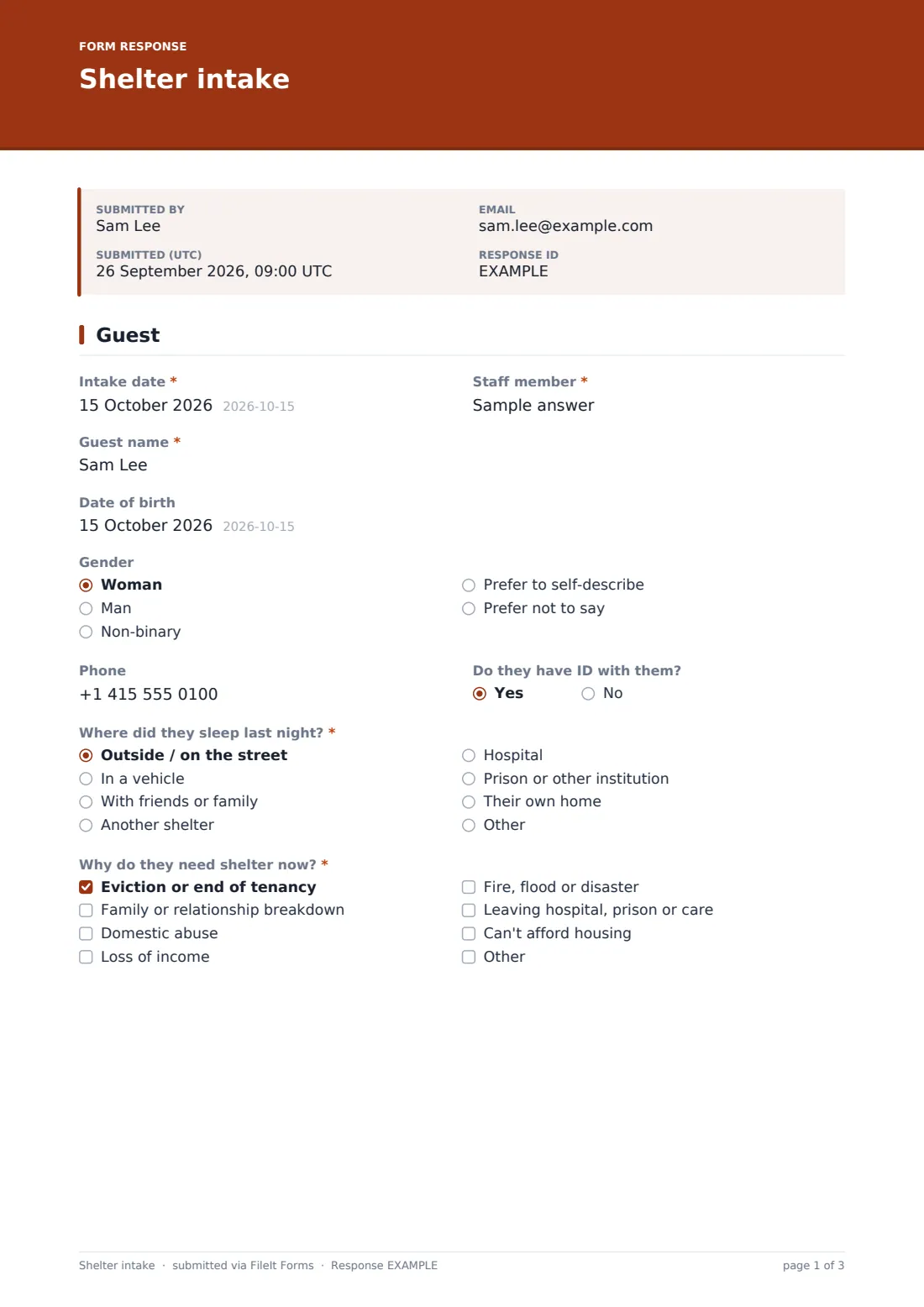
1 Guest
- Intake date*
- Staff member*
- Guest name*
- Date of birth
- Gender Woman · Man · Non-binary · Prefer to self-describe · Prefer not to say
- Phone
- Do they have ID with them?
- Where did they sleep last night?* Outside / on the street · In a vehicle · With friends or family · Another shelter · Hospital · Prison or other institution · Their own home
- Why do they need shelter now?* Eviction or end of tenancy · Family or relationship breakdown · Domestic abuse · Loss of income · Fire, flood or disaster · Leaving hospital, prison or care · Can't afford housing
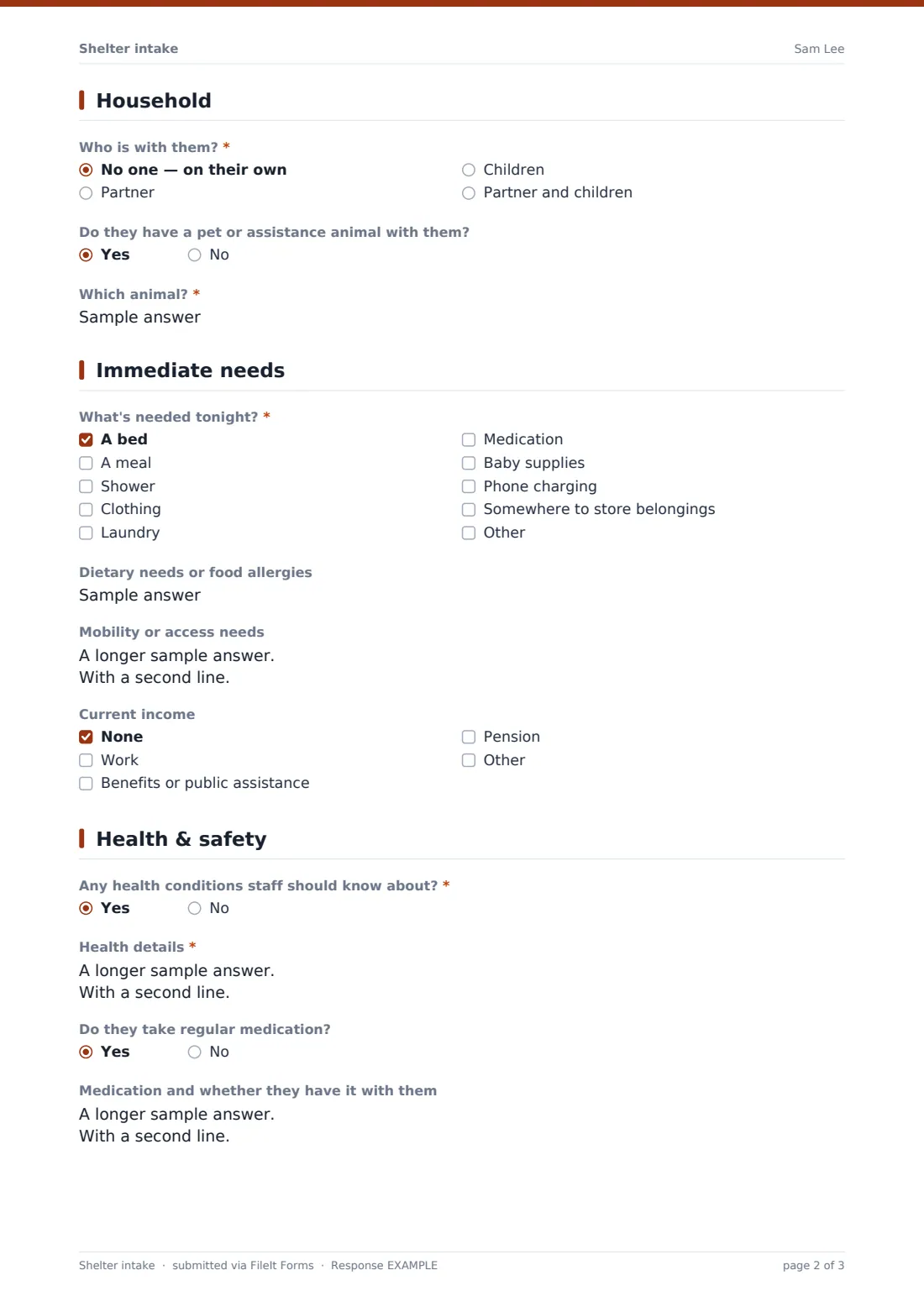
2 Household
- Who is with them?* No one — on their own · Partner · Children · Partner and children
- Number of children* asked only when it applies
- Children's ages* asked only when it applies
- Names of others in the household asked only when it applies
- Do they have a pet or assistance animal with them?
- Which animal?* asked only when it applies
3 Immediate needs
- What's needed tonight?* A bed · A meal · Shower · Clothing · Laundry · Medication · Baby supplies · Phone charging · Somewhere to store belongings
- Dietary needs or food allergies
- Mobility or access needs
- Current income None · Work · Benefits or public assistance · Pension · Other
4 Health & safety
- Any health conditions staff should know about?*
- Health details* asked only when it applies
- Do they take regular medication?
- Medication and whether they have it with them asked only when it applies
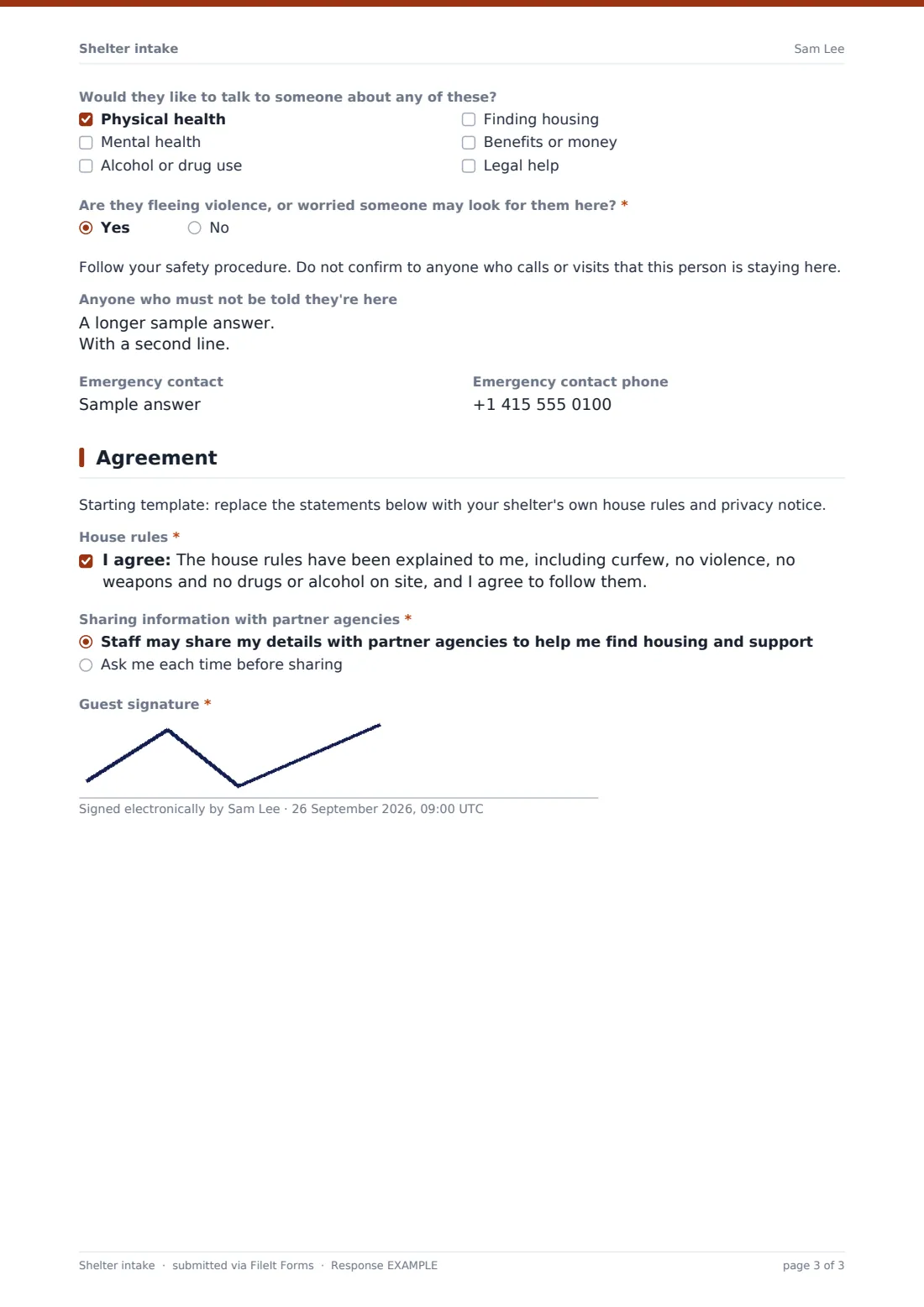
- Would they like to talk to someone about any of these? Physical health · Mental health · Alcohol or drug use · Finding housing · Benefits or money · Legal help
- Are they fleeing violence, or worried someone may look for them here?*
- Anyone who must not be told they're here asked only when it applies
- Emergency contact
- Emergency contact phone
5 Agreement
- House rules*
- Sharing information with partner agencies* Staff may share my details with partner agencies to help me find housing and support · Ask me each time before sharing
- Guest signature*
The shelter intake form, page by page
1 Guest
The intake date and staff member, then the guest's name (the name they'd like to be called is fine), date of birth, gender, phone and whether they have ID. Where they slept last night and why they need shelter now are both required.
2 Household
Who is with them — no one, a partner, children, or a partner and children. Any answer involving children asks how many and their ages; anyone accompanied can have the others' names recorded. A pet or assistance animal question asks which animal on a yes.
3 Immediate needs
What's needed tonight: a bed, meal, shower, clothing, laundry, medication, baby supplies, phone charging or storage. Dietary needs, mobility or access needs and current income follow.
4 Health & safety
Health conditions and regular medication each open a detail field on yes. The guest can say what they'd like to talk to someone about — health, mental health, alcohol or drugs, housing, benefits or legal help. A required question asks whether they're fleeing violence; yes shows a reminder not to confirm the guest's presence to anyone and a field for people who must not be told. An emergency contact is optional.
5 Agreement
A note to replace the statements with your own rules, then agreement to the house rules, a choice between allowing staff to share details with partner agencies or being asked each time, and the guest's signature.
Make the template yours
- Replace the house rules statement with your own rules and curfew
- Edit the 'needed tonight' list to what you can actually provide
- Add a bed or room number field for your allocation
- Keep the form for staff only — share the link inside your team rather than publicly
- File intakes in a restricted vault folder
Tips for a better shelter intake form
- Ask the questions conversationally rather than reading them out — the form follows the conversation
- It's fine to leave optional questions blank on the first night and come back to them
- Take the safety question seriously: brief every shift on guests who must not be disclosed
- Check medication needs before lights out
- Respect the information-sharing choice every time you contact another agency
Every response becomes a PDF in your vault
Each intake is saved as a PDF, with the guest's signature, in the vault folder you choose. You, and anyone you add to the notification list, get an email for each new intake; no copy is emailed to the guest.
The Responses table gives you a nightly list of new guests that you can filter by household type, needs or safety flag. Export to CSV for occupancy reports.
- Start from this template. It opens in the FileIt Forms designer — change any question, add pages, set the rules for when questions appear.
- Share it. Turn on a public link, or send it to people by email, each with their own link. They don’t need a FileIt account.
- Get the answers as PDFs. Each response is saved as a PDF in the vault folder you choose, with uploaded files attached — and listed in a Responses table you can export to CSV.
Shelter intake form: frequently asked questions
Is this shelter intake form template free?
Yes. It's one of the ready-made templates in the Forms app on every FileIt account, including the free plan. Use it as it is or change any question in the designer.
Is this filled in by staff or the guest?
It's designed for staff or volunteers to fill in with the guest, on a tablet or laptop. The guest signs at the end.
How does it handle safety concerns?
A required question asks whether the guest is fleeing violence. Yes shows a reminder not to confirm their presence to anyone and asks who must not be told they're there.
Can it handle families?
Yes. Choosing children or partner and children asks for the number and ages of children, and the needs list includes baby supplies.
Can I use my own house rules?
Yes. The house rules are a consent statement you can rewrite in the designer.
Who can see the intake records?
Only people you give access to the vault folder. Keep it restricted to staff who need it.