
What is the pool service log form template?
Pool owners want to know the water is safe and the equipment is looked after. Service companies need a record of what was measured and added in case water quality or equipment is ever questioned. A paper tag on the pump rarely does either job well.
This log covers each visit in four pages: the visit and sanitiser system, water chemistry, cleaning and equipment, and notes for the owner. Chlorine readings appear for chlorine and salt systems and bromine for bromine systems, salt level appears only for salt systems, and chemicals added require an exact list.
Each log is filed as a PDF in your FileIt vault, and the owner can receive a copy by email, so both sides have the same record.
- Best for
- Pool service companies, hotels, HOAs and spa maintenance technicians
- Filled in by
- The technician at the end of each visit
- Time to complete
- About 4–6 minutes
- Includes
- Chemistry readings, chemicals added, equipment grid, owner notes
Who uses a pool service log form?
- A weekly residential pool route with an emailed log to each owner
- A hotel or apartment complex keeping daily pool records
- A hot tub technician servicing bromine spas
- A salt system check with salt level and cell condition
- A green-pool recovery tracked over several visits
- An HOA checking its contractor's visits
Questions on this pool service log form
34 questions over 4 pages · includes signature, file upload, conditional questions, multiple pages, ratings.
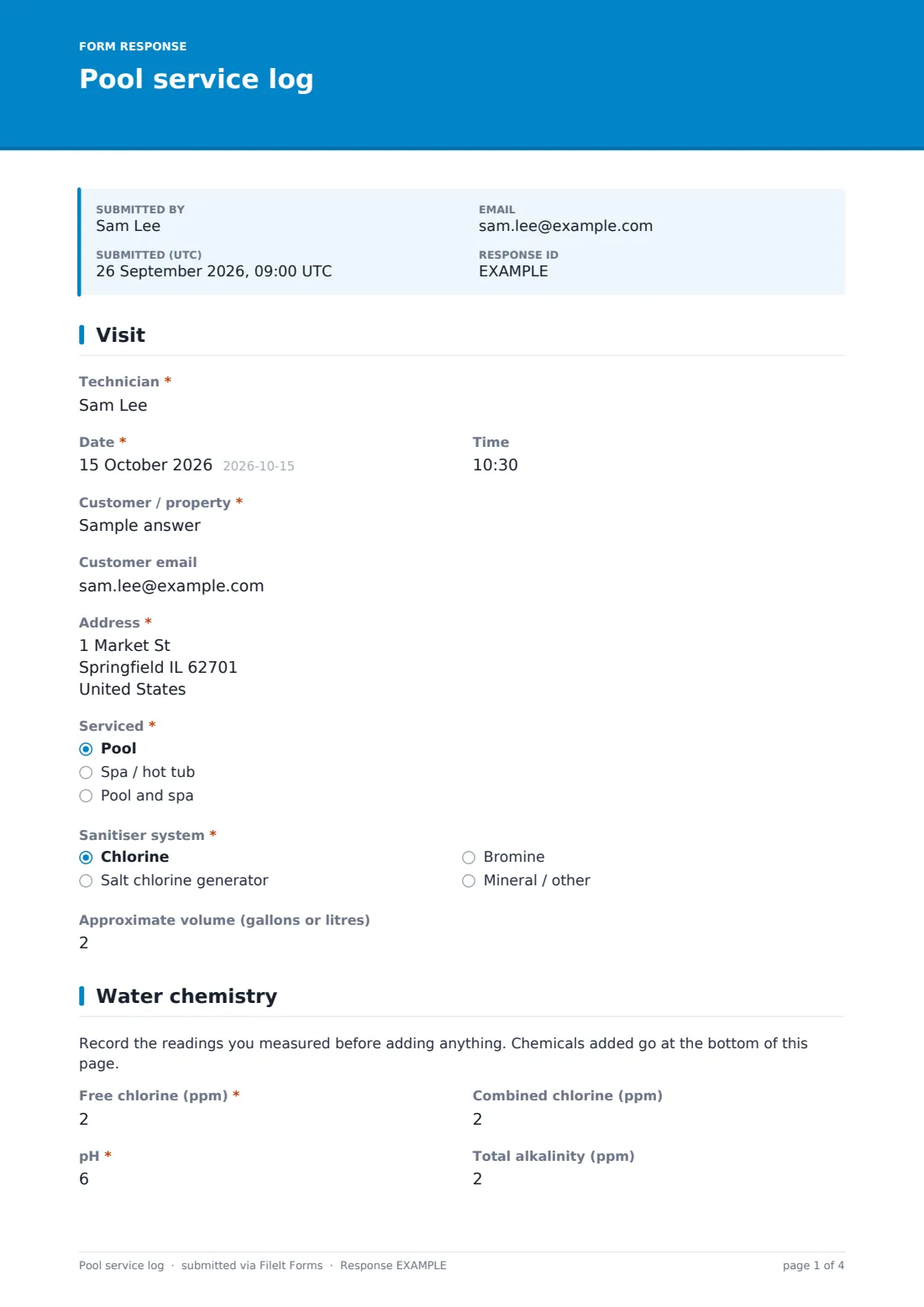
1 Visit
- Technician*
- Date*
- Time
- Customer / property*
- Customer email
- Address*
- Serviced* Pool · Spa / hot tub · Pool and spa
- Sanitiser system* Chlorine · Salt chlorine generator · Bromine · Mineral / other
- Approximate volume (gallons or litres)
2 Water chemistry
- Free chlorine (ppm)* asked only when it applies
- Combined chlorine (ppm) asked only when it applies
- Bromine (ppm)* asked only when it applies
- pH*
- Total alkalinity (ppm)
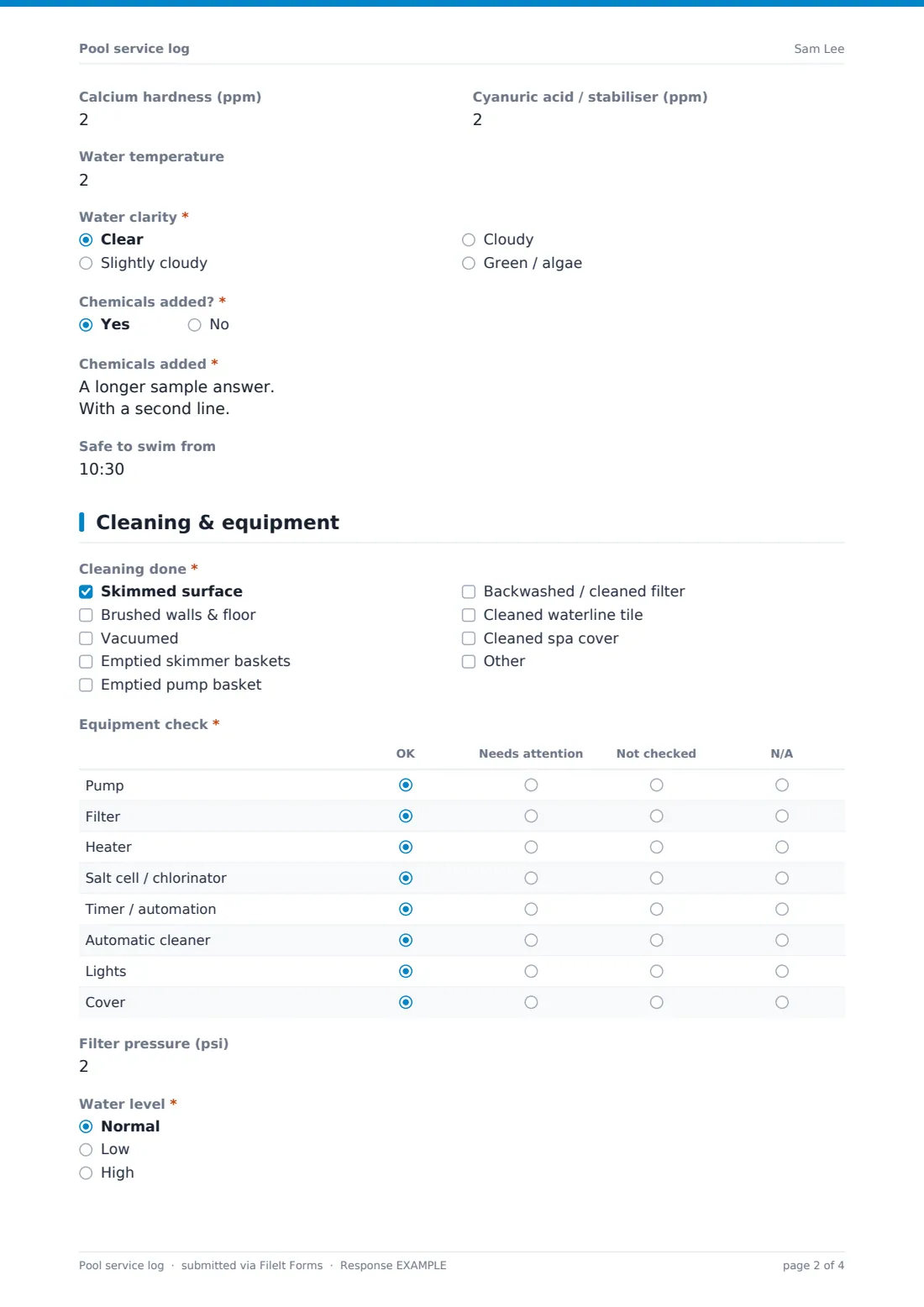
- Calcium hardness (ppm)
- Cyanuric acid / stabiliser (ppm)
- Salt (ppm) asked only when it applies
- Water temperature
- Water clarity* Clear · Slightly cloudy · Cloudy · Green / algae
- Chemicals added?*
- Chemicals added* asked only when it applies
- Safe to swim from asked only when it applies
3 Cleaning & equipment
- Cleaning done* Skimmed surface · Brushed walls & floor · Vacuumed · Emptied skimmer baskets · Emptied pump basket · Backwashed / cleaned filter · Cleaned waterline tile · Cleaned spa cover
- Equipment check* OK · Needs attention · Not checked · N/A
- Filter pressure (psi)
- Water level* Normal · Low · High
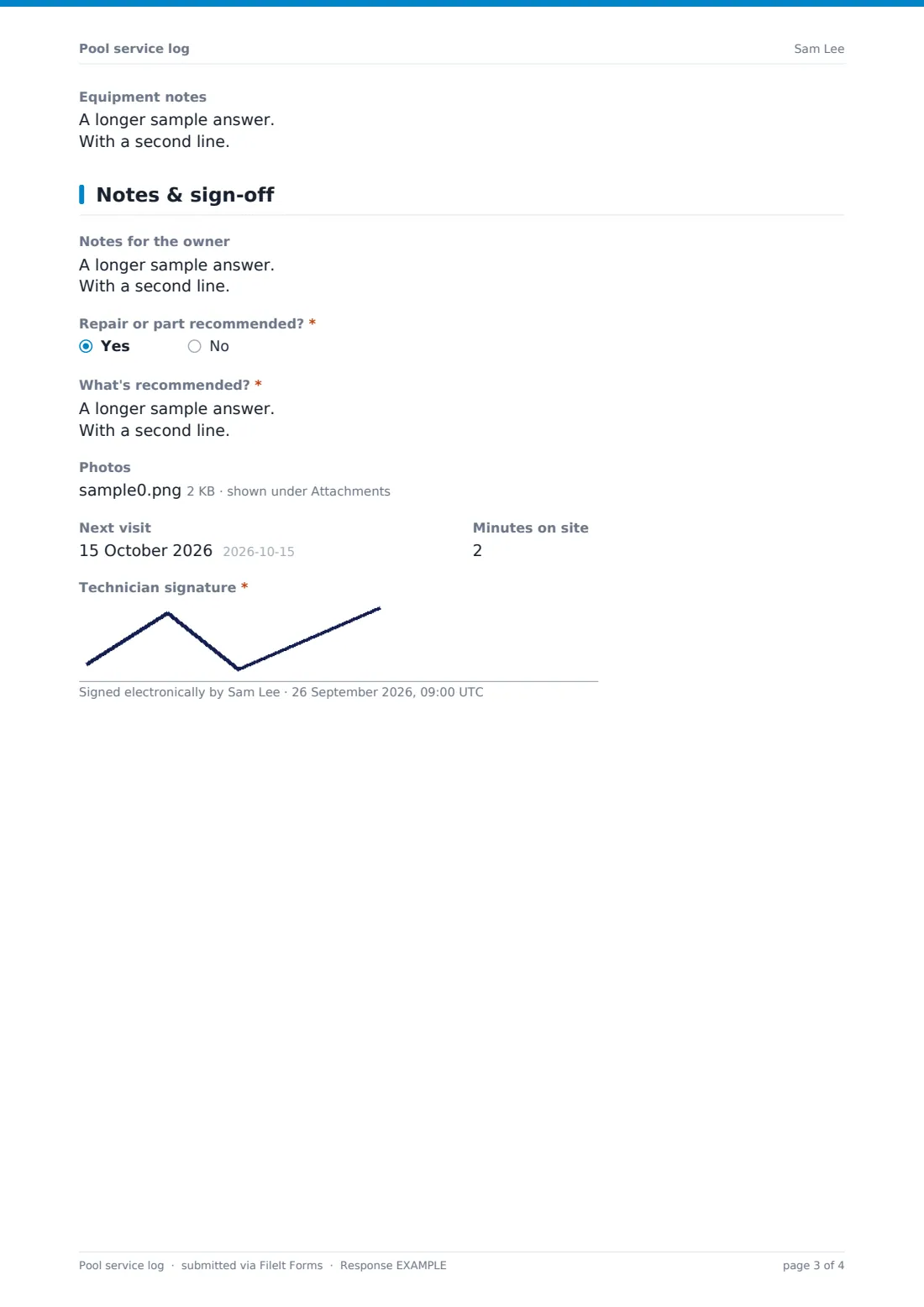
- Equipment notes
4 Notes & sign-off
- Notes for the owner
- Repair or part recommended?*
- What's recommended?* asked only when it applies
- Photos
- Next visit
- Minutes on site
- Technician signature*
The pool service log form, page by page
1 Visit
The technician, date and time, customer or property, customer email and address come first. The technician chooses what was serviced (pool, spa or both) and the sanitiser system (chlorine, salt, bromine, or mineral/other), and can record the approximate volume.
2 Water chemistry
A note reminds the technician to test before adding anything. Free and combined chlorine appear for every system except bromine, where bromine is asked instead; pH is always required. Total alkalinity, calcium hardness, cyanuric acid and water temperature are optional, and salt appears for salt systems.
Water clarity is required. If chemicals were added, the product and amount for each are required, with an optional safe-to-swim time.
3 Cleaning & equipment
A required checklist records the cleaning done, from skimming and brushing to baskets, filter backwash and waterline tile. A required grid checks the pump, filter, heater, salt cell, timer, automatic cleaner, lights and cover as OK, needs attention, not checked or N/A. Filter pressure, the water level (required) and equipment notes follow.
4 Notes & sign-off
Notes for the owner, a required question on whether a repair or part is recommended (with details), photos, the next visit date and minutes on site are recorded, and the technician signs.
Make the template yours
- Remove readings you don't test for, or add ones you do, such as phosphates
- Add your target ranges to the help text of each reading
- Change the equipment grid rows to match the systems you service
- Make the customer email required so every owner receives each log
- File logs by property so the water history is in one place
- Add a customer signature for commercial sites that require one
Tips for a better pool service log form
- Record the readings before you add anything
- Write exact product names and amounts, not "some chlorine"
- Watch filter pressure over several visits — a rising trend means cleaning is due
- Tell the owner about equipment issues in plain language
- Follow the product labels for re-entry times
- Keep the same test kit or method so readings compare across visits
Every response becomes a PDF in your vault
The log is filed as a PDF in your FileIt vault, and if the customer's email was entered, the owner receives a copy as soon as the technician submits.
Service companies often review repair recommendations in the Responses table to send quotes, and export readings to CSV to spot trends for each pool.
- Start from this template. It opens in the FileIt Forms designer — change any question, add pages, set the rules for when questions appear.
- Share it. Turn on a public link, or send it to people by email, each with their own link. They don’t need a FileIt account.
- Get the answers as PDFs. Each response is saved as a PDF in the vault folder you choose, with uploaded files attached — and listed in a Responses table you can export to CSV.
Pool service log form: frequently asked questions
Is this pool service log template free?
Yes. It's included with the Forms app on every FileIt account, including the free plan, and you can edit any question to fit the way you work.
Does it work for spas and hot tubs?
Yes. Choose spa or hot tub, and pick bromine if that's the sanitiser — the form asks for bromine instead of chlorine.
Can the owner get a copy?
Yes. Enter the customer's email on the first page and a copy of the log is emailed to that address when the technician submits.
Can I add my own target ranges?
Yes. Edit the help text of each reading to show the ranges you work to.
Is there a salt reading?
Yes. It appears when the sanitiser system is a salt chlorine generator.
Can I track readings over time?
Export the Responses table to CSV, or keep each pool's logs in its own folder.