What is the service booking form template?
A service booking form gives clients a simple way to request an appointment, with the service they need, a preferred and alternative date and time, and how they'd like to be reached, all in one submission. It's a general-purpose template that suits almost any service business taking bookings by request rather than through a live calendar.
Booking by phone or email alone usually takes several messages just to land on a time that works for both sides, and it's easy for details like the number of people attending or an access requirement to get lost along the way. A form captures a preferred and backup time up front, so confirming a booking is often a single reply.
This template runs on FileIt's Forms app, included on every FileIt account including the free plan. Clients fill it in without needing a FileIt account of their own, and every booking request becomes a PDF, automatically filed in your vault so you have a clear, dated record of every request that comes in.
- Best for
- Consultants, therapists, trades and any service business taking appointment requests
- Filled in by
- Clients requesting a booking
- Time to complete
- About 3 minutes
- Includes
- Service picker, preferred and alternative time, on-site/at-client/online location choice
Who uses a service booking form?
- A consultant taking booking requests for an initial consultation
- A therapist or coach offering a standard or extended session length
- A tradesperson booking a visit to a client's home with access notes attached
- A business offering an online or video-call appointment alongside in-person visits
- A returning client requesting a follow-up appointment and flagging it's not their first booking
- A team tracking incoming booking requests by preferred time of day before confirming a slot
Questions on this service booking form
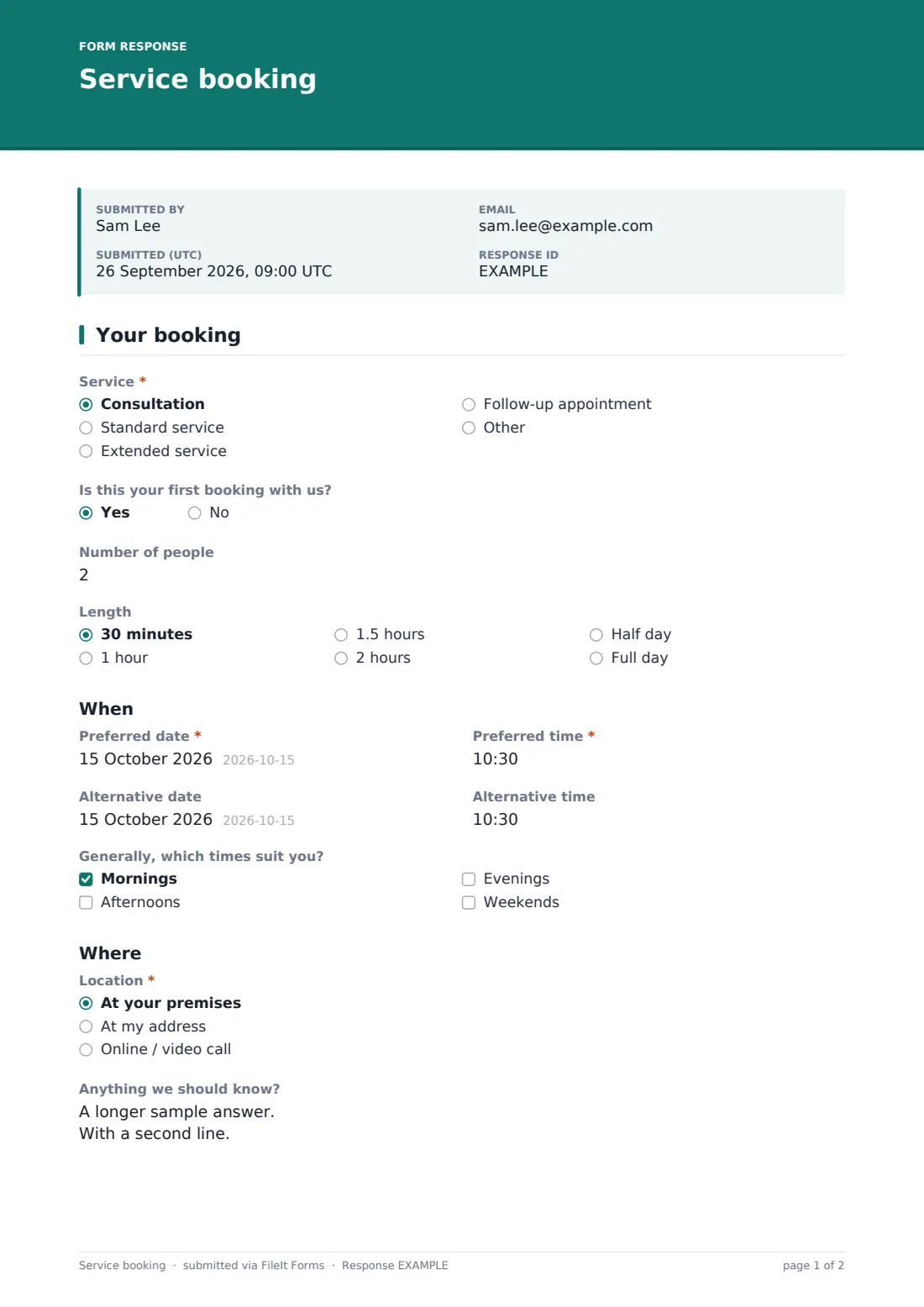
19 questions over 2 pages · includes conditional questions, multiple pages, consent checkbox.
1 Your booking
- Service* Consultation · Standard service · Extended service · Follow-up appointment · Other
- Which service?* asked only when it applies
- Is this your first booking with us?
- Number of people
- Length 30 minutes · 1 hour · 1.5 hours · 2 hours · Half day · Full day
- Preferred date*
- Preferred time*
- Alternative date
- Alternative time
- Generally, which times suit you? Mornings · Afternoons · Evenings · Weekends
- Location* At your premises · At my address · Online / video call
- Your address* asked only when it applies
- Access notes asked only when it applies
- Anything we should know?
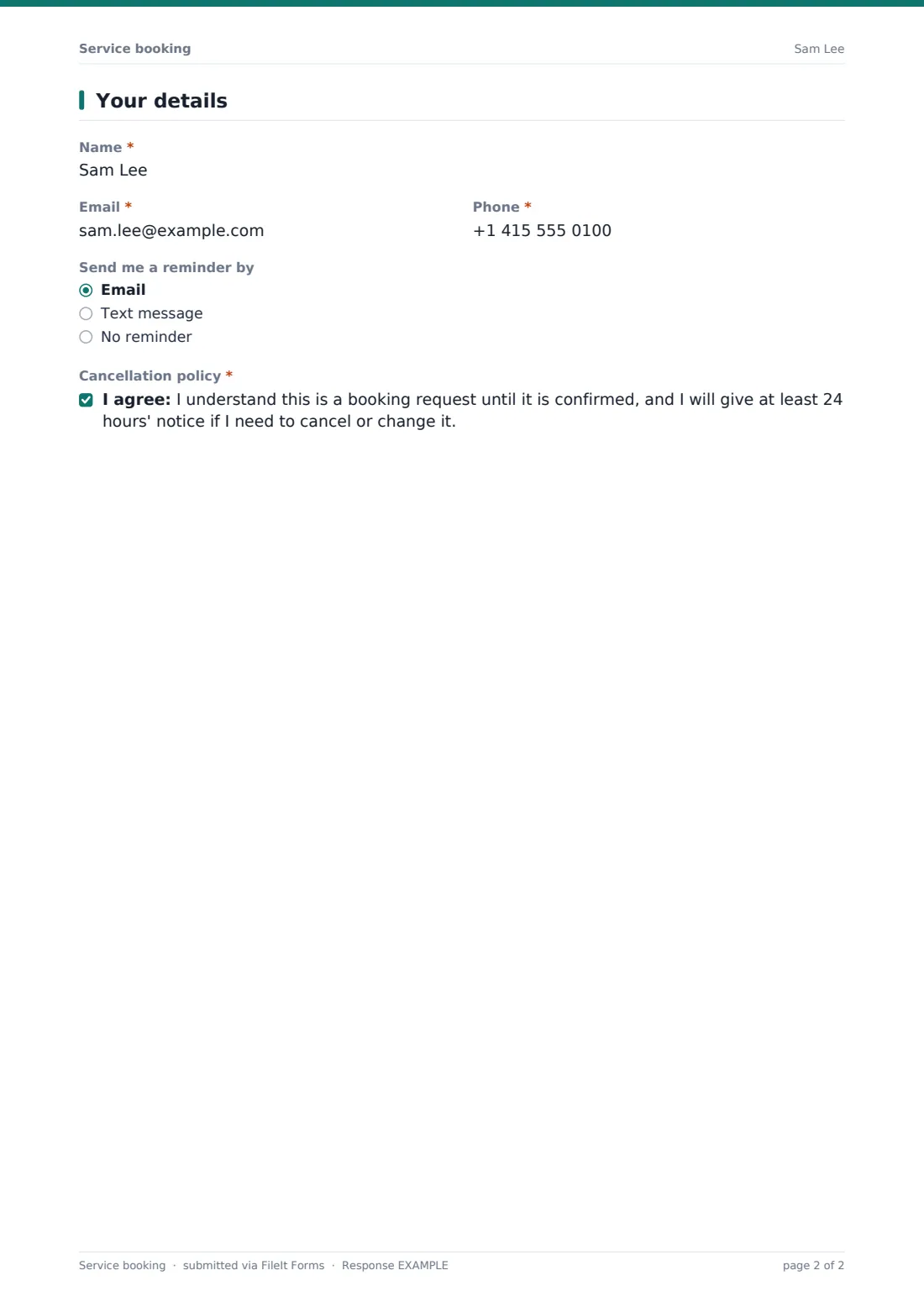
2 Your details
- Name*
- Email*
- Phone*
- Send me a reminder by Email · Text message · No reminder
- Cancellation policy*
The service booking form, page by page
1 Your booking
Service offers consultation, standard service, extended service, follow-up appointment, or an Other option with a free-text field. Is this your first booking with us?, Number of people and Length (from 30 minutes up to a full day) set the scope of the appointment. A When heading introduces Preferred date and time plus an optional alternative date and time, and a checkbox list for which times of day generally suit the client — mornings, afternoons, evenings or weekends — gives useful flexibility if the exact preferred slot isn't available.
2 Where & notes
A Where heading introduces Location, offering the business's own premises, the client's address, or online / video call. Choosing the client's address opens a required address field plus an optional access notes field for parking, floor, entry codes or pets. Anything we should know? closes the page with an open field for what the client wants to achieve or any special requirements.
3 Your details
Name, Email and Phone identify the client, and Send me a reminder by lets them choose email, text message or no reminder at all. The form ends with a consent statement confirming the client understands this is a booking request until confirmed, and that they'll give at least 24 hours' notice if they need to cancel or change it.
Make the template yours
- Replace the generic service list with your own named services or packages
- Adjust the cancellation notice period to match your own policy
- Add a deposit or payment-link question if you take a booking fee ahead of confirming
- Route requests by service type into different folders for different team members
- Turn on a maximum number of responses per day if you only take a set number of bookings
- Add a closing date if bookings are only open for a limited season or promotion
Tips for a better service booking form
- Reply quickly to confirm or suggest an alternative time, since this form is a request rather than an instant booking
- Use the alternative time field to reduce the number of messages needed to land on a confirmed slot
- Ask for access notes whenever you're visiting a client's own address, not just for larger jobs
- Set clear expectations on your cancellation policy in the confirmation message as well as the form itself
- Track first-time versus returning clients to understand where new business is coming from
- Export bookings to CSV regularly if you plan your week from a separate calendar or diary
Every response becomes a PDF in your vault
As soon as a client submits a booking request, FileIt saves it as a PDF named with the client's name and files it in the vault folder you've set up for bookings. With owner notification and a client copy both switched on by default, your team hears about the request immediately and the client has a written record of what they asked for.
From there, most businesses use the Responses table to see requests waiting to be confirmed, filter by preferred date or service, and export the list to CSV to plan the week against a separate calendar. The usual next step is replying to confirm the date and time, exactly as the built-in confirmation message tells the client to expect.
- Start from this template. It opens in the FileIt Forms designer — change any question, add pages, set the rules for when questions appear.
- Share it. Turn on a public link, or send it to people by email, each with their own link. They don’t need a FileIt account.
- Get the answers as PDFs. Each response is saved as a PDF in the vault folder you choose, with uploaded files attached — and listed in a Responses table you can export to CSV.
Service booking form: frequently asked questions
Is this service booking form template free?
Yes. It's included with the Forms app on every FileIt account, including the free plan.
Do clients need a FileIt account to request a booking?
No. Clients fill in and submit the form using only the link you share, without ever needing a FileIt account.
How do I get booking requests as PDFs?
Every submission is automatically saved as a PDF in the vault folder you choose, and the full list is browsable and exportable to CSV from the Responses table.
Does this form book the appointment into a calendar automatically?
No. FileIt doesn't include scheduling or calendar integrations — this form collects the request as a PDF, and confirming the actual slot is done manually or through your own booking system.
Can clients request an online appointment as well as in-person?
Yes. Location includes at your premises, at the client's address, or online / video call, with an address field appearing only when the client's own address is chosen.
Can I change the services or session lengths offered?
Yes. Every option in the designer, including the service list and available lengths, can be edited to match your business.
Can I collect a deposit through this form?
No. FileIt doesn't handle payments — you can add a note about a deposit or send a separate payment request through your own payment provider.
Can I limit how many bookings I take per day?
Yes — you can set a maximum number of responses or a closing date to control how many booking requests come in over a given period.