What is the cleaning service checklist form template?
If you run a cleaning business, or you're a cleaner who works for several regular clients, you already know the value of a written record of what got done. A paper checklist left on the kitchen counter is easy to lose, hard to read back later, and gives the client nothing to refer to if a question comes up in a week's time. This cleaning checklist template moves that same room-by-room record online, so it's filled in on a phone at the end of the job and never goes missing.
The template covers the whole visit: who cleaned, which property, what type of clean it was, which rooms were tackled, and a Done, Not done or N/A tick for the individual tasks in the kitchen, bathrooms and general living areas. There's space to flag anything not completed and why, report damage or issues with photos, and note which cleaning products were used so nobody runs out unexpectedly. Both the cleaner and the client can sign on the same screen before the cleaner leaves.
Once the form is submitted, FileIt turns it into a PDF and files it straight into the vault, with no separate step, no printer, and no folder of loose paper receipts. Search back through past visits by client or by date, and hand over a full history if a client ever asks what was and wasn't included in a service.
- Best for
- Cleaning businesses, sole-trader cleaners and letting agents who need a record of each visit
- Filled in by
- The cleaner on site, with the client optionally signing off before they leave
- Time to complete
- About 3-5 minutes, ticking off rooms as the clean finishes
- Includes
- Room-by-room checklists, photo upload for issues, two signature fields, conditional questions
Who uses a cleaning service checklist form?
- A cleaning company standardizing what a clean means across every cleaner on the team, so clients get a consistent service every time
- A sole-trader house cleaner who wants a professional-looking record to send clients instead of a text message
- A letting agent or property manager confirming an end-of-tenancy or holiday-let changeover clean was actually completed before the next guest or tenant arrives
- An office cleaning contractor logging out-of-hours visits when no one is on site to watch the work happen
- A cleaner flagging damage, a leak or a pest sighting they noticed while working, with a photo attached, so the client hears about it straight away
- A business owner tracking which cleaning products are running low at a client's property before the next visit
Questions on this cleaning service checklist form
24 questions over 4 pages · includes signature, file upload, conditional questions, multiple pages, ratings.
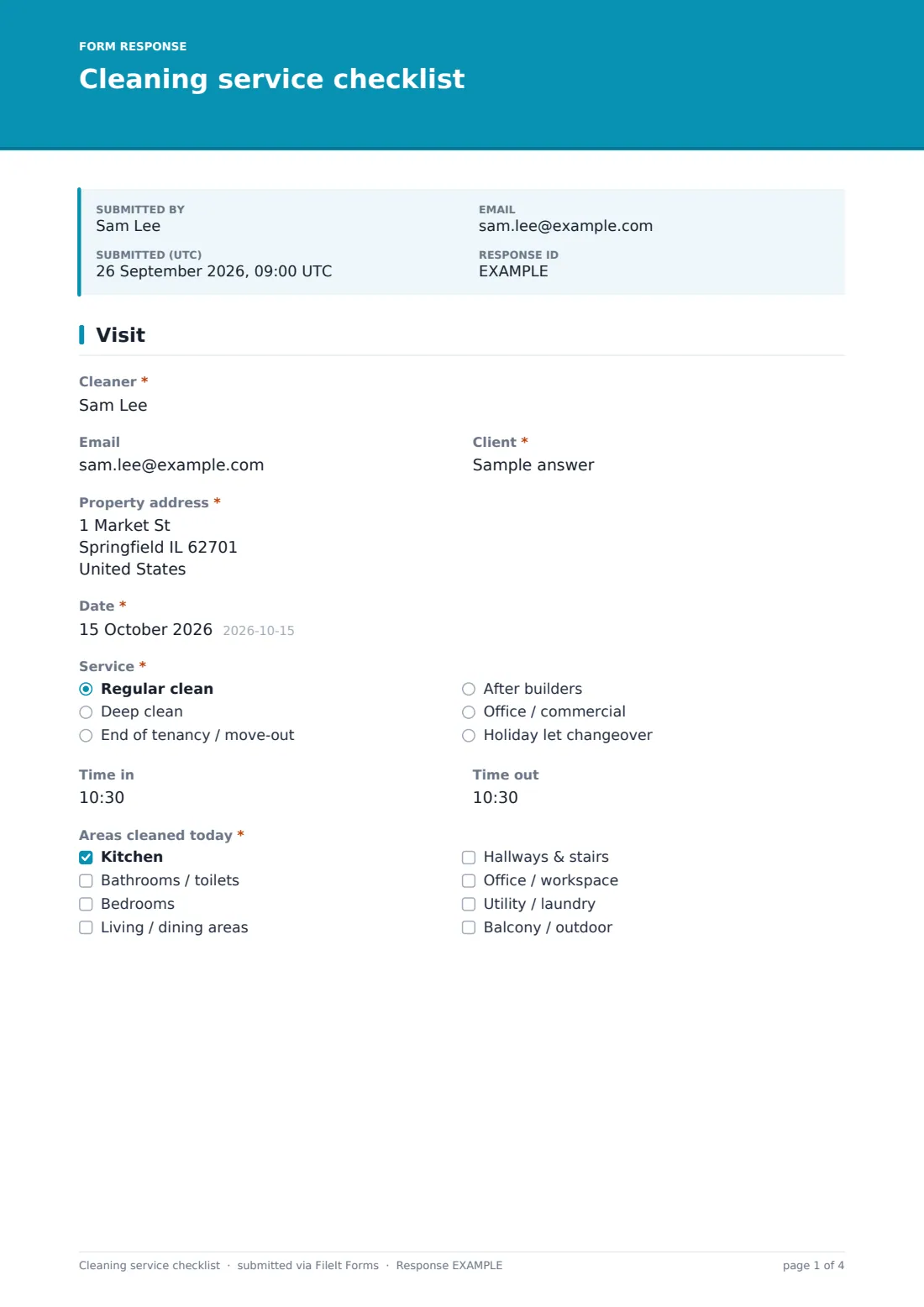
1 Visit
- Cleaner*
- Client*
- Property address*
- Date*
- Service* Regular clean · Deep clean · End of tenancy / move-out · After builders · Office / commercial · Holiday let changeover
- Time in
- Time out
- Areas cleaned today* Kitchen · Bathrooms / toilets · Bedrooms · Living / dining areas · Hallways & stairs · Office / workspace · Utility / laundry · Balcony / outdoor
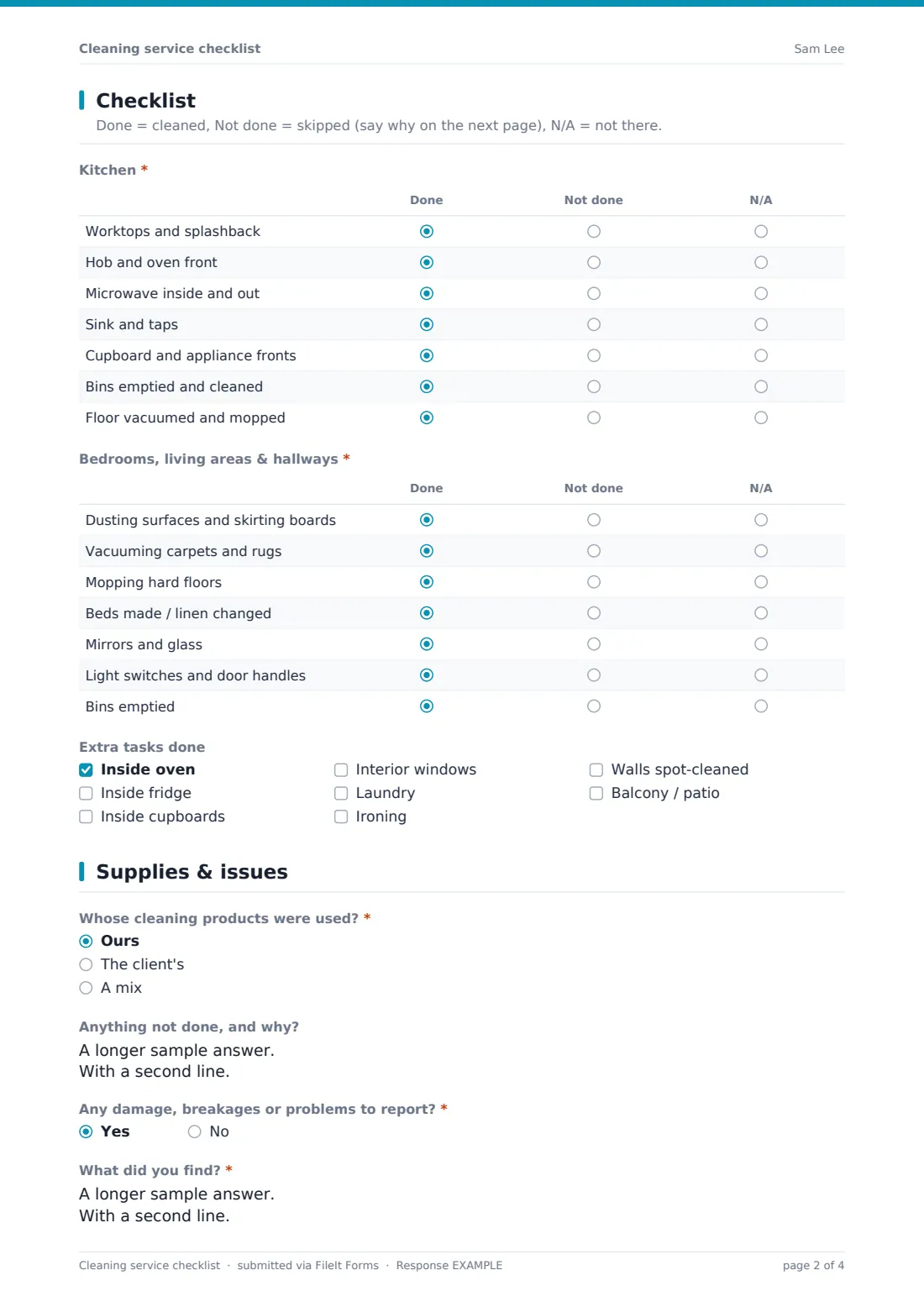
2 Checklist
- Kitchen* asked only when it applies Done · Not done · N/A
- Bathrooms* asked only when it applies Done · Not done · N/A
- Bedrooms, living areas & hallways* Done · Not done · N/A
- Extra tasks done Inside oven · Inside fridge · Inside cupboards · Interior windows · Laundry · Ironing · Walls spot-cleaned · Balcony / patio
3 Supplies & issues
- Whose cleaning products were used?* Ours · The client's · A mix
- Client products running low asked only when it applies
- Anything not done, and why?
- Any damage, breakages or problems to report?*
- What did you find?* asked only when it applies
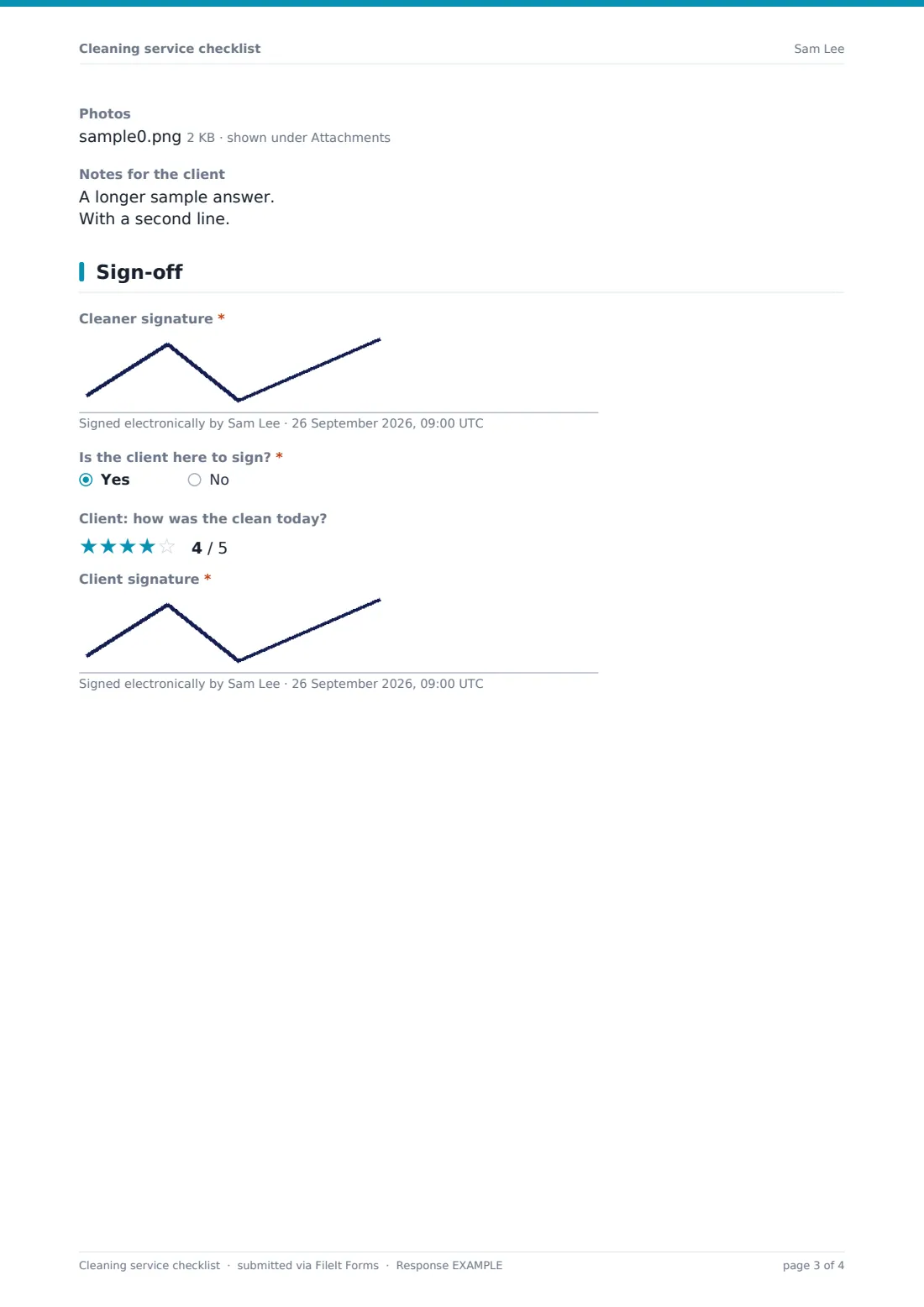
- Photos asked only when it applies
- Notes for the client
4 Sign-off
- Cleaner signature*
- Is the client here to sign?*
- Client: how was the clean today? asked only when it applies
- Client signature* asked only when it applies
The cleaning service checklist form, page by page
1 Visit
The first page captures the basics: the Cleaner's name and email, the Client, the Property address, the Date, and which Service this was: Regular clean, Deep clean, End of tenancy / move-out, After builders, Office / commercial, or Holiday let changeover. Time in and Time out are optional but useful for tracking how long jobs actually take against what was quoted.
The key question on this page is Areas cleaned today, a checkbox list covering the kitchen, bathrooms, bedrooms, living and dining areas, hallways and stairs, office space, utility/laundry, and balcony or outdoor space. What's ticked here controls exactly which checklists appear on the next page, so nobody has to scroll past a bathroom checklist for a property with no bathroom cleaned that visit.
2 Checklist
This page uses conditional logic built around the rooms selected on page one. If Kitchen was ticked, a Kitchen checklist appears listing worktops and splashback, hob and oven front, microwave inside and out, sink and taps, cupboard and appliance fronts, bins, and floors, each marked Done, Not done or N/A. If Bathrooms was ticked, the same pattern applies to toilets, shower or bath, basin and taps, mirrors, tiles and grout, consumables, and floors.
A general checklist for bedrooms, living areas and hallways always shows, covering dusting, vacuuming, mopping, beds and linen, mirrors and glass, light switches and door handles, and bins. Below that, an optional Extra tasks done list lets the cleaner tick off add-ons like inside the oven or fridge, interior windows, laundry, ironing, or a balcony or patio, the kind of extras that often get agreed on the day rather than quoted upfront.
3 Supplies & issues
Whose cleaning products were used, Ours, The client's, or A mix, is recorded here, and if the client supplied any or all of them, a follow-up question asks which of their products are running low, so the client can restock before the next visit. Anything not done, and why gives the cleaner room to explain a skipped task, such as a locked room or an oven still too hot to touch.
Any damage, breakages or problems to report is a simple yes or no gate: answering yes opens a required description field plus an optional photo upload of up to six images, so the client has both a written note and visual evidence of anything found, whether a leak, a pest, a scuff on paintwork, or something broken during the clean. A general Notes for the client field covers anything else worth passing on.
4 Sign-off
The cleaner signs first. Then a yes or no question, Is the client here to sign?, decides what happens next: if yes, the client is asked to rate today's clean out of five stars and add their own signature; if the client isn't present, the form simply closes with just the cleaner's signature, which is common for lockbox or unattended jobs like holiday-let changeovers.
Having both signatures on file, when the client is present, gives a clear, dated record that the work was inspected and accepted on the day, which is useful if a dispute ever comes up later about whether a particular task was covered.
Make the template yours
- Add or remove rooms in the Areas cleaned today list to match the properties you actually service; a template used only for offices, for example, can drop the bedroom and bathroom checklists entirely
- Turn on a maximum number of responses or a closing date if you want to stop using an old link once you switch to a new checklist version
- Change the client rating question to a simple yes or no satisfaction check if you find a five-star scale feels like overkill for routine visits
- File responses under a specific vault folder per client, so each client's full visit history builds up in its own place automatically
- Add a question for parking, access codes or pets if that's routinely useful information for your cleaners to record
- Turn off the client signature step for unattended jobs where no one is ever on site, and use it only when it's genuinely needed
- Adjust the document title pattern so exported PDFs sort neatly by client and date in the vault
Tips for a better cleaning service checklist form
- Keep task lists short and specific: worktops and splashback is something a cleaner can tick with confidence, while a vague kitchen tidy is not
- Only ask for what you'll actually use; a long supplies inventory nobody reads defeats the point of a quick on-site form
- Encourage cleaners to photograph any damage or issue immediately, before the site is left, so the record is timestamped and unambiguous
- Review the anything-not-done answers regularly; recurring reasons like locked rooms or missing access often point to a scheduling fix, not a cleaning problem
- Ask clients directly whether they want a rating question at all; some love giving quick feedback, others find it unnecessary for a routine service
- Keep the confirmation message reassuring and specific, so both the cleaner and the client know the record has been saved
Every response becomes a PDF in your vault
As soon as the checklist is submitted, FileIt generates a PDF of the whole visit, every room ticked, every note, every photo, and saves it in the vault folder the business owner has chosen. The account owner gets an email notification for each new submission, so nobody has to check a spreadsheet to know a visit happened.
From there, the owner or office manager can open the Responses table, filter by client or date range, and pull up any past visit in seconds. If a client calls asking whether the oven was cleaned on a particular date, the answer is a PDF away rather than a memory. Responses can also be exported to CSV for a broader view across a whole month or team.
- Start from this template. It opens in the FileIt Forms designer — change any question, add pages, set the rules for when questions appear.
- Share it. Turn on a public link, or send it to people by email, each with their own link. They don’t need a FileIt account.
- Get the answers as PDFs. Each response is saved as a PDF in the vault folder you choose, with uploaded files attached — and listed in a Responses table you can export to CSV.
Cleaning service checklist form: frequently asked questions
Is this cleaning checklist template free?
Yes. It's one of FileIt's ready-made Forms templates, available on every FileIt account including the free plan, and you can edit any part of it in the drag-and-drop designer.
Does the client need a FileIt account to sign off on the clean?
No. Share the form by a public link or email it to the client, and they fill it in and sign, including drawing a signature on screen, without ever creating an account.
How do I get a PDF copy of each cleaning visit?
Every submitted response is automatically turned into a PDF and saved in your FileIt vault. You can also turn on an emailed PDF copy for the client in the form's settings.
Can I use this for a one-off deep clean instead of a regular contract?
Yes. The Service dropdown already includes deep clean, after-builders and end-of-tenancy options alongside regular visits, so the same form works for occasional and recurring jobs.
What happens if a room wasn't cleaned that visit?
Only tick the rooms actually cleaned in the Areas cleaned today list. The checklist logic then only shows the matching room checklists, so cleaners aren't asked about spaces they didn't touch.
Can more than one cleaner use the same form?
Yes. The Cleaner field captures who did the work each time, so a whole team can share one link while every visit is still attributed to the right person.
Does this replace a formal cleaning contract?
No, it's a visit record, not a contract. It documents what was done on the day; any agreement about pricing, frequency or scope should still be handled separately.