What is the parade entry application form template?
A parade is a moving event with a lot of moving parts. Floats need the right gap, brass bands shouldn't be next to a pram group, and you need a phone number for every group's leader on the morning. This parade entry application gathers that from each group in the same format, so building the running order is a planning job, not a detective job.
Questions follow what the group is bringing. Ticking a float or decorated vehicle asks how many vehicles and the length of the longest, and later whether they're insured, with a place to upload the certificate. Ticking animals asks what they are and who will handle them. Handouts, a particular line-up position, and the name of a neighbouring entry each appear only when relevant. The last page asks for marshals and the lead marshal's name, confirms assembly time, and has the contact person sign the parade rules.
Each application is filed as a PDF in your FileIt vault, with insurance certificates attached to the same document.
- Best for
- Carnival, holiday, pride, heritage and town festival parades
- Filled in by
- The group's contact person
- Time to complete
- About 7 minutes
- Includes
- Entry checklist, vehicle and animal questions, line-up preferences, marshals, insurance upload, signature
Who uses a parade entry application form?
- A town's holiday parade with schools, businesses and decorated floats
- A pride march taking entries from community groups and sponsors
- A carnival procession with bands, dancers and sound systems
- A heritage or vintage vehicle parade collecting vehicle details
- A small village fete procession with walking groups and children
Questions on this parade entry application form
29 questions over 3 pages · includes signature, file upload, conditional questions, multiple pages, consent checkbox.
1 Your group
- Group or organisation name*
- Contact person*
- Email*
- Phone*
- Mobile number on the day*
- Website or social media
- Type of group* Community group or club · School or youth group · Business · Band or performers · Faith group · Charity
- Is this your first time in the parade?
2 Your entry
- Your entry includes* Walking group · Float or decorated vehicle · Marching band · Dancers or performers · Vintage or classic vehicles · Animals · Bicycles, scooters or skaters
- Number of people taking part*
- How many are under 18?
- Number of vehicles* asked only when it applies
- Length of the longest vehicle (metres) asked only when it applies
- What animals, how many, and who will handle them?* asked only when it applies
- Music or sound* None · Live music · Amplified recorded music
- Describe your entry*
- Will you hand anything out to the crowd?*
- What will you hand out?* asked only when it applies
- Position in the line-up No preference · Near the front (young children or older walkers) · Away from bands and loud music · Next to another entry
- Which entry?* asked only when it applies
3 Safety and agreement
- Adult marshals walking with your entry*
- Lead marshal's name*
- Are your vehicles insured for use in the parade?* asked only when it applies
- Insurance certificate asked only when it applies
- Does your group have its own public liability insurance?
- Can you be at the assembly area 90 minutes before the start?*
- Parade rules*
- Signature of contact person*
- Date*
The parade entry application form, page by page
1 Your group
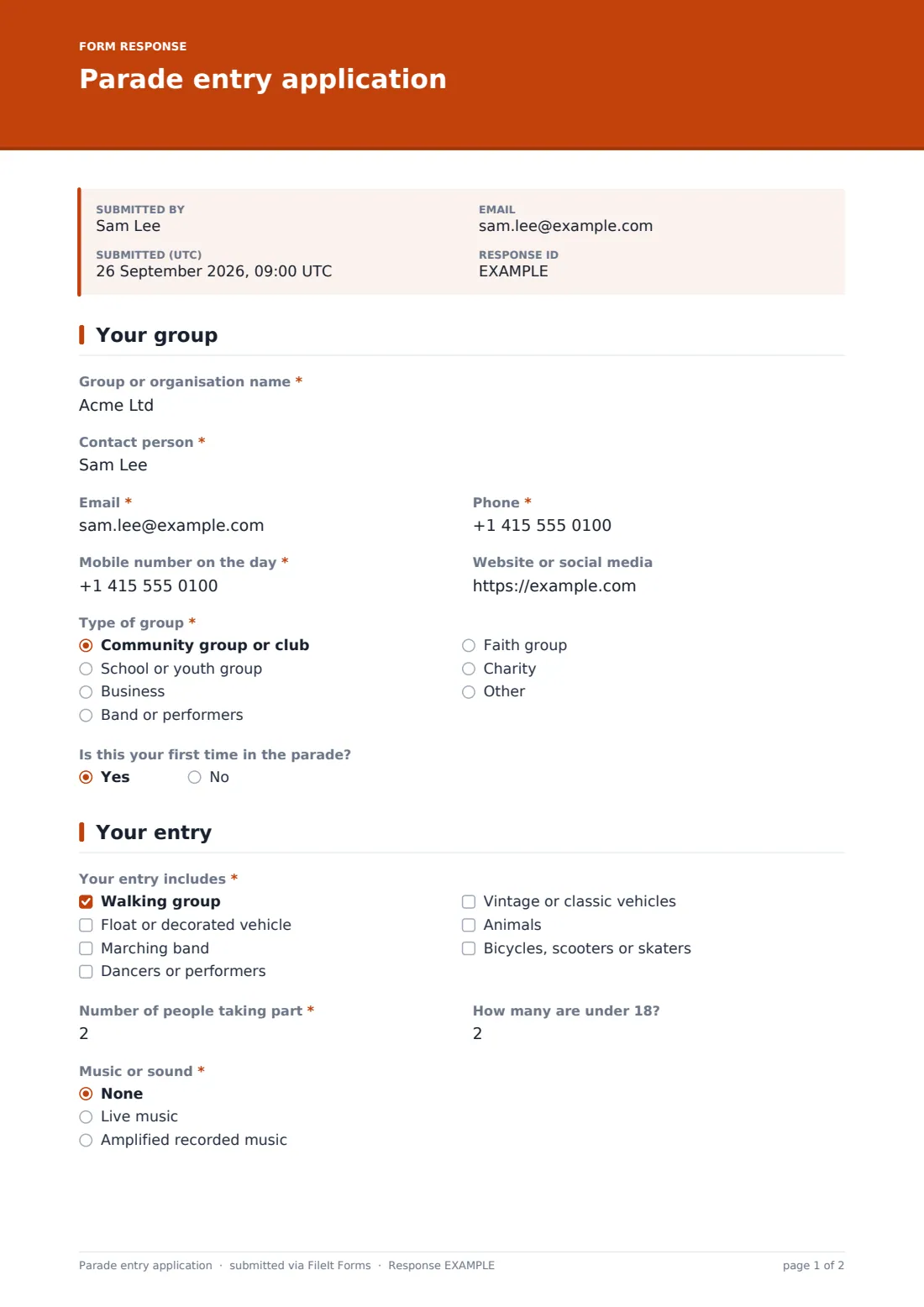
The group gives its "Group or organisation name", a contact person, email, phone, a "Mobile number on the day" and its website or social media. "Type of group" covers community groups, schools or youth groups, businesses, bands, faith groups, charities or another type, and a yes/no asks whether this is their first parade.
2 Your entry
"Your entry includes" lists walking groups, floats or decorated vehicles, marching bands, dancers, vintage vehicles, animals, and bicycles, scooters or skaters. The group says how many people are taking part and how many are under 18. A float asks for "Number of vehicles" and "Length of the longest vehicle (metres)", and animals open "What animals, how many, and who will handle them?".
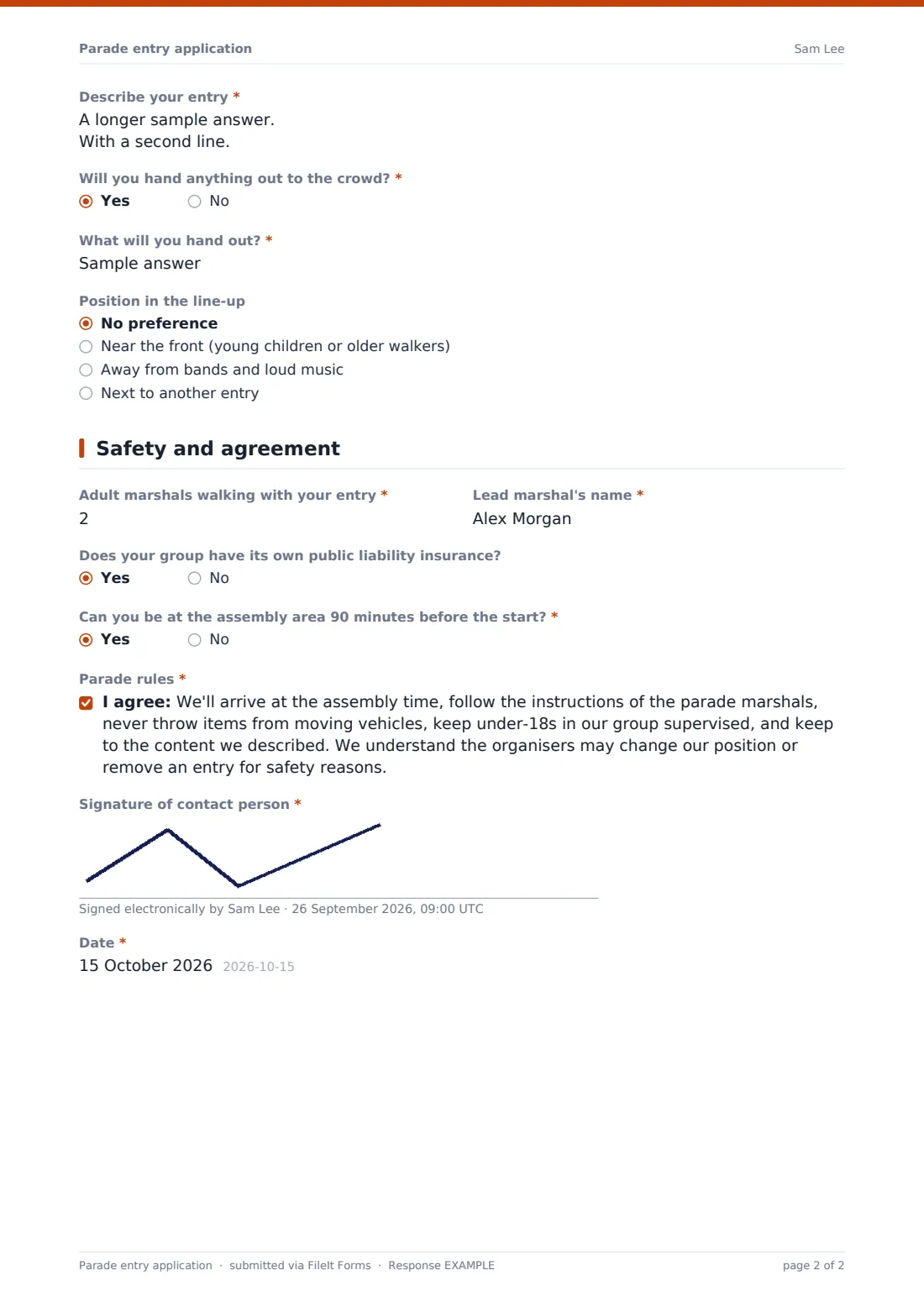
"Music or sound" covers none, live or amplified recorded music. "Describe your entry" has help text saying the announcer may read it out. A yes to "Will you hand anything out to the crowd?" asks what. "Position in the line-up" offers no preference, near the front, away from bands, or next to another entry, which asks which one.
3 Safety and agreement
The group gives the number of "Adult marshals walking with your entry" and the lead marshal's name. Groups with vehicles answer "Are your vehicles insured for use in the parade?", and a yes offers an upload for the certificate. Every group is asked about its own public liability insurance, and "Can you be at the assembly area 90 minutes before the start?" is required. The contact person accepts the parade rules — assembly time, marshals' instructions, no throwing from moving vehicles, supervising under-18s, sticking to the described content — then signs and dates.
Make the template yours
- Change the marshal guidance and assembly time to match your own safety plan
- Rewrite the parade rules with your organisers' actual conditions
- Make the insurance certificate required if your licence or council demands it
- Add a question for an entry fee category if you charge businesses
- Set a closing date so the line-up can be fixed in good time
- Add your safety officer to the notification emails
Tips for a better parade entry application form
- Use the CSV export to sort entries by type when building the running order
- Separate loud music entries from groups with young children or animals
- Text every lead marshal the assembly point the day before
- Check vehicle lengths against tight corners on the route
- Keep the vault folder handy on the day — every contact number is in one place
Every response becomes a PDF in your vault
Each application becomes a PDF in your vault, with the insurance certificate attached, and you receive an email notice. The contact person gets a copy of their signed application.
The Responses table lets you search by group name or contact, and the CSV export gives you a sheet of entries with their type, size, music and position requests to plan the line-up and assign numbers.
- Start from this template. It opens in the FileIt Forms designer — change any question, add pages, set the rules for when questions appear.
- Share it. Turn on a public link, or send it to people by email, each with their own link. They don’t need a FileIt account.
- Get the answers as PDFs. Each response is saved as a PDF in the vault folder you choose, with uploaded files attached — and listed in a Responses table you can export to CSV.
Parade entry application form: frequently asked questions
Is this parade entry form free?
Yes. It's one of the ready-made templates in the Forms app on every FileIt account, including the free plan.
Can groups upload their insurance certificate?
Yes. Groups with vehicles who say they're insured can upload up to two files, which are attached to their vault document.
Can I charge an entry fee through the form?
No. The form doesn't take payments. Invoice or collect fees separately once you've accepted the entry.
Are the parade rules legally reviewed?
No. They're an example to adapt. Replace them with the conditions your organisers, council or insurer set.
Can I stop entries after a deadline?
Yes. Set a closing date or a maximum number of responses in Settings, and the form closes itself.
Can one group submit more than one entry?
Yes. A group with two floats can either list both on one entry or submit the form twice.