
What is the site material request form template?
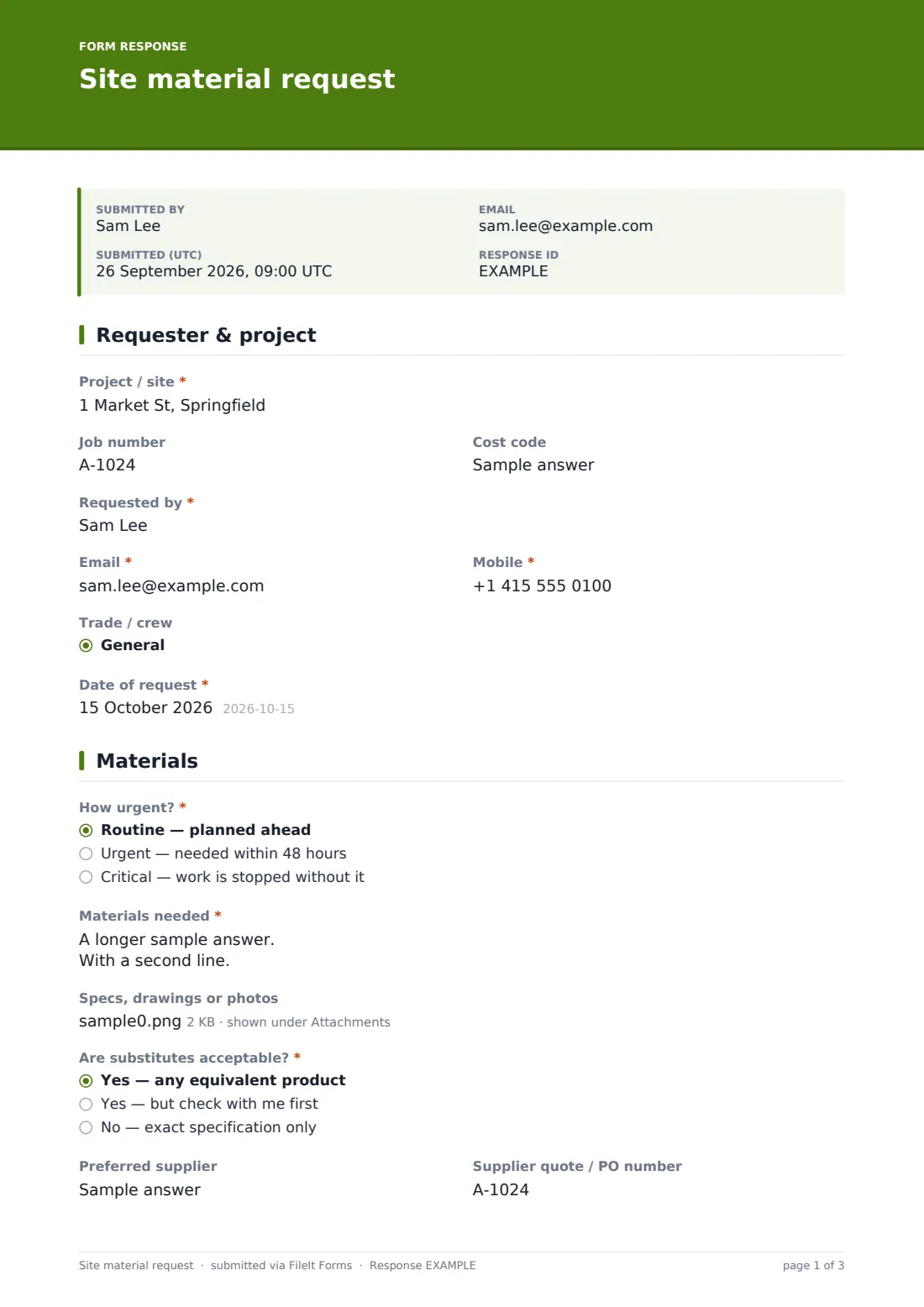
Materials ordered by phone call or text message are how the wrong size of pipe turns up on the wrong day. A written material request gives the office or buyer everything they need to place the order: the job and cost code, a clear list of items with specifications and quantities, how urgent it is, and exactly where and when it should be delivered.
The form is built for a foreman on a phone. The item list uses a set line format, a photo of a label or a marked-up drawing can be attached, and the urgency question asks for a reason whenever something isn't routine. The delivery page captures the date, window, unloading needs and access restrictions that drivers need to know.
Every request is filed as a PDF in your FileIt vault with its attachments, so the office has a record of who asked for what and when, which helps when checking deliveries against orders or tracking materials against the job budget.
- Best for
- Contractors, site managers, trade crews and the office staff who order for them
- Filled in by
- Foremen, site supervisors and tradespeople
- Time to complete
- About 3–5 minutes
- Includes
- Urgency with reasons, spec attachments, delivery address and access notes
Who uses a site material request form?
- A foreman orders rebar and formwork ply for next week's pour
- An electrician requests cable and fittings for the second-fix stage
- A crew needs an urgent replacement after materials were damaged on site
- A site team collects materials from a supplier's counter instead of waiting for delivery
- A project manager moves spare stock from the yard or another site
- An office buyer collects requests from several sites in one place
Questions on this site material request form
27 questions over 3 pages · includes file upload, conditional questions, multiple pages.
1 Requester & project
- Project / site*
- Job number
- Cost code
- Requested by*
- Email*
- Mobile*
- Trade / crew General · Groundworks · Concrete · Carpentry · Steel · Electrical · Plumbing · HVAC · Drywall · Painting · Roofing · Landscaping
- Date of request*
2 Materials
- How urgent?* Routine — planned ahead · Urgent — needed within 48 hours · Critical — work is stopped without it
- Why is it urgent?* asked only when it applies
- Materials needed*
- Specs, drawings or photos
- Are substitutes acceptable?* Yes — any equivalent product · Yes — but check with me first · No — exact specification only
- Preferred supplier
- Supplier quote / PO number
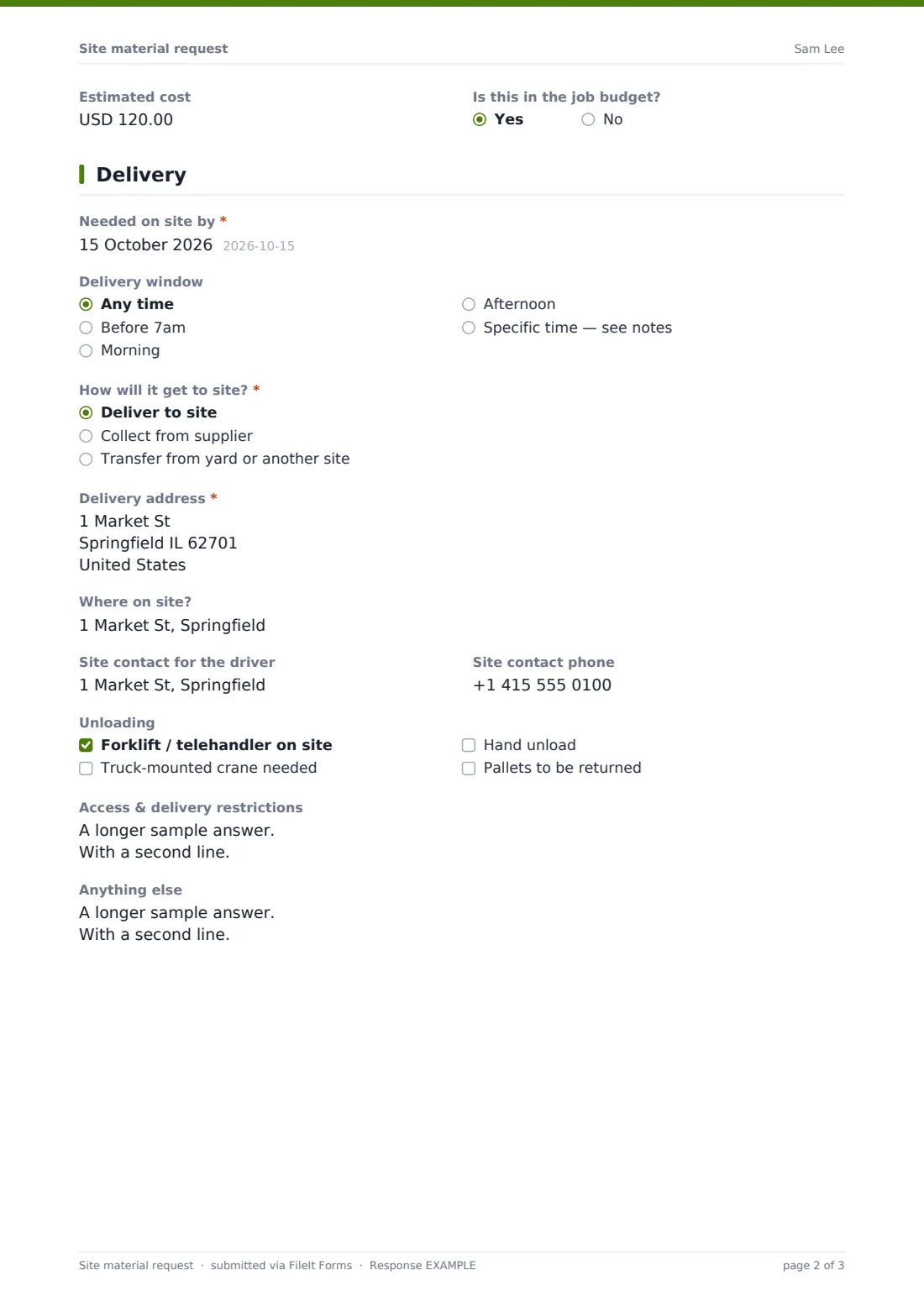
- Estimated cost
- Is this in the job budget?
3 Delivery
- Needed on site by*
- Delivery window Any time · Before 7am · Morning · Afternoon · Specific time — see notes
- How will it get to site?* Deliver to site · Collect from supplier · Transfer from yard or another site
- Delivery address* asked only when it applies
- Where on site?
- Site contact for the driver
- Site contact phone
- Unloading Forklift / telehandler on site · Truck-mounted crane needed · Hand unload · Pallets to be returned
- Access & delivery restrictions
- Anything else
The site material request form, page by page
1 Requester & project
The requester records the project, job number and cost code, their name, email and mobile, their trade or crew, and the date of the request. The cost code means the office can charge the order to the right part of the budget without asking.
2 Materials
Urgency comes first: routine, urgent (within 48 hours), or critical (work is stopped). Anything other than routine requires a reason.
The materials list is one long-text field, with one line per item: description, size or specification, quantity and unit. Specs, drawings or photos can be attached. The requester says whether substitutes are acceptable — any equivalent, check first, or exact spec only — and can add a preferred supplier, a quote or PO number, an estimated cost and whether it's in the job budget.
3 Delivery
The date the materials are needed on site is required, along with an optional delivery window. The requester chooses delivery to site, collection from the supplier, or a transfer from the yard or another site; delivery to site requires the address.
Optional fields cover where on site to drop, a site contact and phone for the driver, unloading needs (forklift, truck-mounted crane, hand unload, pallet returns), access restrictions such as gate codes or vehicle limits, and any other notes.
Make the template yours
- Replace the trade list with your own crews or departments
- Change the cost code field to a dropdown of your real codes
- Notify the buyer or purchasing inbox on every request
- File requests into a folder per project to track materials by job
- Add an approval step by including a manager signature on the last page
- Adjust the urgency options to match your ordering lead times
Tips for a better site material request form
- Write the specification in full — size, grade, finish — rather than a nickname
- Photograph the label of the item you're running out of and attach it
- Order with lead time: flag "critical" only when work is actually stopped
- Give a site contact who will actually be there when the delivery arrives
- Mention crane lifts and restricted hours up front — they change what vehicle the supplier sends
- Keep a copy of the request to check against the delivery note when it arrives
Every response becomes a PDF in your vault
When a request comes in, FileIt files it as a PDF in your vault with any attachments, and emails the office if notifications are on. The requester can receive a copy.
Buyers typically work through the Responses table by needed-by date, place orders, and export the list to CSV to reconcile against supplier invoices and job budgets.
- Start from this template. It opens in the FileIt Forms designer — change any question, add pages, set the rules for when questions appear.
- Share it. Turn on a public link, or send it to people by email, each with their own link. They don’t need a FileIt account.
- Get the answers as PDFs. Each response is saved as a PDF in the vault folder you choose, with uploaded files attached — and listed in a Responses table you can export to CSV.
Site material request form: frequently asked questions
Is this site material request form template free?
Yes. It's included with the Forms app on every FileIt account, including the free plan, and you can edit any question to fit the way you work.
Can site crews submit without a FileIt account?
Yes. Share the form link with your crews — anyone with the link can submit a request from their phone.
How do I list many items?
Use the materials list with one line per item in the suggested format. For very long lists, attach a spreadsheet as well.
Can we require approval before ordering?
Add a manager name and signature field on the last page, or review each request in the Responses table before ordering.
Can I track requests by project?
Yes. File responses into a folder per project, or filter the Responses table by the project field.
What if the site contact changes?
The site contact and phone are entered on each request, so the driver always gets the details for that particular delivery.