
What is the employee handbook acknowledgement form template?
Most employers ask staff to confirm they've read the handbook, and most then struggle to find that confirmation when it matters. A signature on a loose page in a filing cabinet, or an email saying "yep, read it", doesn't say much about which version they read or which policies were in it. This template records all of it.
Employees name the version they received and how they got it, then tick each key policy to confirm they've read it. The standard list covers conduct, equal opportunities, health and safety, data protection, IT use, social media, absence, expenses, grievance and disciplinary procedures, and whistleblowing. They can raise questions or ask for an adjustment before signing three short acknowledgements.
Every acknowledgement is saved as a signed PDF in your FileIt vault. When the handbook changes, you can send the form again and keep a clean record of who has acknowledged which version.
- Best for
- Any employer with a staff handbook or set of workplace policies
- Filled in by
- Employees, during onboarding and whenever the handbook is updated
- Time to complete
- About 5 minutes, after reading the handbook
- Includes
- Handbook version tracking, a per-policy checklist, questions and adjustments, and three signed acknowledgements
Who uses a employee handbook acknowledgement form?
- Getting every new starter's handbook sign-off as part of onboarding
- Collecting fresh acknowledgements after a major handbook update
- Running an annual policy re-acknowledgement across the whole company
- Confirming staff have read a new policy, such as social media or remote working
- Giving employees a clear, safe place to raise questions about policies before they sign
- Keeping evidence of policy acknowledgement for audits, tenders or client due diligence
Questions on this employee handbook acknowledgement form
21 questions over 3 pages · includes signature, conditional questions, multiple pages, consent checkbox.
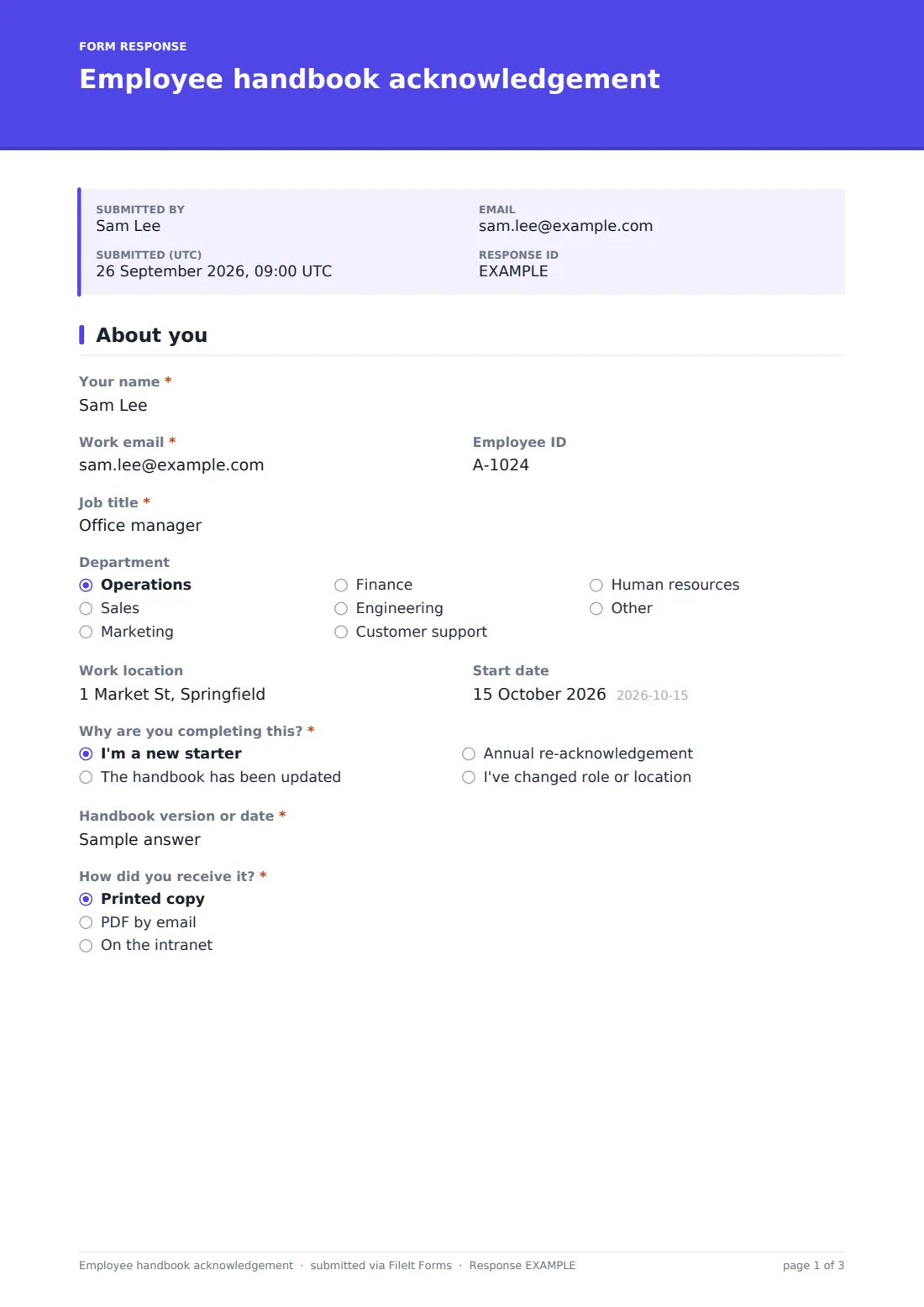
1 About you
- Your name*
- Work email*
- Employee ID
- Job title*
- Department Operations · Sales · Marketing · Finance · Engineering · Customer support · Human resources · Other
- Work location
- Start date
- Why are you completing this?* I'm a new starter · The handbook has been updated · Annual re-acknowledgement · I've changed role or location
- Handbook version or date*
- How did you receive it?* Printed copy · PDF by email · On the intranet
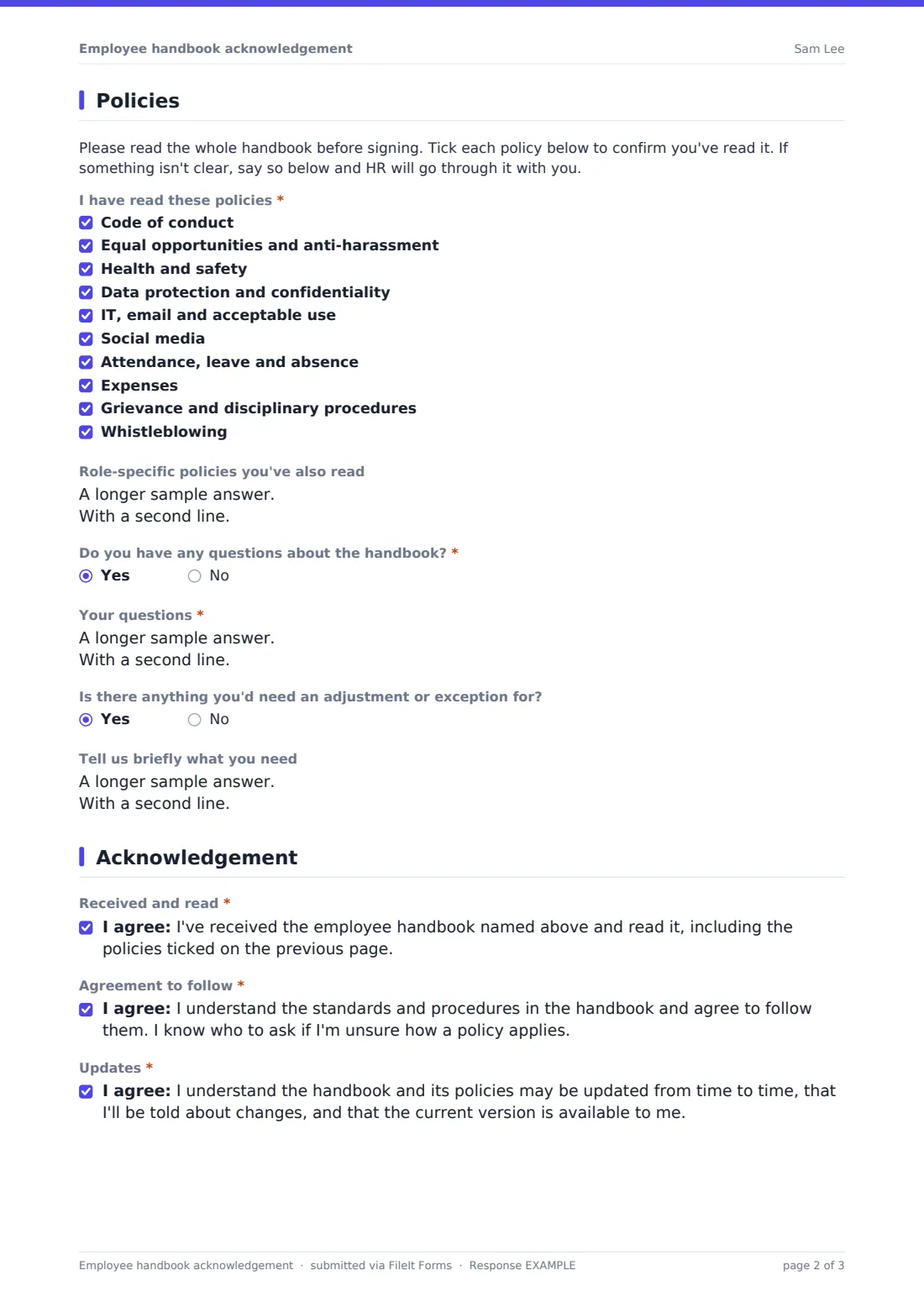
2 Policies
- I have read these policies* Code of conduct · Equal opportunities and anti-harassment · Health and safety · Data protection and confidentiality · IT, email and acceptable use · Social media · Attendance, leave and absence · Expenses · Grievance and disciplinary procedures · Whistleblowing
- Role-specific policies you've also read
- Do you have any questions about the handbook?*
- Your questions* asked only when it applies
- Is there anything you'd need an adjustment or exception for?
- Tell us briefly what you need asked only when it applies
3 Acknowledgement
- Received and read*
- Agreement to follow*
- Updates*
- Signature*
- Date*
The employee handbook acknowledgement form, page by page
1 About you
The employee gives Your name, Work email, Employee ID, Job title, Department, Work location and Start date. They say why they're completing the form: new starter, handbook update, annual re-acknowledgement or a change of role. They then record the Handbook version or date and whether they received a printed copy, a PDF or an intranet link.
2 Policies
A short note asks employees to read the whole handbook first. A required checklist then asks them to tick each of the ten listed policies to confirm they've read it, and all ten must be ticked. They can list extra role-specific policies. Answering yes to Do you have any questions about the handbook? asks for the questions. A separate question lets them flag anything they'd need an adjustment or exception for, such as a disability, health, religious or caring need, and HR follows up confidentially.
3 Acknowledgement
Three required statements confirm the employee received and read the handbook, agrees to follow it, and understands it may be updated and that they'll be told about changes. The employee signs and dates the form.
Make the template yours
- Replace the policy checklist with the exact section names in your own handbook
- Put a link to the handbook in the cover text so employees can read it from the form
- Update the version placeholder each time you publish a new edition
- Send the form as a request to each employee so you can see who hasn't acknowledged yet
- File acknowledgements in each employee's vault folder next to their contract
- Adjust the acknowledgement wording with your own advisers if your handbook is part of the employment contract
Tips for a better employee handbook acknowledgement form
- Give people time to actually read the handbook, and don't collect signatures in the first ten minutes of day one
- Answer every question raised on the form, and consider updating the handbook if the same question keeps coming up
- Collect a fresh acknowledgement when a policy changes materially, not just once at onboarding
- Keep old handbook versions filed so you can show what an employee actually signed for
- Treat adjustment requests as the start of a conversation, not a formality
Every response becomes a PDF in your vault
When the employee submits, FileIt saves the signed acknowledgement as a PDF in your vault and notifies the form owner. The employee gets a copy for their own records.
HR usually checks the Responses table for anyone who raised questions or asked for an adjustment and follows up with them. After a handbook update, filtering by the version field shows who has acknowledged the new edition.
- Start from this template. It opens in the FileIt Forms designer — change any question, add pages, set the rules for when questions appear.
- Share it. Turn on a public link, or send it to people by email, each with their own link. They don’t need a FileIt account.
- Get the answers as PDFs. Each response is saved as a PDF in the vault folder you choose, with uploaded files attached — and listed in a Responses table you can export to CSV.
Employee handbook acknowledgement form: frequently asked questions
Is this handbook acknowledgement template free?
Yes. It's included in FileIt's Forms app on every account, including the free plan, and you can edit every question.
Do employees need a FileIt account to sign?
No. You share the form as a link, or send it as a request, and employees sign on screen without an account.
Can I change the list of policies?
Yes. The policy checklist is an ordinary question. Edit the options to match your handbook's sections.
Does the employee have to tick every policy?
In the template, yes. The checklist requires all ten to be ticked. You can change the minimum in the designer.
Is the acknowledgement legally binding?
The form records what the employee confirmed and signed. How that is treated depends on your contracts and local law, so check the wording with your own advisers.
How do we handle handbook updates?
Update the version on your handbook, share the form again, and employees pick The handbook has been updated. Each acknowledgement records the version it relates to.