What is the employee details change form template?
HR records go out of date quietly. Someone moves house and tells their manager in passing, a new mobile number never reaches payroll, and the emergency contact on file turns out to be an ex-partner the one time you need it. A change of details form gives employees a single, obvious place to tell HR what's different — and gives HR a dated record of when they were told.
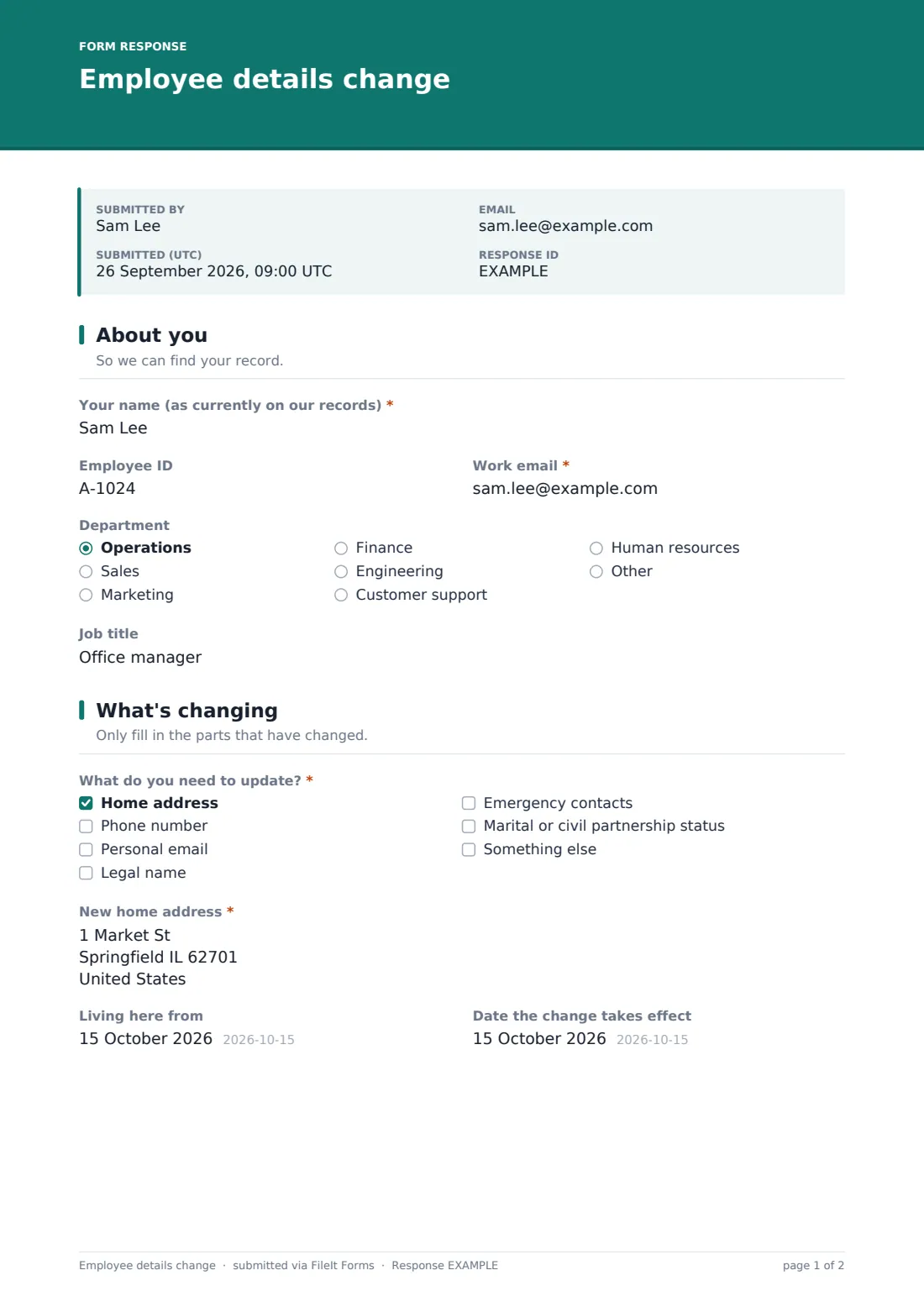
This template starts with a tick-list of what's changing: home address, phone number, personal email, legal name, emergency contacts, marital or civil partnership status, or something else. Only the sections for the ticked items appear, so updating a phone number takes a minute and nobody wades through questions that don't apply.
Every submission is saved as a PDF in your FileIt vault, with any name-change evidence attached, so you can update your HR and payroll systems from one clear document and keep it alongside the employee's other records.
- Best for
- Small and mid-sized employers keeping HR and payroll records up to date
- Filled in by
- The employee whose details have changed
- Time to complete
- About 2–4 minutes
- Includes
- A tick-list of changes with conditional sections, evidence upload for name changes, up to two emergency contacts
Who uses a employee details change form?
- An employee who has moved house updating their home address for payroll and HR
- Recording a legal name change after marriage, divorce or deed poll, with evidence attached
- Refreshing emergency contact details as part of an annual records check
- Updating a personal phone number or email used for out-of-hours contact
- Asking staff to confirm their details before a benefits or payroll system migration
- Giving remote and field workers a way to update records without paperwork
Questions on this employee details change form
27 questions over 4 pages · includes file upload, conditional questions, multiple pages, consent checkbox.
1 About you
- Your name (as currently on our records)*
- Employee ID
- Work email*
- Department Operations · Sales · Marketing · Finance · Engineering · Customer support · Human resources · Other
- Job title
2 What's changing
- What do you need to update?* Home address · Phone number · Personal email · Legal name · Emergency contacts · Marital or civil partnership status · Something else
- New home address* asked only when it applies
- Living here from asked only when it applies
- Mobile number asked only when it applies
- Home or other number asked only when it applies
- New personal email* asked only when it applies
- Your new legal name* asked only when it applies
- Reason for the name change asked only when it applies Marriage or civil partnership · Divorce or dissolution · Deed poll or legal name change · Correction of an error · Other
- Evidence of the name change asked only when it applies
- New status asked only when it applies Single · Married · Civil partnership · Separated · Divorced or dissolved · Widowed · Prefer not to say
- What else has changed?* asked only when it applies
- Date the change takes effect
3 Emergency contacts
- Main emergency contact* asked only when it applies
- Relationship to you* asked only when it applies
- Their phone number* asked only when it applies
- Another number for them asked only when it applies
- Add a second emergency contact? asked only when it applies
- Second emergency contact* asked only when it applies
- Relationship to you* asked only when it applies
- Their phone number* asked only when it applies
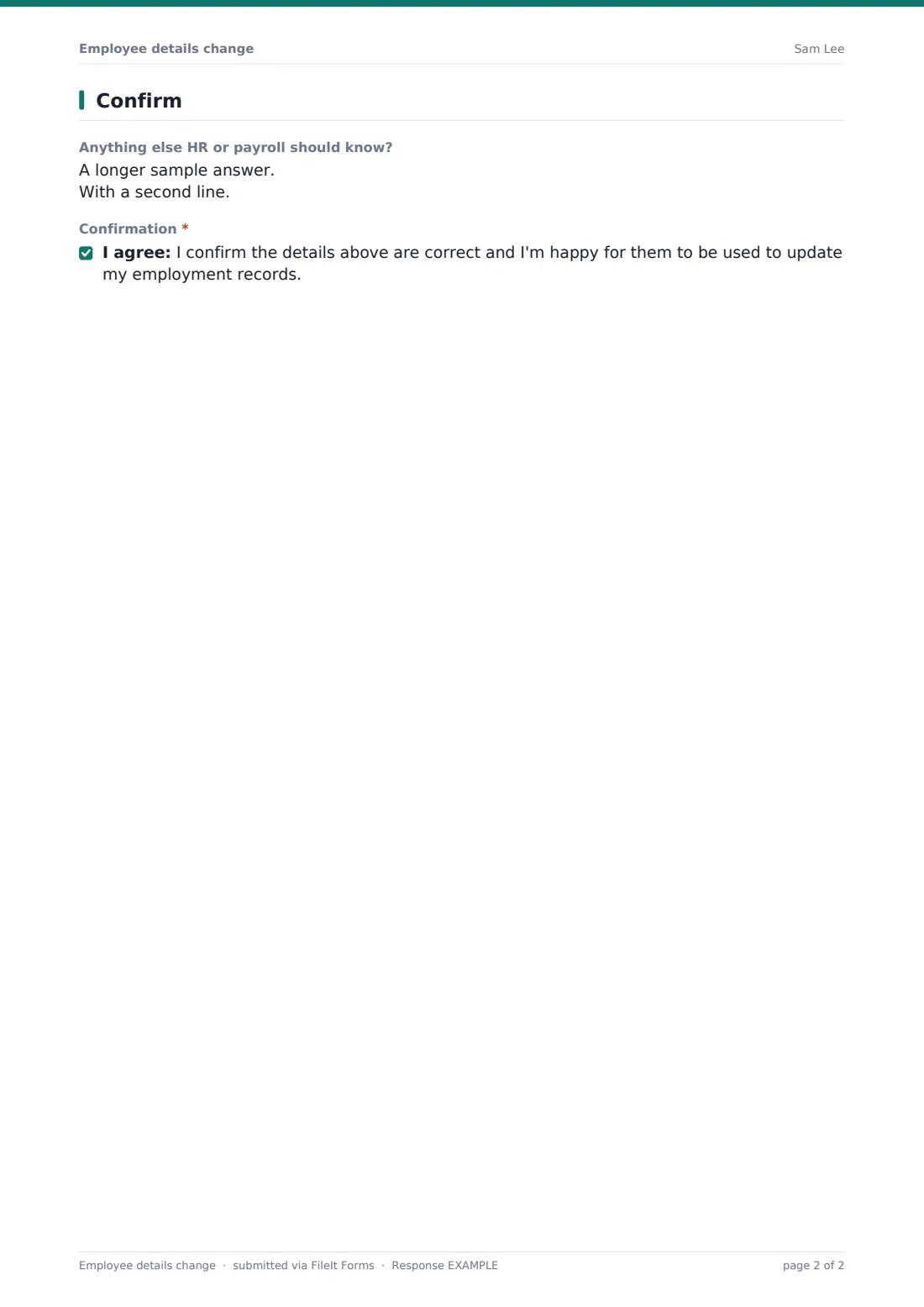
4 Confirm
- Anything else HR or payroll should know?
- Confirmation*
The employee details change form, page by page
1 About you
The employee gives their name as it currently appears on your records, plus their work email and, optionally, employee ID, department and job title — enough to find the right record even if the name itself is changing.
2 What's changing
A required checklist asks what needs updating. Each ticked item opens its own questions: a new home address and the date they moved in; mobile and home numbers; a new personal email; a new legal name with the reason and an upload for evidence such as a marriage certificate or deed poll; a new marital or civil partnership status; or a free-text box for anything else. A single optional effective date covers changes that don't apply straight away.
3 Emergency contacts
If emergency contacts were ticked, the employee gives a main contact's name, relationship and phone number, with an optional second number, then chooses whether to add a second contact. A short note reminds them to let their contacts know their details have been shared.
4 Confirm
An optional notes box covers anything else HR or payroll should know — for example if the change affects benefits dependants or a pension beneficiary — and the employee confirms the details are correct before submitting.
Make the template yours
- Add or remove items from the 'What do you need to update?' list to match the records you keep
- Add a bank details option only if you route it to a separate, secure payroll process
- Set the vault folder so each update files next to the employee's HR records
- Add your payroll team's address to the notification emails
- Change the evidence help text to list the documents your payroll provider accepts
Tips for a better employee details change form
- Ask all staff to check their details once a year, even if nothing has changed
- Update every system that holds the data — HR, payroll, benefits and any emergency call lists
- Treat emergency contact details as personal data and only share them with people who need them
- For name changes, check what payroll or tax authorities need before changing the name on payslips
- Reply to confirm the update is done so the employee knows it hasn't been missed
Every response becomes a PDF in your vault
Each change of details is saved as a PDF in your FileIt vault, with any evidence of a name change attached, and the form owner gets an email notification. If you leave the respondent copy on, the employee receives a PDF of what they submitted.
HR teams typically work through new responses from the Responses table, update their HR and payroll systems, and keep the PDF as the record of when and how the employee reported the change.
- Start from this template. It opens in the FileIt Forms designer — change any question, add pages, set the rules for when questions appear.
- Share it. Turn on a public link, or send it to people by email, each with their own link. They don’t need a FileIt account.
- Get the answers as PDFs. Each response is saved as a PDF in the vault folder you choose, with uploaded files attached — and listed in a Responses table you can export to CSV.
Employee details change form: frequently asked questions
Is this change of details form template free?
Yes — it's included with the Forms app on every FileIt account, including the free plan, alongside the rest of the template gallery.
Do employees need a FileIt account to use it?
No. Share the form link by email or on your intranet and employees can fill it in and submit without an account.
Will employees see questions about things they're not changing?
No. They tick what's changing first, and only the sections for those items are shown.
Can employees upload proof of a name change?
Yes. When 'Legal name' is ticked the form asks for the new name, the reason and an optional upload of up to three files, such as a marriage certificate or deed poll.
Does it update our payroll system automatically?
No. The form collects and files the change as a PDF; someone on your team still makes the update in your HR or payroll system.
Why doesn't the template ask for bank details?
Bank details changes are a common target for fraud, so many employers handle them through a separate, verified process. FileIt also has a direct deposit authorization template if you want one.