What is the drug & alcohol testing consent form template?
Whether it's a pre-employment screen, a random selection or a test after an incident, you need a clear record that the worker agreed to it, knew which tests were involved and had the chance to mention anything that might affect the result.
This template captures all of that in four short pages. The reason for the test drives follow-up questions — a post-incident test asks for the incident date — and the medications section only asks for detail when someone says yes. If a breath alcohol test is included, the form also asks about recent mouthwash or breath spray.
Each signed consent is saved as a PDF in the vault folder you choose, so the record is ready if a result is ever questioned.
- Best for
- Employers, safety managers and staffing agencies arranging workplace testing
- Filled in by
- The worker or candidate being tested
- Time to complete
- About 5 minutes
- Includes
- Test reason with follow-ups, test type checklist, medication declarations, procedure text, three consents, signature
Who uses a drug & alcohol testing consent form?
- Pre-employment screening for safety-sensitive roles
- Random testing programs on construction, transport or industrial sites
- Post-incident testing after a workplace accident or near miss
- Return-to-duty and follow-up testing after a policy violation
- Staffing agencies collecting consent on behalf of a client site
- Replacing paper consent slips filled in at the collection point
Questions on this drug & alcohol testing consent form
25 questions over 4 pages · includes signature, conditional questions, multiple pages, consent checkbox.
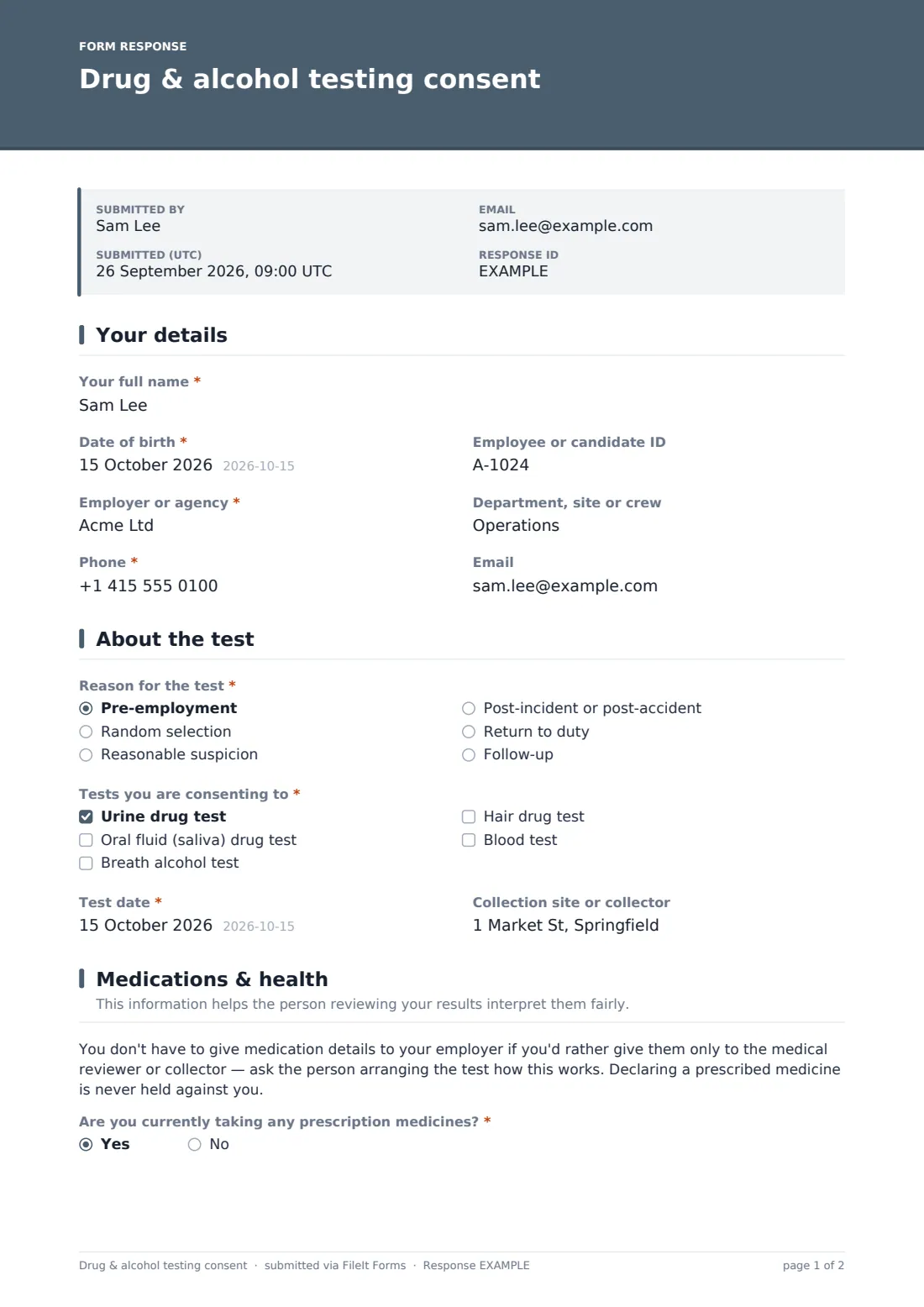
1 Your details
- Your full name*
- Date of birth*
- Employee or candidate ID
- Employer or agency*
- Department, site or crew
- Phone*
2 About the test
- Reason for the test* Pre-employment · Random selection · Reasonable suspicion · Post-incident or post-accident · Return to duty · Follow-up
- Date of the incident* asked only when it applies
- Incident reference (if known) asked only when it applies
- Tests you are consenting to* Urine drug test · Oral fluid (saliva) drug test · Breath alcohol test · Hair drug test · Blood test
- Test date*
- Collection site or collector
3 Medications & health
- Are you currently taking any prescription medicines?*
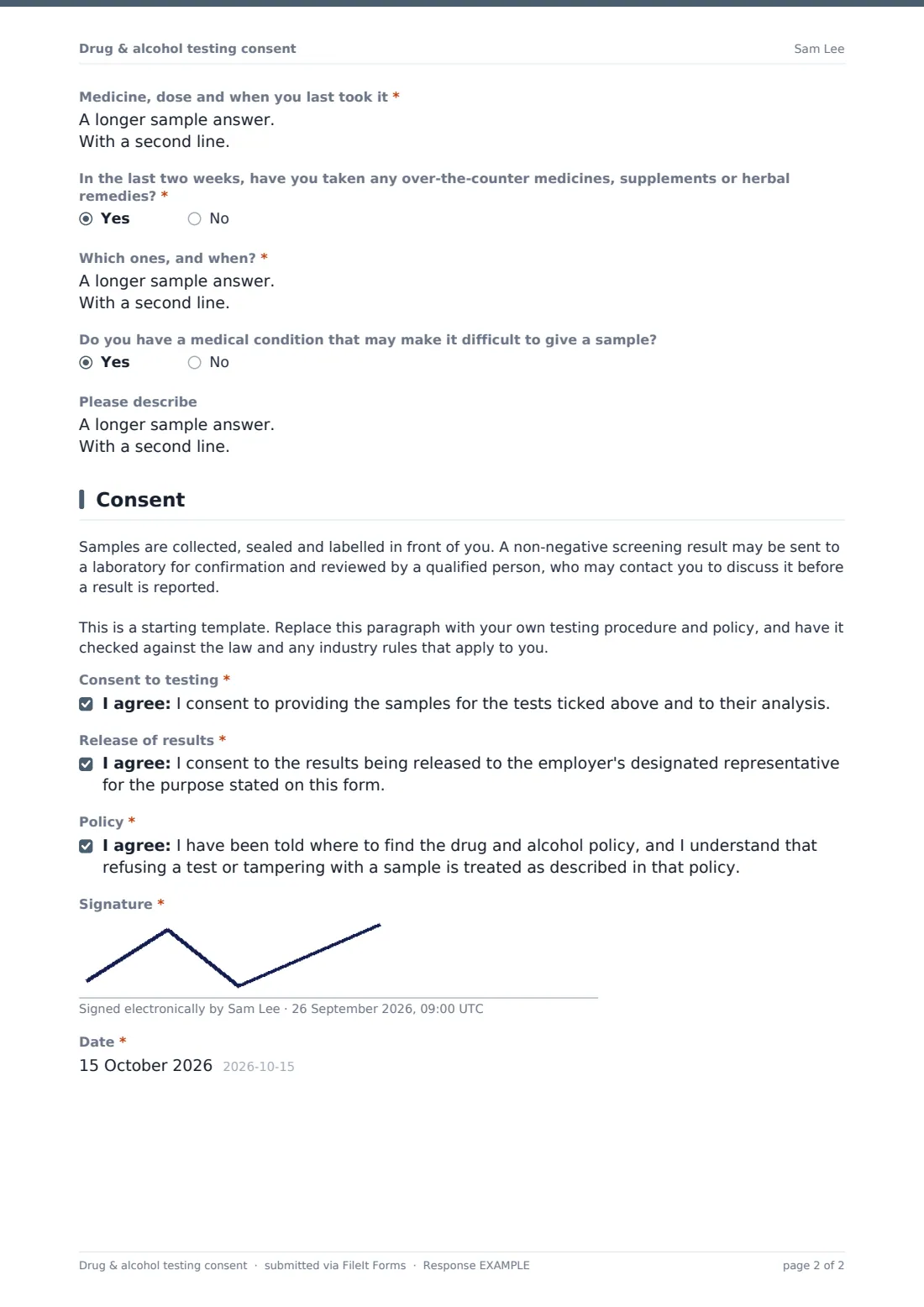
- Medicine, dose and when you last took it* asked only when it applies
- In the last two weeks, have you taken any over-the-counter medicines, supplements or herbal remedies?*
- Which ones, and when?* asked only when it applies
- In the last 15 minutes, have you used mouthwash, breath spray or anything else containing alcohol? asked only when it applies
- Do you have a medical condition that may make it difficult to give a sample?
- Please describe asked only when it applies
4 Consent
- Consent to testing*
- Release of results*
- Policy*
- Signature*
- Date*
The drug & alcohol testing consent form, page by page
1 Your details
Name, date of birth, employer or agency and phone are required. Employee or candidate ID, department or site and email are optional, so the form works for new candidates and existing staff alike.
2 About the test
The worker picks the reason — pre-employment, random selection, reasonable suspicion, post-incident, return to duty or follow-up. Post-incident reveals a required incident date and an optional incident reference. They then tick the tests they're consenting to (urine, oral fluid, breath alcohol, hair or blood — at least one), give the test date and, optionally, the collection site.
3 Medications & health
A short note explains that medication details can be given only to the medical reviewer if preferred, and that declaring a prescribed medicine is never held against anyone. Two required yes/no questions ask about prescription medicines and recent over-the-counter products or supplements; each yes asks what was taken and when. If a breath alcohol test was ticked, the form asks about mouthwash or breath spray in the last 15 minutes. An optional question covers conditions that make giving a sample difficult.
4 Consent
A procedure paragraph — to be replaced with your own — explains how samples are handled and that a non-negative screen may be confirmed and reviewed. Three consents cover the test itself, release of results to the employer's designated representative, and acknowledgement of the policy on refusal or tampering. Signature and date complete the form.
Make the template yours
- Replace the procedure paragraph with your own testing policy and collection process
- Trim the list of test types to the ones your program actually uses
- Name your designated representative or medical reviewer in the release consent
- If medication details should go only to the reviewer, remove that page and collect it at the collection site instead
- Route responses to a restricted vault folder that only the people managing the program can open
- Match the accent color and cover text to your safety program
Tips for a better drug & alcohol testing consent form
- Explain why a test is happening before sending the form — surprise requests feel accusatory
- Keep test results and consent forms separate from general personnel files, and limit who can see them
- Make sure everyone can find the policy you reference in the final consent
- Treat medication information as health data and only share it with those who need it
- In regulated industries, follow the testing rules that apply to you exactly — they may prescribe their own forms
- Have the wording checked by an employment lawyer, as testing rules differ widely between places
Every response becomes a PDF in your vault
The signed consent is filed as a PDF in the vault folder you've set up for your testing program, and the worker receives a copy by email if they gave an address. You'll be notified of each new submission if owner notifications are on.
The Responses table lets you check who has consented before a collection, filter by test reason, and export the list to share with your collector or program administrator.
- Start from this template. It opens in the FileIt Forms designer — change any question, add pages, set the rules for when questions appear.
- Share it. Turn on a public link, or send it to people by email, each with their own link. They don’t need a FileIt account.
- Get the answers as PDFs. Each response is saved as a PDF in the vault folder you choose, with uploaded files attached — and listed in a Responses table you can export to CSV.
Drug & alcohol testing consent form: frequently asked questions
Is this drug and alcohol testing consent template free to use?
Yes. It's one of FileIt's ready-made templates, and every FileIt account, including the free plan, includes the Forms app and its full library of templates.
Do people filling in this form need a FileIt account?
No. Anyone with the link, or an emailed request, can complete and submit the form without creating a FileIt account. Only the form owner needs one.
Can workers fill this in on a phone at the collection site?
Yes. The form works on any phone or tablet, and the signature can be drawn with a finger.
Does FileIt store the test results?
No. This form records consent and declarations only. If you choose to file results in FileIt, keep them in a restricted folder.
Is this template suitable for regulated transport testing?
It's a general workplace template. Regulated programs, such as US Department of Transportation testing, have their own required forms and procedures, so check what applies to you.
Can I remove the medication questions?
Yes. Every question can be removed or edited in the designer — some programs prefer to collect medication information only at the collection site or by the medical reviewer.
Is this legal advice?
No. It's a starting template. Drug and alcohol testing is regulated differently in different countries and states, so have your policy and this form reviewed before you use it.