
What is the workplace incident report form template?
The value of an incident report depends heavily on how soon after the event it's completed and how much detail it actually captures. A quick verbal report to a supervisor, followed by a memory-jogged write-up days later, tends to miss details that matter — exactly where something happened, who else was there, what was done immediately afterwards. This template is built to be filled in the same day, capturing everything a safety review needs in one structured pass.
The form opens with a clear priority: if someone needs urgent medical help, call emergency services first, before filling anything in. From there, it adapts to the type of incident — a straightforward hazard report doesn't ask about body parts affected or treatment given, while an injury does, keeping the form quick for the situation that's actually being reported.
Each report becomes a PDF saved automatically in your FileIt vault, with any photos attached, so your safety lead has a complete, dated record — useful for spotting patterns over time, and for anything the incident might later require, from an insurance claim to a regulatory report.
- Best for
- Employers, warehouses, construction sites and any workplace with a health and safety process
- Filled in by
- The person injured, a witness, or a supervisor the incident was reported to
- Time to complete
- About 6-8 minutes
- Includes
- Conditional injury detail, photo upload, witness list, prevention suggestions
Who uses a workplace incident report form?
- A warehouse requires every accident or near miss to be reported through this form before the end of the shift
- A construction site logs hazards and unsafe conditions spotted during daily work, not just accidents that already happened
- A retail business records an incident involving a customer or visitor, not just an employee
- A company tracks whether an injury has led to time off work, which often matters for regulatory reporting
- A facilities team uses the prevention field to build a running list of practical safety improvements
- A safety officer reviews incident trends over time using the exported response data, spotting recurring locations or causes
Questions on this workplace incident report form
25 questions over 4 pages · includes signature, file upload, conditional questions, multiple pages, consent checkbox.
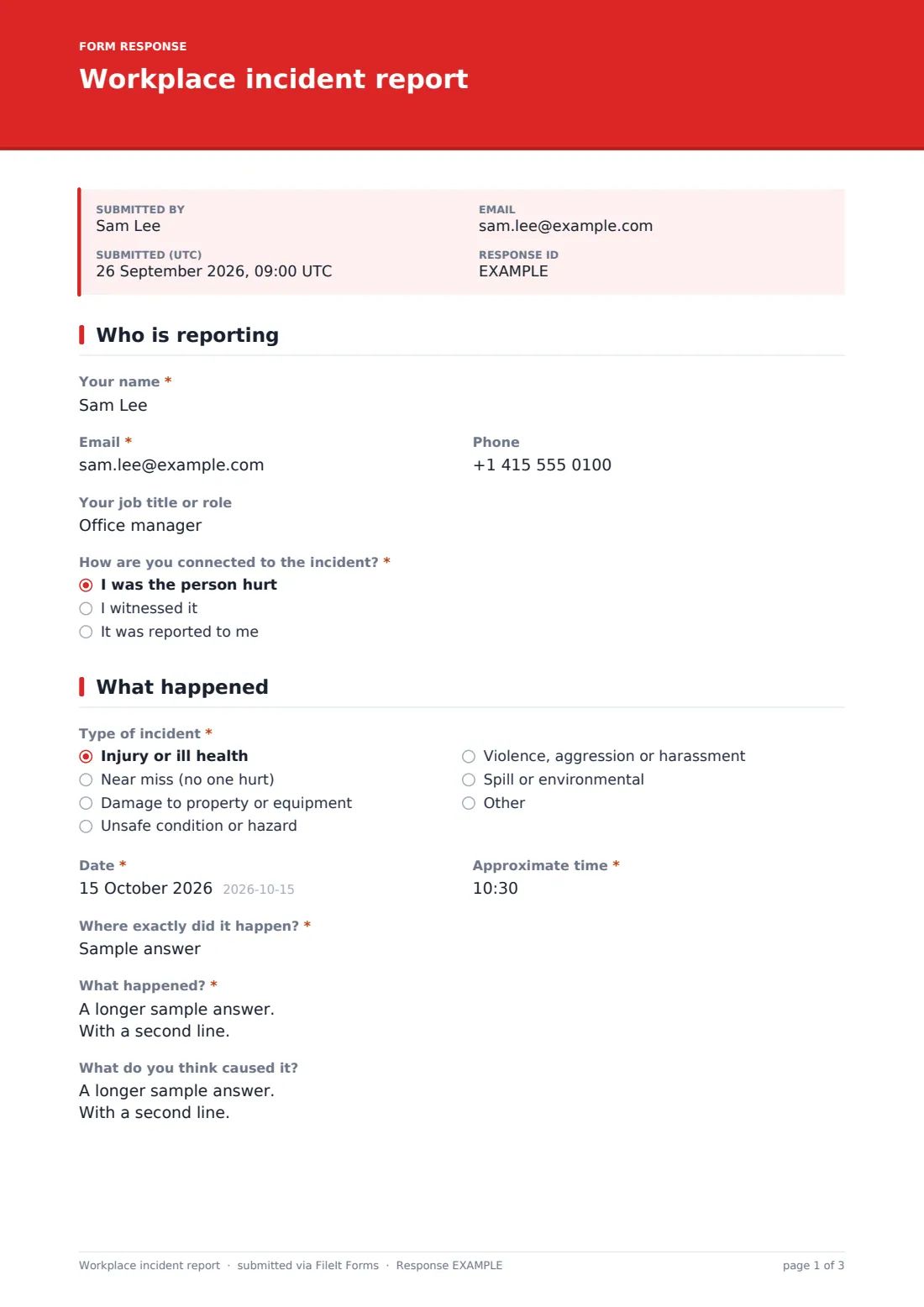
1 Who is reporting
- Your name*
- Email*
- Phone
- Your job title or role
- How are you connected to the incident?* I was the person hurt · I witnessed it · It was reported to me
2 What happened
- Type of incident* Injury or ill health · Near miss (no one hurt) · Damage to property or equipment · Unsafe condition or hazard · Violence, aggression or harassment · Spill or environmental
- Date*
- Approximate time*
- Where exactly did it happen?*
- What happened?*
- What do you think caused it?
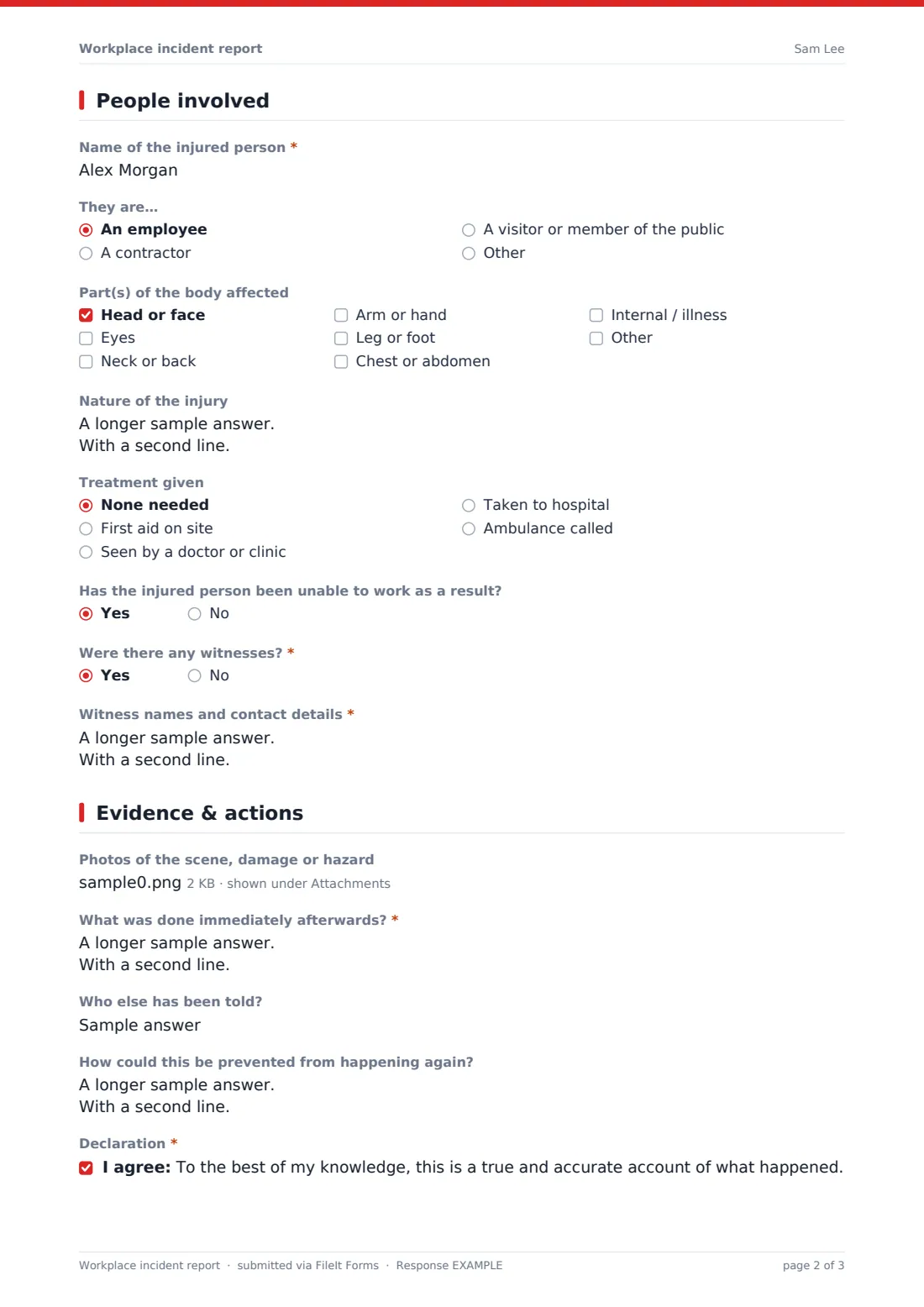
3 People involved
- Name of the injured person* asked only when it applies
- They are… asked only when it applies An employee · A contractor · A visitor or member of the public · Other
- Part(s) of the body affected asked only when it applies Head or face · Eyes · Neck or back · Arm or hand · Leg or foot · Chest or abdomen · Internal / illness
- Nature of the injury asked only when it applies
- Treatment given asked only when it applies None needed · First aid on site · Seen by a doctor or clinic · Taken to hospital · Ambulance called
- Has the injured person been unable to work as a result? asked only when it applies
- Were there any witnesses?*
- Witness names and contact details* asked only when it applies
4 Evidence & actions
- Photos of the scene, damage or hazard
- What was done immediately afterwards?*
- Who else has been told?
- How could this be prevented from happening again?
- Declaration*
- Signature
The workplace incident report form, page by page
1 Who is reporting
The reporter gives their name, email, optional phone and job title, and answers how they're connected to the incident — they were the person hurt, they witnessed it, or it was reported to them. This sets useful context for whoever reviews the report, since a first-hand account and a relayed one carry different weight.
2 What happened
A radio question covers the type of incident — injury or ill health, a near miss with no one hurt, damage to property or equipment, an unsafe condition or hazard, violence or harassment, or a spill or environmental issue, with an "Other" option. Date, approximate time and an exact location are required, followed by a description of what happened in order — what was being done, what went wrong, and the result — and an optional field for what the reporter thinks caused it.
3 People involved
If the incident was an injury, this page expands to ask the injured person's name, whether they're an employee, contractor, visitor or member of the public, which parts of the body were affected, the nature of the injury, what treatment was given (from none needed through to an ambulance being called), and whether the injury has led to time off work. Regardless of incident type, a yes/no question asks whether there were witnesses, revealing a required field for their names and contact details if so.
4 Evidence & actions
An optional photo upload lets the reporter capture the scene, damage or hazard — with a note to only take photos if it's safe to do so, and to avoid photographing injuries unless asked. A required field records what was done immediately afterwards, such as cordoning off an area or isolating a machine, and an optional field notes who else has already been told. A prevention question invites suggestions for stopping it happening again, and a declaration confirms the account is true and accurate to the best of the reporter's knowledge, with an optional signature.
Make the template yours
- Adjust the incident types to match categories your safety management system already uses for reporting
- Add fields for a specific regulatory reference number if your jurisdiction requires reporting certain incidents formally
- Make the photo upload required for property damage or hazard reports, where visual evidence is usually available and useful
- Route injury reports to a different notification email than near-miss or hazard reports, if different people handle each
- File reports into a folder by location or department, so patterns by site are easy to review later
- Add a follow-up status field internally (outside the form) to track whether prevention suggestions were actually implemented
- Set the confirmation message to include your organisation's own safety contact for urgent follow-up
Tips for a better workplace incident report form
- Encourage reporting the same day, even for near misses — the details fade fast and near misses are valuable early warnings
- Make it clear that reporting a hazard or near miss won't lead to blame, so people don't hesitate to flag smaller issues
- Take photos only when it's safe to do so, and avoid photographing injuries unless specifically asked to
- Follow up on every witness listed while the incident is still recent in their memory
- Review prevention suggestions regularly, not just incident counts — they're often the most actionable part of a report
- Look at incident reports in aggregate periodically to spot a pattern by location, time of day or task, not just one at a time
Every response becomes a PDF in your vault
As soon as someone submits a report, FileIt saves it as a PDF in your vault, with any photos attached, in the folder you've set up for incident reporting. You're notified by email straight away, and the confirmation message tells the reporter the safety lead has been notified and may follow up for more details.
Your safety lead or manager then reviews the report in the Responses table, following up with witnesses and the injured person if needed, and using the prevention suggestions and cause field as a starting point for any corrective action. Because every report follows the same structure, exporting incidents to CSV makes it straightforward to track trends by location, cause or incident type over time.
- Start from this template. It opens in the FileIt Forms designer — change any question, add pages, set the rules for when questions appear.
- Share it. Turn on a public link, or send it to people by email, each with their own link. They don’t need a FileIt account.
- Get the answers as PDFs. Each response is saved as a PDF in the vault folder you choose, with uploaded files attached — and listed in a Responses table you can export to CSV.
Workplace incident report form: frequently asked questions
Is this workplace incident report form template free?
Yes. It's included in FileIt's Forms app on every plan, including the free plan, and every question can be edited.
Do employees need a FileIt account to submit a report?
No. Share it as a public link on your intranet or a personal emailed invitation, and reports are submitted without creating an account.
How do we receive completed incident reports?
Every report is saved automatically as a PDF in your FileIt vault, with any photos attached, and you can filter and export the full list to CSV.
Should this form be used for a medical emergency?
No — the form itself says to call emergency services first if urgent medical help is needed, and to complete the report afterwards once the immediate situation is handled.
Can we report a hazard even if no one was hurt?
Yes, the incident type includes a near miss option and an unsafe condition or hazard option, both designed for situations where no injury occurred.
Is this form suitable for formal regulatory reporting, like OSHA or RIDDOR?
This template collects the underlying facts a formal report typically needs, but it isn't itself a regulatory submission — you should check what your specific reporting obligations require and adapt accordingly.
Can witnesses be recorded even if they don't fill in their own statement?
Yes, the form collects witness names and contact details directly from the reporter, and you can separately ask a witness to complete a full witness statement if needed.
Can we track whether an injury led to lost work time?
Yes, there's a dedicated yes/no question for that, which appears whenever the incident is reported as an injury.