What is the customer cancellation survey form template?
Every cancellation has a reason, but most businesses never find out what it was. A short, respectful cancellation survey — sent at the moment someone leaves — is one of the most direct ways to understand churn.
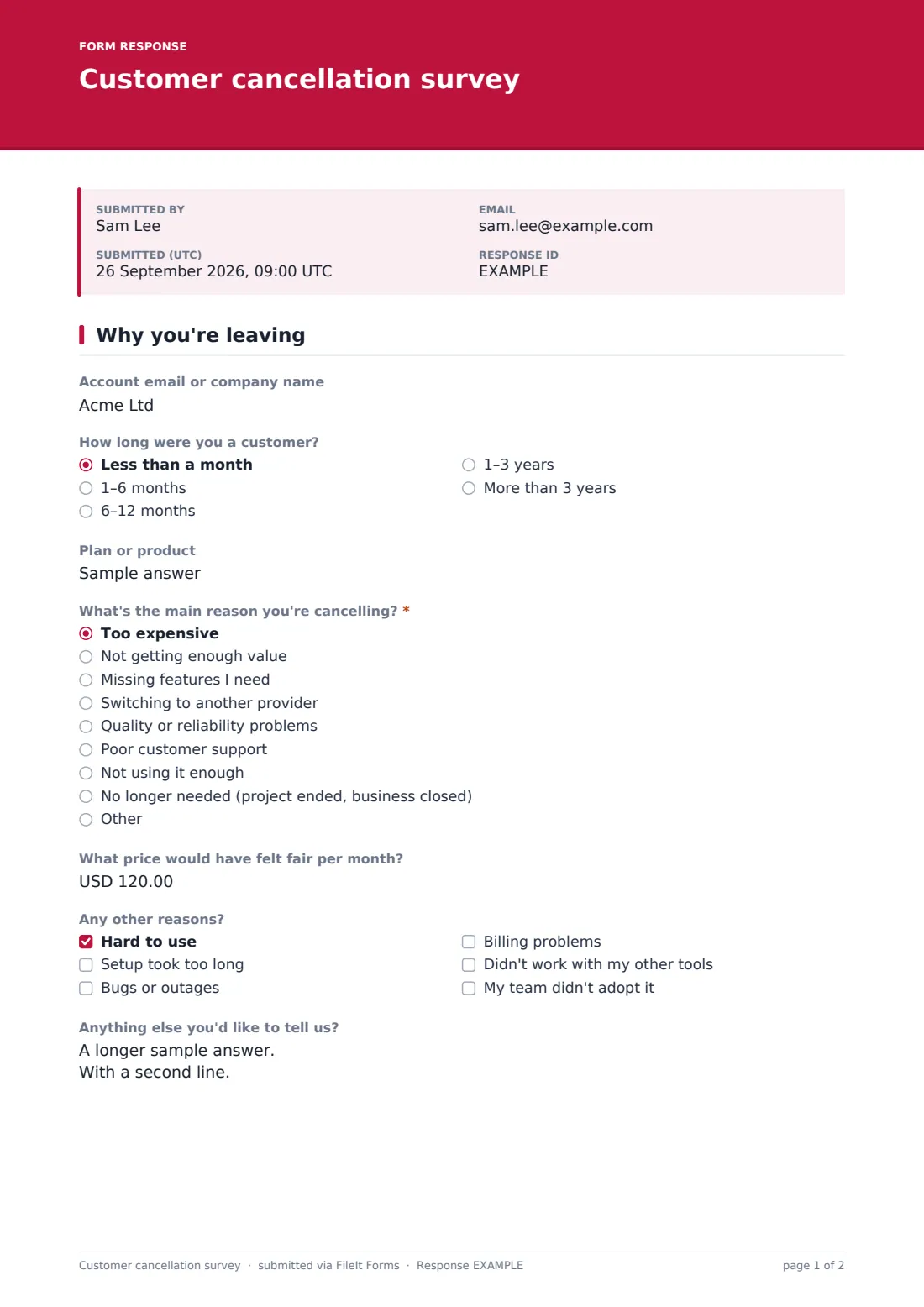
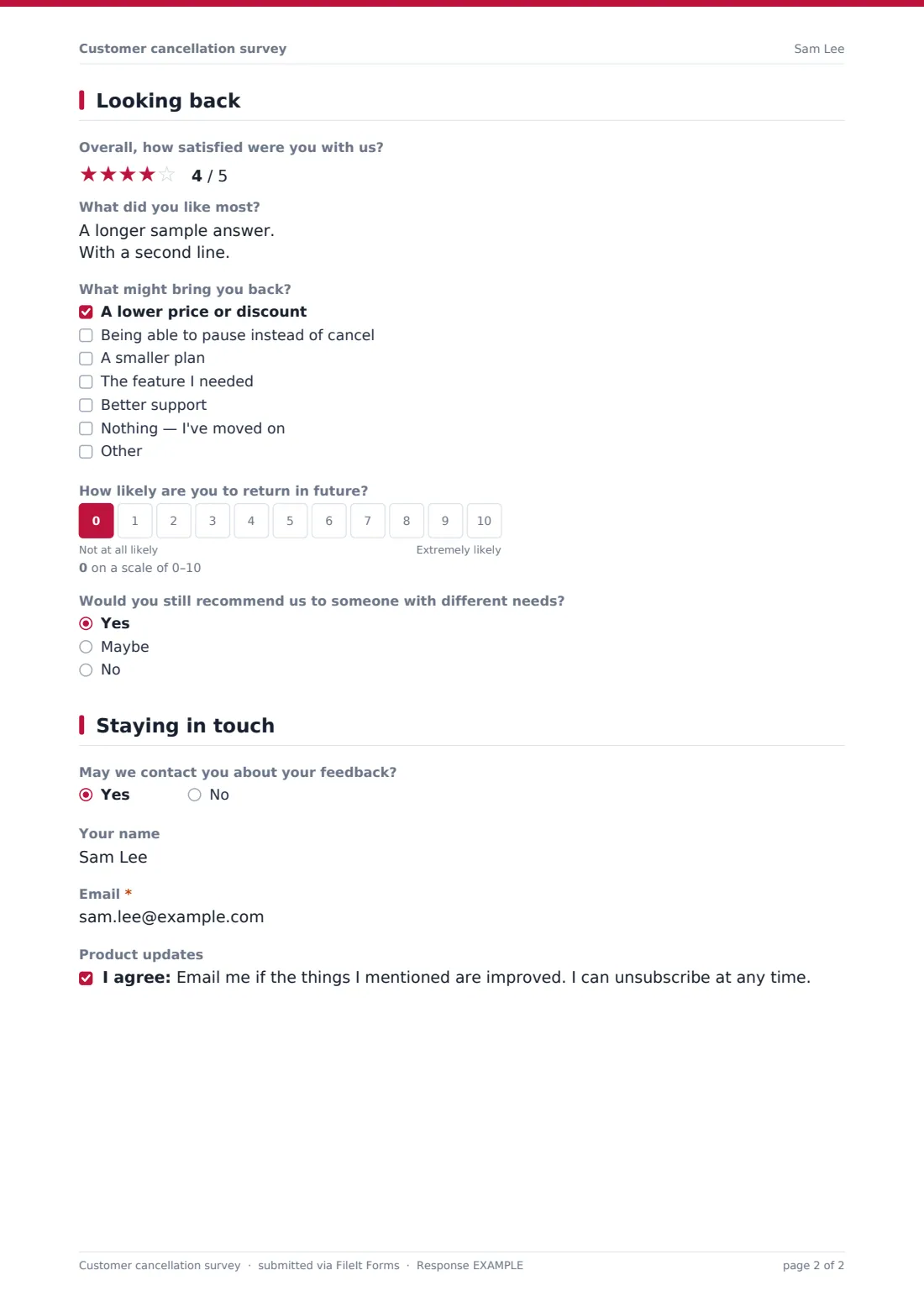
This customer cancellation survey asks for the main reason for leaving and adapts to the answer: switching to a competitor asks who and what they offer, missing features asks which ones, and price asks what would have felt fair. Customers can add other reasons, rate their overall satisfaction, say what they liked and tick what might bring them back, from a lower price to the option to pause instead of cancel.
Each response is saved as a PDF in your FileIt vault, and the Responses table lets you export all cancellation reasons to CSV to see the patterns.
- Best for
- Subscription businesses, SaaS companies, gyms, agencies and service providers
- Filled in by
- Customers who are cancelling
- Time to complete
- About 2–3 minutes
- Includes
- Main reason with adaptive follow-ups, other reasons, satisfaction rating, win-back options, return likelihood scale
Who uses a customer cancellation survey form?
- A SaaS company links the survey from its cancellation confirmation email
- A gym asks members why they're ending their membership
- A subscription box business learns why customers stop ordering
- An agency asks departing clients for honest feedback
- A product team finds which missing features cost the most customers
- A customer success team follows up with customers who might return
Questions on this customer cancellation survey form
19 questions over 3 pages · includes conditional questions, multiple pages, consent checkbox, ratings.
1 Why you're leaving
- Account email or company name
- How long were you a customer? Less than a month · 1–6 months · 6–12 months · 1–3 years · More than 3 years
- Plan or product
- What's the main reason you're cancelling?* Too expensive · Not getting enough value · Missing features I need · Switching to another provider · Quality or reliability problems · Poor customer support · Not using it enough · No longer needed (project ended, business closed)
- Who are you switching to? asked only when it applies
- What do they offer that we don't? asked only when it applies
- Which features were missing? asked only when it applies
- What price would have felt fair per month? asked only when it applies
- Any other reasons? Hard to use · Setup took too long · Bugs or outages · Billing problems · Didn't work with my other tools · My team didn't adopt it
- Anything else you'd like to tell us?
2 Looking back
- Overall, how satisfied were you with us?
- What did you like most?
- What might bring you back? A lower price or discount · Being able to pause instead of cancel · A smaller plan · The feature I needed · Better support · Nothing — I've moved on
- How likely are you to return in future?
- Would you still recommend us to someone with different needs? Yes · Maybe · No
3 Staying in touch
- May we contact you about your feedback?
- Your name asked only when it applies
- Email* asked only when it applies
- Product updates
The customer cancellation survey form, page by page
1 Why you're leaving
Customers can give an account email or company name, how long they were a customer and their plan. A required question asks for the main reason: too expensive, not enough value, missing features, switching provider, quality problems, poor support, not using it enough, no longer needed, or something else. Choosing a competitor asks who and what they offer; missing features asks which; price asks what monthly price would have felt fair. Customers can tick other reasons and add anything else.
2 Looking back
Customers rate their overall satisfaction, say what they liked most, tick what might bring them back — a lower price, pausing instead of cancelling, a smaller plan, the feature they needed, better support, or nothing — and rate how likely they are to return on a 0–10 scale. A final question asks whether they'd still recommend you to someone with different needs.
3 Staying in touch
Customers can agree to be contacted, which asks for their name and email, and opt in to hear if the things they mentioned are improved.
Make the template yours
- Change the reasons list to reflect your business
- Change the currency in the fair price question
- Remove the pause option from the win-back list if you don't offer pausing
- Send personal links so responses match accounts without asking for an email
- Add a question about data export if customers need their data
- Route responses to your customer success team
Tips for a better customer cancellation survey form
- Keep it optional and short — cancelling customers owe you nothing
- Don't use the survey to argue; thank people and learn
- Group reasons monthly to find the biggest causes of churn
- Follow up with customers who said they might come back when things change
- Tell product teams which missing features come up most often
Every response becomes a PDF in your vault
Each response is saved as a PDF in the vault folder you choose, and the owner is notified by email.
Export the Responses table to CSV to count cancellation reasons, compare them by plan or customer tenure and share the results with your team.
- Start from this template. It opens in the FileIt Forms designer — change any question, add pages, set the rules for when questions appear.
- Share it. Turn on a public link, or send it to people by email, each with their own link. They don’t need a FileIt account.
- Get the answers as PDFs. Each response is saved as a PDF in the vault folder you choose, with uploaded files attached — and listed in a Responses table you can export to CSV.
Customer cancellation survey form: frequently asked questions
Is this cancellation survey template free?
Yes. It's included in the Forms app on every FileIt account, including the free plan.
Does the form cancel the customer's account?
No. It only collects feedback. Cancellations are handled in your own system.
Is it anonymous?
Account details are optional, and contact details are only asked for if the customer agrees to be contacted.
Can I change the reasons?
Yes. Edit the options and follow-up questions in the designer.
Where should I link the survey?
From your cancellation confirmation page or email, while the decision is fresh.
Can I follow up with customers?
Only with those who agree to be contacted and leave their email.
Does it work on phones?
Yes. The form adapts to phone screens.