What is the contract review request form template?
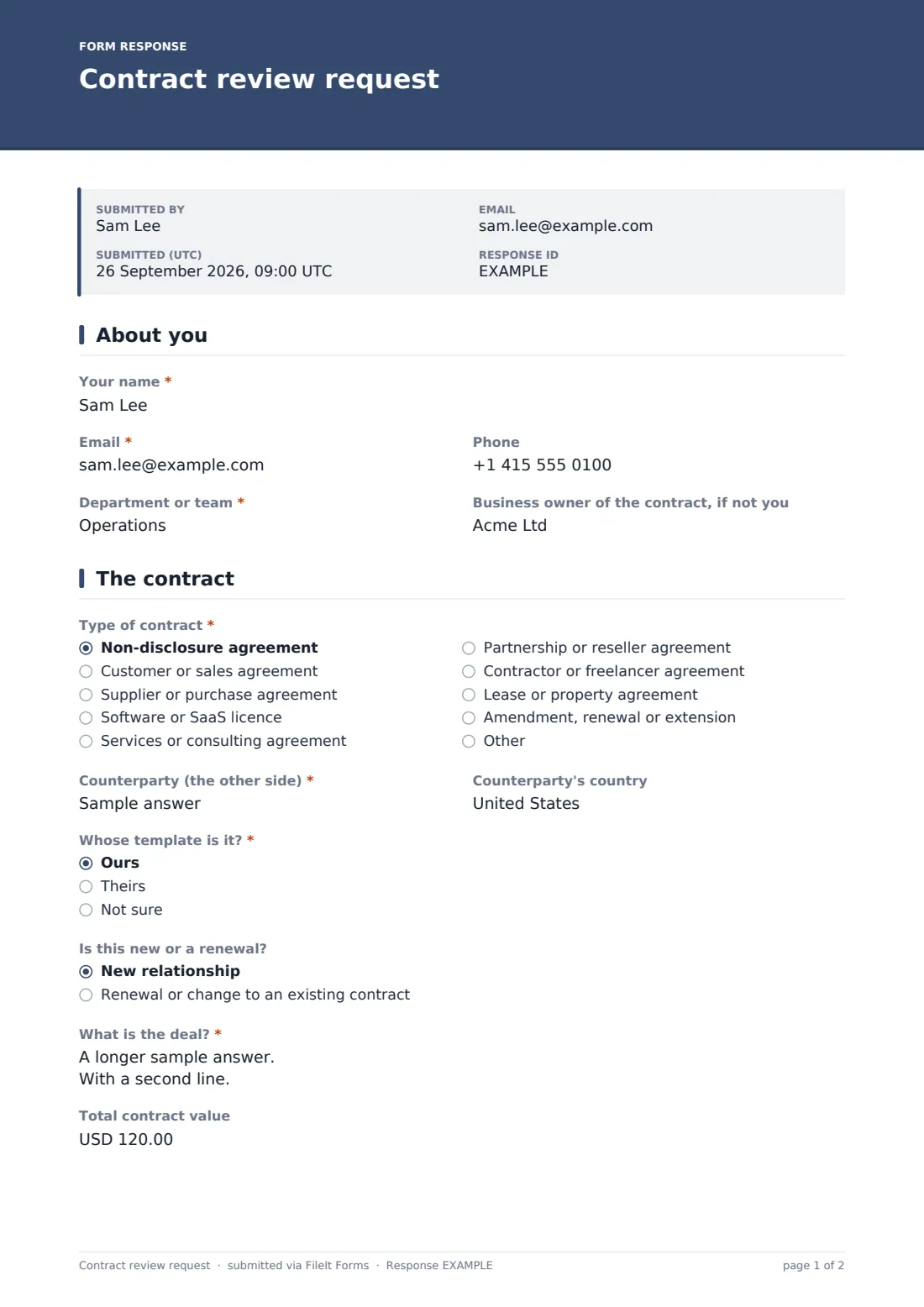
In-house legal teams often receive contracts as a forwarded email with "can you look at this by Friday?" and little else. This template makes the requester supply the context legal needs to prioritise and review: the contract type, counterparty, whose paper it is, the commercial deal, value, term and deadline.
It also flags common risk areas early. A required question asks whether personal data will be shared, opening a box for what data and whose. A checklist lets the requester point legal at liability caps, indemnities, IP, termination, data protection or other areas of concern, and a free-text box captures anything already negotiated.
The contract itself is a required upload, with a place for statements of work or pricing, and the requester confirms nothing will be signed before review. Every request is saved as a PDF in your FileIt vault with its attachments.
- Best for
- In-house legal teams, general counsel and operations teams handling contracts
- Filled in by
- Any employee who needs a contract reviewed
- Time to complete
- About 5 minutes
- Includes
- Contract details, value and term, personal data flag, focus checklist, deadline, required contract upload and a do-not-sign confirmation
Who uses a contract review request form?
- Sales teams sending customer paper for review before a deal closes
- Procurement routing supplier agreements through legal
- Teams requesting an NDA before sharing information
- Renewals and amendments to existing contracts
- Small companies using an outside law firm, with requests collected in one place
- Operations teams keeping a record of every contract that went through legal
Questions on this contract review request form
24 questions over 3 pages · includes file upload, conditional questions, multiple pages, consent checkbox.
1 About you
- Your name*
- Email*
- Phone
- Department or team*
- Business owner of the contract, if not you
2 The contract
- Type of contract* Non-disclosure agreement · Customer or sales agreement · Supplier or purchase agreement · Software or SaaS licence · Services or consulting agreement · Partnership or reseller agreement · Contractor or freelancer agreement · Lease or property agreement · Amendment, renewal or extension · Other
- Counterparty (the other side)*
- Counterparty's country
- Whose template is it?* Ours · Theirs · Not sure
- Is this new or a renewal? New relationship · Renewal or change to an existing contract
- What is the deal?*
- Total contract value
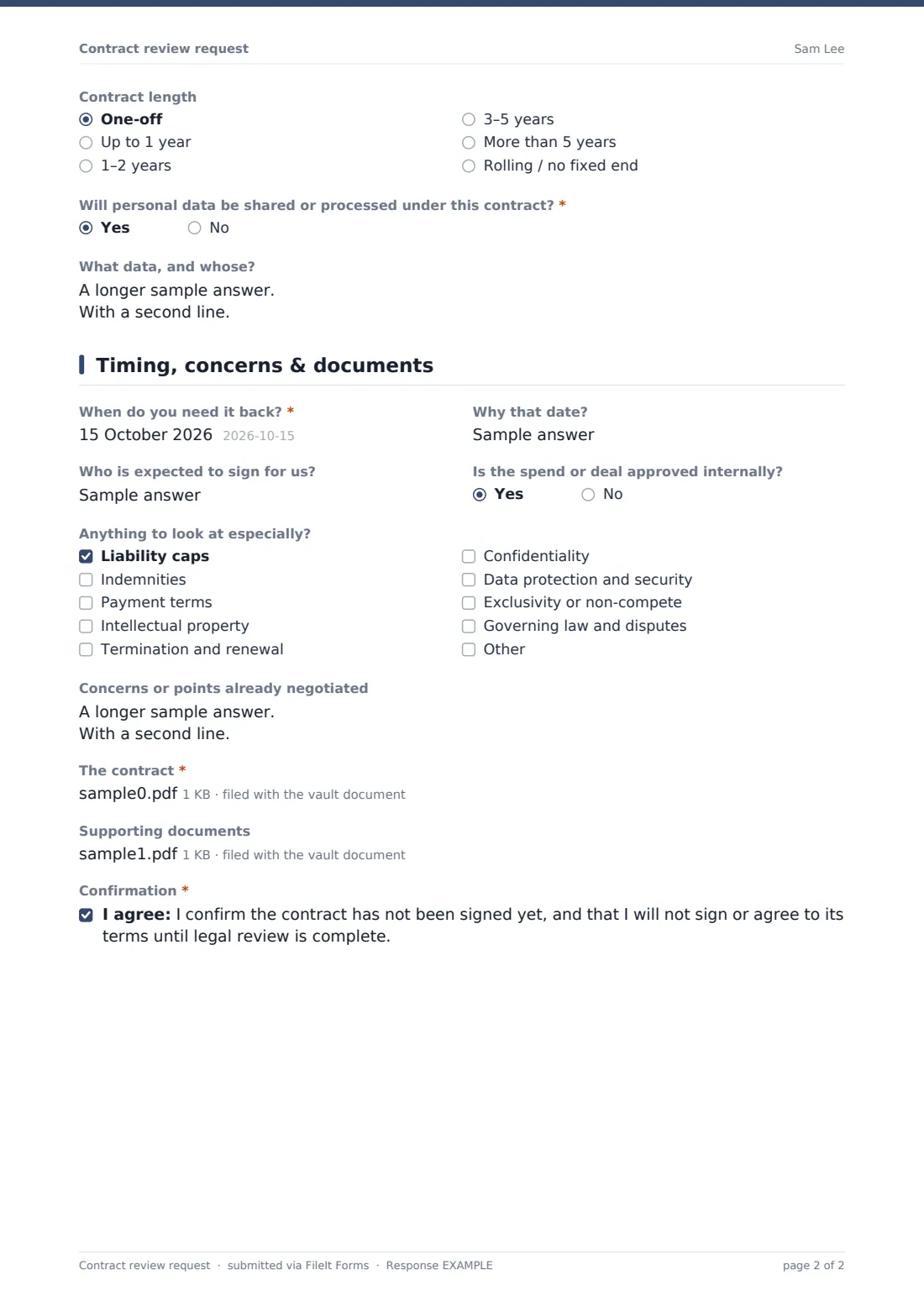
- Contract length One-off · Up to 1 year · 1–2 years · 3–5 years · More than 5 years · Rolling / no fixed end
- Will personal data be shared or processed under this contract?*
- What data, and whose? asked only when it applies
3 Timing, concerns & documents
- When do you need it back?*
- Why that date?
- Who is expected to sign for us?
- Is the spend or deal approved internally?
- Anything to look at especially? Liability caps · Indemnities · Payment terms · Intellectual property · Termination and renewal · Confidentiality · Data protection and security · Exclusivity or non-compete · Governing law and disputes
- Concerns or points already negotiated
- The contract*
- Supporting documents
- Confirmation*
The contract review request form, page by page
1 About you
Name, email, phone, department and the business owner of the contract if it's someone else.
2 The contract
Contract type, counterparty and their country, whose template it is, and whether it's new or a renewal. A required summary of the deal, total value and length follow, and a required yes/no on personal data opens a box for what data is involved.
3 Timing, concerns & documents
When it's needed and why, the expected signatory, whether the spend is approved, a checklist of focus areas, and a box for concerns or points already negotiated. The contract upload is required (Word or PDF), supporting documents are optional, and the requester confirms the contract hasn't been signed and won't be until review is complete.
Make the template yours
- Add your approval thresholds, such as a question that appears only above a certain value
- Replace the contract types with your own catalogue
- Route requests into folders by contract type or department
- Add the legal inbox or a named lawyer as notification emails
- Link to your NDA template in the help text for NDA requests
- Adjust the confirmation message to your team's service levels
Tips for a better contract review request form
- Ask requesters for the Word version — it makes mark-up far quicker
- Push for a real deadline and the reason; it helps legal prioritise fairly
- Treat any personal data sharing as a flag for a data protection review
- Ask requesters to note points already agreed commercially so legal doesn't reopen them
Every response becomes a PDF in your vault
Each request is filed as a PDF in the vault folder you choose with the contract and supporting files attached, and the legal team is notified. With a respondent copy on, the requester gets a PDF receipt of their request.
Legal usually triages the request, assigns a reviewer and replies with a mark-up or questions. The Responses table works as a simple request log and exports to CSV.
- Start from this template. It opens in the FileIt Forms designer — change any question, add pages, set the rules for when questions appear.
- Share it. Turn on a public link, or send it to people by email, each with their own link. They don’t need a FileIt account.
- Get the answers as PDFs. Each response is saved as a PDF in the vault folder you choose, with uploaded files attached — and listed in a Responses table you can export to CSV.
Contract review request form: frequently asked questions
Is this contract review request template free?
Yes. It's included with FileIt's Forms app on every plan, including free.
Does FileIt review the contract?
No. The form collects the request and the document; your legal team or lawyer does the review.
What file types can be uploaded?
The contract accepts Word and PDF; supporting documents also accept spreadsheets.
Can I use it with an external law firm?
Yes. Add the firm's contact as a notification email so they receive each request.
Why ask about personal data?
Contracts that share personal data often need specific data protection terms, so legal needs to know early.
Do staff need an account?
No. Share the link internally and anyone can submit a request.