What is the beneficiary designation form template?
Beneficiary nominations are often kept on paper forms that are easy to lose and hard to read. This template lets a policyholder or plan member name who should receive a benefit, with each beneficiary's relationship, date of birth, share and contact details, and sign it on screen.
Members start with one primary beneficiary and can add a second and third; they can then name up to two contingent beneficiaries who would receive the benefit only if no primary beneficiary survives them. Short notes remind them that shares within each group should total 100%. If any beneficiary is under 18, the form asks who should manage that share.
Every designation is saved as a signed PDF in your FileIt vault, so the plan administrator has a clear, dated record of each member's current wishes.
- Best for
- Insurers, pension and benefit plan administrators, HR teams and advisers
- Filled in by
- The policyholder or plan member
- Time to complete
- About 5 minutes
- Includes
- Up to three primary and two contingent beneficiaries, a minors question, declaration and signature
Who uses a beneficiary designation form?
- HR teams collecting nominations for group life or death-in-service benefits
- Pension or retirement plan administrators refreshing member records
- Advisers helping clients update beneficiaries after marriage, divorce or a birth
- Credit unions and mutual societies recording nominations for member accounts
- Clubs or associations with a member death benefit
- An annual reminder asking members to confirm or change their beneficiaries
Questions on this beneficiary designation form
48 questions over 4 pages · includes signature, conditional questions, multiple pages, consent checkbox.
1 Policyholder or member
- Your full name*
- Email*
- Phone
- Date of birth*
- Policy, plan or member number*
- Plan or policy name
- Your address
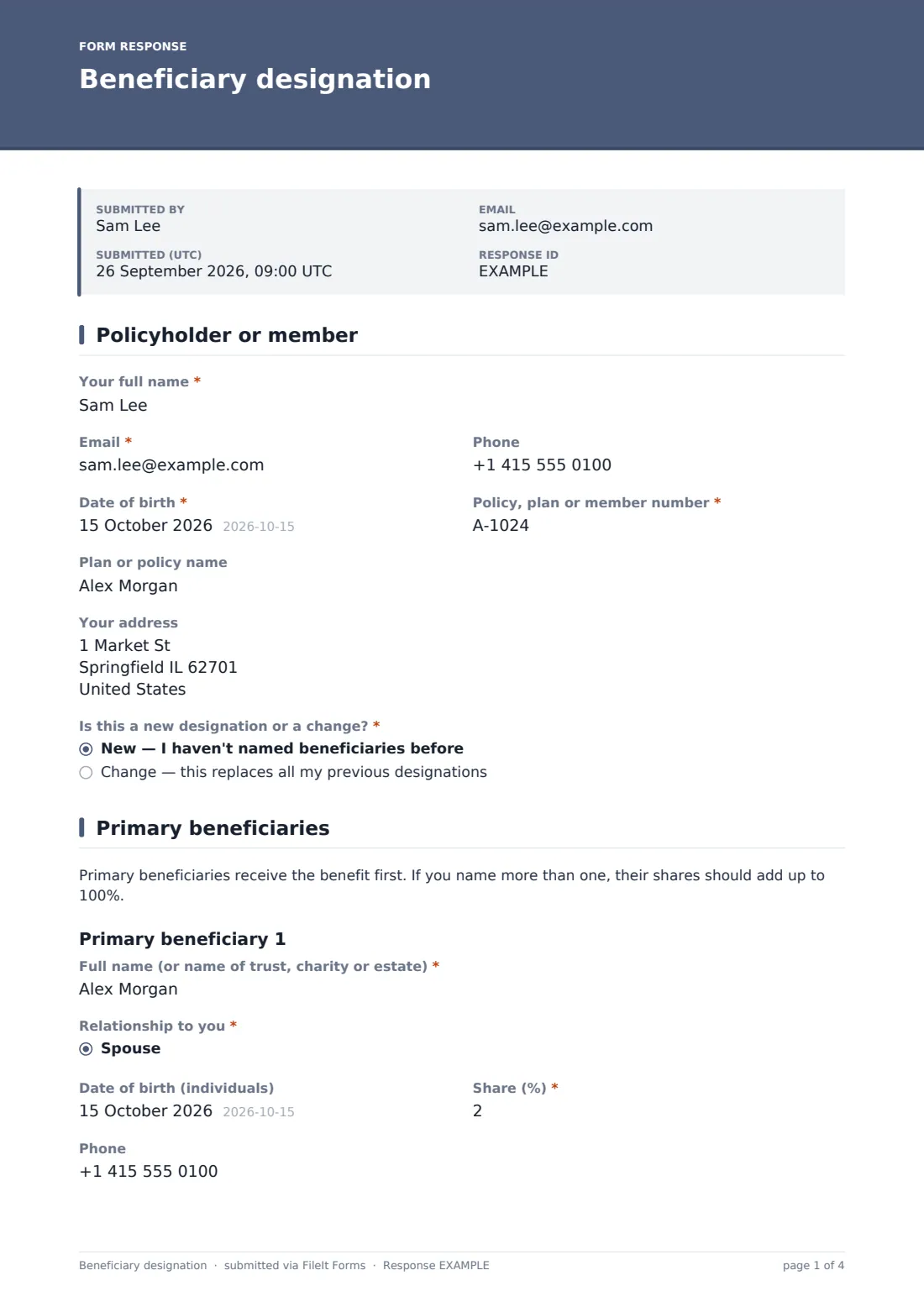
- Is this a new designation or a change?* New — I haven't named beneficiaries before · Change — this replaces all my previous designations
2 Primary beneficiaries
- Full name (or name of trust, charity or estate)*
- Relationship to you* Spouse · Civil partner · Partner · Child · Grandchild · Parent · Sibling · Other relative · Friend · Trust · Charity · Estate
- Date of birth (individuals)
- Share (%)*
- Phone
- Address
- Add a second primary beneficiary?
- Full name (or name of trust, charity or estate)* asked only when it applies
- Relationship to you* asked only when it applies Spouse · Civil partner · Partner · Child · Grandchild · Parent · Sibling · Other relative · Friend · Trust · Charity · Estate
- Date of birth (individuals) asked only when it applies
- Share (%)* asked only when it applies
- Phone asked only when it applies
- Address asked only when it applies
- Add a third primary beneficiary? asked only when it applies
- Full name (or name of trust, charity or estate)* asked only when it applies
- Relationship to you* asked only when it applies Spouse · Civil partner · Partner · Child · Grandchild · Parent · Sibling · Other relative · Friend · Trust · Charity · Estate
- Date of birth (individuals) asked only when it applies
- Share (%)* asked only when it applies
- Phone asked only when it applies
- Address asked only when it applies
3 Contingent beneficiaries
- Would you like to name a contingent beneficiary?*
- Full name (or name of trust, charity or estate)* asked only when it applies
- Relationship to you* asked only when it applies Spouse · Civil partner · Partner · Child · Grandchild · Parent · Sibling · Other relative · Friend · Trust · Charity · Estate
- Date of birth (individuals) asked only when it applies
- Share (%)* asked only when it applies
- Phone asked only when it applies
- Address asked only when it applies
- Add a second contingent beneficiary? asked only when it applies
- Full name (or name of trust, charity or estate)* asked only when it applies
- Relationship to you* asked only when it applies Spouse · Civil partner · Partner · Child · Grandchild · Parent · Sibling · Other relative · Friend · Trust · Charity · Estate
- Date of birth (individuals) asked only when it applies
- Share (%)* asked only when it applies
- Phone asked only when it applies
- Address asked only when it applies
4 Instructions & signature
- Is any beneficiary under 18?*
- Who should manage a minor's share? asked only when it applies
- Any other instructions
- Declaration*
- Signature*
- Date*
The beneficiary designation form, page by page
1 Policyholder or member
Name, contact details, date of birth, policy or member number, plan name and address. The member says whether this is a new designation or a change that replaces all previous ones.
2 Primary beneficiaries
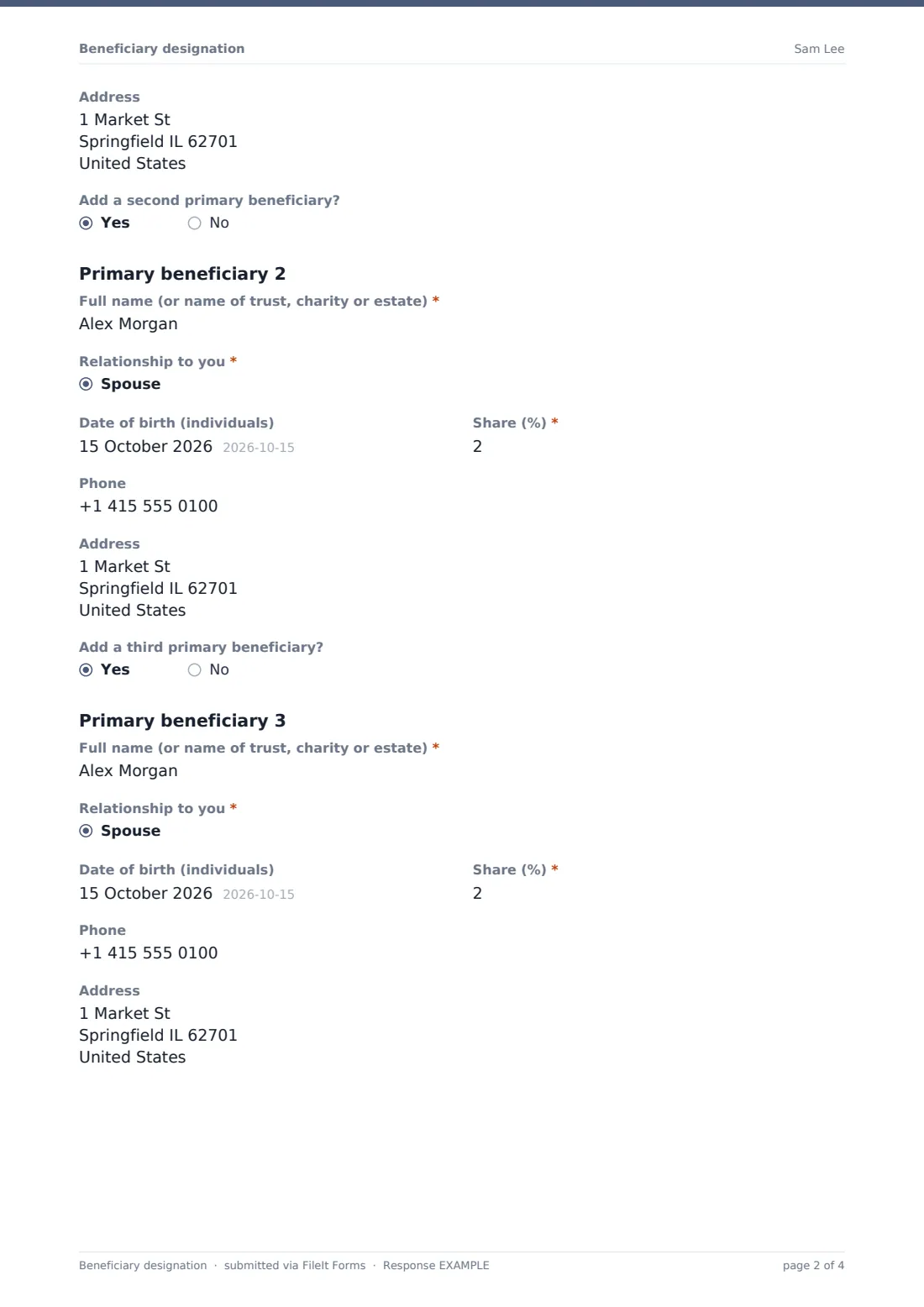
A short note explains primary beneficiaries and that shares should add up to 100%. The first beneficiary's name, relationship, date of birth, share, phone and address are asked, then yes/no questions add a second and third beneficiary with the same fields. Names can also be a trust, charity or estate.
3 Contingent beneficiaries
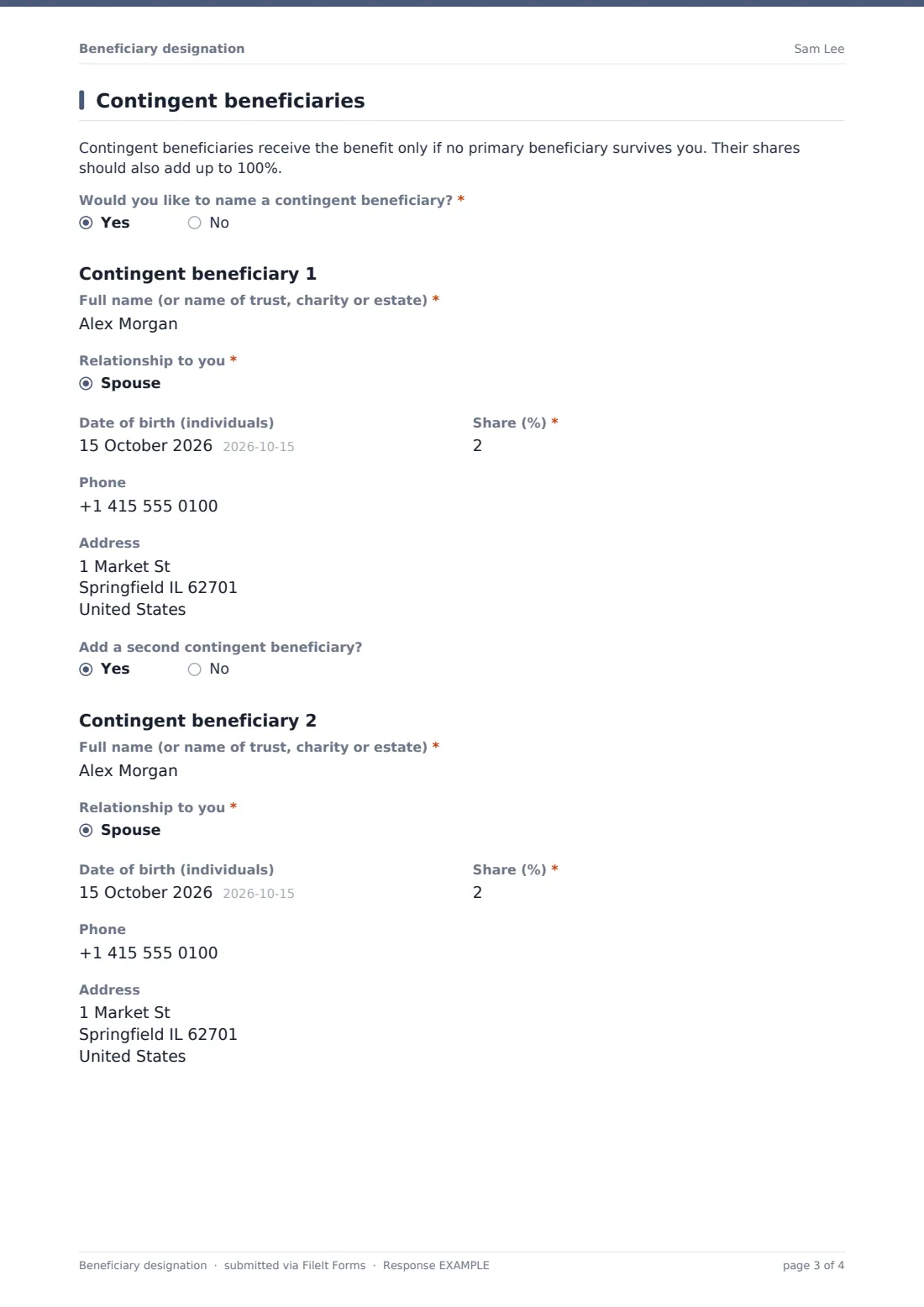
A note explains contingent beneficiaries. If the member wants to name one, the same set of fields appears, with the option to add a second.
4 Instructions & signature
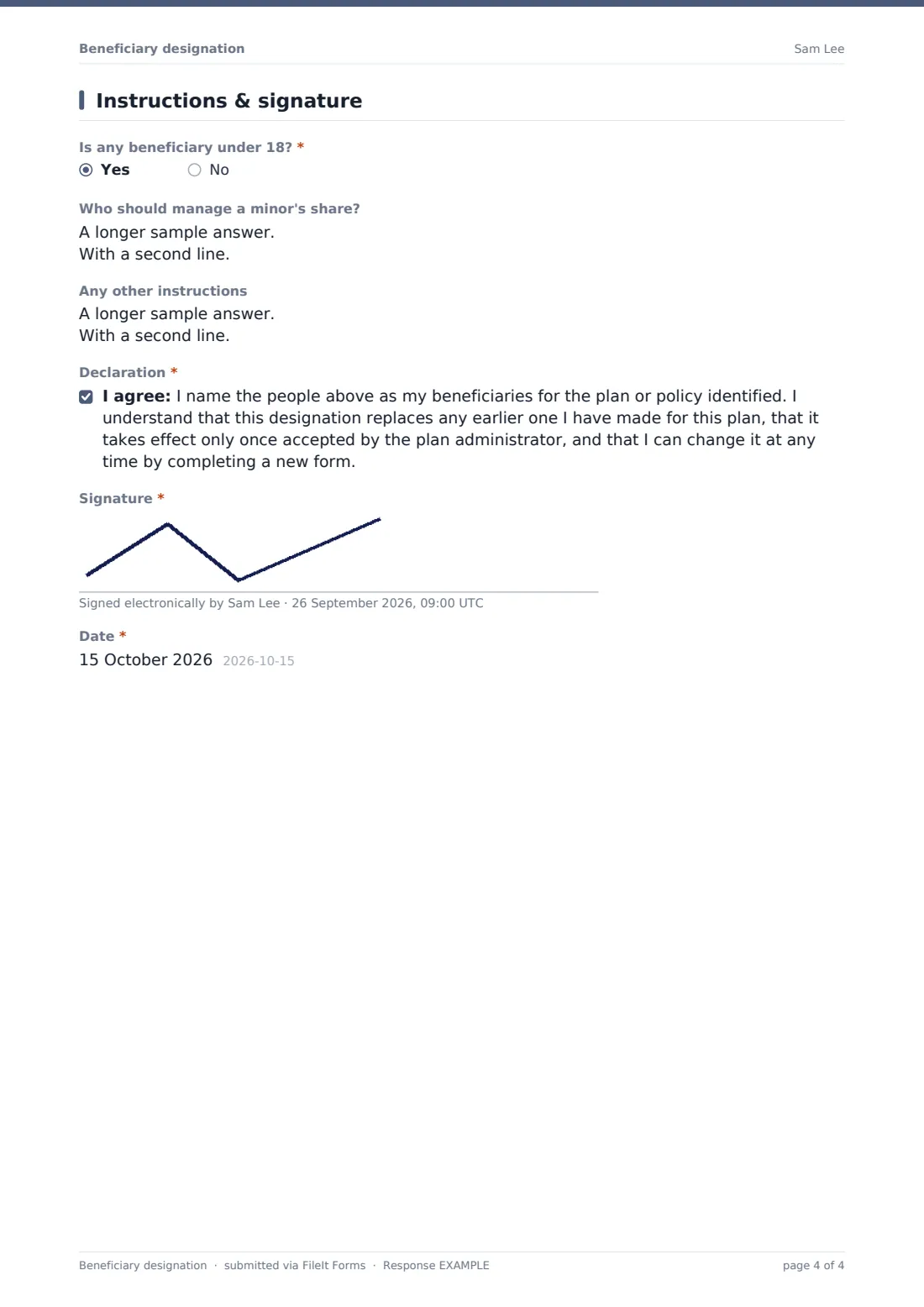
A required question about beneficiaries under 18 opens a box for who should manage a minor's share. A free-text box takes any other instructions. The member agrees to a declaration that this replaces earlier designations for the plan and only takes effect once accepted, then signs and dates it.
Make the template yours
- Adjust the declaration to match your plan's rules — for example if nominations are an expression of wish rather than binding
- Remove the address field if you only need names and shares
- Add a spouse consent section if your plan requires it for non-spouse beneficiaries
- Change the relationship options to match your records
- Set the document title to include the member number
- File each designation in a member's folder in the vault
Tips for a better beneficiary designation form
- Ask members to check that shares in each group add up to 100% before they sign
- Encourage members to review nominations after marriage, divorce, a birth or a death in the family
- Use full legal names rather than nicknames so beneficiaries can be identified
- Where a trust is named, ask for the trust's full name and date
Every response becomes a PDF in your vault
The signed designation is saved as a PDF in the vault folder you choose and you receive an email notification. With a respondent copy on, the member gets their own signed PDF.
Administrators usually check the shares and details, record the nomination against the member's plan and confirm back to the member. The Responses table lists every designation and exports to CSV.
- Start from this template. It opens in the FileIt Forms designer — change any question, add pages, set the rules for when questions appear.
- Share it. Turn on a public link, or send it to people by email, each with their own link. They don’t need a FileIt account.
- Get the answers as PDFs. Each response is saved as a PDF in the vault folder you choose, with uploaded files attached — and listed in a Responses table you can export to CSV.
Beneficiary designation form: frequently asked questions
Is this beneficiary designation template free?
Yes. It's a starter template in FileIt's Forms app, on every plan including free.
Is a designation made through this form legally binding?
That depends on the plan's rules and local law. The form records the member's wishes; the declaration says it takes effect once accepted by the plan administrator, and you should adjust it to match your plan.
How many beneficiaries can be named?
Up to three primary and two contingent beneficiaries. You can add more in the designer by copying the questions.
Does the form check that shares add up to 100%?
No — notes on the page remind members, and administrators should check before recording the nomination.
Can a charity or trust be named?
Yes. The name field accepts the name of a trust, charity or estate, and those are in the relationship list.
Does the member need an account?
No. They can sign on screen from the link without signing up.