What is NCO — vehicle change of ownership?
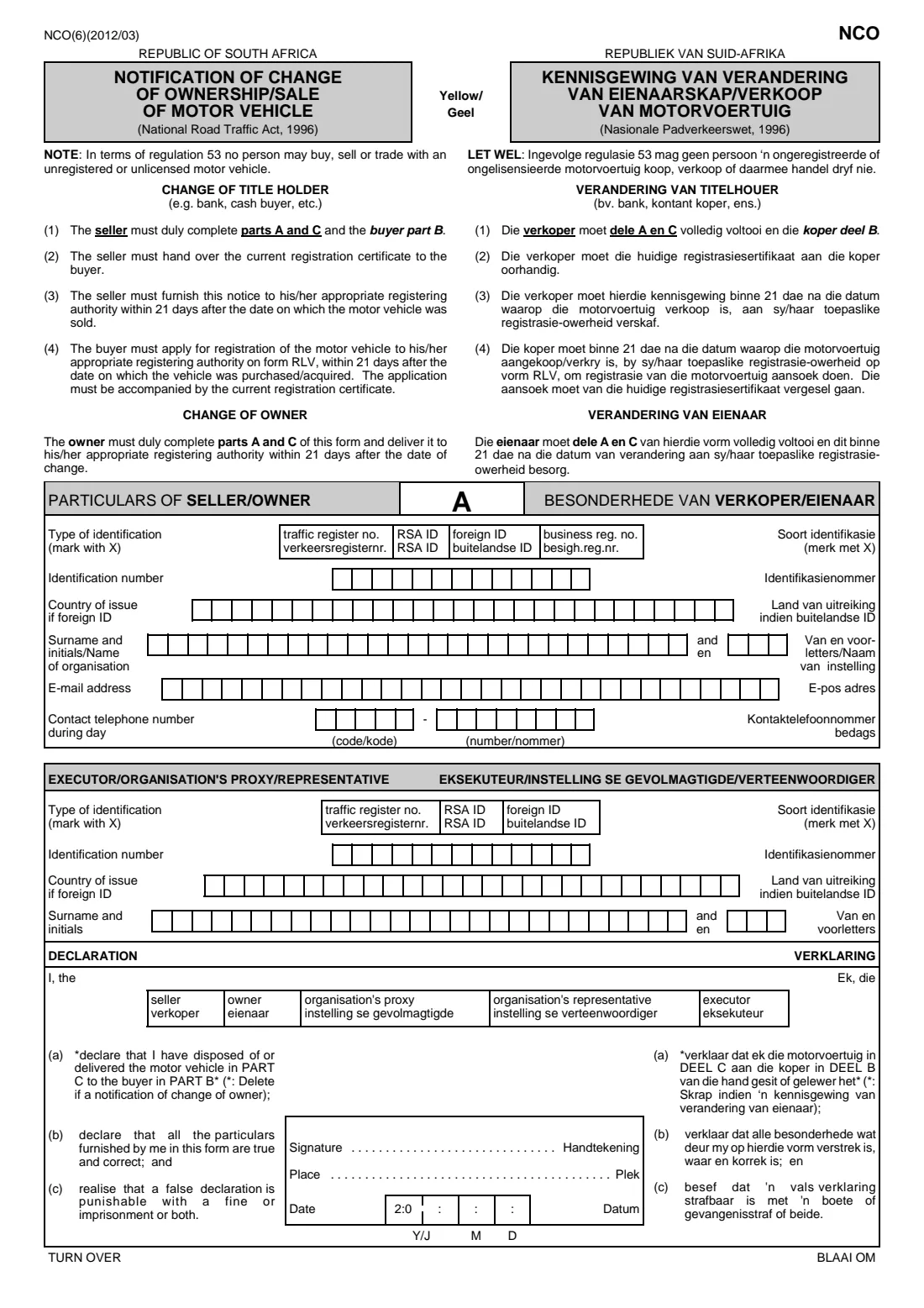
The NCO (Notification of Change of Ownership / Sale of Motor Vehicle, or Kennisgewing van verandering van eienaarskap / verkoop van motorvoertuig) is the national form under the National Road Traffic Act, 1996 that records a vehicle leaving its current owner or title holder. The current edition is NCO(6)(2012/03): a three-page bilingual English and Afrikaans form with part A for the seller or owner, part B for the buyer and part C for the vehicle itself, plus a declaration for each side.
It matters because, until the registering authority records the change, the vehicle is still on the seller's name. The form itself sets the deadline: the seller must furnish the notice to their registering authority within 21 days after the date on which the vehicle was sold, and the buyer must apply to register the vehicle on form RLV within 21 days of buying it. It also reminds both sides that, under regulation 53, no person may buy, sell or trade with an unregistered or unlicensed motor vehicle.
FileIt helps you fill in the NCO online in plain English. It pre-fills your surname and email from the People records in your vault, prints every answer in capitals one character per box as the form expects, marks your choices with an X, checks South African ID numbers and dates, and places everything on the official PDF. The finished form is saved in your vault folder. FileIt never submits anything: you print the form, sign it by hand, and take it to the vehicle licensing office yourself.
- Who fills it
- The seller or owner completes parts A and C; on a sale, the buyer completes part B.
- Given to
- The seller's or owner's registering authority (the vehicle licensing office).
- When
- Within 21 days after the date the vehicle was sold or the change took place.
- Signatures
- Handwritten: the seller or owner (or executor, proxy or representative) and, on a sale, the buyer.
- Edition
- NCO(6)(2012/03), English and Afrikaans.
- Buyer's next step
- Register the vehicle on form RLV within 21 days, with the current registration certificate.
Who needs to fill out NCO — vehicle change of ownership?
- Private sellers who have sold a car, bakkie or motorcycle registered in their name in South Africa.
- Owners whose vehicle has changed owner without a sale to a new title holder, who complete parts A and C only.
- Executors winding up a deceased estate that includes a motor vehicle.
- Banks, finance houses and other organisations repossessing a vehicle, acting through a proxy or representative.
- Companies and dealers disposing of a vehicle registered under a business registration number.
- Buyers asked by the seller to complete part B and sign the buyer's declaration.
When to use NCO — vehicle change of ownership
- As soon as you sell or hand over a vehicle — the notice must reach the registering authority within 21 days after the date of sale.
- When a vehicle is repossessed, or passes to a deceased estate, and the owner on record changes.
- On a change of owner where only the owner's side needs to be recorded, completing parts A and C.
- Before the buyer applies to register the vehicle on form RLV, which they must do within 21 days of acquiring it.
What you need before you start
- The vehicle's current registration certificate — its licence number, vehicle register number, VIN or chassis number and make are copied from it, and on a sale it goes to the buyer.
- Your identification: a South African ID number, a traffic register number, a foreign ID and its country of issue, or an organisation's business registration number.
- Your surname and initials (or the organisation's name), email address and a daytime phone number.
- The date the vehicle was sold, repossessed or passed to the estate.
- The odometer reading on that day, if the vehicle has one.
- On a sale, the buyer's identification, name, email, postal address, street address and daytime phone number.
- If an executor, proxy or representative signs, their identification number, surname and initials — and any authority they hold, such as letters of executorship or a proxy.
- A pen, to sign both declarations by hand.
What’s on NCO — vehicle change of ownership
The 2012 edition has 3 pages. FileIt asks for it in 7 parts:
- A — Particulars of seller / owner (besonderhede van verkoper / eienaar)Seller / owner
- A — Executor / organisation's proxy / representative (seller's side)Seller / owner
- A — Declaration of seller / owner (verklaring)Seller / owner
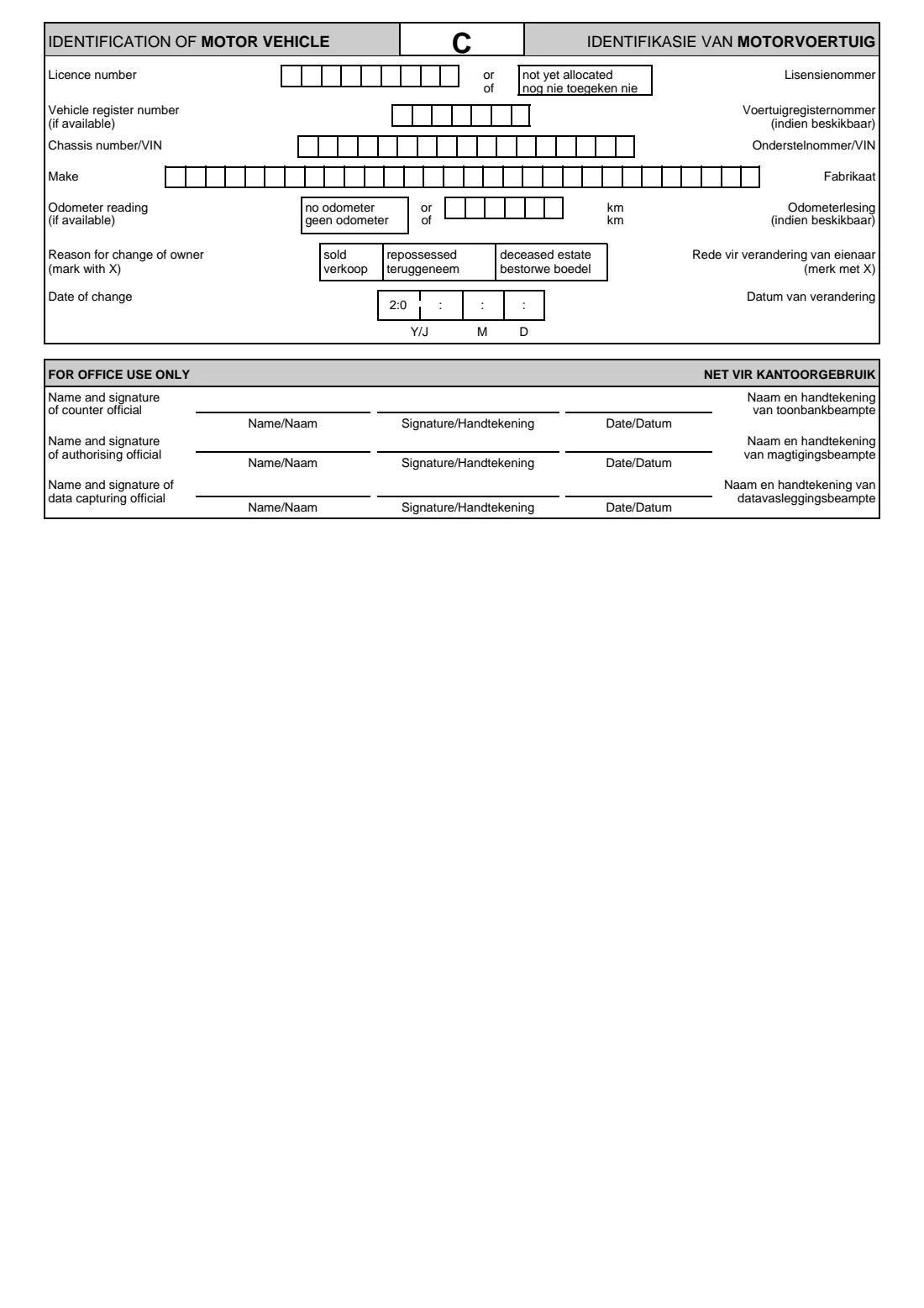
- C — Identification of motor vehicle (identifikasie van motorvoertuig)Seller / owner
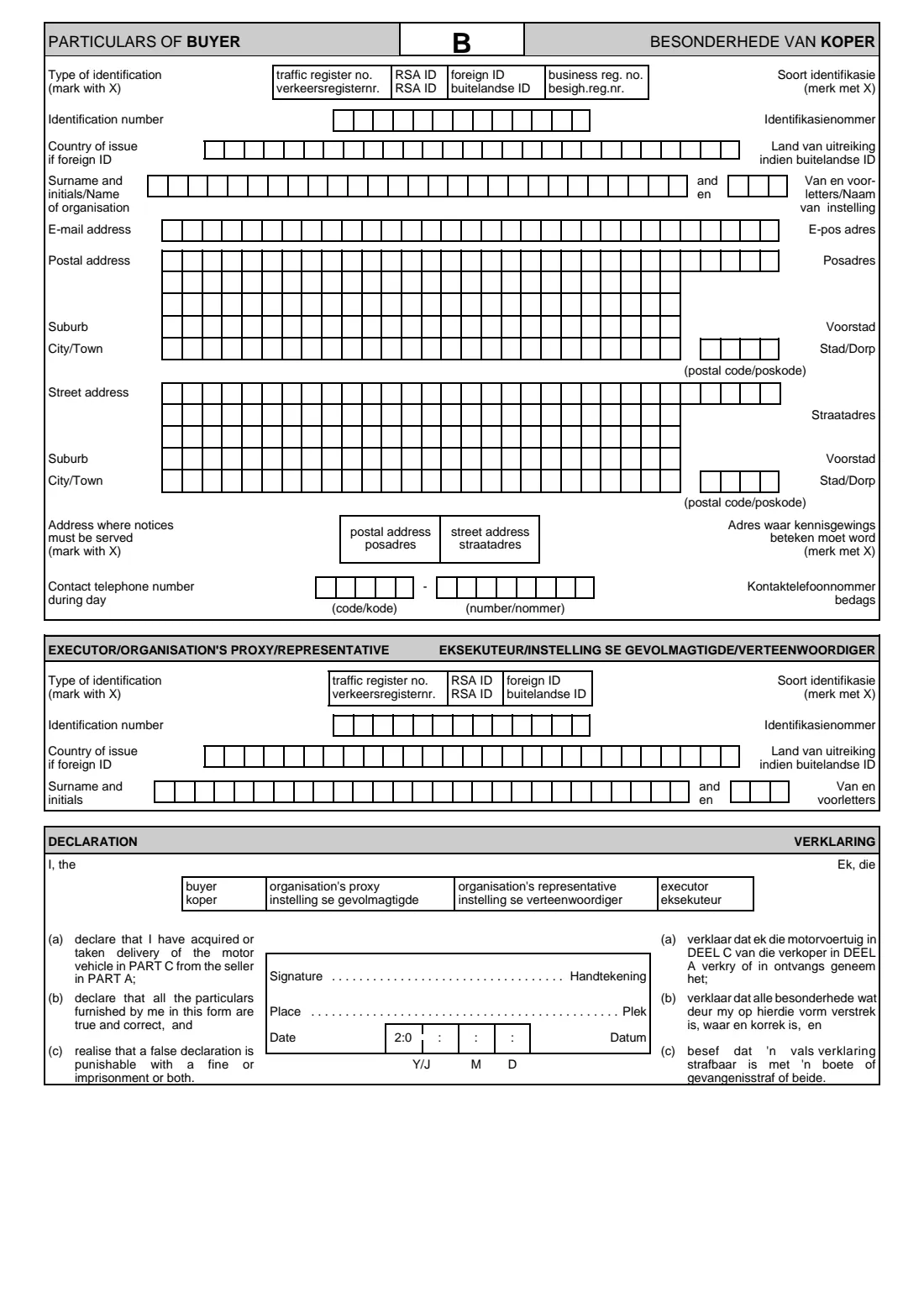
- B — Particulars of buyer (besonderhede van koper)Buyer
- B — Executor / organisation's proxy / representative (buyer's side)Buyer
- B — Declaration of buyer (verklaring)Buyer
How to fill out NCO — vehicle change of ownership, step by step
1 Change of title holder or change of owner
The first page explains the two cases the form covers. On a change of title holder — for example a sale to a cash buyer or to a bank — the seller completes parts A and C and the buyer part B, and the seller hands the current registration certificate to the buyer. On a change of owner, the owner completes parts A and C only.
FileIt asks which case applies first, so it can check that the rest of the form matches it.
2 A — Particulars of seller / owner
Mark with an X how you identify yourself: traffic register number, RSA ID, foreign ID or business registration number. Then write the identification number in the 13 boxes, the country of issue if it's a foreign ID, your surname and initials (or the organisation's name), your email address and a daytime phone number split into code and number.
Every box takes one character, in capitals. FileIt checks that a South African ID number has 13 digits, a real date of birth and a valid check digit, and asks for a business registration number without its slashes so it fits the boxes.
3 A — Executor / organisation's proxy / representative
Complete this block only when someone signs on the seller's or owner's behalf: the executor of a deceased estate, or the proxy or representative of a company, dealer or bank. It asks for their type of identification, ID number, country of issue for a foreign ID, and surname and initials.
If the vehicle belongs to an organisation, the organisation signs through this person — FileIt reminds you to fill this block in when you choose an executor, proxy or representative as the signatory.
4 A — Declaration
Mark who is signing — seller, owner, organisation's proxy, organisation's representative or executor. By signing you declare that you disposed of or delivered the vehicle in part C to the buyer in part B, that the particulars are true and correct, and that a false declaration is punishable with a fine or imprisonment or both.
On a change of owner only, the form asks you to delete statement (a), which you strike through by hand. Sign by hand, and write the place and the date — the date boxes start with a printed '20', followed by the year, month and day.
5 B — Particulars of buyer
On a sale, the buyer gives the same identification details as the seller, plus a postal address and a street address — each with suburb, city or town and a four-digit postal code — and marks with an X which of the two the registering authority must use to serve notices. A daytime phone number completes the part.
In FileIt, part B is optional: switch it on to type the buyer's details in, or leave it off and let the buyer complete it by hand. If the buyer has no separate postal address, give the street address twice.
6 B — Executor / organisation's proxy / representative, and the buyer's declaration
If the buyer is an organisation or a deceased estate, its proxy, representative or executor gives their details in this block. The buyer's declaration then confirms that they acquired or took delivery of the vehicle in part C from the seller in part A, and that the particulars are true and correct.
The buyer marks who is signing, signs by hand, and writes the place and date.
7 C — Identification of motor vehicle
Copy the licence number (or mark 'not yet allocated'), the vehicle register number if available, the chassis number or VIN, and the make from the registration certificate. Add the odometer reading in kilometres if available, or mark 'no odometer'. Mark the reason for the change — sold, repossessed or deceased estate — and write the date of change.
Check the VIN against the vehicle itself as well as the paperwork: a single wrong character can stop the change being recorded against the right vehicle.
Common mistakes to avoid
- Missing the 21-day window: the seller must furnish the notice within 21 days after the date of sale, so don't wait for the buyer to register first.
- Keeping the registration certificate: on a sale the seller must hand the current certificate to the buyer, who needs it for form RLV.
- Copying the VIN or chassis number wrongly — take it from the registration certificate and check it on the vehicle.
- Writing a business registration number with slashes, so it overflows the 13 boxes — leave out the slashes.
- Marking 'seller' on a change of owner only, or forgetting to strike out statement (a) in that case.
- Having an executor or company representative sign without filling in their own identification block.
- Dating the declaration before the date of change, or leaving the odometer and 'no odometer' both blank when the vehicle has a working odometer.
- Buying or selling a vehicle that is unregistered or unlicensed — regulation 53, printed on the form, says no person may do so.
After you fill it out
Print all three pages, check them, and sign the declaration by hand in the signature space — the buyer signs the part B declaration on a sale. If you left the place or date blank, write them in when you sign. Nothing on this form is signed electronically.
The seller or owner takes the completed notice to their registering authority — the vehicle licensing office — within 21 days after the date of change. Take your identity document and ask the office what else it needs, especially if you act as an executor, proxy or representative. On a sale, give the buyer the current registration certificate: the buyer applies to register the vehicle on form RLV within 21 days. FileIt never submits the form for you.
Keep a copy of the signed notice, and any proof the office gives you that it was received, with the vehicle's records in your FileIt vault. It's your evidence of when the vehicle left your name if questions about it come up later.
Fill out NCO — vehicle change of ownership online with FileIt
- Pick the person. Choose someone from People and FileIt fills in their name, date of birth, address and other details it already knows.
- Answer plain-language questions. One part of the form at a time, with the official help text beside each question — 55 fields in all. Your answers save as you go.
- Check the live preview. Watch your answers land on the real Department of Transport (DoT) — delivered to a registering authority under the National Road Traffic Act, 1996 form, and let FileIt do any worksheet arithmetic.
- Generate the official PDF. FileIt prints your answers into the agency’s own PDF and files it in that person’s folder in your vault.
FileIt fills the form — it never files or submits anything for you. Deliver the finished form to whoever asked for it, the way the form’s instructions say.
Start NCO — vehicle change of ownership now — it’s freeNCO — vehicle change of ownership: frequently asked questions
What is the NCO form?
It's the Notification of Change of Ownership / Sale of Motor Vehicle, the national South African form under the National Road Traffic Act, 1996 that a seller or owner uses to tell the registering authority a vehicle has been sold or has changed owner. The current edition is NCO(6)(2012/03).
Who completes the NCO — the seller or the buyer?
Both, on a sale. The seller completes parts A and C and the buyer part B. On a change of owner only, the owner completes parts A and C and there is no part B.
How long do I have to submit the NCO?
The form says the seller must furnish the notice to their registering authority within 21 days after the date on which the vehicle was sold. On a change of owner, the owner delivers it within 21 days after the date of change.
Where do I hand in the NCO form?
At your appropriate registering authority, which is the vehicle licensing office that serves you. FileIt doesn't submit it — you print, sign and deliver it yourself.
Can I fill in the NCO form online?
Yes. With FileIt you answer plain-English questions, and FileIt prints your answers in capitals, one character per box, into the official NCO PDF and saves it in your vault. You then print it and sign it by hand.
What does the buyer have to do after the sale?
The buyer applies to register the vehicle at their registering authority on form RLV, within 21 days after buying or acquiring it. The application must be accompanied by the current registration certificate, which the seller hands over.
Who signs the NCO for a deceased estate?
The executor. They complete the executor / organisation's proxy / representative block with their own details, mark 'executor' in the declaration and sign it, and mark 'deceased estate' as the reason for the change in part C.
What if the vehicle has no licence number or no odometer?
Part C lets you mark 'not yet allocated' instead of a licence number, and 'no odometer' instead of a reading. The odometer reading and the vehicle register number are asked for only if available.
Official sources
- Blank form (PDF), published by Department of Transport (DoT) — delivered to a registering authority under the National Road Traffic Act, 1996: https://nelsonmandelabay.gov.za/datarepository/documents/nco-notification-of-change-of-ownership-of-motor-vehicle.pdf
- Official instructions and guidance: https://nelsonmandelabay.gov.za/page/licensing-forms
- Edition shown on this page: NCO(6)(2012/03) (checked 2026-09-26).
FileIt is not affiliated with or endorsed by Department of Transport (DoT) — delivered to a registering authority under the National Road Traffic Act, 1996 or any government. This page explains the form in general terms and is not legal, tax or immigration advice. Always read the official instructions, and check that you are using the edition the recipient accepts. Page last reviewed 2026-09-26.