What is J190 Acceptance of trust?
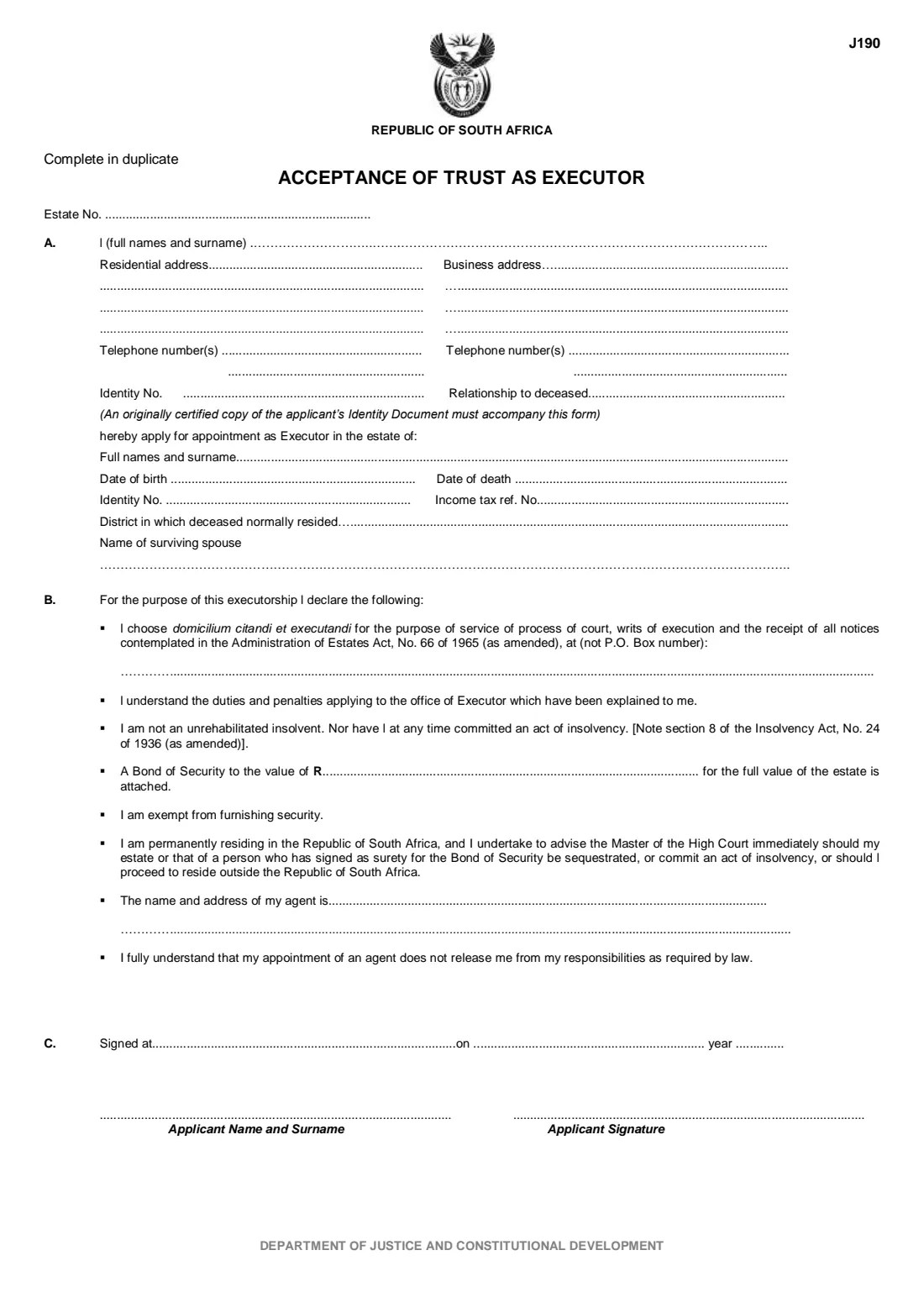
Before the Master of the High Court appoints someone as executor of a deceased estate, that person signs the J190, Acceptance of Trust as Executor. It records who the applicant is, which estate they are applying for, and a set of declarations they make about the office of executor.
Part A asks for your names, addresses, telephone numbers, ID number and relationship to the deceased, and then the deceased's names, dates of birth and death, ID number, income tax reference number, district and surviving spouse. Part B is the declaration: an address for service of legal papers (not a post-office box), that the executor's duties have been explained to you, that you are not an unrehabilitated insolvent, whether a bond of security is attached or you are exempt, that you live permanently in South Africa, and the name of any agent.
FileIt walks you through both parts, works out the 'signed on ... year ...' wording from one date, and prints everything into the Department of Justice's own J190 PDF. The form says to complete it in duplicate, so print two copies.
- Who fills it
- Each person applying to be appointed executor of the estate
- Lodged with
- The Master of the High Court dealing with the estate
- Copies
- Complete in duplicate (the form says so at the top)
- Attach
- An originally certified copy of the applicant's identity document
- Pages
- 1
- Agency
- Department of Justice and Constitutional Development — Master of the High Court
Who needs to fill out J190 Acceptance of trust?
- A person named as executor in a will who is applying to the Master for letters of executorship.
- A surviving spouse or family member applying to be appointed executor when there is no will.
- Each co-executor, when more than one person will act — every applicant signs their own acceptance.
When to use J190 Acceptance of trust
- When you lodge the documents to report an estate and apply for appointment as executor.
- When the Master asks a nominated executor to accept the trust before letters of executorship are issued.
- When an executor is replaced and the new executor applies for appointment.
What you need before you start
- The estate number, if the Master has already allocated one.
- Your full names, residential and business addresses, telephone numbers, ID number and relationship to the deceased.
- An originally certified copy of your identity document.
- The deceased's full names, date of birth, date of death, ID number and income tax reference number.
- The district where the deceased normally lived, and the name of any surviving spouse.
- A street address where legal papers can be served on you (not a P.O. box).
- If security is required, the bond of security and its value.
- The name and address of any agent you appoint.
What’s on J190 Acceptance of trust
The 2021 edition has 1 page. FileIt asks for it in 5 parts, and it is signed by Applicant (executor):
- A. You, the applicantApplicant (executor)
- The estate you are applying forApplicant (executor)
- B. Your declarationsApplicant (executor)
- Agent (if you appoint one)Applicant (executor)
- C. SignatureApplicant (executor)
How to fill out J190 Acceptance of trust, step by step
1 Part A — you
Give your full names and surname, your residential and business addresses on three lines each, up to two telephone numbers for each, your ID number and your relationship to the deceased. The form notes that an originally certified copy of your ID must accompany it.
2 Part A — the estate
Under 'hereby apply for appointment as Executor in the estate of' you give the deceased's full names, date of birth, date of death, ID number, income tax reference number and the district where they normally lived, then the name of the surviving spouse.
FileIt pre-fills the deceased's name and date of birth from the person you picked in your vault.
3 Part B — address for service and declarations
You choose a domicilium citandi et executandi: the street address where court process and notices under the Administration of Estates Act can be delivered. A post-office box is not accepted.
The printed declarations follow: the duties and penalties of the office have been explained to you, you are not an unrehabilitated insolvent and have not committed an act of insolvency, and you live permanently in South Africa and will tell the Master if that or your solvency changes.
4 Security
The form prints two statements: that a bond of security for the full value of the estate is attached (with its rand value), and that you are exempt from furnishing security. FileIt prints the bond value when you choose the bond. Cross out by hand the statement that does not apply before you sign.
5 Agent and signature
If you appoint an agent, give their name and address on the two lines. The form adds that appointing an agent does not release you from your responsibilities.
Part C records where and when you sign. FileIt prints the town, the day and month, and the year, plus your name under 'Applicant Name and Surname'. You sign above 'Applicant Signature'.
Common mistakes to avoid
- Giving a post-office box as the address for service — the form asks for a physical address.
- Leaving both security statements standing; cross out the one that does not apply.
- Forgetting the second copy: the form is completed in duplicate.
- Attaching a plain photocopy of your ID instead of an originally certified copy.
- Getting the deceased's ID number or dates different from the death notice.
After you fill it out
Print two copies of the filled J190 from your vault, cross out the security statement that does not apply, and sign both.
Lodge them with the Master together with your certified ID and the other estate documents the office asks for. FileIt never submits anything for you.
Keep the PDF with the deceased's other estate papers in your FileIt vault.
Fill out J190 Acceptance of trust online with FileIt
- Pick the person. Choose someone from People and FileIt fills in their name, date of birth, address and other details it already knows.
- Answer plain-language questions. One part of the form at a time, with the official help text beside each question — 29 fields in all. Your answers save as you go.
- Check the live preview. Watch your answers land on the real Department of Justice and Constitutional Development — Master of the High Court form, and let FileIt do any worksheet arithmetic.
- Generate the official PDF. FileIt prints your answers into the agency’s own PDF and files it in that person’s folder in your vault. Sign it, or send it for e-signature.
FileIt fills the form — it never files or submits anything for you. Deliver the finished form to whoever asked for it, the way the form’s instructions say.
Start J190 Acceptance of trust now — it’s freeJ190 Acceptance of trust: frequently asked questions
What does 'acceptance of trust as executor' mean?
It is the applicant's formal acceptance of the office of executor. By signing the J190 you apply to be appointed and make the declarations printed in Part B.
What is a domicilium citandi et executandi?
It is the address you choose where legal documents and notices can be delivered to you. The J190 asks for a physical address, not a P.O. box number.
Do I have to furnish security?
The form covers both possibilities: a bond of security attached, or exemption. Whether security is required is a matter for the Master; ask the Master's office if you are unsure.
Can two people be executors?
Each person applying signs their own acceptance of trust. FileIt fills one J190 per applicant.
Can I fill in the J190 online?
Yes. FileIt guides you through it and prints your answers into the official PDF, saved in your vault. You print, sign and lodge it yourself.
How is the J190 different from the J155?
The J155 is the undertaking for smaller estates handled under the Master's section 18(3) directions. The J190 is for applying to be appointed executor.
Official sources
- Blank form (PDF), published by Department of Justice and Constitutional Development — Master of the High Court: https://www.justice.gov.za/master/m_forms/J190.pdf
- Official instructions and guidance: https://www.justice.gov.za/master/deceased-how.html
- Edition shown on this page: J190 (no revision date printed; PDF revised September 2021) (checked 2026-10-19).
FileIt is not affiliated with or endorsed by Department of Justice and Constitutional Development — Master of the High Court or any government. This page explains the form in general terms and is not legal, tax or immigration advice. Always read the official instructions, and check that you are using the edition the recipient accepts. Page last reviewed 2026-10-19.