What is Form W-4?
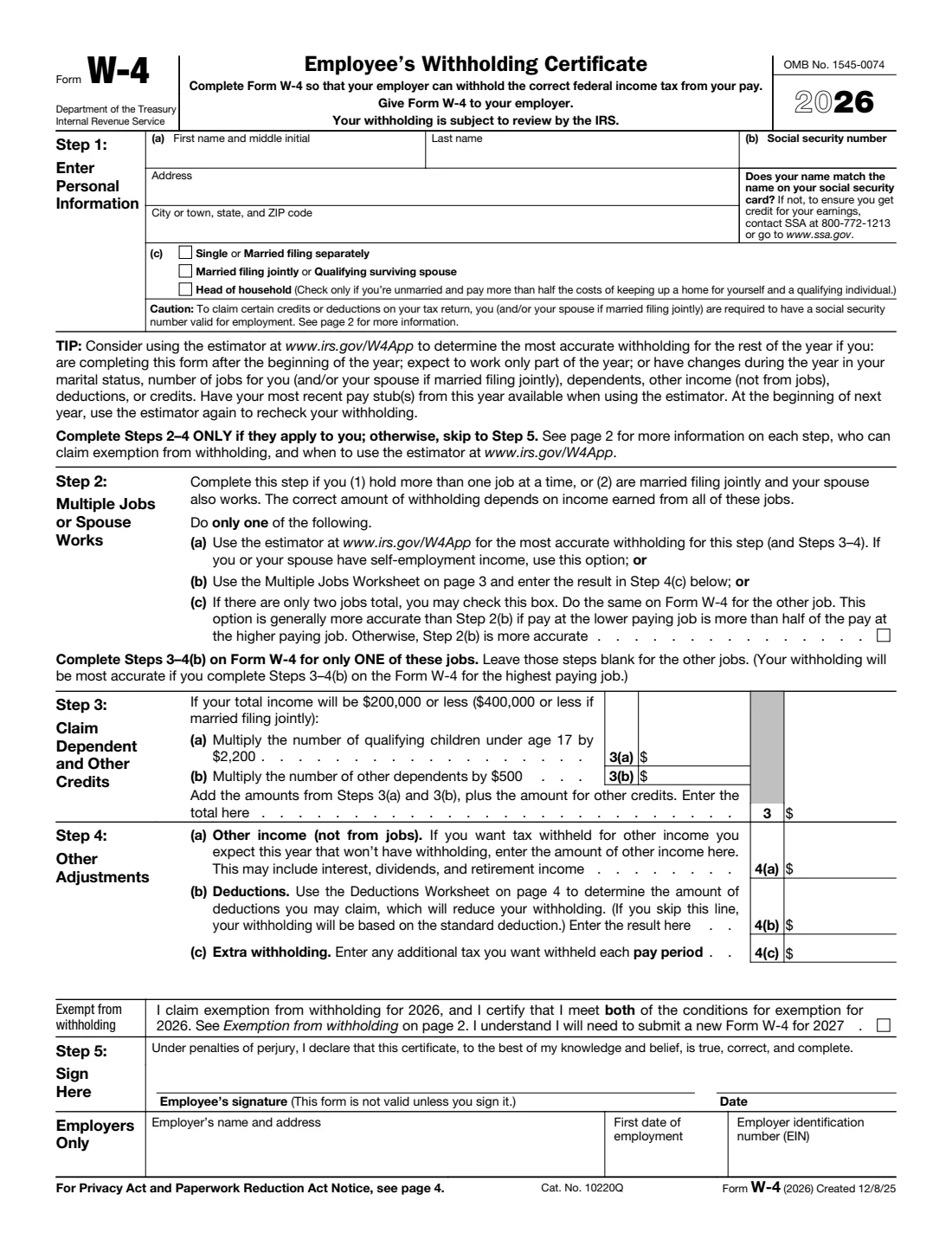
Form W-4, the Employee's Withholding Certificate, tells your employer how much federal income tax to withhold from your pay. It is published by the Internal Revenue Service (IRS), but you don't send it to the IRS. You give it to your employer, who uses it to set up payroll. The 2026 edition keeps the five-step layout the IRS introduced in 2020, so there are no "allowances" to count any more. Instead you enter your filing status, account for other jobs, and optionally claim credits, other income and deductions in dollar amounts.
Getting your W-4 right matters because withholding is how most people pay their income tax during the year. If too little is withheld, you will generally owe tax when you file your return and may owe a penalty. If too much is withheld, you will generally get a refund, which means you had less money in each paycheck than you needed to.
FileIt walks you through each step of the W-4 in plain language and prints your answers into the IRS's own official PDF. It pre-fills your name, address and other details from the People records in your vault, and works out the arithmetic for Step 3 and for the optional Multiple Jobs and Deductions Worksheets. The finished PDF is saved to your vault folder, and you can optionally send it for e-signature. You then give the signed form to your employer yourself — FileIt never files anything with the IRS or your employer.
- Who fills it
- The employee fills Steps 1–5; the employer fills the "Employers Only" box.
- Given to
- Your employer (payroll or HR). Do not send it to the IRS.
- When
- When you start a new job, and whenever your personal or financial situation changes.
- Signatures
- Employee signs and dates Step 5. The form is not valid unless you sign it.
- Edition
- 2026 (created 12/8/25)
- Agency
- Internal Revenue Service (IRS), Department of the Treasury
Who needs to fill out Form W-4?
- Every new employee in the United States who is paid wages and has federal income tax withheld.
- Current employees who want to change how much tax comes out of their paycheck, for example after getting a big refund or owing money at tax time.
- People who hold more than one job at the same time, since the right withholding depends on income from all jobs.
- Married couples filing jointly where both spouses work — each spouse gives a W-4 to their own employer.
- Employees who want to claim exemption from withholding for 2026 because they had no federal income tax liability in 2025 and expect none in 2026.
- Nonresident alien employees, who should first read IRS Notice 1392, Supplemental Form W-4 Instructions for Nonresident Aliens, as the form itself advises.
When to use Form W-4
- On or before your first day at a new job, so your very first paycheck is withheld correctly.
- When your marital status changes, you have or adopt a child, or a dependent no longer qualifies.
- When you or your spouse start or stop a second job, or your pay changes significantly.
- When you expect other income without withholding (such as interest, dividends or retirement income) or larger deductions than the standard deduction.
- If you claimed exemption for 2026: the form says you will need to submit a new Form W-4 by February 16, 2027.
- At the start of each year, the IRS suggests rechecking your withholding with its online estimator at www.irs.gov/W4App.
What you need before you start
- Your full legal name exactly as it appears on your Social Security card.
- Your Social Security number.
- Your current home address.
- Your expected tax filing status for the year (single, married filing jointly, head of household and so on).
- The number of qualifying children under age 17 and any other dependents you expect to claim.
- Pay details for every job you and your spouse hold, if Step 2 applies to you.
- Estimates of any income not from jobs, such as interest, dividends or retirement income.
- Estimates of deductions you expect to claim, if you want to use the Deductions Worksheet.
- Your most recent pay stub, if you are updating your W-4 partway through the year.
What’s on Form W-4
The 2026 edition has 5 pages. FileIt asks for it in 8 parts, and it is signed by Employee:
- Step 1: Personal informationEmployee
- Step 2: Multiple jobs or spouse worksEmployee
- Step 3: Claim dependent and other creditsEmployee
- Step 4 (optional): Other adjustmentsEmployee
- Exemption from withholdingEmployee
- Employers onlyEmployer
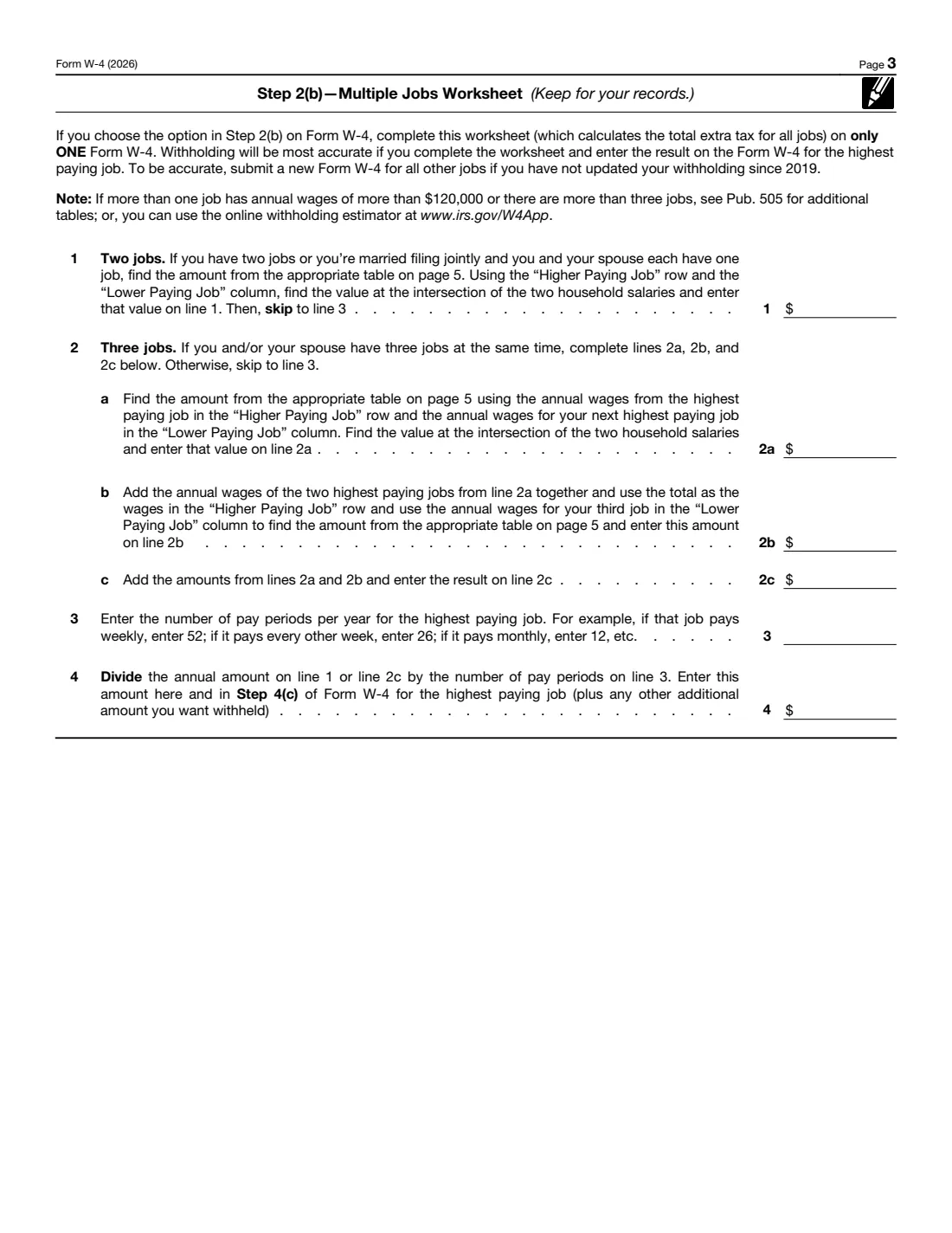
- Step 2(b) — Multiple Jobs WorksheetEmployee
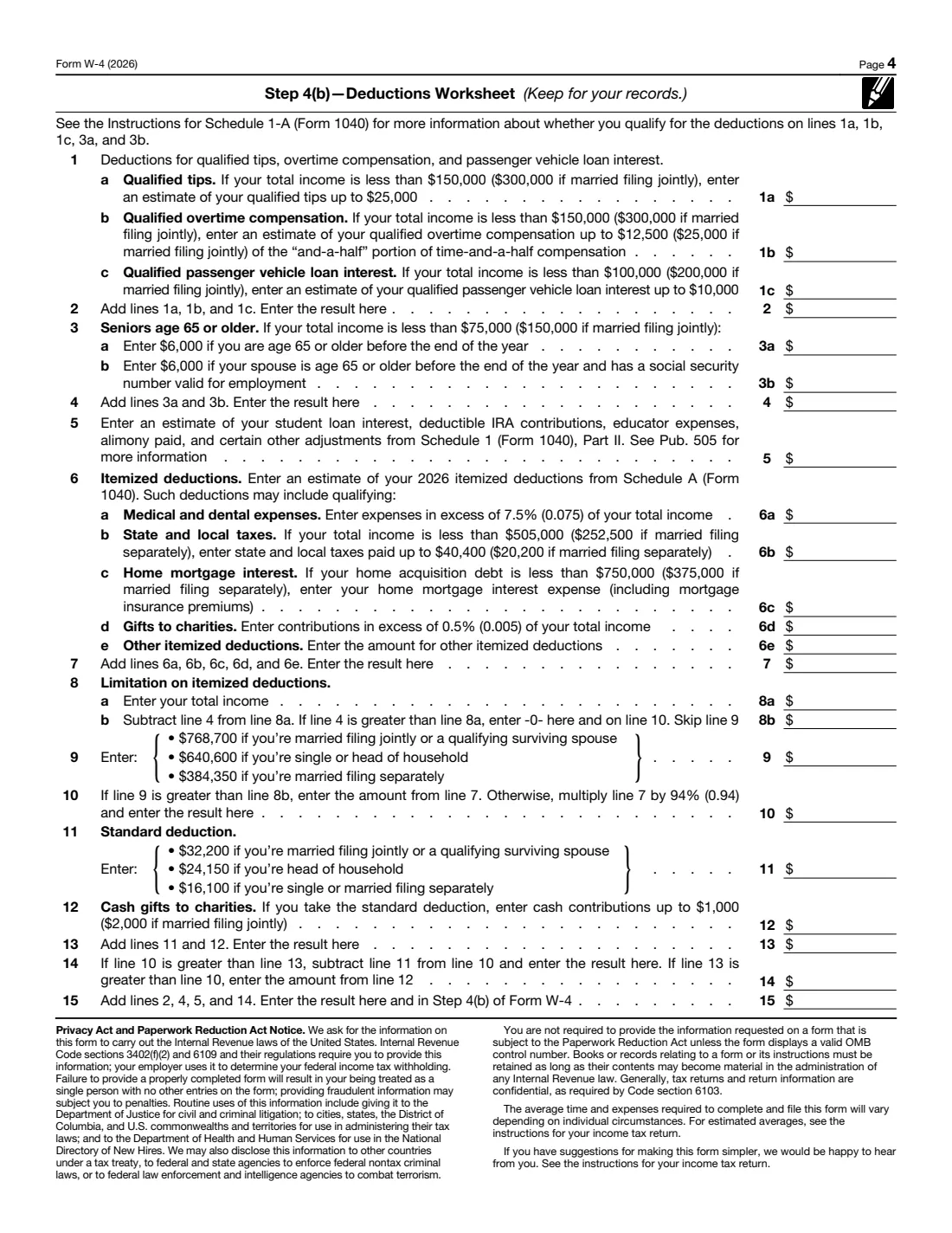
- Step 4(b) — Deductions WorksheetEmployee
How to fill out Form W-4, step by step
1 Step 1: Enter Personal Information
Enter your first name, middle initial, last name, address and Social Security number. The form asks whether your name matches the name on your Social Security card — if it doesn't, the IRS suggests contacting the Social Security Administration so you get credit for your earnings.
Then check one filing status in Step 1(c): "Single or Married filing separately", "Married filing jointly or Qualifying surviving spouse", or "Head of household". Only check head of household if you are unmarried and pay more than half the costs of keeping up a home for yourself and a qualifying individual. Your filing status sets the standard deduction and tax rates used to compute your withholding.
2 Step 2: Multiple Jobs or Spouse Works
Complete this step only if you hold more than one job at a time, or you are married filing jointly and your spouse also works. You do only one of three options: (a) use the IRS estimator at www.irs.gov/W4App — the most accurate option, and the one to use if you or your spouse have self-employment income; (b) use the Multiple Jobs Worksheet and enter the result in Step 4(c); or (c) if there are only two jobs in total, check the box on the W-4 for both jobs.
The checkbox in 2(c) splits the standard deduction and tax brackets in half for each job. The form says it works well when the two jobs pay similar amounts; otherwise more tax than necessary may be withheld. If you'd rather not share information about your other job with this employer, the form notes you can use option 2(b) instead of 2(c).
3 Step 3: Claim Dependent and Other Credits
This step applies only if your total income will be $200,000 or less ($400,000 or less if married filing jointly). On the 2026 edition you multiply the number of qualifying children under age 17 by $2,200 and the number of other dependents by $500, then add any other credits you expect, such as education credits or the foreign tax credit. FileIt does this multiplication and totals Step 3 for you.
If you have more than one job, complete Step 3 on the W-4 for only one of them — the IRS says withholding is most accurate if you use the highest paying job. Claiming credits here increases your take-home pay and reduces any refund.
4 Step 4 (optional): Other Adjustments
Step 4(a) is for other income (not from jobs) that you expect this year and that won't have tax withheld — for example interest, dividends and retirement income. Don't include self-employment income here. Step 4(b) is for deductions beyond the basic standard deduction, taken from the Deductions Worksheet. Step 4(c) is any extra tax you want withheld each pay period, including the result of the Multiple Jobs Worksheet.
If you skip Step 4(b), your withholding is based on the standard deduction. Entering an amount in 4(c) lowers each paycheck but increases your refund or reduces what you owe.
5 Exempt from withholding
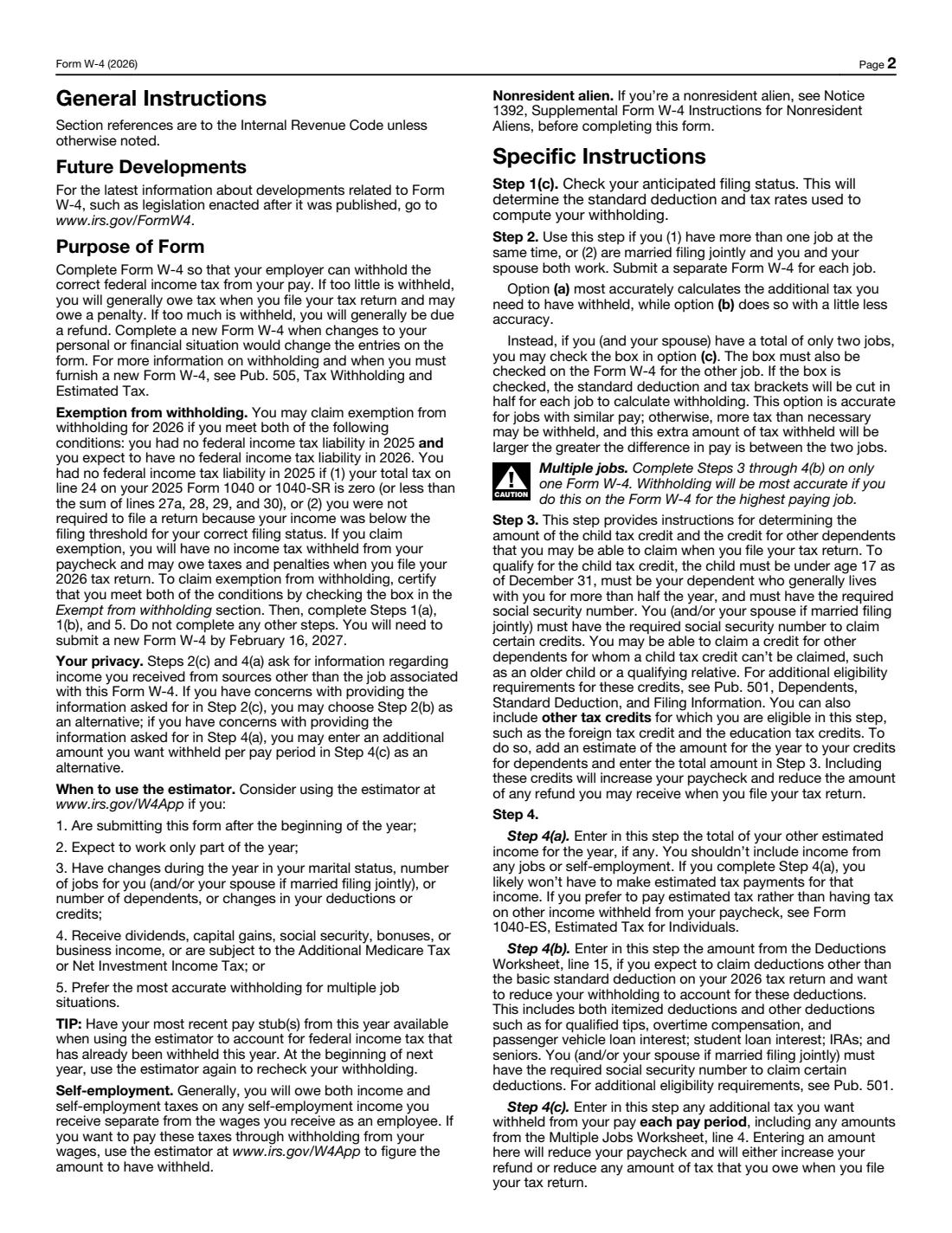
You may claim exemption for 2026 only if you meet both conditions: you had no federal income tax liability in 2025, and you expect none in 2026. If you check this box, complete only Steps 1(a), 1(b) and 5 — leave everything else blank. No federal income tax will be withheld, and you may owe tax and penalties when you file if your situation turns out differently.
An exemption lasts for one year only. The 2026 form states that you will need to submit a new W-4 by February 16, 2027.
6 Step 5: Sign Here
Sign and date the form. By signing you declare, under penalties of perjury, that the certificate is true, correct and complete to the best of your knowledge. The form is not valid unless you sign it.
7 Employers Only
This box is for your employer, not you. The employer enters its name and address, your first date of employment and its employer identification number (EIN). If you are filling in the form for your own household employee or small business, FileIt lets you complete this box too.
8 Step 2(b) — Multiple Jobs Worksheet
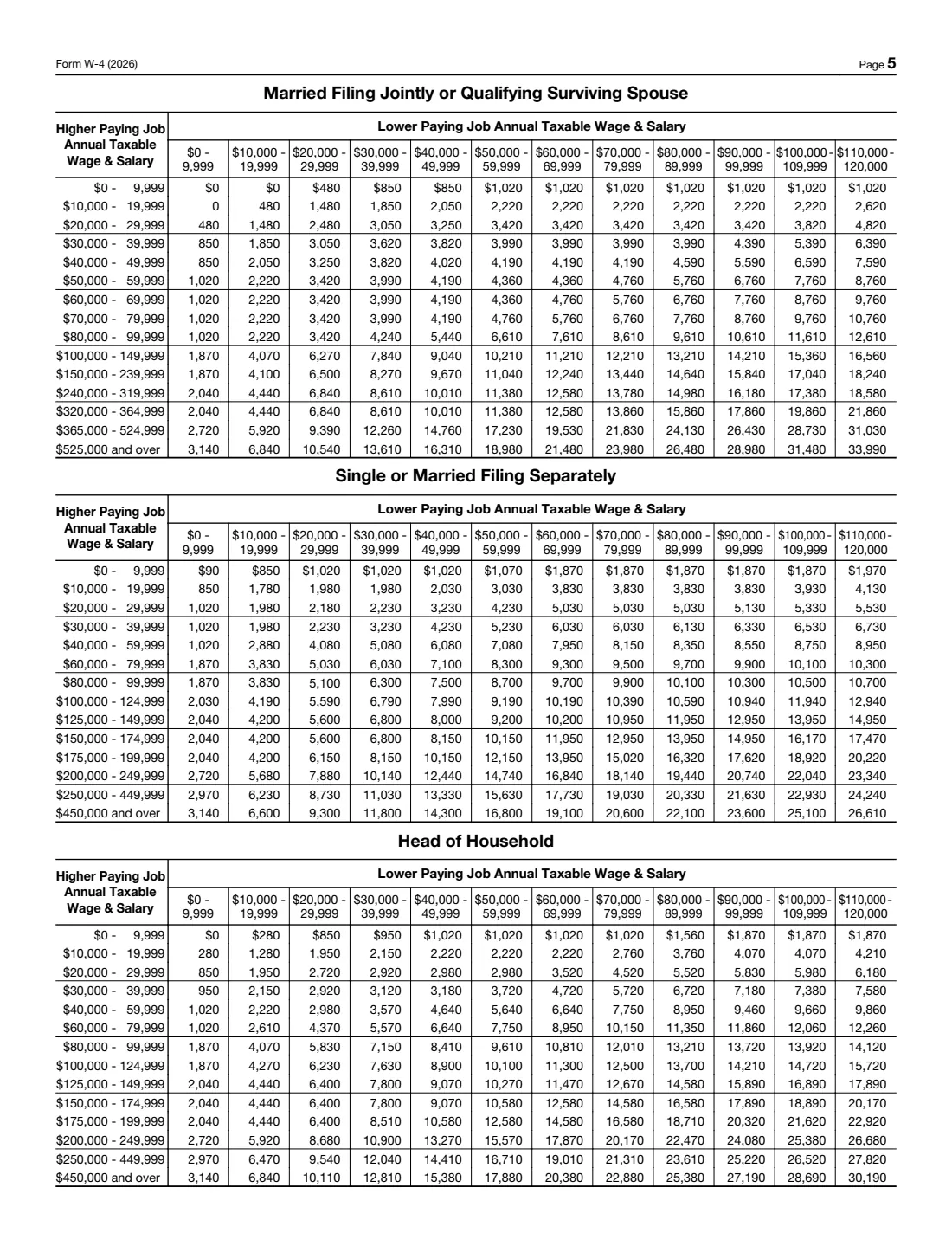
This worksheet works out the extra tax to withhold when you have two or three jobs. For two jobs, look up the amount in the table on page 5 where the higher paying job's row meets the lower paying job's column. For three jobs, you use the table twice (lines 2a and 2b). Divide the result by the number of pay periods per year for the highest paying job (for example 52 weekly, 26 every other week, 12 monthly) and enter the answer in Step 4(c).
Complete this worksheet on only one W-4, ideally for the highest paying job. The form says to see Pub. 505 or use the online estimator if more than one job pays over $120,000 a year or there are more than three jobs. FileIt does the addition and division once you've looked up the table amounts.
9 Step 4(b) — Deductions Worksheet
Use this worksheet if you expect to claim more than the standard deduction on your 2026 return. The 2026 edition includes lines for qualified tips, qualified overtime compensation, qualified passenger vehicle loan interest and the additional amount for people 65 or older, each with its own income limits and caps printed on the worksheet. It also covers adjustments such as student loan interest and deductible IRA contributions, and itemized deductions like mortgage interest, state and local taxes, medical expenses and gifts to charity.
The worksheet compares your itemized deductions to the standard deduction for your filing status and carries the result from line 15 into Step 4(b). FileIt computes the totals, the limit and the standard deduction lines for you from the figures you enter.
Common mistakes to avoid
- Filling in Steps 3 and 4(b) on the W-4 for every job. Complete them on only one W-4 — ideally the one for your highest paying job — and leave them blank on the others.
- Checking the Step 2(c) box on only one job. If you use it, the box must also be checked on the W-4 for the other job.
- Using more than one Step 2 option. The form tells you to do only one of the estimator, the worksheet or the checkbox.
- Claiming exemption without meeting both conditions. You must have had no federal income tax liability in 2025 and expect none in 2026.
- Choosing head of household just because you live alone. It requires paying more than half the cost of keeping up a home for yourself and a qualifying individual.
- Using a name that doesn't match your Social Security card, which can cause problems crediting your earnings.
- Forgetting to sign. An unsigned W-4 is not valid.
- Never updating it. A W-4 from years ago may no longer reflect your jobs, family or deductions.
After you fill it out
Sign and date Step 5 — by hand on the printed PDF, or through FileIt's optional e-signature. Then give the form to your employer, usually the payroll or HR department. The form itself says: give Form W-4 to your employer. You do not mail it to the IRS; your employer keeps it and uses it to calculate your withholding.
FileIt saves the completed PDF in your vault folder, so you have a copy of exactly what you gave your employer. Keep the worksheets for your records too — the form notes the Multiple Jobs Worksheet is for your records and isn't something your employer needs.
Check your first paycheck after the change to make sure the withholding looks right. Fill out a new W-4 whenever your situation changes, and recheck your withholding at the start of each year. If you claimed exemption for 2026, remember a new W-4 is due by February 16, 2027.
Fill out Form W-4 online with FileIt
- Pick the person. Choose someone from People and FileIt fills in their name, date of birth, address and other details it already knows.
- Answer plain-language questions. One part of the form at a time, with the official help text beside each question — 54 fields in all. Your answers save as you go.
- Check the live preview. Watch your answers land on the real Internal Revenue Service (IRS) form, and let FileIt do any worksheet arithmetic.
- Generate the official PDF. FileIt prints your answers into the agency’s own PDF and files it in that person’s folder in your vault. Sign it, or send it for e-signature.
FileIt fills the form — it never files or submits anything for you. Deliver the finished form to whoever asked for it, the way the form’s instructions say.
Start Form W-4 now — it’s freeForm W-4: frequently asked questions
Can I fill out Form W-4 online?
Yes. With FileIt you answer guided questions and your answers are printed into the official IRS W-4 PDF, with Step 3 and the worksheets calculated for you. Filling forms is available on every FileIt account, including the free plan. You can download the PDF, sign it by hand or use FileIt's optional e-signature, and then give it to your employer.
Where do I send my W-4?
Give it to your employer, not the IRS. The form says "Give Form W-4 to your employer." Your employer's payroll team uses it to set your withholding and keeps it on file.
What are allowances on the W-4?
The current W-4 no longer uses allowances. Since 2020 the form asks for your filing status, whether you have multiple jobs, and dollar amounts for credits, other income, deductions and extra withholding.
How much is the child credit on the 2026 W-4?
On the 2026 edition, Step 3 multiplies the number of qualifying children under age 17 by $2,200 and other dependents by $500. Step 3 applies only if your total income will be $200,000 or less ($400,000 or less if married filing jointly). These amounts can change from year to year, so always use the edition for the current year.
Should I check the box in Step 2(c)?
Only if there are exactly two jobs in total between you and your spouse, and you check it on both W-4s. The form says this option is accurate when the two jobs have similar pay; if the pay is very different, more tax than necessary may be withheld, and the worksheet or IRS estimator is more accurate.
Can I claim exempt on my W-4?
Only if you had no federal income tax liability in 2025 and expect none in 2026. If you qualify, check the box, complete Steps 1(a), 1(b) and 5 only, and plan to submit a new W-4 by February 16, 2027.
How often should I update my W-4?
Whenever a change in your life would change your entries — marriage, divorce, a new child, a second job, a big change in income or deductions. The IRS also suggests rechecking your withholding at the start of each year.
Do I need a W-4 for a second job?
Yes. You submit a separate Form W-4 for each job. Complete Steps 3 through 4(b) on only one of them, ideally the highest paying job, and handle Step 2 so the total withholding across jobs is right.
What if I'm self-employed as well as an employee?
The W-4 says that if you or your spouse have self-employment income, you should use the IRS estimator at www.irs.gov/W4App for Step 2. It can figure extra withholding from your wages to cover income and self-employment tax on that income.
Official sources
- Blank form (PDF), published by Internal Revenue Service (IRS): https://www.irs.gov/pub/irs-pdf/fw4.pdf
- Official instructions and guidance: https://www.irs.gov/forms-pubs/about-form-w-4
- Edition shown on this page: 2026 (created 12/8/25) (checked 2026-09-25).
FileIt is not affiliated with or endorsed by Internal Revenue Service (IRS) or any government. This page explains the form in general terms and is not legal, tax or immigration advice. Always read the official instructions, and check that you are using the edition the recipient accepts. Page last reviewed 2026-09-25.