What is Form DE 4?
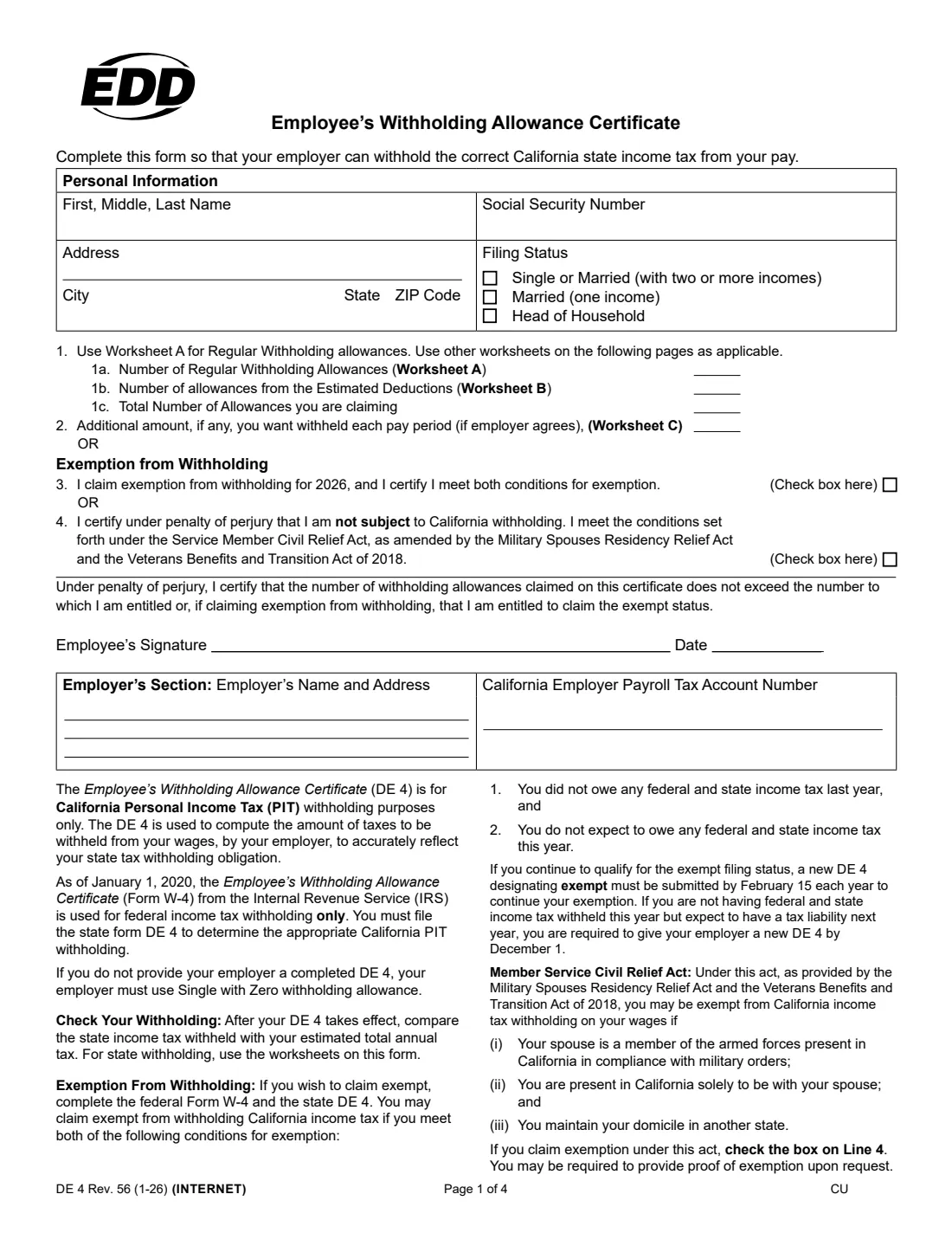
Form DE 4, the Employee's Withholding Allowance Certificate, is California's own version of a withholding certificate. The federal Form W-4 only controls federal income tax withholding, so if you work in California your employer also needs a DE 4 to work out how much California Personal Income Tax (PIT) to take out of each paycheck. The current edition is DE 4 Rev. 56 (1-26), issued by the California Employment Development Department (EDD).
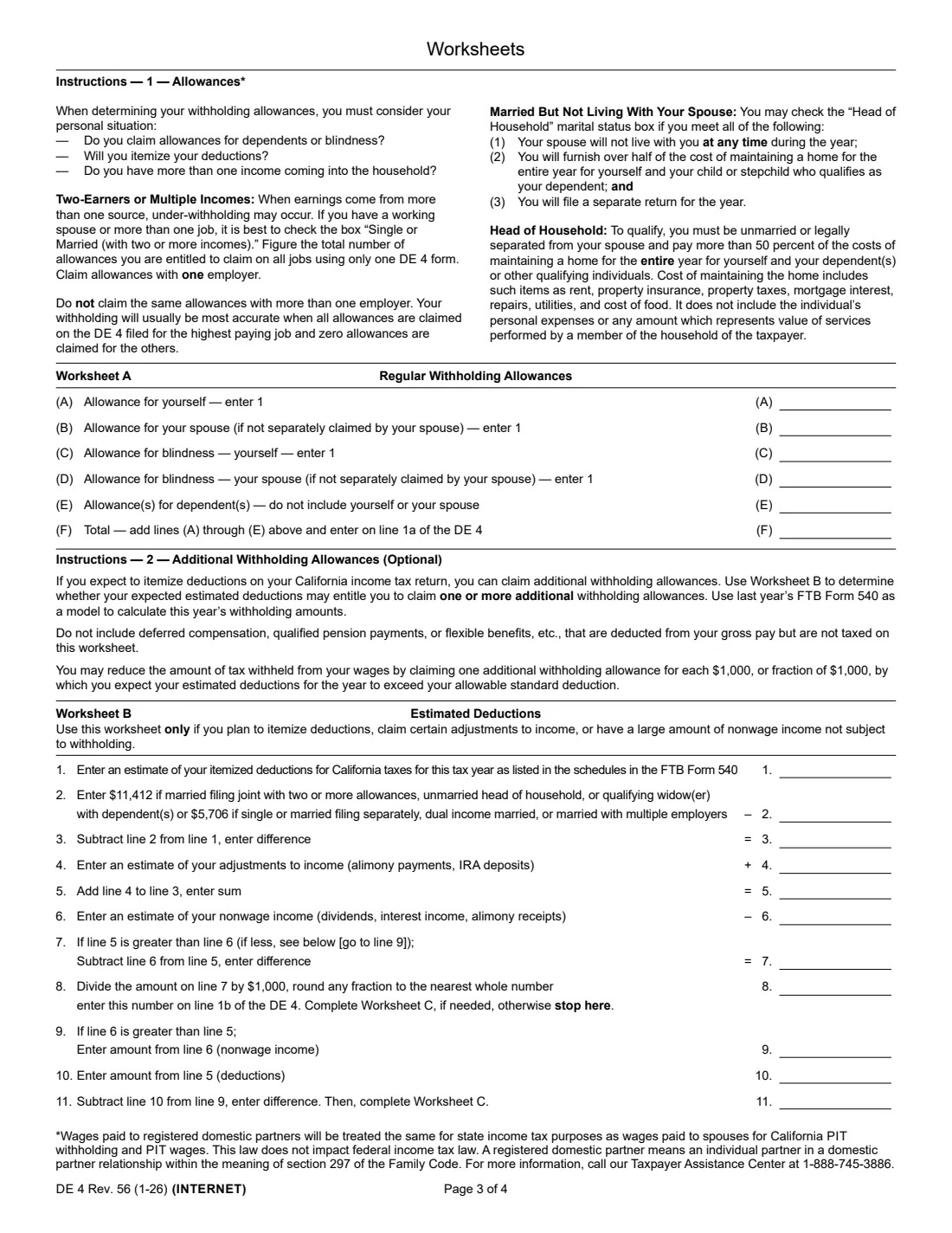
Getting the DE 4 right matters in both directions. If you never hand one in, the form says your employer must withhold as if you were Single with zero allowances, which can mean more tax taken out than you need. Claim too many allowances and you may end up owing California tax at filing time. The form's three worksheets help you land in between: Worksheet A counts your regular allowances, Worksheet B adds allowances for large itemized deductions, and Worksheet C works out an extra flat amount to withhold each pay period.
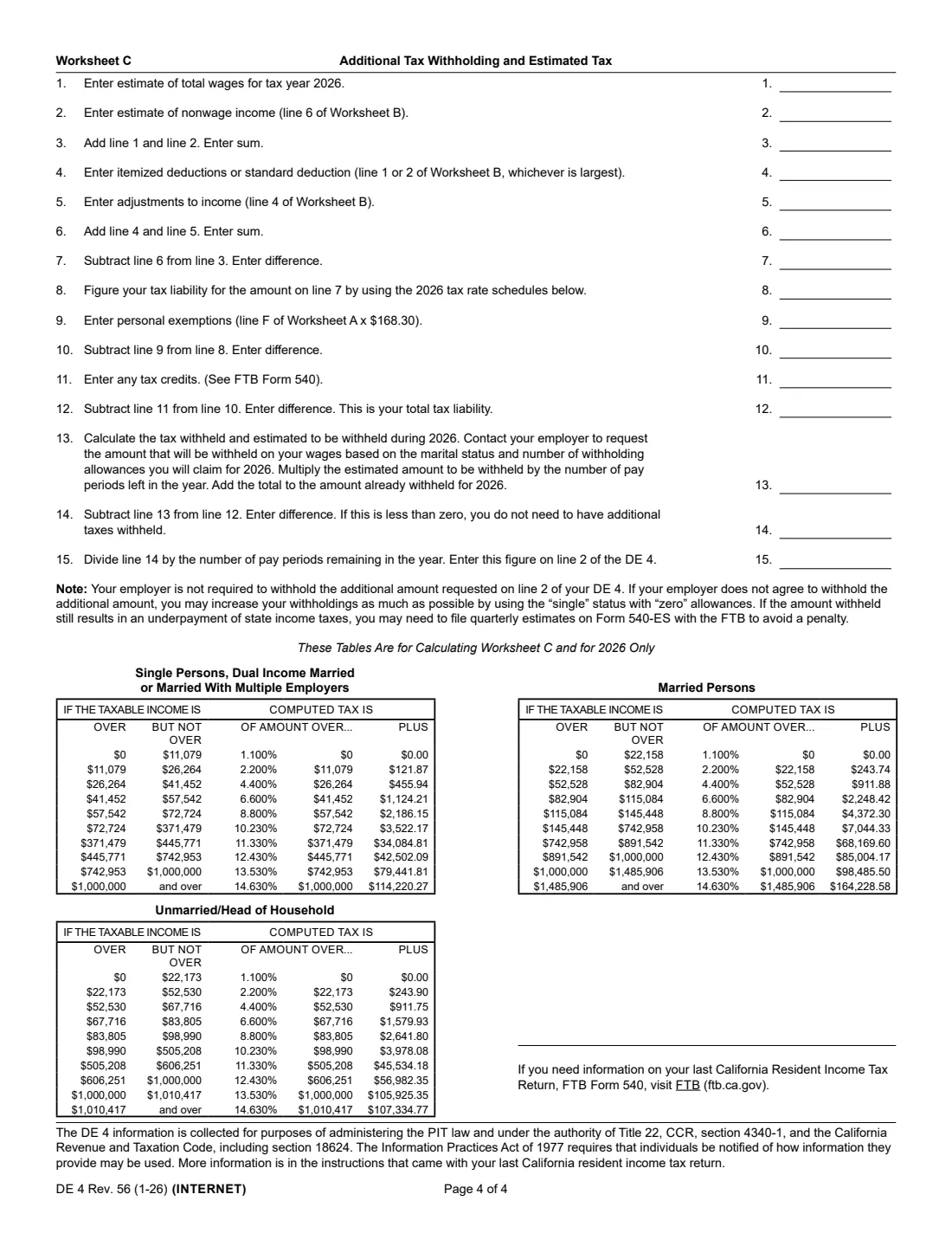
FileIt lets you fill out the DE 4 online in a guided form. It pre-fills your name and address from the People records in your vault, does the worksheet math for you (including the 2026 tax rate schedules printed on page 4 of the form), and prints your answers into the EDD's own official PDF. The finished DE 4 is saved in your vault folder, and you can send it for e-signature if you like. FileIt never submits anything to the EDD or to your employer — you hand the completed form to your employer yourself.
- Who fills it
- The employee (personal information, allowances or exemption, signature); the employer adds its name, address and California payroll tax account number.
- Given to
- Your employer, not the EDD. The EDD or the Franchise Tax Board can ask the employer for it.
- When
- When you start a job in California, whenever your situation changes, and by February 15 each year if you claim exemption.
- Signatures
- The employee signs and dates it under penalty of perjury.
- Edition
- DE 4 Rev. 56 (1-26), for 2026.
- Cost
- Free to fill out on any FileIt account.
Who needs to fill out Form DE 4?
- New employees starting a job where California state income tax will be withheld from their wages.
- Current California employees who want to change how much state tax comes out of each paycheck.
- Anyone whose federal W-4 has changed and who wants their California withholding to match their new situation — the W-4 no longer carries over to California.
- Two-income households and people with more than one job, who the form says are usually best off checking Single or Married (with two or more incomes).
- Employees who owed no federal or state income tax last year and expect to owe none this year, and want to claim exemption on line 3.
- Military spouses in California only to be with a service member spouse under military orders, who keep a domicile in another state (line 4).
When to use Form DE 4
- On your first day or during onboarding with a California employer, alongside the federal Form W-4 and Form I-9.
- After a life change that affects your taxes: marriage, divorce or separation, a new dependent, a spouse starting or stopping work, or picking up a second job.
- If you plan to itemize large deductions or have significant nonwage income (dividends, interest) that nothing is withheld from.
- By February 15 each year if you want to keep claiming exempt status — the form says an exempt DE 4 must be renewed by that date.
- By December 1 if you are not having federal and state tax withheld this year but expect to owe tax next year — the form says you must give your employer a new DE 4 by then.
- Any time you check your withholding against your expected annual California tax and find it is too high or too low.
What you need before you start
- Your full legal name, Social Security number and home address.
- Your filing status: Single or Married (with two or more incomes), Married (one income), or Head of Household.
- The number of dependents you can claim, and whether you or your spouse is blind (Worksheet A).
- Last year's California Resident Income Tax Return (FTB Form 540), which the form suggests using as a model for Worksheet B.
- An estimate of your itemized deductions and adjustments to income such as IRA deposits or alimony payments (Worksheet B).
- An estimate of your nonwage income, such as dividends and interest (Worksheets B and C).
- Your estimated total 2026 wages, any tax credits you expect, and what has been withheld so far this year (Worksheet C).
- The number of pay periods left in the year, if you are using Worksheet C.
- Your employer's name, address and 8-digit California employer payroll tax account number, if you are filling in the employer's section.
What’s on Form DE 4
The 2026 edition has 4 pages. FileIt asks for it in 7 parts, and it is signed by Employee:
- Personal informationEmployee
- Lines 1–2: Withholding allowances and additional withholdingEmployee
- Lines 3–4: Exemption from withholdingEmployee
- Employer's sectionEmployer
- Worksheet A — Regular withholding allowancesEmployee
- Worksheet B — Estimated deductionsEmployee
- Worksheet C — Additional tax withholding and estimated taxEmployee
How to fill out Form DE 4, step by step
1 Personal Information
Enter your first, middle and last name, Social Security number, and street address with city, state and ZIP code. The name box on the form is short, so if your full name doesn't fit, use your middle initial.
Then pick your filing status. The DE 4 has three choices: Single or Married (with two or more incomes), Married (one income), and Head of Household. If you have a working spouse or more than one job, the form's instructions say it is best to check Single or Married (with two or more incomes), because under-withholding is common when there are several paychecks. Registered domestic partners are treated the same as spouses for California withholding.
2 Filing status: Head of Household and married but living apart
Head of Household is for people who are unmarried or legally separated and pay more than 50 percent of the costs of keeping up a home for the whole year for themselves and their dependents or other qualifying individuals. Costs include rent, mortgage interest, property taxes, property insurance, repairs, utilities and food.
If you are married but not living with your spouse, the form lets you check Head of Household only if all three apply: your spouse won't live with you at any time during the year, you pay over half the cost of a home for the whole year for yourself and a child or stepchild who is your dependent, and you will file a separate return.
3 Worksheet A — Regular Withholding Allowances
Worksheet A is where most people start. You enter 1 for yourself, 1 for your spouse (if your spouse isn't claiming their own allowance), 1 for your own blindness and 1 for your spouse's blindness (same rule), plus the number of dependents — not counting yourself or your spouse. Line F is the total, and it goes on line 1a of the DE 4.
Claim your allowances with one employer only. The form says withholding is usually most accurate when all allowances are claimed on the DE 4 for your highest-paying job and zero allowances on the others. FileIt adds up Worksheet A and fills line 1a automatically.
4 Worksheet B — Estimated Deductions
Use Worksheet B only if you plan to itemize deductions, claim adjustments to income, or have a large amount of nonwage income that nothing is withheld from. You enter your estimated itemized deductions, subtract the standard deduction, add adjustments to income, and subtract your nonwage income. For the 2026 edition the standard deduction on line 2 is $5,706 for single, married filing separately, dual-income married or married with multiple employers, and $11,412 for married filing jointly with two or more allowances, unmarried head of household, or qualifying widow(er) with dependents.
If deductions come out ahead, you get one extra allowance for each $1,000 (line 8), which goes on line 1b. If your nonwage income is bigger, lines 9 to 11 show the difference and send you to Worksheet C. Don't include deferred compensation, qualified pension payments or flexible benefits that are taken out of your pay before tax. FileIt runs this worksheet and fills line 1b for you.
5 Worksheet C — Additional Tax Withholding and Estimated Tax
Worksheet C estimates your full-year California tax and compares it with what will be withheld. You enter estimated 2026 wages, nonwage income, deductions and adjustments; the worksheet finds your taxable income, looks up the tax in the 2026 rate schedule for your filing status, subtracts $168.30 for each Worksheet A allowance (the 2026 personal exemption figure), and subtracts any credits.
On line 13 you enter the tax withheld and expected to be withheld for the rest of the year — the form suggests asking your employer what will be withheld per pay period at the status and allowances you are claiming. If there is a shortfall, line 15 divides it by the pay periods remaining, and that per-paycheck amount goes on line 2. FileIt does the tax-table lookup and division and rounds line 2 to whole dollars.
6 Lines 1a–1c and line 2 — Allowances and additional withholding
Line 1a is your regular allowances from Worksheet A, line 1b is your extra allowances from Worksheet B, and line 1c is the total you are claiming. Line 2 is any additional flat amount you want withheld each pay period, usually from Worksheet C.
The form notes that your employer is not required to withhold the additional amount on line 2. If they won't, the form suggests using Single status with zero allowances to increase withholding, and paying quarterly estimated tax on Form 540-ES with the Franchise Tax Board if that still isn't enough.
7 Lines 3 and 4 — Exemption from Withholding
Instead of lines 1 and 2, you can claim exemption. Line 3 is for people who owed no federal and state income tax last year and don't expect to owe any this year; you must also complete a federal Form W-4, and an exempt DE 4 must be renewed by February 15 each year.
Line 4 is the military-spouse exemption under the Service Member Civil Relief Act, as amended by the Military Spouses Residency Relief Act and the Veterans Benefits and Transition Act of 2018. It applies if your spouse is a member of the armed forces present in California under military orders, you are in California only to be with your spouse, and you keep your domicile in another state. You may be asked to prove it. Claim line 3 or line 4, not both, and leave lines 1 and 2 blank if you claim either.
8 Employee's Signature and Date
You sign and date the DE 4, certifying under penalty of perjury that you aren't claiming more allowances than you're entitled to, or that you qualify for the exemption you claimed. With FileIt you can sign using the optional e-signature flow or print the finished PDF and sign by hand, depending on what your employer accepts.
9 Employer's Section
The bottom of page 1 is for the employer: the employer's name and address, and its California Employer Payroll Tax Account Number (an 8-digit EDD number, often written like 123-4567-8). Employees can leave this blank for HR to complete. If you run payroll for your own business or household employee, FileIt can pre-fill your employer details from the entity records in your vault.
Common mistakes to avoid
- Assuming your federal W-4 covers California. Since 2020 the W-4 is for federal withholding only, so without a DE 4 your employer must use Single with zero allowances.
- Claiming the same allowances at two jobs, or both spouses claiming each other. Put all allowances on the DE 4 for your highest-paying job and zero on the others.
- Choosing Married (one income) when both spouses work. The form recommends Single or Married (with two or more incomes) for two-earner households.
- Checking the exemption box and also entering allowances or an extra amount. Lines 3 and 4 replace lines 1 and 2.
- Forgetting to renew an exempt DE 4 by February 15 — without a new one your exemption doesn't carry on.
- Using Worksheet C without accounting for tax already withheld earlier in the year, which overstates the extra amount needed on line 2.
- Reusing an old edition's worksheet figures. The standard deduction, the per-allowance amount and the tax rate schedules are specific to the 2026 edition (Rev. 56).
- Claiming more allowances than you're entitled to. The form warns of a $500 fine for filing a DE 4 with no reasonable basis that results in less tax withheld, and criminal penalties for willfully false information.
After you fill it out
Sign and date the form, then give it to your employer's payroll or HR team. The DE 4 stays with your employer — the form doesn't ask you to send it to the EDD, though the EDD or the Franchise Tax Board can require your employer to produce it. Your employer uses it together with the withholding tables in the California Employer's Guide (DE 44).
Keep a copy. FileIt saves the finished, flattened PDF in your vault folder, so you can see exactly which status and allowances you claimed if a paycheck looks wrong or you need to update the form later.
Check your first few paychecks once the DE 4 takes effect and compare the California tax withheld with your expected tax for the year. File a new DE 4 whenever your household, income or deductions change, and by February 15 each year if you claim exempt status.
Fill out Form DE 4 online with FileIt
- Pick the person. Choose someone from People and FileIt fills in their name, date of birth, address and other details it already knows.
- Answer plain-language questions. One part of the form at a time, with the official help text beside each question — 53 fields in all. Your answers save as you go.
- Check the live preview. Watch your answers land on the real California Employment Development Department (EDD) form, and let FileIt do any worksheet arithmetic.
- Generate the official PDF. FileIt prints your answers into the agency’s own PDF and files it in that person’s folder in your vault. Sign it, or send it for e-signature.
FileIt fills the form — it never files or submits anything for you. Deliver the finished form to whoever asked for it, the way the form’s instructions say.
Start Form DE 4 now — it’s freeForm DE 4: frequently asked questions
What is the California DE 4 form?
The DE 4 is the Employee's Withholding Allowance Certificate from the California Employment Development Department. It tells your employer how much California state income tax to withhold from your pay. It is separate from the federal Form W-4, which covers federal tax only.
Do I need both a W-4 and a DE 4?
Yes, if you work in California. Since January 1, 2020, the W-4 is used for federal withholding only, so California needs its own DE 4. If you don't give your employer a DE 4, they must withhold as Single with zero allowances.
How many allowances should I claim on the DE 4?
Worksheet A gives you one allowance for yourself, one for your spouse if your spouse isn't claiming it, one each for blindness, and one per dependent. Worksheet B can add more if you itemize large deductions. The right number depends on your situation, so work through the worksheets rather than guessing.
Where do I send Form DE 4?
Give it to your employer, not the EDD. Your employer keeps it and uses it to calculate your withholding. The EDD or the Franchise Tax Board can ask your employer for it if needed.
Can I fill out the DE 4 online?
Yes. With FileIt you answer a guided form, FileIt runs Worksheets A, B and C for you and prints everything into the official EDD PDF. The finished form is saved in your vault and can be sent for e-signature. You then give it to your employer yourself — FileIt does not submit it anywhere.
Can I claim exempt from California withholding?
Only if you meet both conditions printed on the form: you owed no federal and state income tax last year, and you expect to owe none this year. You also need to complete a federal Form W-4, and you must renew the exempt DE 4 by February 15 each year. Military spouses may qualify separately under line 4.
What if my employer won't withhold the extra amount on line 2?
The form says employers aren't required to agree. It suggests using Single status with zero allowances to increase withholding, and if that still leaves you short, paying quarterly estimated tax on Form 540-ES to the Franchise Tax Board.
Is the DE 4 different from New York's IT-2104?
Yes. Each state that has its own withholding certificate uses its own form and rules. The DE 4 covers California only, while the IT-2104 covers New York State, New York City and Yonkers withholding. If you work in New York, you need the IT-2104 instead.
How often should I update my DE 4?
Whenever your filing status, number of dependents, jobs or expected deductions change, and every year by February 15 if you claim exemption. It's also worth reviewing after you check a few paychecks against your expected annual California tax.
Official sources
- Blank form (PDF), published by California Employment Development Department (EDD): https://edd.ca.gov/siteassets/files/pdf_pub_ctr/de4.pdf
- Official instructions and guidance: https://edd.ca.gov/Payroll_Taxes/Forms_and_Publications.htm
- Edition shown on this page: DE 4 Rev. 56 (1-26) (checked 2026-09-25).
FileIt is not affiliated with or endorsed by California Employment Development Department (EDD) or any government. This page explains the form in general terms and is not legal, tax or immigration advice. Always read the official instructions, and check that you are using the edition the recipient accepts. Page last reviewed 2026-09-25.