What is Form I-9?
Form I-9, Employment Eligibility Verification, is the form U.S. employers use to verify the identity and employment authorization of every person they hire. It is published by U.S. Citizenship and Immigration Services (USCIS), part of the Department of Homeland Security. The new employee completes Section 1 by their first day of work, and the employer completes Section 2 within three business days after examining the employee's identity and work-authorization documents.
Unlike most government forms, the I-9 is not sent to USCIS. The employer keeps it on file and must be able to produce it if asked. The current edition is dated 01/20/25 and shows an expiration date of 05/31/2027 in the top corner — that date refers to the form version, not to the employee's paperwork.
FileIt guides both the employee and the employer through their parts in plain language and prints the answers into USCIS's own official PDF. It pre-fills the employee's name, address and date of birth, and the employer's details, from the People records in your vault. The finished form is saved to the vault, and you can optionally send it for e-signature. FileIt never submits anything to USCIS or E-Verify — the employer keeps the completed form.
- Who fills it
- The employee completes Section 1; the employer or its authorized representative completes Section 2.
- Given to
- The employer, who retains it. Do not send it to USCIS.
- When
- Section 1 by the first day of employment (not before accepting a job offer); Section 2 within three business days after the first day of employment.
- Signatures
- The employee signs Section 1; the employer or authorized representative signs Section 2.
- Edition
- 01/20/25 (expires 05/31/2027)
- Agency
- U.S. Citizenship and Immigration Services (USCIS), Department of Homeland Security
Who needs to fill out Form I-9?
- Every person hired for employment in the United States — U.S. citizens included, not just noncitizens.
- Every U.S. employer, including small businesses, which must complete and keep an I-9 for each new hire.
- Households that employ someone directly, such as a nanny or caregiver, since they are employers too.
- Employers rehiring a former employee, who may use Supplement B instead of a new form in some cases.
- Employees whose employment authorization document expires, who will need reverification in Supplement B.
- Anyone who helps an employee fill out Section 1 as a preparer or translator, who must complete Supplement A.
When to use Form I-9
- After a job offer is accepted: the employee completes Section 1 no later than the first day of employment, but not before accepting the offer.
- Within three business days after the employee's first day of work, the employer examines the documents and completes Section 2.
- When an employee's temporary work authorization expires, the employer completes reverification in Supplement B.
- When a former employee is rehired within three years of the date the original I-9 was completed, the employer can use Supplement B.
- When an employee provides proof of a legal name change, the change can be recorded in Supplement B.
What you need before you start
- The employee's full legal name and any other last names used (for example a maiden name).
- The employee's home address and date of birth.
- The employee's Social Security number — optional unless the employer participates in E-Verify.
- For a lawful permanent resident: the USCIS number or A-Number.
- For a noncitizen authorized to work: the work authorization expiration date (if any) and one of an A-Number, Form I-94 admission number, or foreign passport number and country of issuance.
- Original, unexpired documents the employee chooses to present: one from List A, or one from List B plus one from List C.
- The employee's first day of employment.
- The employer's business name and address, and the name and title of the person completing Section 2.
What’s on Form I-9
The 2025 edition has 4 pages. FileIt asks for it in 2 parts, and it is signed by Employee and Employer:
- Section 1: Employee information and attestationEmployee
- Section 2: Employer review and verificationEmployer
How to fill out Form I-9, step by step
1 Section 1. Employee Information and Attestation
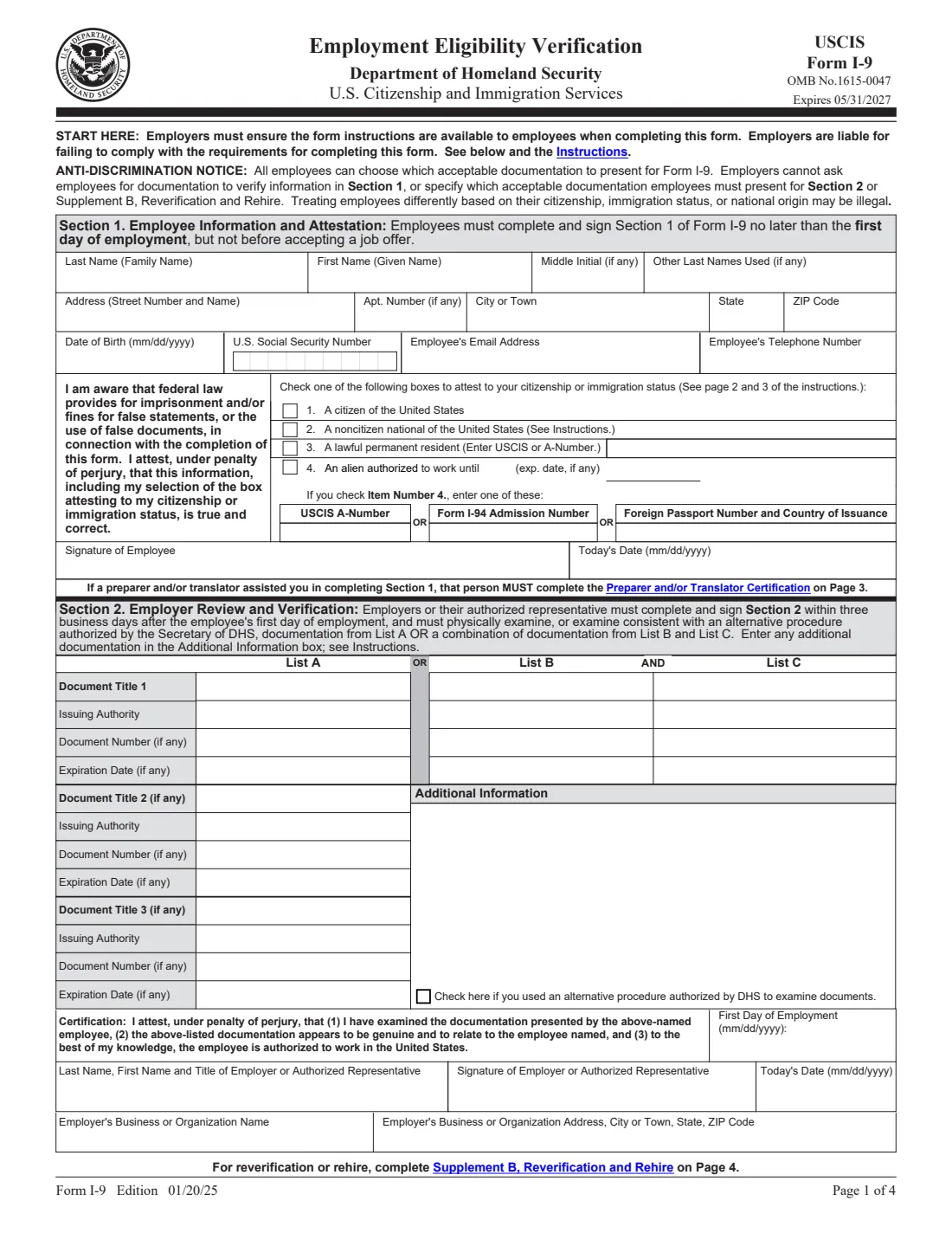
The employee enters their last name, first name, middle initial, other last names used, address, date of birth, and optionally their Social Security number, email address and phone number. The Social Security number is optional unless the employer participates in E-Verify.
The employee then checks one box to attest to their citizenship or immigration status: (1) a citizen of the United States; (2) a noncitizen national of the United States; (3) a lawful permanent resident, with their USCIS or A-Number; or (4) a noncitizen authorized to work until a stated expiration date (or N/A if the authorization doesn't expire), with an A-Number, Form I-94 admission number, or foreign passport number and country of issuance.
The employee signs and dates Section 1, attesting under penalty of perjury that the information is true. The form warns that federal law provides for imprisonment and/or fines for false statements or use of false documents.
2 Section 2. Employer Review and Verification
Within three business days after the employee's first day of employment, the employer or its authorized representative physically examines the employee's original documents — or examines them under an alternative procedure authorized by DHS, in which case there is a box to check. The employee may present one document from List A, or one from List B and one from List C.
For each document, the employer records the document title, issuing authority, document number and expiration date (if any). There is room for up to three List A documents, since some List A items are combinations (such as a foreign passport together with Form I-94), and an Additional Information box. The employer then enters the employee's first day of employment, the employer representative's name and title, the business name and address, and signs the certification that the documents appear genuine and relate to the employee.
3 Lists of Acceptable Documents
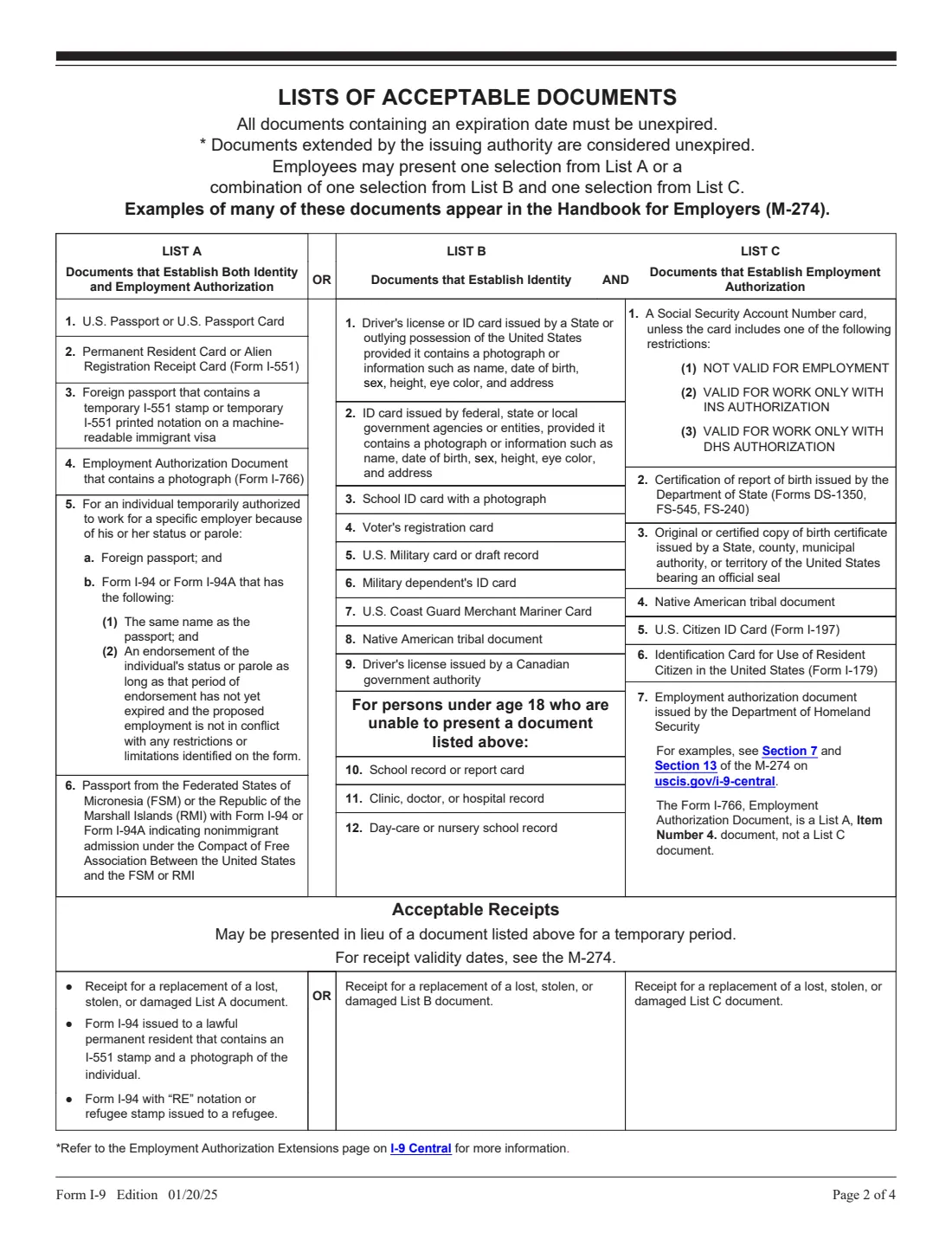
Page 2 of the form lists the documents that can be accepted. List A documents establish both identity and employment authorization — for example a U.S. passport or passport card, a Permanent Resident Card (Form I-551), or an Employment Authorization Document with a photograph (Form I-766). List B documents establish identity only, such as a state driver's license or ID card, and List C documents establish employment authorization only, such as an unrestricted Social Security card or a U.S. birth certificate.
All documents with an expiration date must be unexpired, although documents extended by the issuing authority count as unexpired. In some cases a receipt for a replacement of a lost, stolen or damaged document can be presented for a temporary period. The employee chooses which acceptable documents to present — the employer cannot ask for specific ones.
4 Supplement A, Preparer and/or Translator Certification for Section 1
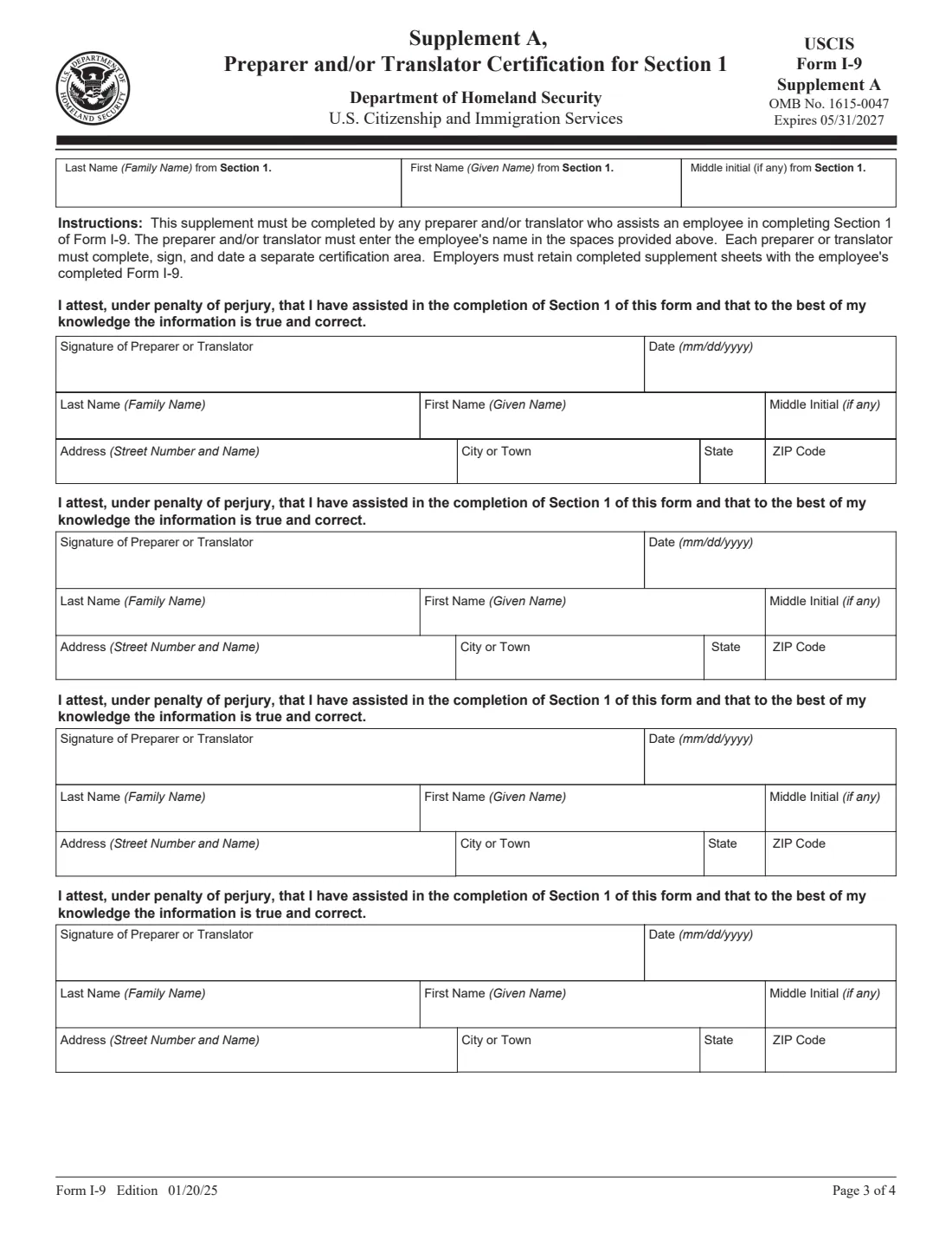
If someone helped the employee complete Section 1 — by preparing it or translating it — that person must complete Supplement A on page 3 of the official form. Each preparer or translator signs a separate certification area with their name and address. The employer keeps completed supplement sheets with the employee's I-9.
5 Supplement B, Reverification and Rehire
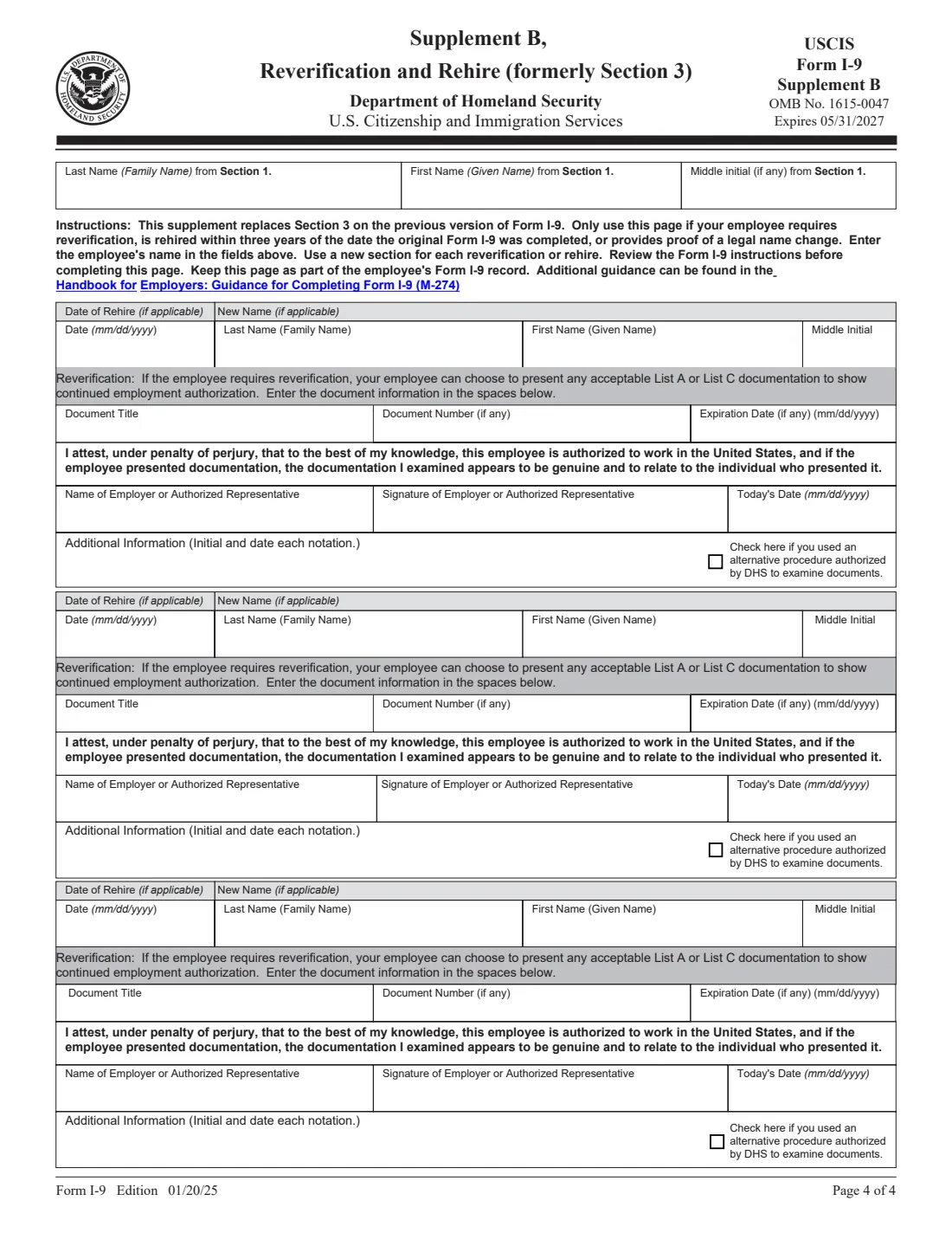
Supplement B (formerly Section 3) is used later, only if the employee requires reverification, is rehired within three years of the date the original I-9 was completed, or provides proof of a legal name change. For reverification, the employee may present any acceptable List A or List C document showing continued employment authorization. The employer uses a new section each time and keeps the page with the employee's original I-9.
FileIt's guided form covers Sections 1 and 2; the supplements are on the official PDF for employers who need them.
Common mistakes to avoid
- Having the employee complete Section 1 before accepting a job offer. It must be completed after the offer is accepted and no later than the first day of work.
- Telling the employee which documents to bring. The anti-discrimination notice on the form says employers cannot specify which acceptable documents an employee must present.
- Accepting both List A and List B/C documents, or a List B document without a List C document. It's one from List A, or one from List B plus one from List C.
- Accepting expired documents. Documents with an expiration date must be unexpired, unless extended by the issuing authority.
- Missing the three-business-day deadline for Section 2 after the employee's first day of work.
- Leaving the citizenship or immigration status box blank, or checking box 4 without also giving an A-Number, I-94 number or foreign passport details.
- Mailing the form to USCIS. The I-9 stays with the employer.
- Forgetting Supplement A when a friend, relative or translator helped the employee fill in Section 1.
After you fill it out
The employee signs Section 1 and the employer or authorized representative signs Section 2. With FileIt you can sign the printed PDF by hand or use the optional e-signature. Once both parts are done, the form is complete — it is not filed with any government agency.
The employer keeps the completed I-9 and must be able to make it available for inspection. Store it securely with any supplements. FileIt saves the finished PDF in the vault, which gives you an organized copy alongside the employee's other records. If the employer participates in E-Verify, the employer creates that case itself — FileIt does not connect to E-Verify.
If the employee's work authorization or a List A or List C document expires, complete reverification in Supplement B before it runs out. If the employee is rehired within three years, or legally changes their name, you can also record that in Supplement B.
Fill out Form I-9 online with FileIt
- Pick the person. Choose someone from People and FileIt fills in their name, date of birth, address and other details it already knows.
- Answer plain-language questions. One part of the form at a time, with the official help text beside each question — 47 fields in all. Your answers save as you go.
- Check the live preview. Watch your answers land on the real U.S. Citizenship and Immigration Services (USCIS) form, and let FileIt do any worksheet arithmetic.
- Generate the official PDF. FileIt prints your answers into the agency’s own PDF and files it in that person’s folder in your vault. Sign it, or send it for e-signature.
FileIt fills the form — it never files or submits anything for you. Deliver the finished form to whoever asked for it, the way the form’s instructions say.
Start Form I-9 now — it’s freeForm I-9: frequently asked questions
Can I fill out Form I-9 online?
Yes. FileIt walks the employee through Section 1 and the employer through Section 2, then prints the answers into the official USCIS PDF. It is available on every FileIt account, including the free plan. You can sign by hand or with FileIt's optional e-signature.
Where do I send Form I-9?
You don't send it anywhere. The employer keeps the completed I-9 on file and must be able to produce it for inspection. Do not mail it to USCIS.
What documents are acceptable for the I-9?
The employee presents either one document from List A (which proves identity and work authorization), or one from List B (identity) plus one from List C (work authorization). Common examples are a U.S. passport (List A), or a driver's license (List B) together with an unrestricted Social Security card or birth certificate (List C). The full lists are on page 2 of the form.
Do U.S. citizens need to fill out an I-9?
Yes. The I-9 is completed for every person hired in the United States, whatever their citizenship. U.S. citizens check box 1 in Section 1.
Is my Social Security number required on the I-9?
The form treats it as optional unless the employer participates in E-Verify. If your employer uses E-Verify, you'll need to provide it.
What is the deadline for completing Form I-9?
The employee completes Section 1 no later than the first day of employment. The employer completes Section 2 within three business days after the employee's first day.
What does the expiration date at the top of the form mean?
The date in the top corner (05/31/2027 on this edition) is when this version of the form expires, not a deadline for the employee. Employers should always use the current edition.
What is the difference between Supplement A and Supplement B?
Supplement A is completed by anyone who helped the employee prepare or translate Section 1. Supplement B (formerly Section 3) is used by the employer for reverification, rehires within three years, and legal name changes.
Can the employer choose which documents I show?
No. The form's anti-discrimination notice says all employees can choose which acceptable documentation to present, and employers cannot specify which documents an employee must present.
Official sources
- Blank form (PDF), published by U.S. Citizenship and Immigration Services (USCIS): https://www.uscis.gov/sites/default/files/document/forms/i-9.pdf
- Official instructions and guidance: https://www.uscis.gov/i-9
- Edition shown on this page: 01/20/25 (expires 05/31/2027) (checked 2026-09-25).
FileIt is not affiliated with or endorsed by U.S. Citizenship and Immigration Services (USCIS) or any government. This page explains the form in general terms and is not legal, tax or immigration advice. Always read the official instructions, and check that you are using the edition the recipient accepts. Page last reviewed 2026-09-25.