What is Form IT-2104?
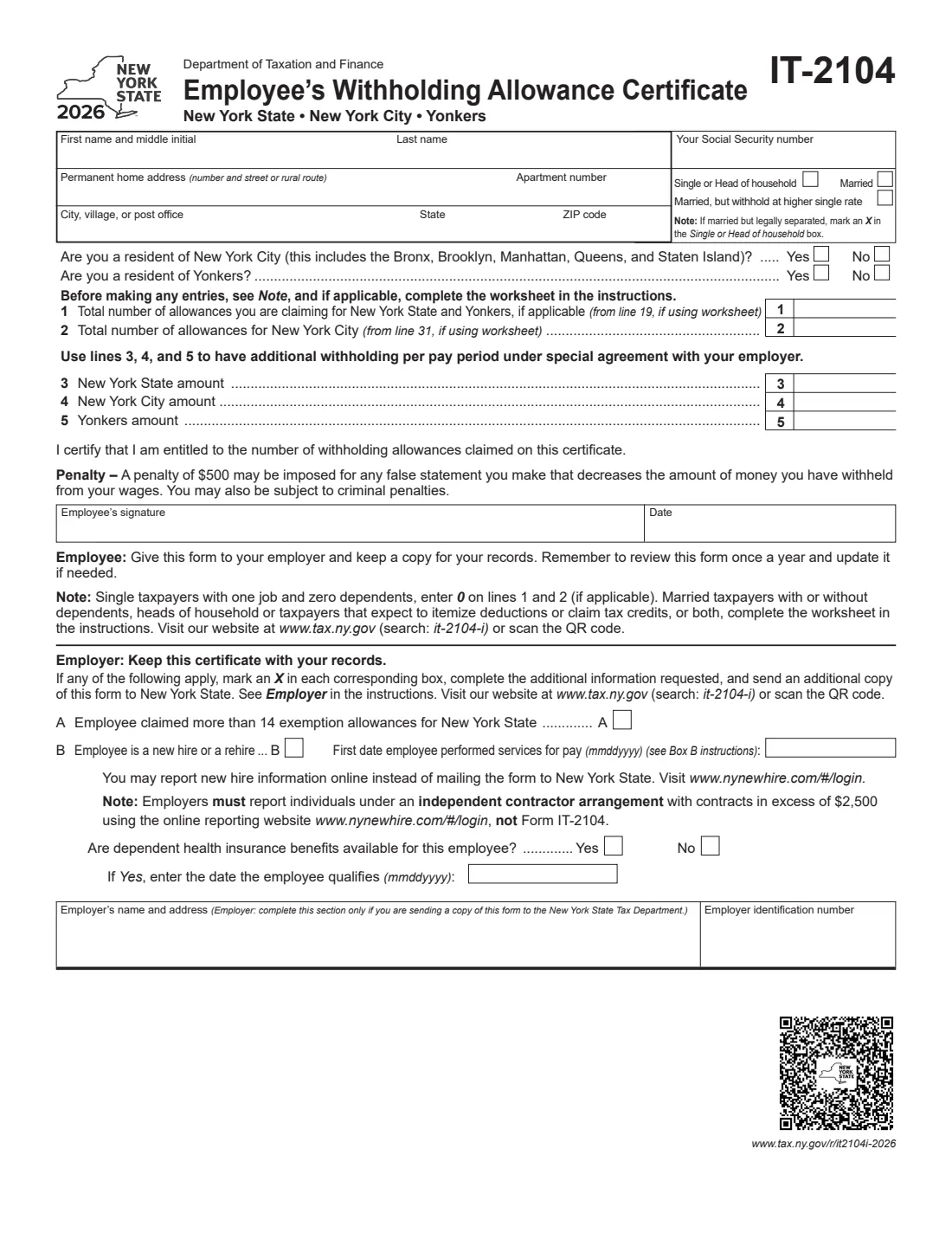
Form IT-2104, the Employee's Withholding Allowance Certificate, is how you tell your employer how much New York income tax to withhold from your wages. It is issued by the New York State Department of Taxation and Finance and covers three taxes at once: New York State income tax, New York City resident tax and Yonkers resident tax. The federal Form W-4 doesn't set New York withholding, so New York employees normally complete both.
The form itself is one page: your details, whether you live in New York City or Yonkers, your filing status, the number of allowances for New York State (and Yonkers) and for New York City, and optional extra dollar amounts to withhold. The allowance worksheet that works out those numbers isn't printed on the form — it is in the separate instructions, Form IT-2104-I. Single people with one job and no dependents can simply enter 0; married people, heads of household and anyone who expects to itemize or claim credits are asked to use the worksheet.
With FileIt you can fill out the IT-2104 online in a guided form. FileIt pre-fills your name and address from the People records in your vault, checks the rules printed on the form (for example, you can't be a resident of both New York City and Yonkers), and prints your answers into the Tax Department's own fill-in PDF. The finished form is saved in your vault folder and can be sent for e-signature. FileIt never submits it to the Tax Department — you give the completed form to your employer yourself.
- Who fills it
- The employee. The employer completes the bottom section only when it has to send a copy to the Tax Department.
- Given to
- Your employer. The employer sends a copy to New York State only for more than 14 allowances or for new hire reporting.
- When
- When you start a job, whenever your situation changes, and at least a yearly review.
- Signatures
- The employee signs and dates the certification.
- Covers
- New York State, New York City and Yonkers income tax withholding.
- Cost
- Free to fill out on any FileIt account.
Who needs to fill out Form IT-2104?
- New employees whose employer will withhold New York State income tax from their pay.
- Residents of New York City (the Bronx, Brooklyn, Manhattan, Queens and Staten Island), who also need New York City tax withheld.
- Residents of Yonkers, whose employer also withholds Yonkers resident tax.
- Married couples where both spouses work, who may want the Married, but withhold at higher single rate status.
- Employees who itemize deductions, claim credits, or have dependents and want their withholding to match their real tax.
- Anyone who wants extra New York tax taken out each pay period under a special agreement with their employer.
When to use Form IT-2104
- When you start a new job or are rehired, usually together with the federal Form W-4 and Form I-9.
- When you marry, divorce or become legally separated, or your number of dependents changes.
- When you move into or out of New York City or Yonkers, since that changes which local taxes should be withheld.
- At least once a year — the form itself says to review it once a year and update it if needed.
- When your household's combined wages, a second job, or big deductions or credits change the result of the worksheet in the instructions.
What you need before you start
- Your full name, middle initial and Social Security number.
- Your permanent home address, including apartment number, city, state and ZIP code.
- Whether you are a resident of New York City or of Yonkers.
- Your filing status: Single or Head of household, Married, or Married but withhold at higher single rate.
- The results of the worksheet in the instructions (Form IT-2104-I): line 19 for New York State and Yonkers allowances, and line 31 for New York City allowances.
- Your and your spouse's expected wages, dependents, itemized deductions and credits, if you are using the worksheet.
- Any additional per-pay-period amounts you have agreed with your employer to withhold for New York State, New York City or Yonkers.
- For employers completing the bottom section: the employer's name, address and federal employer identification number (EIN), and for new hires, the first date the employee performed services for pay.
What’s on Form IT-2104
The 2026 edition has 1 page. FileIt asks for it in 5 parts, and it is signed by Employee:
- Your detailsEmployee
- Lines 1–2: Withholding allowancesEmployee
- Lines 3–5: Additional withholding per pay periodEmployee
- CertificationEmployee
- Employer: Keep this certificate with your recordsEmployer
How to fill out Form IT-2104, step by step
1 Your name, Social Security number and permanent home address
Enter your first name and middle initial, last name, Social Security number, and your permanent home address with apartment number, city, village or post office, state and ZIP code. The form asks for your permanent home address (number and street or rural route), so give the place you actually live. FileIt pre-fills these from the person's record in your vault; check them against your Social Security card before you sign.
2 Filing status
Mark one box: Single or Head of household; Married; or Married, but withhold at higher single rate. If you are married but legally separated, the form tells you to mark Single or Head of household.
The higher single rate option is aimed at two-earner couples, whose combined pay can otherwise be under-withheld. In the 2026 edition the instructions suggest it when both spouses work and combined wages are under $107,650, with each spouse marking this box and the allowances split between you. Check the instructions for your own situation.
3 New York City and Yonkers residency
Answer Yes or No to both questions: are you a resident of New York City, and are you a resident of Yonkers? New York City includes all five boroughs — the Bronx, Brooklyn, Manhattan, Queens and Staten Island. You can't be a resident of both, and FileIt flags it if you answer Yes twice.
These answers tell your employer whether to withhold the city or Yonkers resident tax as well as New York State tax. If you answer No to New York City, you don't fill in line 2 or line 4.
4 The worksheet in the instructions (IT-2104-I)
Before making entries on lines 1 and 2, the form asks you to read its Note and, if it applies, complete the worksheet in the instructions. Single taxpayers with one job and no dependents can skip it and enter 0 on lines 1 and 2. Married taxpayers (with or without dependents), heads of household, and anyone who expects to itemize deductions or claim tax credits should complete it.
The worksheet's line 19 gives your New York State (and Yonkers) allowances and line 31 your New York City allowances. The worksheet can also produce a negative number. If your employer can't accept negative allowances, enter 0 and use lines 3 to 5 instead — for the 2026 edition the instructions give $1.85 a week for New York State and $0.80 a week for New York City per negative allowance, and 16.75% of the New York State amount for Yonkers.
5 Line 1 — Allowances for New York State and Yonkers
Enter the total number of allowances you are claiming for New York State and, if you live there, Yonkers — from line 19 of the worksheet if you used it, or 0 if you are single with one job and no dependents. Fewer allowances means more tax withheld.
If you claim more than 14 allowances, your employer must send a copy of your IT-2104 to the Tax Department, so be ready to support the number.
6 Line 2 — Allowances for New York City
New York City residents enter the total allowances for New York City here, from line 31 of the worksheet if used, or 0 under the same single-with-one-job rule. Leave this line blank if you don't live in New York City. The New York City figure can differ from line 1 because the worksheet treats city tax separately.
7 Lines 3, 4 and 5 — Additional withholding per pay period
These lines let you have a fixed extra dollar amount withheld each pay period for New York State (line 3), New York City (line 4) and Yonkers (line 5). The form says these are used under a special agreement with your employer, so check with payroll first.
People commonly use these lines when they have income with no withholding, two jobs, or negative allowances their employer can't accept. The charts in the instructions give weekly amounts; if you are paid every two weeks, the instructions say to double them.
8 Certification and signature
By signing, you certify that you are entitled to the number of withholding allowances claimed. The form warns that a penalty of $500 may be imposed for any false statement that decreases the amount withheld from your wages, and that criminal penalties may also apply. Sign the Employee's signature line and date it — FileIt's optional e-signature works for this, or print and sign by hand.
9 Employer: Keep this certificate with your records
The bottom section is for the employer and is only completed when a copy of the form must go to New York State. Box A is marked when the employee claimed more than 14 exemption allowances for New York State. Box B is marked for a new hire or rehire, with the first date the employee performed services for pay, whether dependent health insurance benefits are available and, if so, the date the employee qualifies.
The employer adds its name, address and employer identification number. The form notes that new hire information can be reported online instead of mailing the form, and that independent contractors with contracts over $2,500 must be reported online, not on Form IT-2104. FileIt can pre-fill employer details from the entity records in your vault.
Common mistakes to avoid
- Answering Yes to both New York City and Yonkers residency. You can be a resident of one at most.
- Entering New York City allowances on line 2 when you don't live in New York City. Leave line 2 and line 4 blank if you answered No.
- Guessing allowances when you are married, a head of household or itemizing. The form asks those taxpayers to complete the worksheet in the instructions.
- Both spouses claiming the full household allowances at their own jobs. Split allowances between you, as the instructions suggest for the higher single rate status.
- Putting amounts on lines 3 to 5 without your employer's agreement — the form says additional withholding is by special agreement.
- Forgetting to update the form after moving into or out of New York City or Yonkers, which can leave local tax over- or under-withheld.
- Marking Married when legally separated. The form tells separated taxpayers to mark Single or Head of household.
- Employers filling in the bottom section when neither box A nor box B applies — it is only for copies being sent to the Tax Department.
After you fill it out
Sign and date the form, then give it to your employer. The form's own instruction to employees is to give it to the employer and keep a copy for your records. You don't send it to the Tax Department yourself.
Your employer keeps the certificate. It sends an additional copy to New York State only when box A (more than 14 allowances) or box B (new hire or rehire) applies — and for new hires it may report online instead. FileIt saves your finished, flattened IT-2104 in your vault folder, so you have the copy the form asks you to keep.
Review the IT-2104 once a year, as the form suggests, and file a new one with your employer when your filing status, allowances, household income or residence in New York City or Yonkers changes. Check your next few pay stubs to make sure the New York withholding looks right.
Fill out Form IT-2104 online with FileIt
- Pick the person. Choose someone from People and FileIt fills in their name, date of birth, address and other details it already knows.
- Answer plain-language questions. One part of the form at a time, with the official help text beside each question — 26 fields in all. Your answers save as you go.
- Check the live preview. Watch your answers land on the real New York State Department of Taxation and Finance form, and let FileIt do any worksheet arithmetic.
- Generate the official PDF. FileIt prints your answers into the agency’s own PDF and files it in that person’s folder in your vault. Sign it, or send it for e-signature.
FileIt fills the form — it never files or submits anything for you. Deliver the finished form to whoever asked for it, the way the form’s instructions say.
Start Form IT-2104 now — it’s freeForm IT-2104: frequently asked questions
What is Form IT-2104?
Form IT-2104 is New York's Employee's Withholding Allowance Certificate. You give it to your employer so they withhold the right amount of New York State income tax and, if you live there, New York City or Yonkers resident tax. It comes from the New York State Department of Taxation and Finance.
Do I need an IT-2104 if I already filled out a W-4?
Generally yes. The federal W-4 sets federal withholding only, and New York uses its own allowances and rules. Most New York employers ask new hires for both forms.
How many allowances should I claim on the IT-2104?
If you are single with one job and no dependents, the form says to enter 0 on lines 1 and 2. Married taxpayers, heads of household and anyone who expects to itemize or claim credits should complete the worksheet in the instructions (IT-2104-I), which gives the numbers for line 1 (from worksheet line 19) and line 2 (from line 31).
What does Married, but withhold at higher single rate mean?
It tells your employer to withhold at the single rate even though you are married, which usually increases withholding. It is designed for couples where both spouses work, so their combined income isn't under-withheld. The instructions explain when it is suggested and how to split allowances.
Where do I send the IT-2104?
Give it to your employer and keep a copy. You don't mail it to the Tax Department. Your employer sends a copy to New York State only if you claim more than 14 allowances or as part of new hire reporting.
Can I fill out the IT-2104 online?
Yes. FileIt gives you a guided online form, pre-fills your details from your vault, and prints your answers into the official New York fill-in PDF. You can e-sign it or print it, and the finished copy is saved in your vault. You then hand it to your employer yourself; FileIt never submits it.
What happens if I claim more than 14 allowances?
Nothing is wrong with that by itself, but your employer must mark box A and send a copy of your certificate to the Tax Department. Make sure you can support the number, because the form warns of a $500 penalty for false statements that reduce withholding.
I live in Yonkers — do I need a separate form?
No. Answer Yes to the Yonkers resident question on the IT-2104; line 1 covers New York State and Yonkers allowances together, and line 5 lets you add an extra Yonkers amount if agreed with your employer.
How is the IT-2104 different from California's DE 4?
Both are state withholding certificates, but each follows its own state's rules. The DE 4 covers California tax only and carries its worksheets on the form itself, while the IT-2104 covers New York State, New York City and Yonkers, with its worksheet in the separate instructions.
Official sources
- Blank form (PDF), published by New York State Department of Taxation and Finance: https://www.tax.ny.gov/pdf/current_forms/it/it2104_fill_in.pdf
- Official instructions and guidance: https://www.tax.ny.gov/pdf/current_forms/it/it2104i.pdf
- Edition shown on this page: 2026 (checked 2026-09-25).
FileIt is not affiliated with or endorsed by New York State Department of Taxation and Finance or any government. This page explains the form in general terms and is not legal, tax or immigration advice. Always read the official instructions, and check that you are using the edition the recipient accepts. Page last reviewed 2026-09-25.