What is SF 3102?
Standard Form 3102 lets a federal employee, retiree or former employee name who should receive any lump-sum benefit that becomes payable under the Civil Service Retirement System (CSRS) or the Federal Employees Retirement System (FERS) after their death. The October 2022 revision combines and supersedes the old SF 2808 and SF 3102, and the people named count as beneficiaries for both CSRS and FERS lump sums.
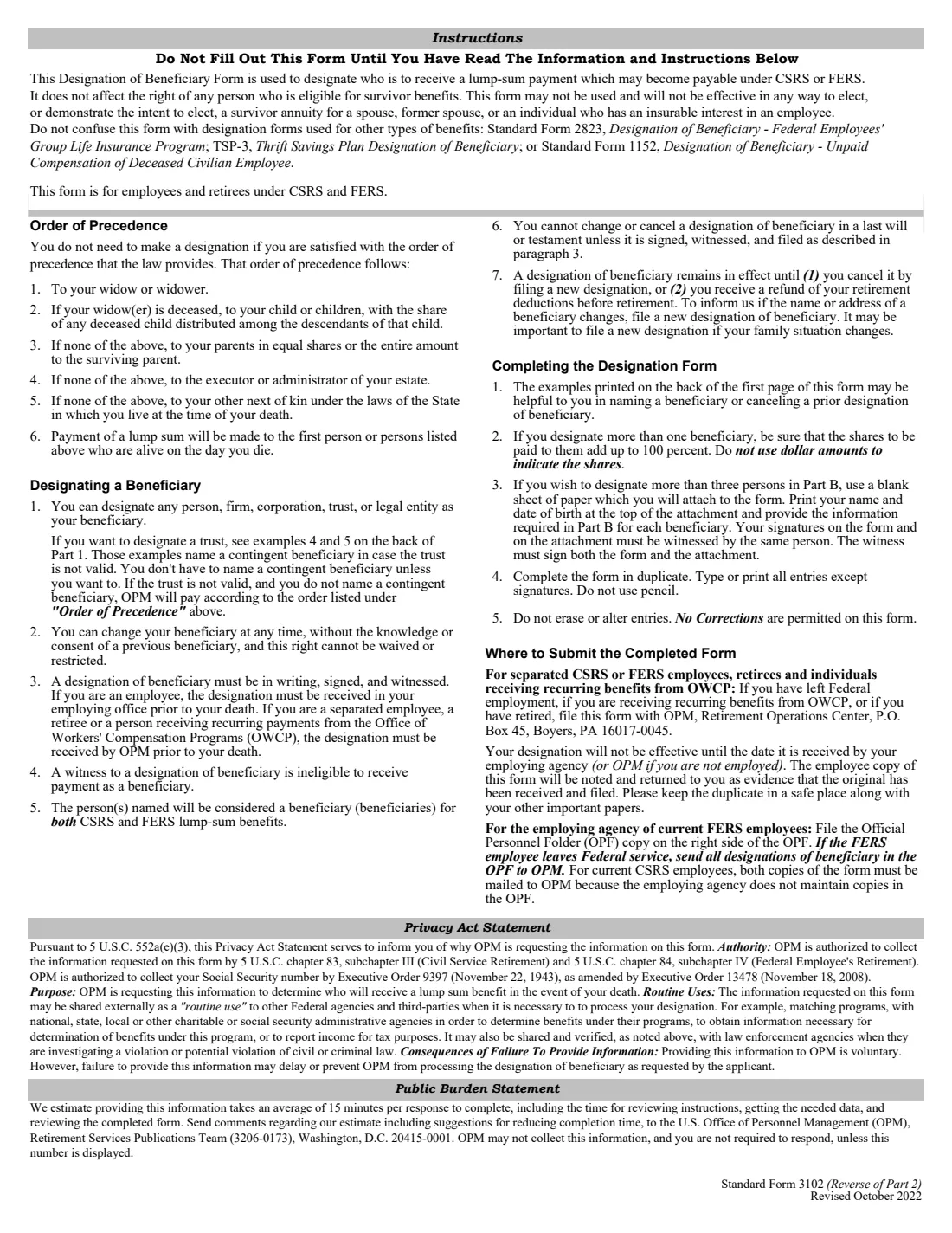
You don't have to file one: if you're satisfied with the order of precedence set by law (widow or widower, then children, then parents, then the executor or administrator of your estate, then next of kin), the instructions say you don't need a designation. Filing one cancels every earlier CSRS or FERS designation. It doesn't affect anyone's right to a survivor annuity and can't be used to elect one. Separate forms cover FEGLI life insurance (SF 2823), the Thrift Savings Plan (TSP-3) and unpaid compensation (SF 1152).
FileIt pre-fills your name and date of birth from your vault, checks that the shares add up to 100%, prints 'Otherwise to:' for a contingent beneficiary, and fills OPM's own PDF. It saves the finished form in your vault folder. The form must be signed in ink in front of two witnesses, so you print it, sign it, and file it yourself.
- Who files
- Federal employees, retirees and former employees under CSRS or FERS.
- Beneficiaries
- Any person, firm, corporation, trust or legal entity; three on the form, more on a witnessed attachment.
- Signed
- In ink, in front of two witnesses, who can't be beneficiaries.
- Filed with
- Current FERS employees: the employing agency. Current CSRS employees, retirees and separated employees: OPM, P.O. Box 45, Boyers, PA.
- Edition
- Standard Form 3102, Revised October 2022 (OMB 3206-0173)
Who needs to fill out SF 3102?
- Federal employees who want their CSRS or FERS lump sum to go to someone other than the legal order of precedence, such as a partner, a sibling, a trust or a charity.
- Retirees and former employees updating beneficiaries after a marriage, divorce, birth or death.
- Anyone who wants to cancel an earlier designation so the order of precedence applies again.
When to use SF 3102
- When you want to name, change or cancel beneficiaries for a CSRS or FERS lump-sum death benefit.
- After a change in your family. The form notes that OPM pays the person you designate even if their name or relationship to you changes later, such as a former spouse after a divorce.
- When a beneficiary's name or address changes: the instructions say to file a new designation.
What you need before you start
- Your name, date of birth and Social Security number, and your CSA claim number if you're retired.
- Your department or agency and its location, and whether you're under CSRS or FERS.
- Each beneficiary's full name, address with ZIP code, relationship to you and share as a percentage.
- Two adult witnesses who aren't beneficiaries, and your return address.
What’s on SF 3102
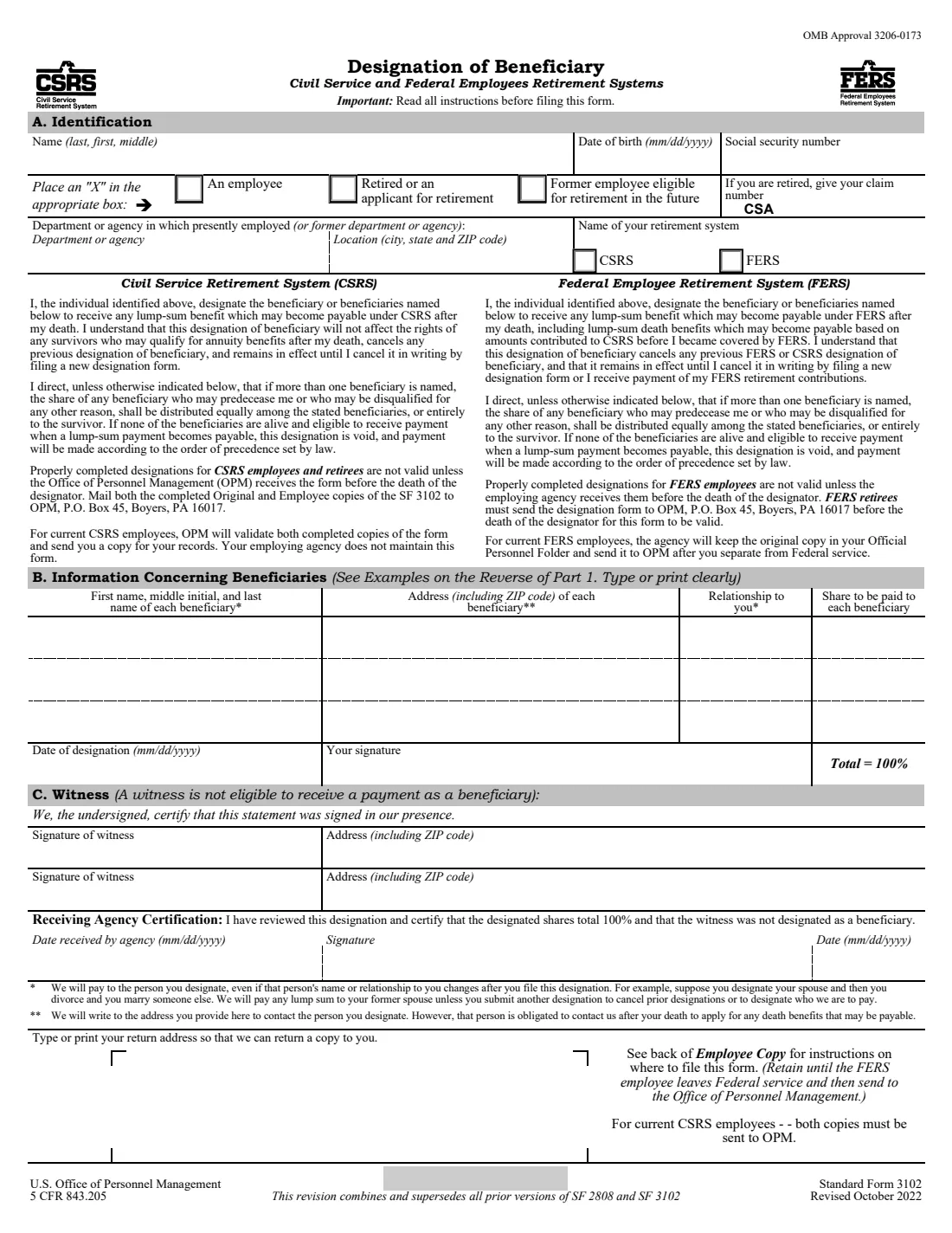
The 2022 edition has 3 pages. FileIt asks for it in 3 parts:
- A. IdentificationEmployee or retiree (designator)
- B. Information concerning beneficiariesEmployee or retiree (designator)
- Date of designation, witnesses and return addressEmployee or retiree (designator)
How to fill out SF 3102, step by step
1 A. Identification
Your name (last, first, middle), date of birth and SSN; whether you're an employee, retired or a former employee eligible for retirement in the future; your CSA claim number if retired; your department or agency and location; and CSRS or FERS.
2 B. Beneficiaries
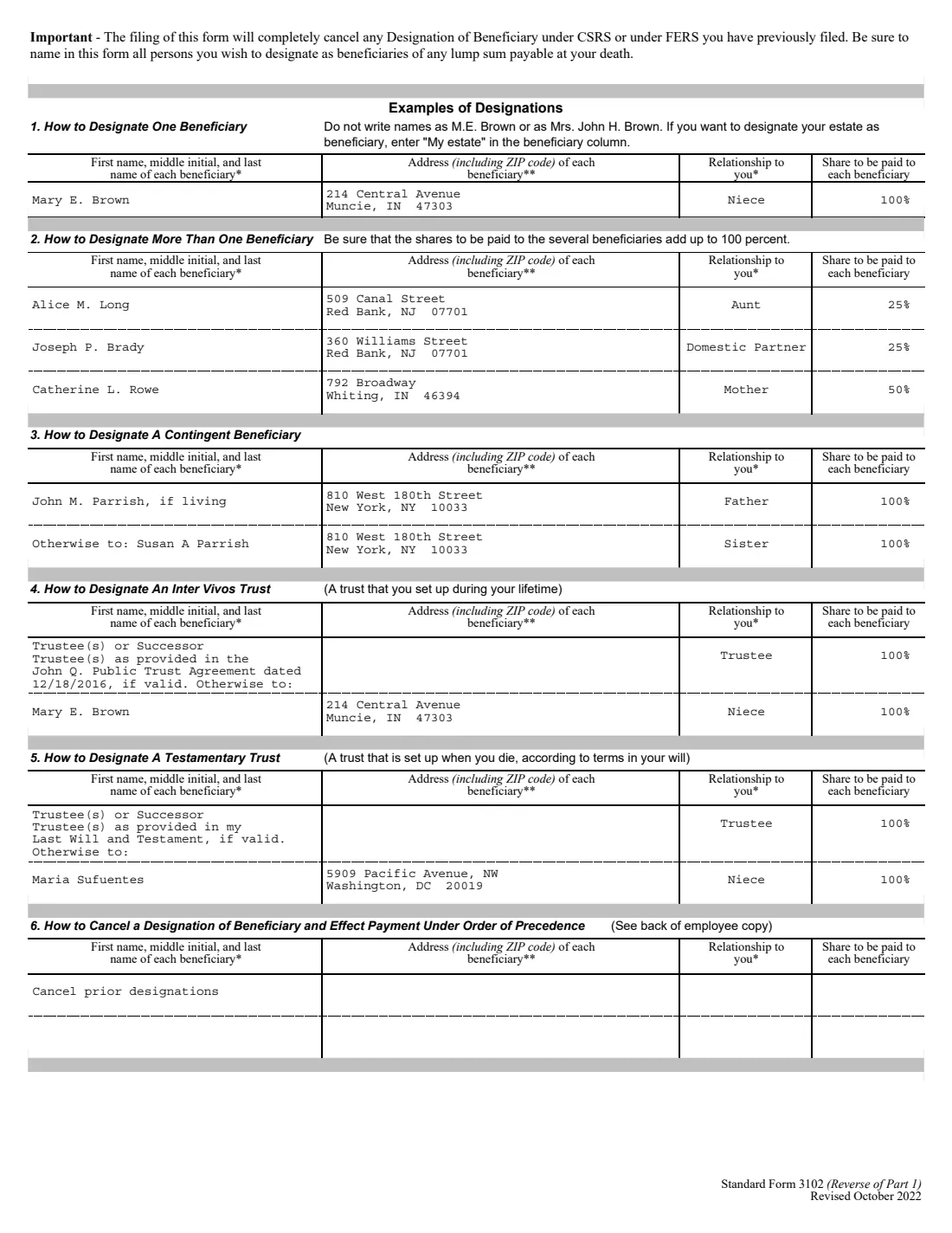
Full name, address, relationship and share for each beneficiary, with shares totalling 100%. You can name 'My estate', a trust, or a contingent beneficiary ('Otherwise to:'). To cancel prior designations, write 'Cancel prior designations' instead. The back of page 1 shows six worked examples.
3 Date and signature
Date the designation and sign it in ink in front of your witnesses.
4 C. Witness
Two witnesses sign and give their addresses, certifying the form was signed in their presence. A witness can't receive a payment as a beneficiary.
5 Return address
Your address, so the employee copy can be noted and returned to you as evidence the original was received.
Common mistakes to avoid
- Shares that don't add up to 100%, or shares written as dollar amounts.
- Naming someone as 'Mrs. John H. Brown' or by initials instead of their own full name.
- Using a beneficiary as a witness: a witness isn't eligible to receive a payment.
- Erasing or correcting an entry: the instructions say no corrections are permitted, so start a new form.
- Filing it in the wrong place, or too late: it's effective only once the employing agency (or OPM) receives it, and it must be received before your death.
- Expecting it to cover FEGLI life insurance or your TSP account, which have their own forms.
After you fill it out
Print the form twice (the Original and the Employee copy), and sign and date both in ink in front of two witnesses, who sign too.
Current FERS employees give it to their employing agency, which keeps the original in the Official Personnel Folder. Current CSRS employees mail both copies to OPM. Retirees, separated employees and people receiving recurring OWCP benefits send it to OPM, Retirement Operations Center, P.O. Box 45, Boyers, PA 16017-0045.
Keep the returned employee copy in a safe place with your other important papers. FileIt keeps the PDF in your vault folder.
Fill out SF 3102 online with FileIt
- Pick the person. Choose someone from People and FileIt fills in their name, date of birth, address and other details it already knows.
- Answer plain-language questions. One part of the form at a time, with the official help text beside each question — 33 fields in all. Your answers save as you go.
- Check the live preview. Watch your answers land on the real U.S. Office of Personnel Management (OPM) form, and let FileIt do any worksheet arithmetic.
- Generate the official PDF. FileIt prints your answers into the agency’s own PDF and files it in that person’s folder in your vault.
FileIt fills the form — it never files or submits anything for you. Deliver the finished form to whoever asked for it, the way the form’s instructions say.
Start SF 3102 now — it’s freeSF 3102: frequently asked questions
Do I have to file SF 3102?
No. If you're happy with the order of precedence set by law, the instructions say you don't need to make a designation.
Does SF 3102 cover my life insurance or TSP?
No. Federal Employees' Group Life Insurance uses SF 2823, the Thrift Savings Plan uses TSP-3, and unpaid compensation uses SF 1152.
Can I sign SF 3102 electronically?
Not with FileIt. The instructions say a designation must be in writing, signed and witnessed, and the form has lines for two witnesses who certify it was signed in their presence.
Can I name more than three beneficiaries?
Yes, on a blank sheet attached to the form with your name and date of birth at the top. Your signatures on the form and the attachment must be witnessed by the same witness, who signs both.
How do I cancel a designation?
File a new SF 3102 with 'Cancel prior designations' in the beneficiary column. Payment then follows the order of precedence. A designation also ends if you get a refund of your retirement deductions before retirement.
Can I name a trust?
Yes. The back of the form shows how to name an inter vivos or testamentary trust, with a contingent beneficiary in case the trust isn't valid.
Does a beneficiary need to know?
No. You can change your beneficiary at any time without the knowledge or consent of a previous beneficiary, and this right can't be waived or restricted.
Official sources
- Blank form (PDF), published by U.S. Office of Personnel Management (OPM): https://www.opm.gov/forms/pdf_fill/sf3102.pdf
- Official instructions and guidance: https://www.opm.gov/forms/standard-forms/
- Edition shown on this page: Standard Form 3102, Revised October 2022 (OMB 3206-0173) (checked 2026-10-01).
FileIt is not affiliated with or endorsed by U.S. Office of Personnel Management (OPM) or any government. This page explains the form in general terms and is not legal, tax or immigration advice. Always read the official instructions, and check that you are using the edition the recipient accepts. Page last reviewed 2026-10-01.