What is SF 2823?
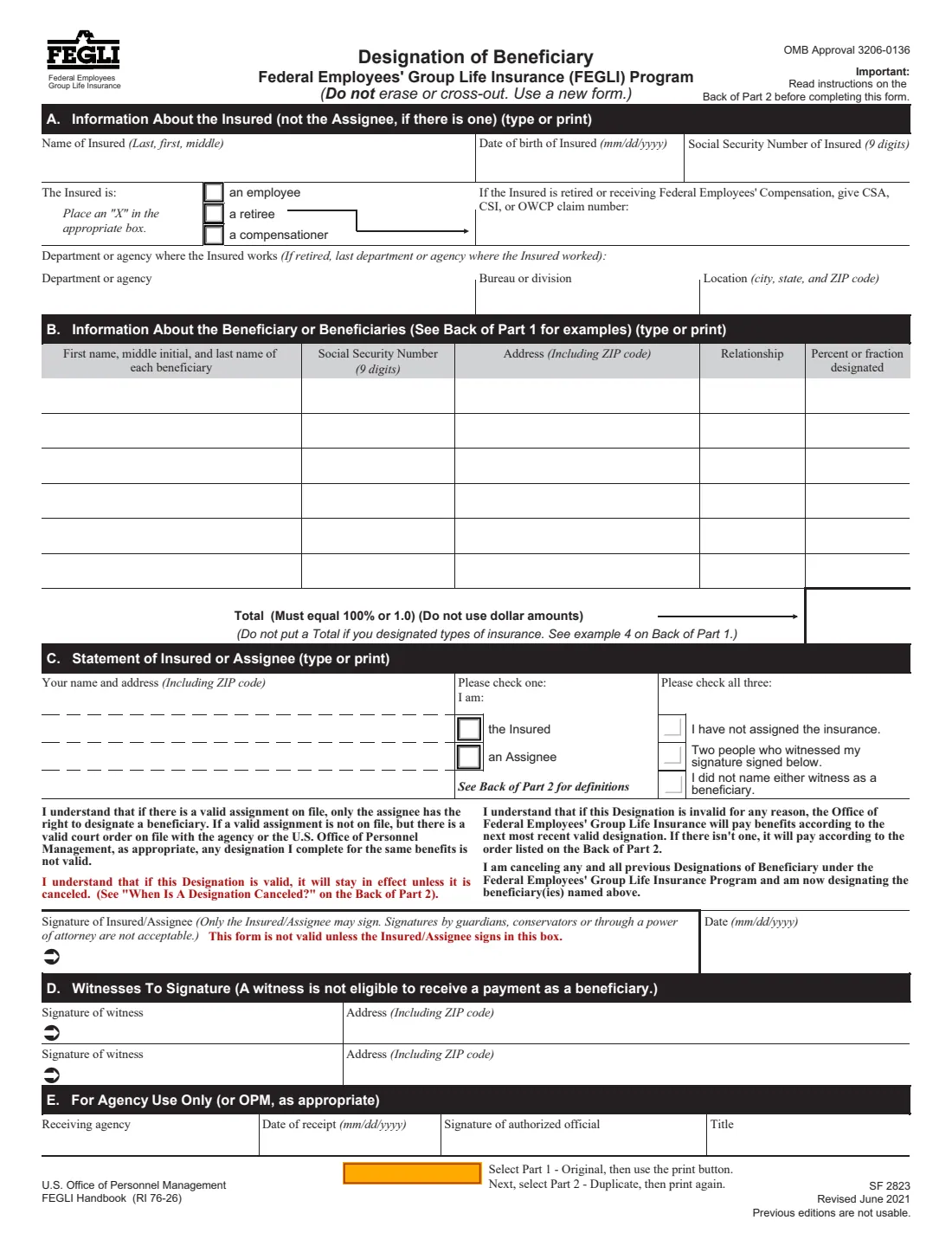
Standard Form 2823 names who receives Federal Employees' Group Life Insurance benefits when the Insured, an employee, retiree or compensationer, dies. You can name any person, firm, corporation or legal entity except a Federal or District of Columbia government agency, set percentages, name contingent beneficiaries or a trust, and even name different beneficiaries for Basic insurance, Option A and Option B. You can also use it to cancel all earlier designations.
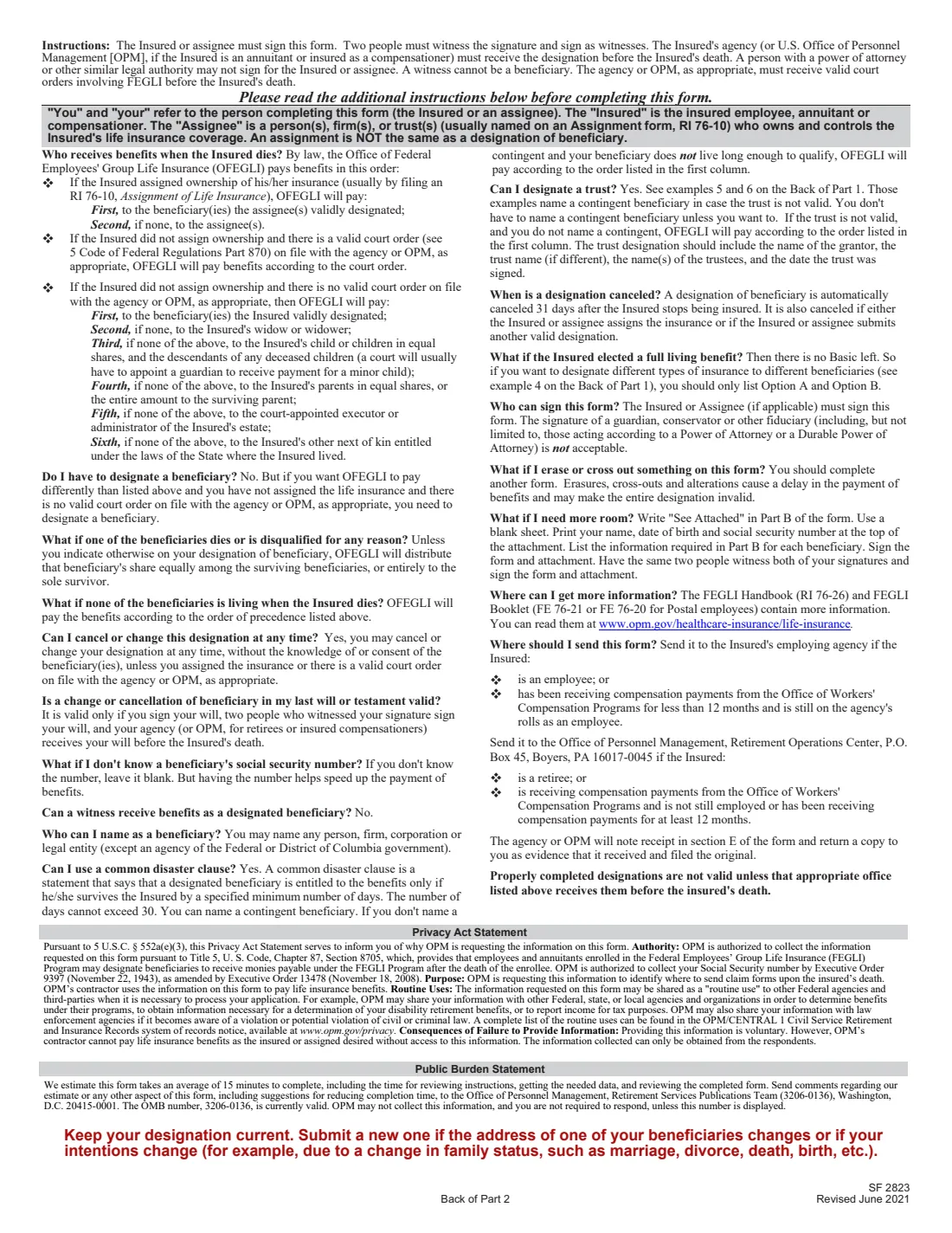
You don't have to designate anyone. The instructions explain that, with no assignment and no valid court order on file, FEGLI pays in a set order: designated beneficiaries, then the widow or widower, then children, then parents, then the executor or administrator of the estate, then other next of kin. A designation matters if you want it paid differently. If the insurance has been assigned, only the assignee can designate.
FileIt pre-fills the Insured's name and date of birth from your vault, checks that the percentages total 100% (per type of insurance where you split them), and prints everything onto OPM's own PDF, Revised June 2021. It saves the finished form in your vault folder. The form must be signed in ink by the Insured or assignee in front of two witnesses, so you print and sign it yourself.
- Who signs
- The Insured, or the assignee if the insurance was assigned. Not a guardian, conservator or power of attorney.
- Witnesses
- Two, who sign the form and can't be beneficiaries.
- Beneficiaries
- Six rows on the form; more on a signed and witnessed attachment.
- Filed with
- The employing agency for employees; OPM, Retirement Operations Center, P.O. Box 45, Boyers, PA 16017-0045 for retirees and most compensationers.
- Edition
- SF 2823, Revised June 2021 (OMB 3206-0136); previous editions are not usable
Who needs to fill out SF 2823?
- Federal employees and retirees with FEGLI coverage who want benefits paid differently from the order set by law.
- Insured people whose family situation has changed through marriage, divorce, a birth or a death.
- Assignees who own an Insured's FEGLI coverage and want to designate beneficiaries.
- Anyone who wants to cancel all prior FEGLI designations.
When to use SF 2823
- When you want to name or change FEGLI beneficiaries, or name different ones for Basic, Option A and Option B.
- When a beneficiary's address changes or your intentions change: the form says to keep the designation current.
- To cancel all prior designations so the order of precedence applies.
What you need before you start
- The Insured's name, date of birth and Social Security number, and the CSA, CSI or OWCP claim number for a retiree or compensationer.
- The department or agency, bureau or division, and location where the Insured works or last worked.
- Each beneficiary's full name, address with ZIP code, relationship and percentage, plus their SSN if you know it.
- Two adult witnesses who aren't beneficiaries.
What’s on SF 2823
The 2021 edition has 3 pages. FileIt asks for it in 3 parts:
- A. Information about the Insured (not the assignee, if there is one)Insured or assignee
- B. Information about the beneficiary or beneficiariesInsured or assignee
- C. Statement of Insured or assignee, and signatureInsured or assignee
How to fill out SF 2823, step by step
1 A. Information about the Insured
The Insured's name, date of birth and SSN; whether they're an employee, retiree or compensationer; the claim number if retired or receiving compensation; and the department, bureau and location.
2 B. Beneficiaries
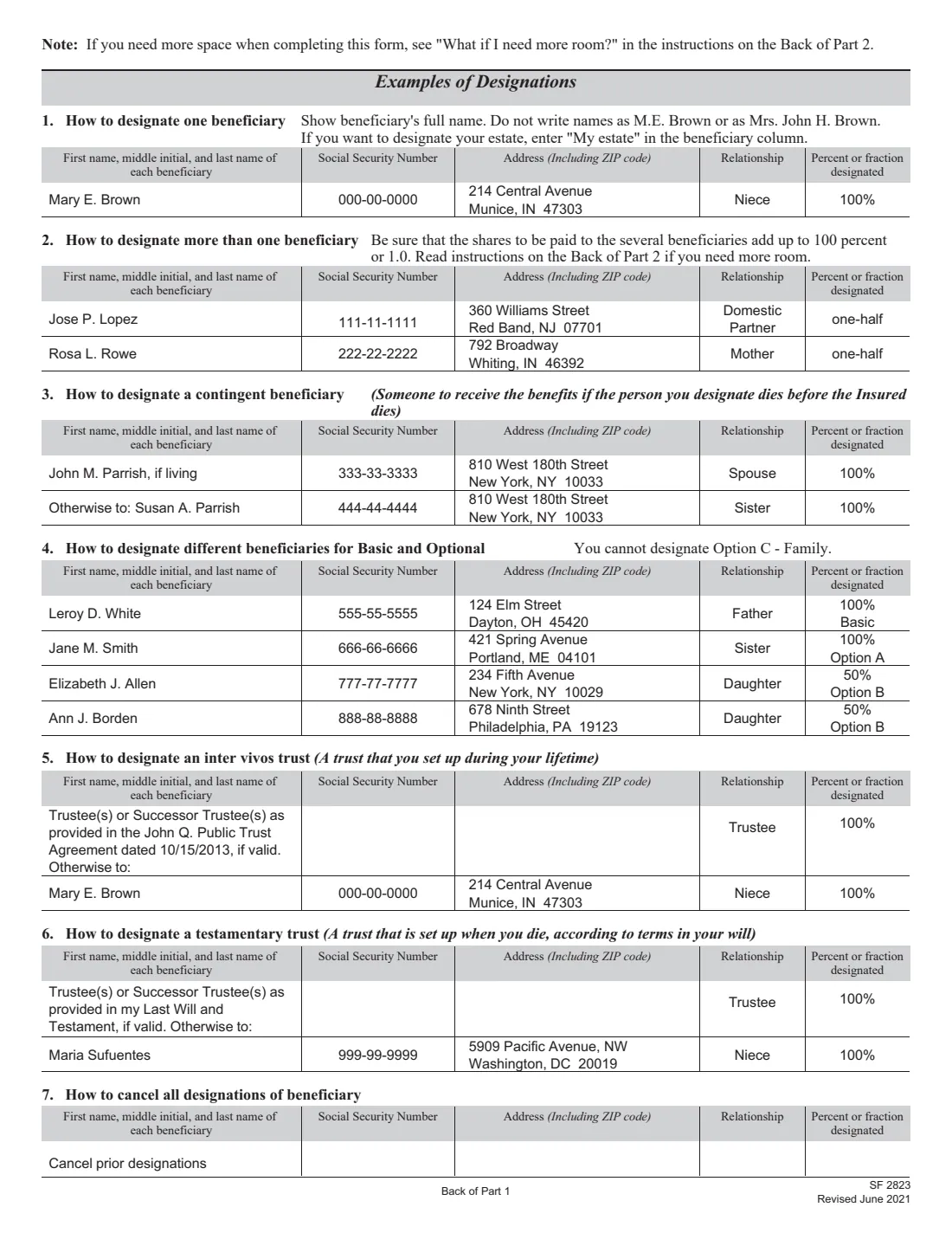
Full name, SSN (if known), address, relationship and percent or fraction for each. Percentages total 100%. Use 'Otherwise to:' for a contingent beneficiary, and list Basic, Option A or Option B under the percentage to designate by type, in which case no total is entered. The back of Part 1 shows seven examples, including trusts and cancellation.
3 C. Statement and signature
Your name and address, whether you're the Insured or an assignee, and three checks: you haven't assigned the insurance, two people witnessed your signature, and neither witness is a beneficiary. Then sign and date.
4 D. Witnesses
Two witnesses sign and give their addresses.
5 E. Agency use
Left blank. The agency or OPM notes receipt here and returns a copy to you.
Common mistakes to avoid
- Erasing or crossing out anything: the instructions say to complete a new form, because alterations delay payment and may invalidate the designation.
- Having a person with power of attorney, a guardian or a conservator sign: only the Insured or assignee may sign.
- Percentages that don't total 100%, or shares written as dollar amounts.
- Entering a Total when you designated by type of insurance.
- Designating Option C - Family, which the form says can't be designated.
- Sending it to the wrong office, or too late: it's valid only if the right office receives it before the Insured's death.
After you fill it out
Print the Original and the Duplicate, and sign and date both in ink in front of two witnesses, who sign Part D.
Send it to the Insured's employing agency for an employee, or to OPM, Retirement Operations Center, P.O. Box 45, Boyers, PA 16017-0045 for a retiree or a compensationer who is no longer on the agency's rolls or has received compensation for at least 12 months.
The agency or OPM notes receipt in Part E and returns a copy. Keep it with your important papers; FileIt keeps the PDF in your vault folder.
Fill out SF 2823 online with FileIt
- Pick the person. Choose someone from People and FileIt fills in their name, date of birth, address and other details it already knows.
- Answer plain-language questions. One part of the form at a time, with the official help text beside each question — 77 fields in all. Your answers save as you go.
- Check the live preview. Watch your answers land on the real U.S. Office of Personnel Management (OPM) form, and let FileIt do any worksheet arithmetic.
- Generate the official PDF. FileIt prints your answers into the agency’s own PDF and files it in that person’s folder in your vault.
FileIt fills the form — it never files or submits anything for you. Deliver the finished form to whoever asked for it, the way the form’s instructions say.
Start SF 2823 now — it’s freeSF 2823: frequently asked questions
Do I have to file SF 2823?
No. Without a designation, FEGLI pays in the order set by law. You need one if you want benefits paid differently and there's no assignment or valid court order on file.
Can I name different beneficiaries for Basic and Option B?
Yes. Example 4 on the back of Part 1 shows how: list the type of insurance under each percentage and don't enter a Total. Option C - Family can't be designated.
Who can sign SF 2823?
Only the Insured or, if the insurance was assigned, the assignee. The form says signatures by guardians, conservators or through a power of attorney are not acceptable.
What if I don't know a beneficiary's Social Security number?
Leave it blank. The instructions say having the number helps speed up payment.
When is a designation canceled?
Automatically 31 days after the Insured stops being insured, or when the Insured or assignee assigns the insurance or files another valid designation.
Does SF 2823 cover my FERS or TSP benefits?
No. It covers FEGLI life insurance only. CSRS and FERS lump sums use SF 3102 and the Thrift Savings Plan uses TSP-3.
Official sources
- Blank form (PDF), published by U.S. Office of Personnel Management (OPM): https://www.opm.gov/forms/pdf_fill/sf2823.pdf
- Official instructions and guidance: https://www.opm.gov/healthcare-insurance/life-insurance/
- Edition shown on this page: SF 2823, Revised June 2021 (OMB 3206-0136); previous editions are not usable (checked 2026-10-01).
FileIt is not affiliated with or endorsed by U.S. Office of Personnel Management (OPM) or any government. This page explains the form in general terms and is not legal, tax or immigration advice. Always read the official instructions, and check that you are using the edition the recipient accepts. Page last reviewed 2026-10-01.